



 screenFetch是一款Bash终端截图信息工具,现在也可以在Windows的PowerShell中使用。通过Install-Module安装windows-screenfetch模块,然后设置执行策略和导入模块即可。在Linux系统中,可以参照GitHub上的KittyKatt/screenFetch项目进行配置。
screenFetch - The Bash Screenshot Information Tool
What is screenFetch?
screenFetch is a “Bash Screenshot Information Tool”. This handy Bash script can be used to generate one of those nifty terminal theme information + ASCII distribution logos you see in everyone’s screenshots nowadays. It will auto-detect your distribution and display an ASCII version of that distribution’s logo and some valuable information to the right. There are options to specify no ASCII art, colors, taking a screenshot upon displaying info, and even customizing the screenshot command! This script is very easy to add to and can easily be extended.
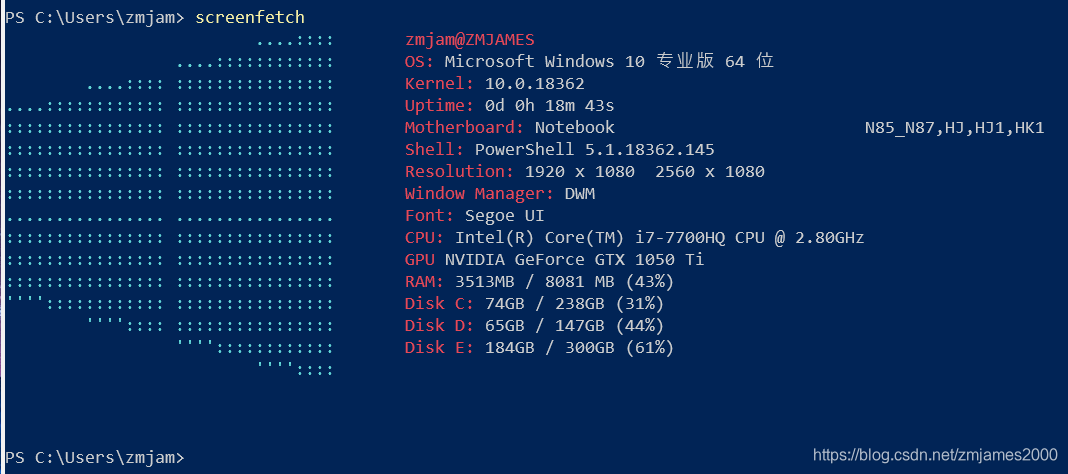
How to show screenfetch at windows
powershell: Install-Module -Name windows-screenfetch
powershell: screenfetch // maybe error: need Import-Module windows-screenfetch
Then:
powershell:Set-ExecutionPolicy -ExecutionPolicy Unrestricted
poweshell:Import-Module windows-screenfetch





 扫一扫
扫一扫


 653
653

 被折叠的 条评论
为什么被折叠?
被折叠的 条评论
为什么被折叠?
 到【灌水乐园】发言





