



(1)属性 value 与 cleanText :
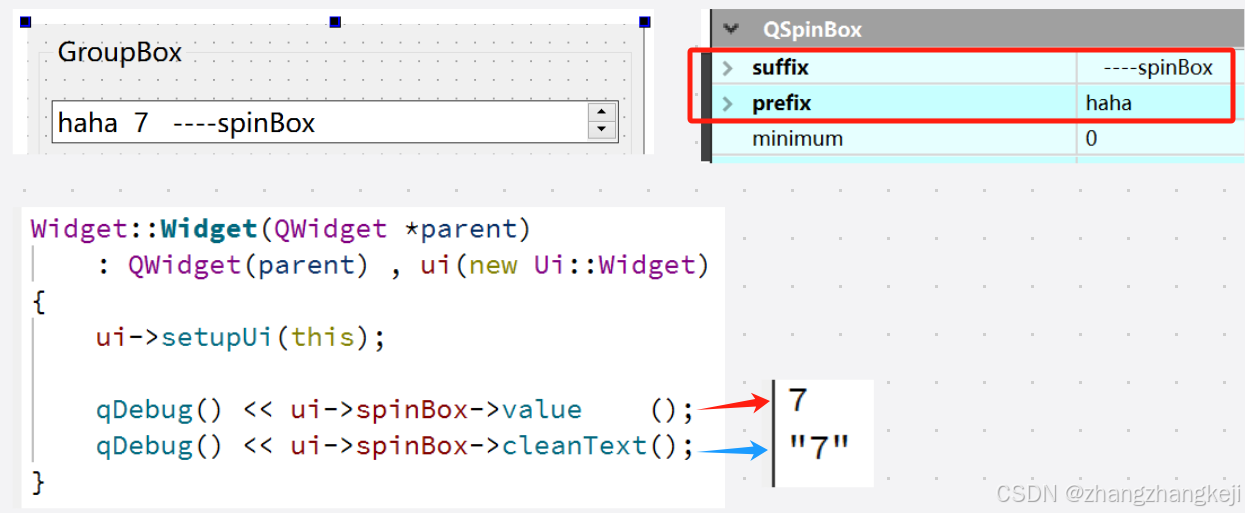
(2) 给出整数螺旋框的源码:
/*
QSpinBox旨在处理整数和离散的值集合(例如,月份名称);使用QDoubleSpinBox处理浮点数。
QSpinBox允许用户通过点击上/下按钮或按键盘上的上/下键来选择值,以增加/减少当前显示的值。
用户也可以手动输入值。旋转框支持整数值,但可以通过validate()、textFromValue()和
valueFromText()扩展以使用不同的字符串。
每次值发生变化,QSpinBox都会发出valueChanged()和textChanged()信号,
前者提供int,后者提供QString。
The textChanged() signal provides the value with both prefix() and suffix().
当前值可以通过value()获取,并通过setValue()设置。
Clicking the up/down buttons or using the keyboard accelerator's up and down arrows
will increase or decrease the current value in steps of size singleStep().
If you want to change this behaviour ,
you can reimplement the virtual function stepBy().
最小值、极大值和步长可以使用其中一个构造函数设置,
以后可以使用setminimum()setMaximum()和setSingleStep()更改。

大多数旋转框都是方向性的,但QSpinBox也可以作为圆形旋转框运行,
即如果范围是0-99,当前值是99,点击“上”键,如果 wrap()设置为 true,则返回 0。
如果需要圆形行为,请使用setWrapping。
显示的值可以前缀和后缀任意字符串,例如表示货币或测量单位。
参见setPrefix和setSuffix()。
The text in the spin box is retrieved with text()
(which includes any prefix() and suffix()),
or with cleanText()
(which has no prefix(), no suffix() and no leading or trailing whitespace)。
除了数字值的范围外,通常希望给用户一个特殊的(通常是默认的)选择。
请参阅setSpecialValueText()以了解如何使用QSpinBox进行此操作。
*/

class Q_WIDGETS_EXPORT QSpinBox : public QAbstractSpinBox
{
    Q_OBJECT // //又插入了此宏

    //This property holds the spin box's prefix。
    //The prefix is prepended to the start of the displayed value.
    //Typical use is to display a unit of measurement or a currency symbol.
    //To turn off the prefix display, set this property to an empty string.
    //The default is no prefix.
    //The prefix is not displayed when value() == minimum() and
    //specialValueText() is set.
    //If no prefix is set, prefix() returns an empty string.
    Q_PROPERTY(QString prefix READ prefix WRITE setPrefix)

    Q_PROPERTY(QString suffix READ suffix WRITE setSuffix)  //后缀
    //This property holds the suffix of the spin box。
    //The suffix is appended to the end of the displayed value.
    //Typical use is to display a unit of measurement or a currency symbol.
    //To turn off the suffix display, set this property to an empty string.
    //The default is no suffix.
    //The suffix is not displayed for the minimum() if specialValueText() is set.
    //If no suffix is set, suffix() returns an empty string.

    //This property holds the minimum value of the spin box。
    //When setting this property the maximum is adjusted if necessary to ensure
    //that the range remains valid.
    //The default minimum value is 0.
    Q_PROPERTY(int minimum READ minimum WRITE setMinimum)

    Q_PROPERTY(int maximum READ maximum WRITE setMaximum)
    //This property holds the maximum value of the spin box。
    //When setting this property the minimum is adjusted if necessary,
    //to ensure that the range remains valid.
    //The default maximum value is 99.

//class QAbstractSpinBox : public QWidget {  //此枚举量在父类中定义
//        enum StepType { DefaultStepType, AdaptiveDecimalStepType };  }
    Q_PROPERTY(StepType stepType READ stepType WRITE setStepType)
    //This property holds the step type.
    //The step type can be single step or adaptive decimal step.

    Q_PROPERTY(int singleStep READ singleStep WRITE setSingleStep)
    //This property holds the step value。
    //When the user uses the arrows to change the spin box's value,
    //the value will be incremented/decremented by the amount of the singleStep.
    //The default value is 1. Setting a singleStep value of less than 0 does nothing.

    //This property holds the value of the spin box。
    //setValue() will emit valueChanged() if the new value is different from the
    //old one. The value property has a second notifier signal which includes the
    //spin box's prefix and suffix.
    Q_PROPERTY(int value READ value WRITE setValue NOTIFY valueChanged USER true)

    Q_PROPERTY(QString cleanText READ cleanText) //返回同一个值的数值形式与文本形式
    //This property holds the text of the spin box excluding any prefix, suffix,
    //or leading or trailing whitespace.

    Q_PROPERTY(int displayIntegerBase            //表示螺旋框中数值的进制
            READ   displayIntegerBase WRITE setDisplayIntegerBase)
    //This property holds the base used to display the value of the spin box。
    //The default displayIntegerBase value is 10.

private:
    Q_DISABLE_COPY(QSpinBox)
    Q_DECLARE_PRIVATE(QSpinBox)

public:
    //Constructs a spin box with 0 as minimum value and 99 as maximum value,
    //a step value of 1. The value is initially set to 0. It is parented to parent.
    explicit QSpinBox(QWidget *parent = nullptr); //有参构造函数

    ~QSpinBox();

//Q_PROPERTY(QString prefix READ prefix WRITE setPrefix)
                    QString      prefix() const;
                    void      setPrefix(const QString & prefix);

//Q_PROPERTY(QString suffix READ suffix WRITE setSuffix)  //后缀
                    QString      suffix() const;
                    void      setSuffix(const QString & suffix);

//Q_PROPERTY(int minimum READ minimum WRITE setMinimum)
                    int       minimum() const;
                    void   setMinimum(int min);

                    void   setRange  (int min, int max);
                    //Convenience function to set the minimum,
                    //and maximum values with a single function call.

//Q_PROPERTY(int maximum READ maximum WRITE setMaximum)
                    int       maximum() const;
                    void   setMaximum(int max);

//Q_PROPERTY(StepType stepType READ stepType WRITE setStepType)
                        StepType    stepType() const;
                        void     setStepType(StepType stepType);

//Q_PROPERTY(int singleStep READ singleStep WRITE setSingleStep)
                        int      singleStep() const;
                        void  setSingleStep(int val);

//Q_PROPERTY(int value READ value WRITE setValue NOTIFY valueChanged USER true)
                    int     value() const;
public Q_SLOTS:
                    void setValue(int val);

public:
//Q_PROPERTY(QString cleanText READ cleanText) //返回同一个值的数值形式与文本形式
                        QString     cleanText() const;

//Q_PROPERTY(int displayIntegerBase            //表示螺旋框中数值的进制
//        READ   displayIntegerBase WRITE setDisplayIntegerBase)
        int      displayIntegerBase() const;
        void  setDisplayIntegerBase(int base);

Q_SIGNALS:
    //This signal is emitted whenever the spin box's value is changed.
    //he new value's integer value is passed in i.
    void valueChanged(int i);

    void  textChanged(const QString & t);
    //This signal is emitted whenever the spin box's text is changed.
    //The new text is passed in t with prefix() and suffix().

protected:  //这些具有 protect 属性的函数,只可以由螺旋框及其子类使用
    //This virtual function is used by the spin box whenever it needs to
    //interpret text entered by the user as a value.
    //Subclasses that need to display spin box values in a non-numeric way
    //need to reimplement this function.
    //Note: QSpinBox handles specialValueText() separately;
    //this function is only concerned with the other values
    virtual int     valueFromText(const QString & text) const;

    virtual QString textFromValue(int val) const;
    //This virtual function is used by the spin box whenever it needs to
    //display the given val. The default implementation returns a string containing
    //value printed in the standard way using QWidget::locale().toString(),
    //but with the thousand separator removed unless setGroupSeparatorShown() is set.
    //Reimplementations may return anything.
    //(See the example in the detailed description.)
    //Note: QSpinBox does not call this function for specialValueText() and
    //that neither prefix() nor suffix() should be included in the return value.
    //If you reimplement this,
    // you may also need to reimplement valueFromText() and validate()。

    QValidator::State validate(QString &input, int & pos) const override;//继承于父类

    void fixup(QString & str) const override; //继承于父类

    bool event(QEvent  * event) override;  //继承于父类
}; //完结 class QSpinBox : public QAbstractSpinBox
(3) 给出类 QDoubleSpinBox 的源码:
class Q_WIDGETS_EXPORT QDoubleSpinBox : public QAbstractSpinBox //浮点型螺旋框
{
    Q_OBJECT

    Q_PROPERTY(QString prefix READ prefix WRITE setPrefix)

    Q_PROPERTY(QString suffix READ suffix WRITE setSuffix)

    Q_PROPERTY(double minimum READ minimum WRITE setMinimum)

    Q_PROPERTY(double maximum READ maximum WRITE setMaximum)

    Q_PROPERTY(StepType stepType READ stepType WRITE setStepType)

    Q_PROPERTY(double singleStep READ singleStep WRITE setSingleStep)

    Q_PROPERTY(double value
                READ  value WRITE setValue NOTIFY valueChanged USER true)

    Q_PROPERTY(QString cleanText READ cleanText) //以上这些属性均等同于整数螺旋框,不再注释

    //This property holds the precision of the spin box, in decimals。
    //Sets how many decimals the spinbox will use for displaying and
    //interpreting doubles.
    //Warning: The maximum value for decimals is
    //DBL_MAX_10_EXP + DBL_DIG (ie. 323)
    //because of the limitations of the double type.
    //Note: The maximum, minimum and value might change as a
    //result of changing this property. //特指浮点数的小数部分的位数。
    Q_PROPERTY(int decimals READ decimals WRITE setDecimals)

private:
    Q_DISABLE_COPY(QDoubleSpinBox)
    Q_DECLARE_PRIVATE(QDoubleSpinBox)

public:
    //Constructs a spin box with 0.0 as minimum value and 99.99 as maximum value,
    //a step value of 1.0 and a precision of 2 decimal places.
    //The value is initially set to 0.00. The spin box has the given parent.
    explicit QDoubleSpinBox(QWidget * parent = nullptr); //有参构造函数

    ~QDoubleSpinBox();

//Q_PROPERTY(QString prefix READ prefix WRITE setPrefix)
    QString          prefix() const;
    void          setPrefix(const QString &prefix);

//Q_PROPERTY(QString suffix READ suffix WRITE setSuffix)
    QString          suffix() const;
    void          setSuffix(const QString &suffix);

//Q_PROPERTY(double minimum READ minimum WRITE setMinimum)
    double          minimum() const;
    void         setMinimum(double min);

    void         setRange  (double min, double max);

//Q_PROPERTY(double maximum READ maximum WRITE setMaximum)
    double          maximum() const;
    void         setMaximum(double max);

//Q_PROPERTY(StepType stepType READ stepType WRITE setStepType)
    StepType          stepType() const;
    void           setStepType(StepType stepType);

//Q_PROPERTY(double singleStep READ singleStep WRITE setSingleStep)
    double          singleStep() const;
    void         setSingleStep(double val);

//Q_PROPERTY(double value
//            READ  value WRITE setValue NOTIFY valueChanged USER true)
    double          value() const;
public Q_SLOTS:
    void         setValue(double val);

public :

//Q_PROPERTY(QString cleanText READ cleanText)
                        QString     cleanText() const;

//Q_PROPERTY(int decimals READ decimals WRITE setDecimals)
                    int        decimals() const;
                    void    setDecimals(int prec);


    QValidator::State validate(QString & input, int & pos) const override;

    void fixup(QString &str) const override;  //继承自父类

    virtual double  valueFromText (const QString & text) const;
    virtual QString  textFromValue(double val) const;

Q_SIGNALS:
    void valueChanged(double);
    void  textChanged(const QString &);

}; //完结 class QDoubleSpinBox : public QAbstractSpinBox
(4) 这俩类的定义源码来自于头文件 qspinbox . h 。
谢谢





 扫一扫
扫一扫


 1136
1136

 被折叠的 条评论
为什么被折叠?
被折叠的 条评论
为什么被折叠?
 到【灌水乐园】发言





