



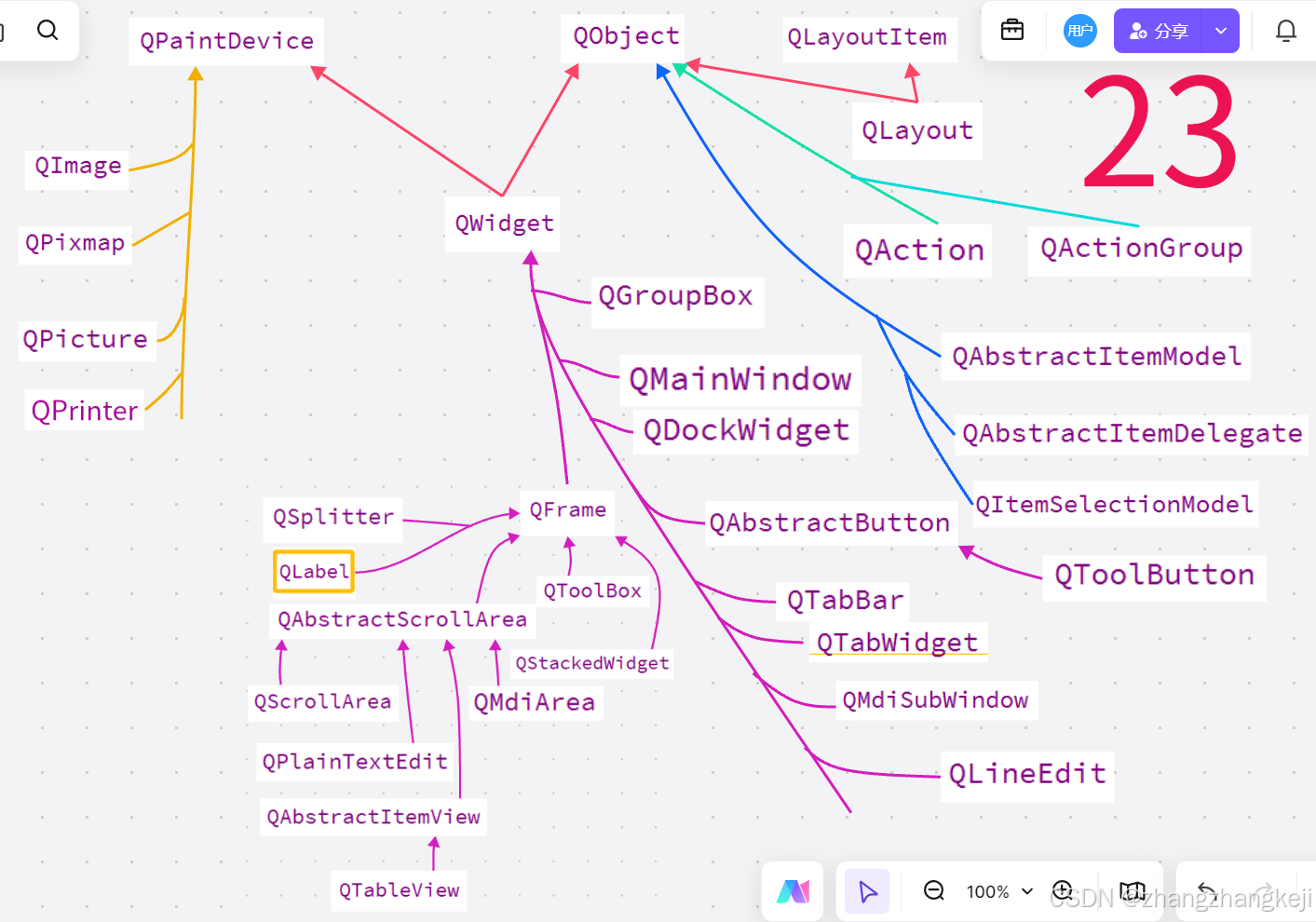
(1)QPaintDevice ,翻译为绘图设备。所有的画板类,都继承于该类。这些类的继承关系如下 :
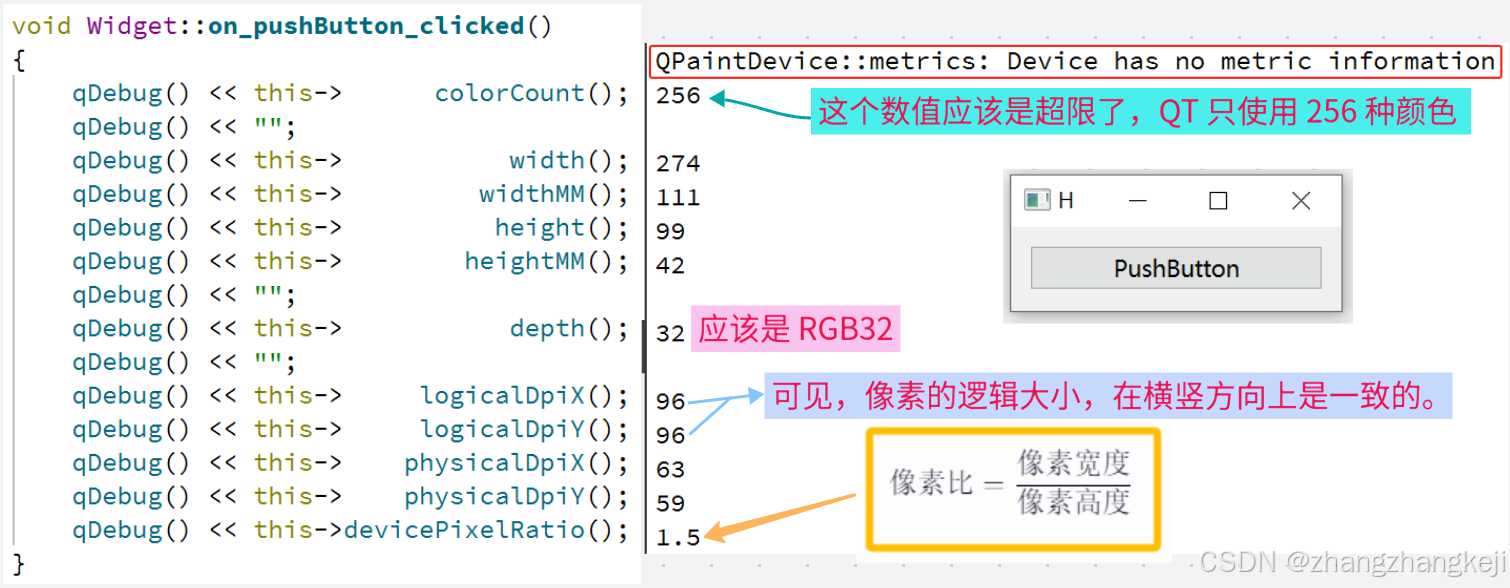
(2)本 QPaintDevice 画板基类的源码并不复杂,代码量很少。给出本类里的所有的成员函数的测试 :
(3)**本类的源代码定义于头文件 qpaintdevice . h ** :
#ifndef QPAINTDEVICE_H
#define QPAINTDEVICE_H

#include <QtGui/qtguiglobal.h>
#include <QtGui/qwindowdefs.h>
#include <QtCore/qrect.h>

QT_BEGIN_NAMESPACE


class QPaintEngine;

/*
The QPaintDevice class is the
    base class of objects that can be painted on with QPainter.

Detailed Description :
一个绘图设备是对二维空间的抽象表示,可以使用QPainter在其上进行绘制。
其默认坐标系原点位于左上角位置。X方向向右延伸,Y方向向下延伸。单位为一个像素。

QPaintDevice的绘图功能目前由QWidget、QImage、QPixmap、QPicture和QPrinter子类实现。

为了实现对新后端的支持,您必须从QPaintDevice派生,
并重实现虚拟的paintEngine()函数,以便告诉QPainter应使用哪个绘图引擎在此特定设备上绘图。
请注意,您还必须创建相应的绘图引擎,以便能够在该设备上绘图,即从QPaintEngine派生并重实现其虚拟函数。

警告:Qt要求在创建任何绘图设备之前必须存在一个QGuiApplication对象。
绘图设备会访问窗口系统的资源,而这些资源在创建应用对象之前并未初始化。

QPaintDevice`类提供了多个函数,用于返回各种设备指标:
`depth()、函数返回其位深度(即位平面数)。
`height()函数返回其在默认坐标系单位中的高度(例如,对于`QPixmap`和`QWidget`则为像素数),
而`heightMM ()、函数返回设备在毫米单位中的高度。
类似地,`width和`widthMM ()、函数分别返回设备在默认坐标系单位中和在毫米单位中的宽度。
此外,还可以通过调用受保护的`metric ()'函数,通过指定所需的`PaintDeviceMetric参数来获取指标信息。

logicalDpiX()、和`logicalDpiY()、函数返回设备每英寸的横向和纵向分辨率。
physicalDpiX()、和`physicalDpiY()、函数也返回设备的每英寸分辨率,
但请注意如果逻辑分辨率和物理分辨率有差异,相应的QPaintEngine 必须处理映射问题。
最后,colorCount()、函数返回该绘图设备可用的不同颜色的数量。


*/


// device for QPainter 本类很重要,是界面组件基类 QWidget 的父类
class Q_GUI_EXPORT QPaintDevice
{
private: //本类的私有部分,并没有定义数据成员
    Q_DISABLE_COPY(QPaintDevice)

    friend class QPainter;
    friend class QPainterPrivate;
    friend class QFontEngineMac;
    friend class QX11PaintEngine;

    friend Q_GUI_EXPORT
    int qt_paint_device_metric(const QPaintDevice * device, PaintDeviceMetric metric);

protected:
    QPaintDevice() noexcept; //默认构造函数,只可以被子类调用

    //描述油漆设备的各种指标。Describes the various metrics of a paint device.
    enum PaintDeviceMetric { //本枚举类的数据成员,可以直接被使用
        PdmWidth = 1, //枚举量定义为从 1开始
        //画笔设备在默认坐标系统单位(例如,对于QPixmap和QWidget为像素)下的宽度。另见width()。

        PdmHeight,    //看着像是定义喷涂的区域,遮挡属性,以及绘画颜色的,
        //在默认坐标系单位(例如,对于QPixmap和QWidget的像素)中,绘图设备的高度。另见height()。

        PdmWidthMM,   //The width  of the paint device in millimeters. See also  widthMM().
        PdmHeightMM,  //The height of the paint device in millimeters. See also heightMM().

        PdmNumColors, //油漆设备可用的不同颜色的数量。另见colorCount()。

        PdmDepth,     //绘图设备的位深度(位平面的数量)。另见depth().表示一个像素点颜色的位数

        PdmDpiX,      //设备的水平分辨率以每英寸点数表示。另见logicalDpiX()。
        PdmDpiY,      //设备的垂直分辨率以每英寸点数表示。另见logicalDpiY()。

        PdmPhysicalDpiX, //See also physicalDpiX()
        PdmPhysicalDpiY, //See also physicalDpiY()

        PdmDevicePixelRatio, //设备的像素比。常见值为正常DPI显示为1,高DPI“视网膜”显示为2。
        //即为像素的宽高比。像素比 = 像素宽度 / 像素高度。
        PdmDevicePixelRatioScaled //该设备的缩放设备像素比率。这与PdmDevicePixelRatio相同,
        //只是其值通过一个常数因子进行了缩放,以支持具有小数比例缩放因子的绘图设备。
        //使用的常数缩放因子为devicePixelRatioFScale()。此枚举值是在Qt5.6中引入的。

    };
    //返回给定绘图设备度量的度量信息。
    //Returns the metric information for the given paint device metric.
    virtual int metric(PaintDeviceMetric metric) const;

    virtual void         initPainter(QPainter * painter) const;
    virtual QPainter * sharedPainter() const; //无注释

    virtual QPaintDevice * redirected(QPoint * offset) const;//重定向

    ushort   painters;  // refcount 引用计数,本类的数据成员

public:

    virtual ~QPaintDevice(); //本类的虚析构函数,可以被继承

    virtual int devType() const //无注释,就是返回设备类型的意思
    { return QInternal::UnknownDevice; }

    //Returns true if the device is currently being painted on,
    //i.e. someone has called QPainter::begin()
    //but not yet called QPainter::end() for this device;
    //otherwise returns false.  //painters 是本类的数据成员 ushort painters;
    //如果设备当前正在绘制中,即有人调用了QPainter::begin(),
    //但尚未为该设备调用QPainter::end(),则返回true; 否则返回false。
    bool paintingActive() const { return painters != 0; }

    //Returns a pointer to the paint engine used for drawing on the device.
    //返回一个指向用于在设备上绘制的绘图引擎的指针。
    virtual QPaintEngine * paintEngine() const = 0;

    //以下这些成员函数都是返回本对象的喷涂属性的值
    //返回默认坐标系统单位(例如 QPixmap 和 QWidget 的像素)中的绘图设备的宽度。
    //Returns the width of the paint device in default coordinate system units
    //(e.g. pixels for QPixmap and QWidget). //metric()是本类的 protected成员函数
    int width()                const { return metric(PdmWidth); }

    //Returns the height of the paint device in default coordinate system units
    //(e.g. pixels for QPixmap and QWidget).
    int height()               const { return metric(PdmHeight); }

    //返回油漆设备的宽度(以毫米为单位)。
    //由于平台限制,可能无法使用此函数来确定屏幕上小部件的实际物理大小。
    //Returns the width of the paint device in millimeters.
    //Due to platform limitations it may not be possible to use this function
    //to determine the actual physical size of a widget on the screen.
    int widthMM()              const { return metric(PdmWidthMM); }

    //Returns the height of the paint device in millimeters.
    //Due to platform limitations it may not be possible to use this function
    //to determine the actual physical size of a widget on the screen.
    int heightMM()             const { return metric(PdmHeightMM); }

    //Returns the number of different colors available for the paint device.
    //If the number of colors available is too great to be represented
    //by the int data type, then INT_MAX will be returned instead.
    int colorCount()           const { return metric(PdmNumColors); }

    //Returns the bit depth (number of bit planes) of the paint device.
    //返回绘图设备的位深度(位平面数量)。
    //位深度在数字图像中通常指每个像素用多少位二进制数来表示颜色信息。
    //比如24位深度的话,红绿蓝各8位,总共有1677万种颜色。
    int depth()                const { return metric(PdmDepth); }

    //Returns the horizontal resolution of the device in dots per inch,
    //which is used when computing font sizes.
    //For X11, this is usually the same as could be computed from widthMM().
    //Note that if the logicalDpiX() doesn't equal the physicalDpiX(),
    //the corresponding QPaintEngine must handle the resolution mapping.
    //返回设备每英寸的横向分辨率,在计算字体大小时使用。
    //对于X11,这通常与从widthMM可以计算出的相同。
    //请注意,如果logicalDpiX()不等于 physicalDpiX(),
    //则相应的 QPaintEngine 必须处理分辨率映射。
    int logicalDpiX()          const { return metric(PdmDpiX); }

    //Returns the vertical resolution of the device in dots per inch,
    //which is used when computing font sizes.
    int logicalDpiY()          const { return metric(PdmDpiY); }

    //Returns the horizontal resolution of the device in dots per inch.
    //For example, when printing, this resolution refers to
    //the physical printer's resolution. The logical DPI on the other hand,
    //refers to the resolution used by the actual paint engine.
    int physicalDpiX()         const { return metric(PdmPhysicalDpiX); }

    int physicalDpiY()         const { return metric(PdmPhysicalDpiY); }

    //返回设备的设备像素比率。普通值对于正常dpi显示器为1,对于高dpi“视网膜”显示器为2。
    //Returns the device pixel ratio for device. Common values are 1
    //for normal-dpi displays and 2 for high-dpi "retina" displays.
    qreal devicePixelRatio() const
    { return metric(PdmDevicePixelRatioScaled) / devicePixelRatioFScale(); }

    //Returns the device pixel ratio for the device as a floating point number.
    qreal devicePixelRatioF()  const { return devicePixelRatio(); } //等价于上面的函数

    static inline qreal devicePixelRatioFScale() //无注释
    { return 0x10000; }


}; // 完结 class QPaintDevice
(4)
谢谢





 扫一扫
扫一扫


 1183
1183

 被折叠的 条评论
为什么被折叠?
被折叠的 条评论
为什么被折叠?
 到【灌水乐园】发言





