


接上一篇,在自己的imgui工程里加入imgui-node-editor.
imgui-node-editor 是一个简单但功能强大的Node Editor,是ImGui的扩展库,专为构建复杂的解决方案如蓝图编辑器而设计。这个项目提供了一个API友好的接口,让开发者可以专注于节点内容的渲染,而交互逻辑则由编辑器自动处理。它是一个轻量级、灵活且可高度定制化的工具,适合任何需要图形化表示程序流程的应用。
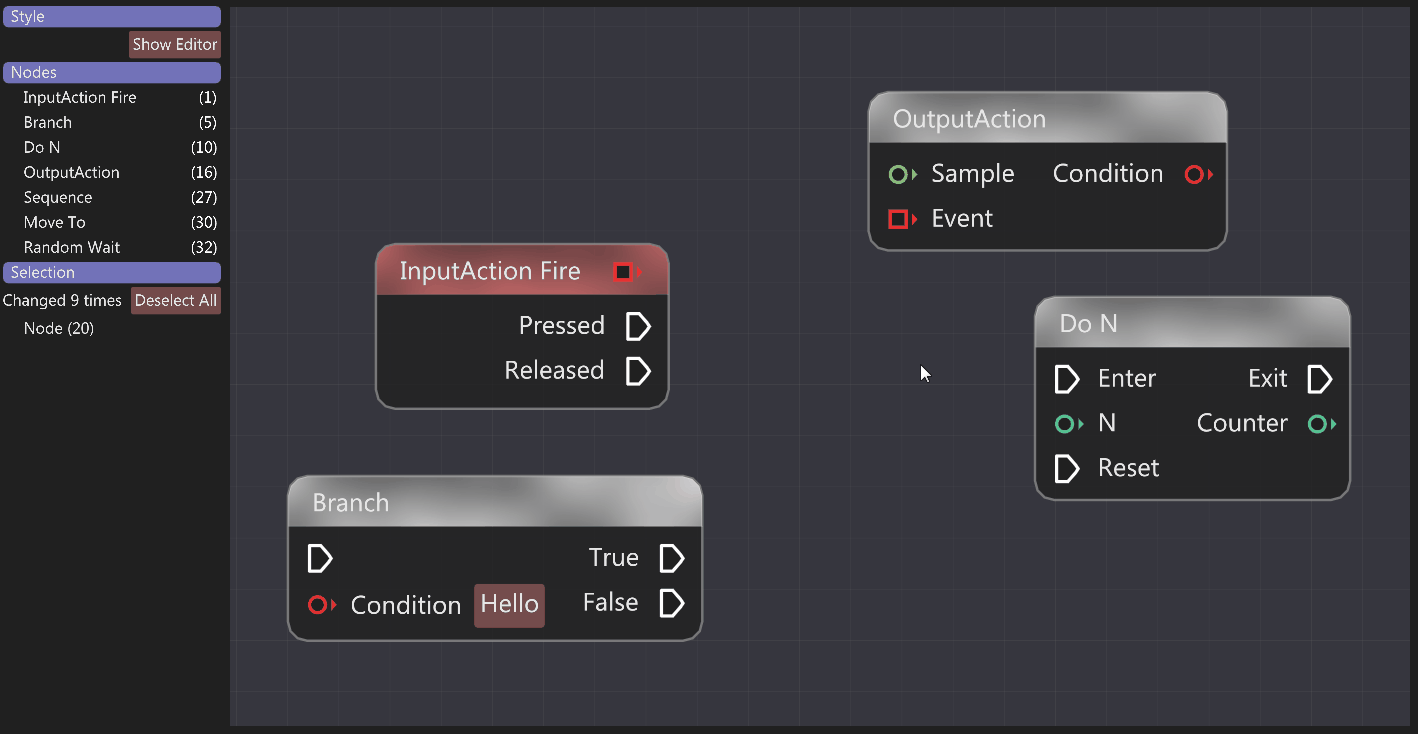
看起来很酷,现在就初步实现一下吧。
1、github上下载源码https://github.com/thedmd/imgui-node-editor
2、把imgui-node-editor放入自己工程的lib文件夹下,只需要保留当前文件夹下内容,example文件夹可删除。目录结构如下:
ImGUITest
├─lib
│ ├─glfw
| └─imgui-node-editor
│ │ *.h
│ │ *.cpp
│ └─imgui
│ │ imconfig.h
│ │ imgui.cpp
│ │ imgui.h
│ │ imgui_demo.cpp
│ │ imgui_draw.cpp
│ │ imgui_internal.h
│ │ imgui_tables.cpp
│ │ imgui_widgets.cpp
│ │ imstb_rectpack.h
│ │ imstb_textedit.h
│ │ imstb_truetype.h
│ │ LICENSE.txt
│ │
│ └─backend
│ imgui_impl_glfw.cpp
│ imgui_impl_glfw.h
│ imgui_impl_opengl3.cpp
│ imgui_impl_opengl3.h
│ imgui_impl_opengl3_loader.h
│
└─src
main.cpp
3、修改cmakelist.txt
注意c++标准必须17以上
cmake_minimum_required(VERSION 3.10)
project(imguiTest)

set(CMAKE_CXX_STANDARD 17)
set(CMAKE_CXX_STANDARD_REQUIRED ON)
set(GLFW3_WINDOWS ${CMAKE_CURRENT_SOURCE_DIR}/lib/GLFW/lib/windows/glfw3.dll)
set(EXECUTABLE ${CMAKE_PROJECT_NAME})

include_directories(lib/GLFW/inc
                    lib/imgui
                    lib/imgui/backends
                    lib/imgui-node-editor
        )
link_directories(
        lib/GLFW/lib/windows
)

file(GLOB_RECURSE IMGUI_SRCS lib/imgui/*.cpp)
file(GLOB_RECURSE NODE_EDITOR_SRCS lib/imgui-node-editor/*.cpp)

add_executable(${EXECUTABLE} WIN32 src/main.cpp ${IMGUI_SRCS} ${NODE_EDITOR_SRCS})
target_link_libraries(${EXECUTABLE} ${GLFW3_WINDOWS} -static opengl32)
add_custom_command(TARGET ${EXECUTABLE} POST_BUILD
        COMMAND ${CMAKE_COMMAND} -E copy
        ${GLFW3_WINDOWS}
        ${CMAKE_BINARY_DIR}/glfw3.dll)
4、仿照node-editor中example中例子,修改main函数。
这个例子参考的 imgui-node-editor/examples/basic-interaction-example中的例子。其中simple-example中的例子也简单运行了一下,就是一个单点,basic-interaction-example这个例子包含了新建连接和删除连接。
blueprints-example这个例子是开头的效果,后续可以继续看一下这个例子。
// Dear ImGui: standalone example application for GLFW + OpenGL 3, using programmable pipeline
// (GLFW is a cross-platform general purpose library for handling windows, inputs, OpenGL/Vulkan/Metal graphics context creation, etc.)

// Learn about Dear ImGui:
// - FAQ                  https://dearimgui.com/faq
// - Getting Started      https://dearimgui.com/getting-started
// - Documentation        https://dearimgui.com/docs (same as your local docs/ folder).
// - Introduction, links and more at the top of imgui.cpp

#include "imgui.h"
#include "imgui_impl_glfw.h"
#include "imgui_impl_opengl3.h"
#include <stdio.h>
#define GL_SILENCE_DEPRECATION
#if defined(IMGUI_IMPL_OPENGL_ES2)
#include <GLES2/gl2.h>
#endif
#include <GLFW/glfw3.h> // Will drag system OpenGL headers
#include <imgui_node_editor.h>
#include <string>
#include <vector>

// [Win32] Our example includes a copy of glfw3.lib pre-compiled with VS2010 to maximize ease of testing and compatibility with old VS compilers.
// To link with VS2010-era libraries, VS2015+ requires linking with legacy_stdio_definitions.lib, which we do using this pragma.
// Your own project should not be affected, as you are likely to link with a newer binary of GLFW that is adequate for your version of Visual Studio.
#if defined(_MSC_VER) && (_MSC_VER >= 1900) && !defined(IMGUI_DISABLE_WIN32_FUNCTIONS)
#pragma comment(lib, "legacy_stdio_definitions")
#endif

// This example can also compile and run with Emscripten! See 'Makefile.emscripten' for details.
#ifdef __EMSCRIPTEN__
#include "../libs/emscripten/emscripten_mainloop_stub.h"
#endif

static void glfw_error_callback(int error, const char* description)
{
    fprintf(stderr, "GLFW Error %d: %s\n", error, description);
}


// 节点和连接的唯一标识符
enum class PinType {
    Input,
    Output
};

struct Node {
    ax::NodeEditor::NodeId Id;
    std::string Title;
    ImVec2 Position;
    std::vector<ax::NodeEditor::PinId> Inputs;
    std::vector<ax::NodeEditor::PinId> Outputs;
};

struct Link {
    ax::NodeEditor::LinkId Id;
    ax::NodeEditor::PinId StartPinId;
    ax::NodeEditor::PinId EndPinId;
};

// 全局状态
ax::NodeEditor::EditorContext* g_Context = nullptr;
std::vector<Node> g_Nodes;
std::vector<Link> g_Links;
int g_NextNodeId = 100;
int g_NextPinId = 200;
int g_NextLinkId = 300;

// 创建新节点的函数
void CreateNode(const std::string& title, ImVec2 position, int inputCount = 1, int outputCount = 1) {
    Node node;
    node.Id = g_NextNodeId;
    ++g_NextNodeId;

    node.Title = title;
    node.Position = position;

    // 创建输入引脚
    for (int i = 0; i < inputCount; ++i) {
        node.Inputs.push_back(g_NextPinId++);
    }

    // 创建输出引脚
    for (int i = 0; i < outputCount; ++i) {
        node.Outputs.push_back(g_NextPinId++);
    }

    g_Nodes.push_back(node);
}

// 初始化节点编辑器
void InitNodeEditor() {
    // 创建编辑器上下文
    g_Context = ax::NodeEditor::CreateEditor();

    // 创建一些示例节点
    CreateNode("Node A", ImVec2(10, 10), 1, 2);
    CreateNode("Node B", ImVec2(300, 100), 2, 1);
    CreateNode("Node C", ImVec2(150, 300), 1, 1);

    // 创建一些示例连接
    if (!g_Nodes.empty() && g_Nodes.size() >= 2) {
        Link link1;
        link1.Id = g_NextLinkId++;
        link1.StartPinId = g_Nodes[0].Outputs[0];
        link1.EndPinId = g_Nodes[1].Inputs[0];
        g_Links.push_back(link1);

        Link link2;
        link2.Id = g_NextLinkId++;
        link2.StartPinId = g_Nodes[0].Outputs[1];
        link2.EndPinId = g_Nodes[2].Inputs[0];
        g_Links.push_back(link2);
    }
}


// Main code
int main(int, char**)
{
    glfwSetErrorCallback(glfw_error_callback);
    if (!glfwInit())
        return 1;

    // Decide GL+GLSL versions
#if defined(IMGUI_IMPL_OPENGL_ES2)
    // GL ES 2.0 + GLSL 100 (WebGL 1.0)
    const char* glsl_version = "#version 100";
    glfwWindowHint(GLFW_CONTEXT_VERSION_MAJOR, 2);
    glfwWindowHint(GLFW_CONTEXT_VERSION_MINOR, 0);
    glfwWindowHint(GLFW_CLIENT_API, GLFW_OPENGL_ES_API);
#elif defined(IMGUI_IMPL_OPENGL_ES3)
    // GL ES 3.0 + GLSL 300 es (WebGL 2.0)
    const char* glsl_version = "#version 300 es";
    glfwWindowHint(GLFW_CONTEXT_VERSION_MAJOR, 3);
    glfwWindowHint(GLFW_CONTEXT_VERSION_MINOR, 0);
    glfwWindowHint(GLFW_CLIENT_API, GLFW_OPENGL_ES_API);
#elif defined(__APPLE__)
    // GL 3.2 + GLSL 150
    const char* glsl_version = "#version 150";
    glfwWindowHint(GLFW_CONTEXT_VERSION_MAJOR, 3);
    glfwWindowHint(GLFW_CONTEXT_VERSION_MINOR, 2);
    glfwWindowHint(GLFW_OPENGL_PROFILE, GLFW_OPENGL_CORE_PROFILE);  // 3.2+ only
    glfwWindowHint(GLFW_OPENGL_FORWARD_COMPAT, GL_TRUE);            // Required on Mac
#else
    // GL 3.0 + GLSL 130
    const char* glsl_version = "#version 130";
    glfwWindowHint(GLFW_CONTEXT_VERSION_MAJOR, 3);
    glfwWindowHint(GLFW_CONTEXT_VERSION_MINOR, 0);
    //glfwWindowHint(GLFW_OPENGL_PROFILE, GLFW_OPENGL_CORE_PROFILE);  // 3.2+ only
    //glfwWindowHint(GLFW_OPENGL_FORWARD_COMPAT, GL_TRUE);            // 3.0+ only
#endif

    // Create window with graphics context
    float main_scale = ImGui_ImplGlfw_GetContentScaleForMonitor(glfwGetPrimaryMonitor()); // Valid on GLFW 3.3+ only
    GLFWwindow* window = glfwCreateWindow((int)(1280 * main_scale), (int)(800 * main_scale), "Dear ImGui GLFW+OpenGL3 example", nullptr, nullptr);
    if (window == nullptr)
        return 1;
    glfwMakeContextCurrent(window);
    glfwSwapInterval(1); // Enable vsync

    // Setup Dear ImGui context
    IMGUI_CHECKVERSION();
    ImGui::CreateContext();
    ImGuiIO& io = ImGui::GetIO(); (void)io;
    io.ConfigFlags |= ImGuiConfigFlags_NavEnableKeyboard;     // Enable Keyboard Controls
    io.ConfigFlags |= ImGuiConfigFlags_NavEnableGamepad;      // Enable Gamepad Controls

    // Setup Dear ImGui style
    ImGui::StyleColorsDark();
    //ImGui::StyleColorsLight();

    // Setup scaling
    ImGuiStyle& style = ImGui::GetStyle();
    style.ScaleAllSizes(main_scale);        // Bake a fixed style scale. (until we have a solution for dynamic style scaling, changing this requires resetting Style + calling this again)
    style.FontScaleDpi = main_scale;        // Set initial font scale. (using io.ConfigDpiScaleFonts=true makes this unnecessary. We leave both here for documentation purpose)

    // Setup Platform/Renderer backends
    ImGui_ImplGlfw_InitForOpenGL(window, true);
#ifdef __EMSCRIPTEN__
    ImGui_ImplGlfw_InstallEmscriptenCallbacks(window, "#canvas");
#endif
    ImGui_ImplOpenGL3_Init(glsl_version);

    // Load Fonts
    // - If no fonts are loaded, dear imgui will use the default font. You can also load multiple fonts and use ImGui::PushFont()/PopFont() to select them.
    // - AddFontFromFileTTF() will return the ImFont* so you can store it if you need to select the font among multiple.
    // - If the file cannot be loaded, the function will return a nullptr. Please handle those errors in your application (e.g. use an assertion, or display an error and quit).
    // - Use '#define IMGUI_ENABLE_FREETYPE' in your imconfig file to use Freetype for higher quality font rendering.
    // - Read 'docs/FONTS.md' for more instructions and details.
    // - Remember that in C/C++ if you want to include a backslash \ in a string literal you need to write a double backslash \\ !
    // - Our Emscripten build process allows embedding fonts to be accessible at runtime from the "fonts/" folder. See Makefile.emscripten for details.
    //style.FontSizeBase = 20.0f;
    //io.Fonts->AddFontDefault();
    //io.Fonts->AddFontFromFileTTF("c:\\Windows\\Fonts\\segoeui.ttf");
    //io.Fonts->AddFontFromFileTTF("../../misc/fonts/DroidSans.ttf");
    //io.Fonts->AddFontFromFileTTF("../../misc/fonts/Roboto-Medium.ttf");
    //io.Fonts->AddFontFromFileTTF("../../misc/fonts/Cousine-Regular.ttf");
    //ImFont* font = io.Fonts->AddFontFromFileTTF("c:\\Windows\\Fonts\\ArialUni.ttf");
    //IM_ASSERT(font != nullptr);

    // Our state
    bool show_demo_window = true;
    bool show_another_window = false;
    ImVec4 clear_color = ImVec4(0.45f, 0.55f, 0.60f, 1.00f);

    //ax::NodeEditor::EditorContext* m_Context = nullptr;
    //m_Context = ax::NodeEditor::CreateEditor();
    InitNodeEditor();

    // Main loop
#ifdef __EMSCRIPTEN__
    // For an Emscripten build we are disabling file-system access, so let's not attempt to do a fopen() of the imgui.ini file.
    // You may manually call LoadIniSettingsFromMemory() to load settings from your own storage.
    io.IniFilename = nullptr;
    EMSCRIPTEN_MAINLOOP_BEGIN
#else
    while (!glfwWindowShouldClose(window))
#endif
    {
        // Poll and handle events (inputs, window resize, etc.)
        // You can read the io.WantCaptureMouse, io.WantCaptureKeyboard flags to tell if dear imgui wants to use your inputs.
        // - When io.WantCaptureMouse is true, do not dispatch mouse input data to your main application, or clear/overwrite your copy of the mouse data.
        // - When io.WantCaptureKeyboard is true, do not dispatch keyboard input data to your main application, or clear/overwrite your copy of the keyboard data.
        // Generally you may always pass all inputs to dear imgui, and hide them from your application based on those two flags.
        glfwPollEvents();
        if (glfwGetWindowAttrib(window, GLFW_ICONIFIED) != 0)
        {
            ImGui_ImplGlfw_Sleep(10);
            continue;
        }

        // Start the Dear ImGui frame
        ImGui_ImplOpenGL3_NewFrame();
        ImGui_ImplGlfw_NewFrame();
        ImGui::NewFrame();

        // 1. Show the big demo window (Most of the sample code is in ImGui::ShowDemoWindow()! You can browse its code to learn more about Dear ImGui!).
        if (show_demo_window)
            ImGui::ShowDemoWindow(&show_demo_window);

        // 2. Show a simple window that we create ourselves. We use a Begin/End pair to create a named window.
        {
            static float f = 0.0f;
            static int counter = 0;

            ImGui::Begin("Hello, world!");                          // Create a window called "Hello, world!" and append into it.

            ImGui::Text("This is some useful text.");               // Display some text (you can use a format strings too)
            ImGui::Checkbox("Demo Window", &show_demo_window);      // Edit bools storing our window open/close state
            ImGui::Checkbox("Another Window", &show_another_window);

            ImGui::SliderFloat("float", &f, 0.0f, 1.0f);            // Edit 1 float using a slider from 0.0f to 1.0f
            ImGui::ColorEdit3("clear color", (float*)&clear_color); // Edit 3 floats representing a color

            if (ImGui::Button("Button"))                            // Buttons return true when clicked (most widgets return true when edited/activated)
                counter++;
            ImGui::SameLine();
            ImGui::Text("counter = %d", counter);

            ImGui::Text("Application average %.3f ms/frame (%.1f FPS)", 1000.0f / io.Framerate, io.Framerate);
            ImGui::End();
        }

        // 3. Show another simple window.
        if (show_another_window)
        {
            ImGui::Begin("Another Window", &show_another_window);   // Pass a pointer to our bool variable (the window will have a closing button that will clear the bool when clicked)
            ImGui::Text("Hello from another window!");
            if (ImGui::Button("Close Me"))
                show_another_window = false;

             auto& io = ImGui::GetIO();

        ImGui::Text("FPS: %.2f (%.2gms)", io.Framerate, io.Framerate ? 1000.0f / io.Framerate : 0.0f);

        ImGui::Separator();

        ax::NodeEditor::SetCurrentEditor(g_Context);
        ax::NodeEditor::Begin("My Editor", ImVec2(0.0, 0.0f));
        // int uniqueId = 1;
        // // Start drawing nodes.
        // ax::NodeEditor::BeginNode(uniqueId++);
        //     ImGui::Text("Node A");
        //     ax::NodeEditor::BeginPin(uniqueId++, ax::NodeEditor::PinKind::Input);
        //         ImGui::Text("-> In");
        //     ax::NodeEditor::EndPin();
        //     ImGui::SameLine();
        //     ax::NodeEditor::BeginPin(uniqueId++, ax::NodeEditor::PinKind::Output);
        //         ImGui::Text("Out ->");
        //     ax::NodeEditor::EndPin();
        // ax::NodeEditor::EndNode();

            int nodeIndex = 0;
    for (auto& node : g_Nodes) {
        // 开始绘制节点
        ax::NodeEditor::NodeId nodeId = node.Id;
        ax::NodeEditor::PinId inputPinId = node.Inputs.empty() ? 0 : node.Inputs[0];
        ax::NodeEditor::PinId outputPinId = node.Outputs.empty() ? 0 : node.Outputs[0];

        ax::NodeEditor::BeginNode(nodeId);
        ImGui::Text("%s", node.Title.c_str());

        // 绘制输入引脚
        for (size_t i = 0; i < node.Inputs.size(); ++i) {
            ax::NodeEditor::BeginPin(node.Inputs[i], ax::NodeEditor::PinKind::Input);
            ImGui::Text("->In%d    ", (int)i + 1);
            ax::NodeEditor::EndPin();
        }

        // 绘制输出引脚
        for (size_t i = 0; i < node.Outputs.size(); ++i) {
            ax::NodeEditor::BeginPin(node.Outputs[i], ax::NodeEditor::PinKind::Output);
            ImGui::Text("   %dOut-> ", (int)i + 1);
            ax::NodeEditor::EndPin();
        }

        ax::NodeEditor::EndNode();

        nodeIndex++;
    }

    // 绘制连接
    for (auto& link : g_Links) {
        ax::NodeEditor::Link(link.Id, link.StartPinId, link.EndPinId);
    }

    if(ax::NodeEditor::BeginCreate())
    {
           // 处理新连接
    ax::NodeEditor::LinkId newLinkId;
    ax::NodeEditor::PinId startPinId=0, endPinId=0;
    if (ax::NodeEditor::QueryNewLink(&startPinId, &endPinId)) {
        // 检查连接是否有效(输入到输出)
        bool startIsOutput = false;
        bool endIsInput = false;

        // 检查引脚类型
        for (auto& node : g_Nodes) {
            for (auto pin : node.Outputs) {
                if (pin == startPinId) startIsOutput = true;
            }
            for (auto pin : node.Inputs) {
                if (pin == endPinId) endIsInput = true;
            }
        }

        if (startIsOutput && endIsInput) {
            if( ax::NodeEditor::AcceptNewItem())
            {
                  // 创建新连接
                Link link;
                link.Id = g_NextLinkId++;
                link.StartPinId = startPinId;
                link.EndPinId = endPinId;
                g_Links.push_back(link);

                 ax::NodeEditor::Link(g_Links.back().Id, g_Links.back().StartPinId, g_Links.back().EndPinId);
            }


        } else {
             // 拒绝连接
             ax::NodeEditor::RejectNewItem();
        }
     }
    }
    ax::NodeEditor::EndCreate();

    if(ax::NodeEditor::BeginDelete())
    {

             // 处理删除连接
    ax::NodeEditor::LinkId deletedLinkId;
    if (ax::NodeEditor::QueryDeletedLink(&deletedLinkId)) {

        if(ax::NodeEditor::AcceptDeletedItem())
        {
             for (auto it = g_Links.begin(); it != g_Links.end(); ++it) {
            if (it->Id == deletedLinkId) {
                g_Links.erase(it);
                break;
            }
        }
        }

    }

    }
    ax::NodeEditor::EndDelete();


        ax::NodeEditor::End();
        ax::NodeEditor::SetCurrentEditor(nullptr);

            ImGui::End();
        }

        // Rendering
        ImGui::Render();
        int display_w, display_h;
        glfwGetFramebufferSize(window, &display_w, &display_h);
        glViewport(0, 0, display_w, display_h);
        glClearColor(clear_color.x * clear_color.w, clear_color.y * clear_color.w, clear_color.z * clear_color.w, clear_color.w);
        glClear(GL_COLOR_BUFFER_BIT);
        ImGui_ImplOpenGL3_RenderDrawData(ImGui::GetDrawData());

        glfwSwapBuffers(window);
    }
#ifdef __EMSCRIPTEN__
    EMSCRIPTEN_MAINLOOP_END;
#endif

    // Cleanup
    ImGui_ImplOpenGL3_Shutdown();
    ImGui_ImplGlfw_Shutdown();
    ImGui::DestroyContext();

    glfwDestroyWindow(window);
    glfwTerminate();
    ax::NodeEditor::DestroyEditor(g_Context);

    return 0;
}
5、用vscode打开代码文件夹,新建终端输入:
cmake -G "MinGW Makefiles" -DCMAKE_C_COMPILER=gcc -DCMAKE_CXX_COMPILER=g++ ..
6、输入 mingw32-make
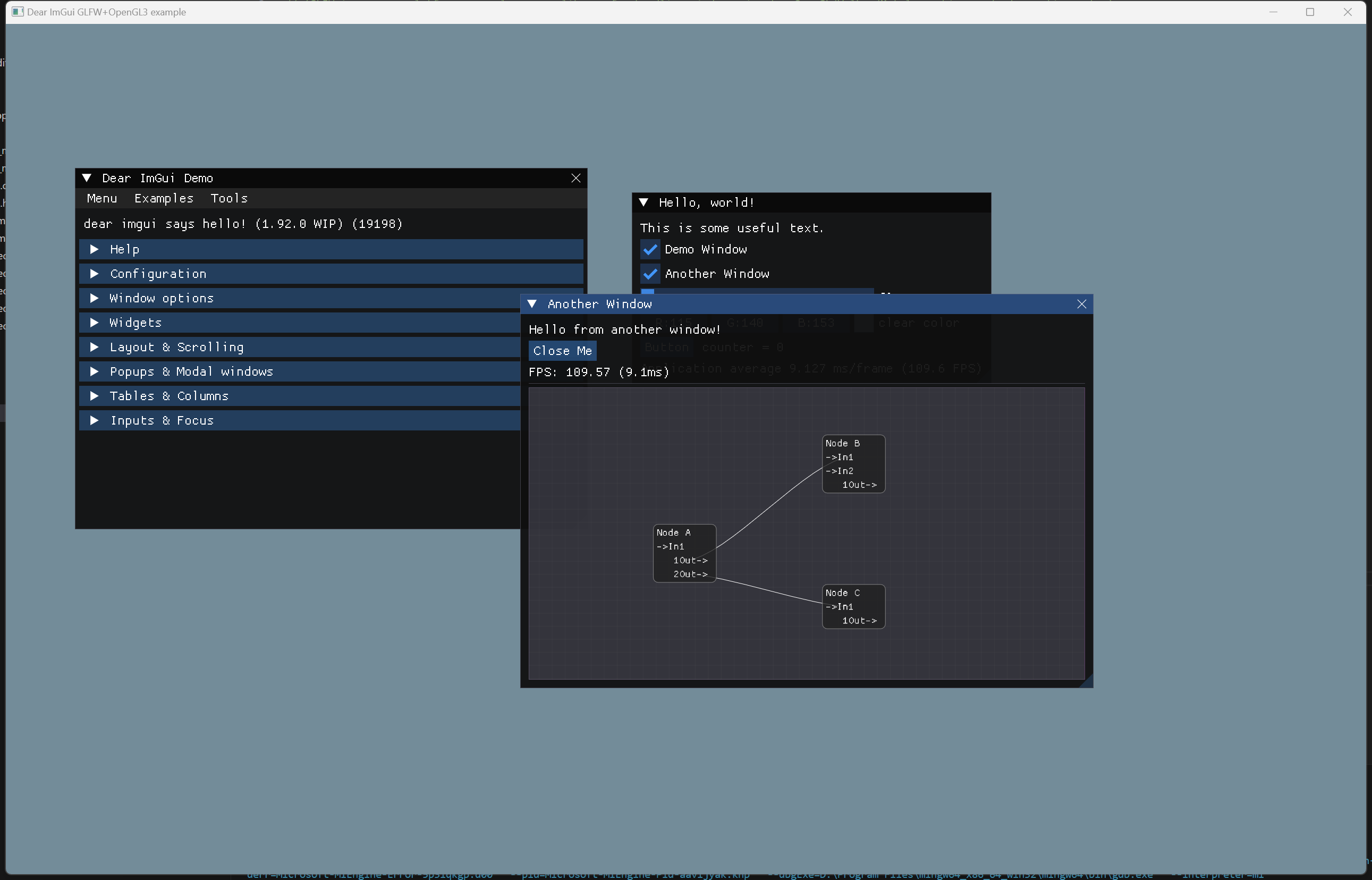
f5运行:点击another window 查看绘制的点。





 扫一扫
扫一扫


 1639
1639

 被折叠的 条评论
为什么被折叠?
被折叠的 条评论
为什么被折叠?
 到【灌水乐园】发言





