



The previous couple of blogs covered Tez concepts and APIs. This gives some details on what is required to write a custom Input / Processor / Output, along with examples of existing I/P/Os provided by the Tez runtime library.
Tez Task
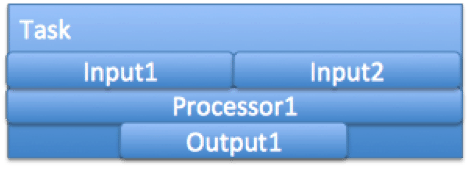 A Tez task is constituted of all the Inputs on its incoming edges, the Processor configured for the Vertex, and all the Output(s) on it’s outgoing edge.
The number of tasks for a vertex is equal to the parallelism set for that vertex – which is set at DAG construction time, or modified during runtime via user plugins running in the AM.
The diagram shows a single task. The vertex is configured to run Processor1 – has two incoming edges – with the output of the edge specified as Input1 and Input2 respectively, and has a single outgoing edge – with the input to this edge configured as Output1. There will be n such Task instances created per Vertex – depending on the parallelism.
Initialization of a Tez task
The following steps are followed to initialize and run a Tez task.
The Tez framework will first construct instances of the specified Input(s), Processor, Output(s) using a 0 argument constructor.
For a LogicalInput and a LogicalOutput – the Tez framework will set the number of physical connections using the respective setNumPhysicalInputs and setNumPhysicalOutputs methods.
The Input(s), Processor and Output(s) will then be initialized via their respective initialize methods. Configuration and context information is made available to the Is/P/Os via this call. More information on the Context classes is available in the JavaDoc for TezInputContext, TezProcessorContext and TezOutputContext.
The Processor run method will be called with the initialized Inputs and Outputs passed in as arguments (as a Map – connected vertexName to Input/Output).
Once the run method completes, the Input(s), Processor and Output(s) will be closed, and the task is considered to be complete.
Notes for I/P/O writers:
- Each Input / Processor / Output must provide a 0 argument constructor.
- No assumptions should be made about the order in which the Inputs, Processor and Outputs will be initialized, or closed.
- Assumptions should also not be made about how the Initialization, Close and Processor run will be invoked – i.e. on the same thread or multiple threads.
Common Interfaces to be implemented by Input/Processor/Output
-
List<Event> initialize(Tez*Context)-This is where I/P/O receive their corresponding context objects. They can, optionally, return a list of events. -
handleEvents(List<Event> events)– Any events generated for the specific I/P/O will be passed in via this interface. Inputs receiveDataMovementEvent(s) generated by corresponding Outputs on this interface – and will need to interpret them to retrieve data. At the moment, this can be ignored for Outputs and Processors. -
List<Event> close()– Any cleanup or final commits will typically be implemented in the close method. This is generally a good place for Outputs to generateDataMovementEvent(s). More on these events later.
Providing User Information to an Input / Processor / Output
Information specified in the bytePayload associated with an Input/Processor/Output is made available to the respective I/P/O via their context objects.
Users provide this information as a byte array – and can specify any information that may be required at runtime by the I/P/O. This could include configuration, execution plans for Hive/PIG, etc. As an example, the current inputs use a Hadoop Configuration instance for backward compatibility. Hive may choose to send it’s vertex execution plan as part of this field instead of using the distributed cache provided by YARN.
Typically, Inputs and Outputs exist as a pair – the Input knows how to process DataMovementEvent(s) generated by the corresponding Output, and how to interpret the data. This information will generally be encoded into some form of configuration (specified via the userPayload) used by the Output-Input pair, and should match. As an example – the output Key type configured on an Output should match the Input key type on the corresponding Input.
Writing a Tez LogicalOutput
A LogicalOutput can be considered to have two main responsibilities – 1) dealing with the actual data provided by the Processor – partitioning it for the ‘physical’ edges, serializing it etc, and 2) Providing information to Tez (in effect the subsequent Input) on where this data is available.
Processing the Data
Depending on the connection pattern being used – an Output will generate data to a single ‘physical’ edge or multiple ‘physical’ edges. A LogicalOutput is responsible for partitioning the data into these ‘physical’ edges.
It would typically work in conjunction with the configured downstream Input to write data in a specific data format understood by the downstream Input. This includes a serialization mechanism, compression etc.
As an example: OnFileSortedOutput which is the Output used for a MapReduce shuffle makes use of aPartitioner to partition the data into n partitions (‘physical’ edges) – where n corresponds to the number of downstream tasks. It also sorts the data per partition, and writes it out as Key-Value pairs using Hadoop serialization which is understood by the downstream Input (ShuffledMergedInput in this case).
Providing information on how the data is to be retrieved
A LogicalOutput needs to send out information on how data is to be retrieved by the corresponding downstream Input defined on an edge. This is done by generating DataMovementEvent(s). These events are routed by the AM, based on the connection pattern, to the relevant LogicalInputs.
These events can be sent at anytime by using the TezOutputContext with which the Output was initialized. Alternately, they can be returned as part of the initialize() or close() calls. More onDataMovementEvent(s) further down.
Continuing with the OnFileSortedOutput example: This will generate one event per partition – the sourceIndex for each of these events will be the partition number. This particular Output makes use of the MapReduce ShuffleHandler, which requires downstream Inputs to pull data over HTTP. The payload for these events contains the host name and port for the http server, as well as an identifier which uniquely identifies the specific task and Input instance running this output.
In case of OnFileSortedOutput – these events are generated during the close() call.
Specific interface for a LogicalOutput
-
setNumPhysicalOutputs(int)– This is where a Logical Output is informed about the number of physical outgoing edges for the output. -
Writer getWriter()– An implementation of theWriterinterface, which can be used by a Processor to write to this Output.
Writing a Tez LogicalInput
The main responsibilities of a Logical Input are 1) Obtaining the actual data over the ‘physical’ edges, and 2) Interpreting the data, and providing a single ‘Logical’ view of this data to the Processor.
Obtaining the Data
A LogicalInput will receive DataMovementEvent(s) generated by the corresponding LogicalOutput which generated them. It needs to interpret these events to get hold of the data. The number of DataMovementEvent(s) a LogicalInput receives is typically equal to the number of physical edges it is configured with, and is used as a termination condition.
As an example: ShuffledMergedInput (which is the Input on the OnFileSortedOutput-ShuffledMergedInputO-I edge) would fetch data from the ShuffleHandler by interpretting the host, port and identifier from theDataMovementEvent(s) it receives.
Providing a view of the data to the Processor
A LogicalInput will typically expose the data to the Processor via a Reader interface. This would involve interpreting the data, manipulating it if required – decompression, ser-de etc.
Continuing with the ShuffledMergedInput example: This input fetches all the data – one chunk per source task and partition – each of which is sorted. It then proceeds to merge the sorted chunks and makes the data available to the Processor only after this step – via a KeyValues reader implementation.
View ShuffledUnorderedKVInput.java
Specific interface for a LogicalInput
-
setNumPhysicalInputs(int)– This is where a LogicalInput is informed about the number of physical incoming edges. -
Reader getReader()– An implementation of theReaderinterface, which can be used by a Processor to read from this Input
Writing a Tez LogicalIOProcessor
A logical processor receives configured LogicalInput(s) and LogicalOutput(s). It is responsible for reading source data from the Input(s), processing it, and writing data out to the configured Output(s).
A processor is aware of which vertex (vertex-name) a specific Input is from. Similarly, it is aware of the output vertex (via the vertex-name) associated with a specific Output. It would typically validate the Input and Output types, process the Inputs based on the source vertex and generate output for the various destination vertices.
As an example: The MapProcessor validates that it is configured with only a single Input of type MRInput – since that is the only input it knows how to work with. It also validates the Output to be an OnFileSortedOutputor a MROutput. It then proceeds to obtain a KeyValue reader from the MRInput, and KeyValueWriter from theOnFileSortedOutput or MROutput. The KeyvalueReader instance is used to walk all they keys in the input – on which the user configured map function is called, with a MapReduce output collector backed by the KeyValue writer instance.
Specific interface for a LogicalIOProcessor
-
run(Map<String, LogicalInput> inputs, Map<String, LogicalOutput> outputs)– This is where a processor should implement it’s compute logic. It receives initialized Input(s) and Output(s) along with the vertex names to which thse Input(s) and Output(s) are connected.
DataMovementEvent
A DataMovementEvent is used to communicate between Outputs and Inputs to specify location information. A byte payload field is available for this – the contents of which should be understood by the communicating Outputs and Inputs. This byte payload could be interpreted by user-plugins running within the AM to modify the DAG (Auto reduce-parallelism as an example).
DataMovementEvent(s) are typically generated per physical edge between the Output and Input. The event generator needs to set the sourceIndex on the event being generated – and this matches the physical Output/Input that generated the event. Based on the ConnectionPattern specified for the DAG – Tez sets the targetIndex, so that the event receiver knows which physical Input/Output the event is meant for. An example of data movement events generated by a ScatterGather connection pattern (Shuffle) follows, with values specified for the source and target Index.
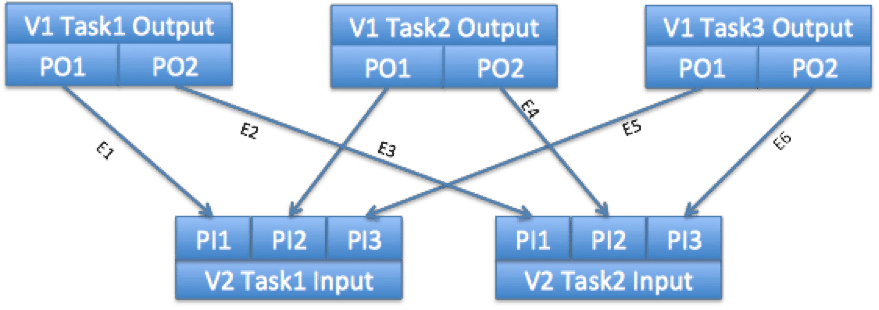
In this case the Input has 3 tasks, and the output has 2 tasks. Each input generates 1 partition (physical output) for the downstream tasks, and each downstream task consumes the same partition from each of the upstream tasks.
Vertex1, Task1 will generate two DataMovementEvents – E1 and E2.
E1, sourceIndex = 0 (since it is generated by the 1st physical output)
E2, sourceIndex = 1 (since it is generated by the 2nd physical output)
Similarly Vertex1, Task2 and Task3 will generate two data movement events each.
E3 and E5, sourceIndex=0
E4 and E6, sourceIndex=1
Based on the ScatterGather ConnectionPattern, the AM will route the events to relevant tasks.
E1, E3, E5 with sourceIndex 0 will be sent to Vertex2, Task1
E2, E4, E6 with sourceIndex 1 will be sent to Vertex2, Task2
The destination will see the following targetIndex (based on the physical edges between the tasks (arrows))
E1, targetIndex=0 – first physical input to V2, Task1
E3, targetIndex=1 – second physical input to V2, Task1
E5, targetIndex=2 – third physical input to V2, Task1
Similarly, E2, E4, E6 will have target indices 0,1 and 2 respectively – i.e. first, second and third physical input to V2 Task2.
DataMovement events generated by an Input are routed to the corresponding upstream Input defined on the edge. Similarly data movement events generated by an Ouput are routed to the corresponding downstream Input defined on the edge.
If the Output is one of the Leaf Outputs for a DAG – it will typically not generate any events.
Error Handling
Reporting errors from an Input/Processor/Output
- Fatal Errors – fatal errors can be reported to Tez via the
fatalErrormethod available on the context instances, with which the I/P/O was initialized. Alternately, throwing an Exception from theinitialize,closeorrunmethods are considered to be fatal. Fatal errors cause the current running task to be killed. - Actionable Non Fatal Errors – Inputs can report the failure to obtain data from a specific Physical connection by sending an
InputReaderErrorEventvia the InputContext. Depending on the Edge configuration, this may trigger a retry of the previous stage task which generated this data.
Errors reported to an Input
If the AM determines that data generated by a previous task is no longer available, Inputs which require this data are informed via an InputFailedEvent. The sourceIndex, targetIndex and attemptNumber information on this event would correspond to the DataMovementEvent event with the same values. The Input will typically handle this event by not attempting to obtain data based on the specific DataMovement event, and would wait for an updated DataMovementEvent for the same data.
Notes on Reader and Writer
Tez does not enforce any interface on the Reader and Writer to stay data format agnostic. Specific Writers and Readers can be implemented for Key-Value, Record or other data formats. A KeyValue and KeyValues Reader/Writer interface and implementation, based on Hadoop serialization, is used by the Shuffle Input/Output provided by the Tez Runtime library.
http://hortonworks.com/blog/writing-a-tez-inputprocessoroutput-2/





 扫一扫
扫一扫


 2357
2357

 被折叠的 条评论
为什么被折叠?
被折叠的 条评论
为什么被折叠?
 到【灌水乐园】发言





