



文章目录
一、普通方法实现员工管理
import requests

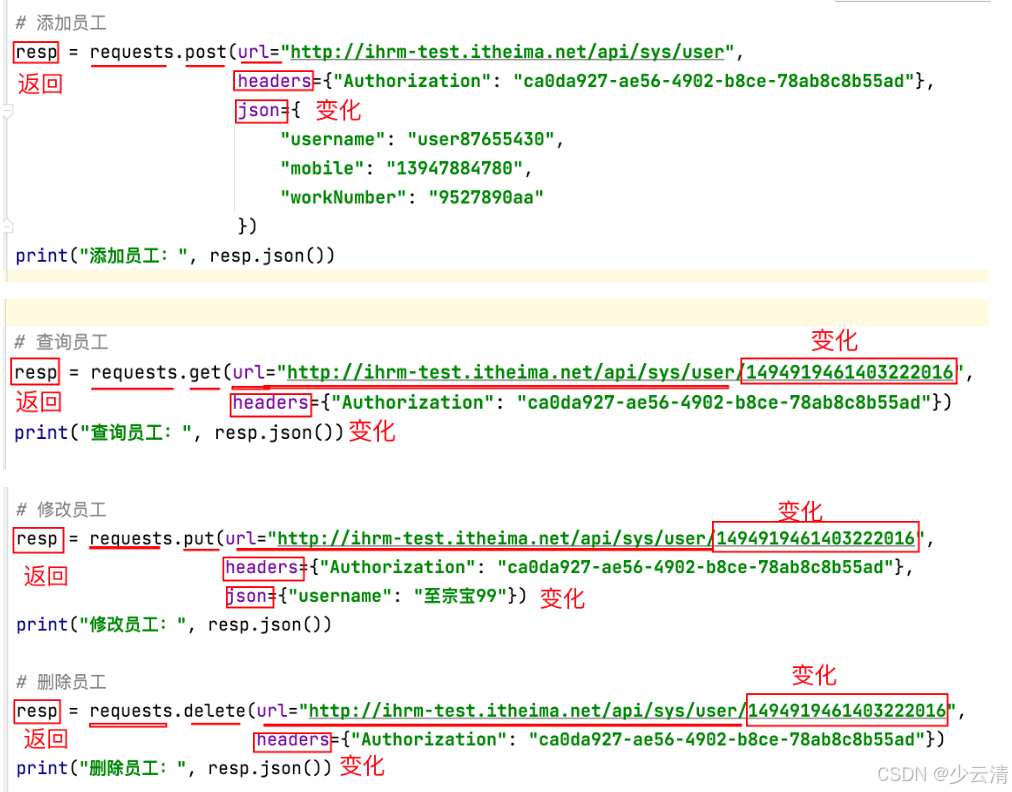
# 添加员工
resp = requests.post(url="http://ihrm-test.itheima.net/api/sys/user",
                     headers={"Authorization": "ca0da927-ae56-4902-b8ce-78ab8c8b55ad"},
                     json={
                         "username": "user87655430",
                         "mobile": "13947884780",
                         "workNumber": "9527890aa"
                     })
print("添加员工:", resp.json())

# 查询员工
resp = requests.get(url="http://ihrm-test.itheima.net/api/sys/user/1494919461403222016",
                    headers={"Authorization": "ca0da927-ae56-4902-b8ce-78ab8c8b55ad"})
print("查询员工:", resp.json())

# 修改员工
resp = requests.put(url="http://ihrm-test.itheima.net/api/sys/user/1494919461403222016",
                    headers={"Authorization": "ca0da927-ae56-4902-b8ce-78ab8c8b55ad"},
                    json={"username": "至宗宝99"})
print("修改员工:", resp.json())

# 删除员工
resp = requests.delete(url="http://ihrm-test.itheima.net/api/sys/user/1494919461403222016",
                       headers={"Authorization": "ca0da927-ae56-4902-b8ce-78ab8c8b55ad"})
print("删除员工:", resp.json())
二、员工管理目录结构(5个目录+2个文件)
1、api/:接口对象层(代码:python package)
- ① __ init__.py 无内容
- ②ihrm_emp_api.py 员工管理api
2、scripts/:测试脚本层(代码:python package)
- ① __ init__.py 无内容
- ②test_add_emp.py
- ③ test_add_emp_params.py
3、common/:通用工具方法、函数(代码:python package)
- ① __ init__.py 无内容
- ②assert_tools.py
- ③db_tools.py
- ④get_header.py(进阶版使用,用于获取动态令牌)
- ⑤read_json_file.py
4、data/:测试数据文件(文件:dir)
- add_emp_data.json
5、report/:测试报告(文件:dir)
6、config.py: 项目中的 配置信息。(全局变量)
7、pytest.ini: pytest 配置
三、搭建
3.1 api
3.1.1 ihrm_emp_api.py
import requests


# 定义 员工管理 类
class IhrmEmpApi(object):
    # 定义 添加员工 方法
    @classmethod # 类方法----类名.方法名 即可调用
     # cls,请求头,请求体——>发送添加员工请求,得到结果之后返回给你
    def add_emp(cls, header, req_data):
        resp = requests.post(url="http://ihrm-test.itheima.net/api/sys/user",
                             headers=header, json=req_data)
        return resp

    # 定义 查询员工 方法
    @classmethod  # 类方法----类名.方法名 即可调用
    def query_emp(cls, emp_id, header):
        resp = requests.get(url="http://ihrm-test.itheima.net/api/sys/user/"+emp_id, headers=header)
        return resp

    # 定义 修改员工 方法
    @classmethod
    def modify_emp(cls, emp_id, header, req_data):
        resp = requests.put(url="http://ihrm-test.itheima.net/api/sys/user/"+emp_id,
                            headers=header, json=req_data)
        return resp

    # 定义 删除员工 方法
    @classmethod
    def del_emp(cls, emp_id, header):
        return requests.delete(url="http://ihrm-test.itheima.net/api/sys/user/"+emp_id, headers=header)


if __name__ == '__main__':
    req_header = {"Authorization": "ca0da927-ae56-4902-b8ce-78ab8c8b55ad"}
    json = {
        "username": "user87655430",
        "mobile": "13947874780",
        "workNumber": "9527890aa"
    }

    response = IhrmEmpApi.add_emp(req_header, json)
    print("添加员工结果:", response.json())

    response = IhrmEmpApi.query_emp("1494919461403222016", req_header)
    print("查询员工结果:", response.json())

    # 修改员工的请求体和添加员工的请求体不一样
    modify_data = {"username": "放大镜考虑"}
    response = IhrmEmpApi.modify_emp("1494919461403222016", req_header, modify_data)
    print("修改员工结果:", response.json())

    response = IhrmEmpApi.del_emp("1494919461403222016", req_header)
    print("删除员工结果:", response.json())
3.2 scripts
3.2.1 方法1-test_add_emp.py -解决反复修改手机号
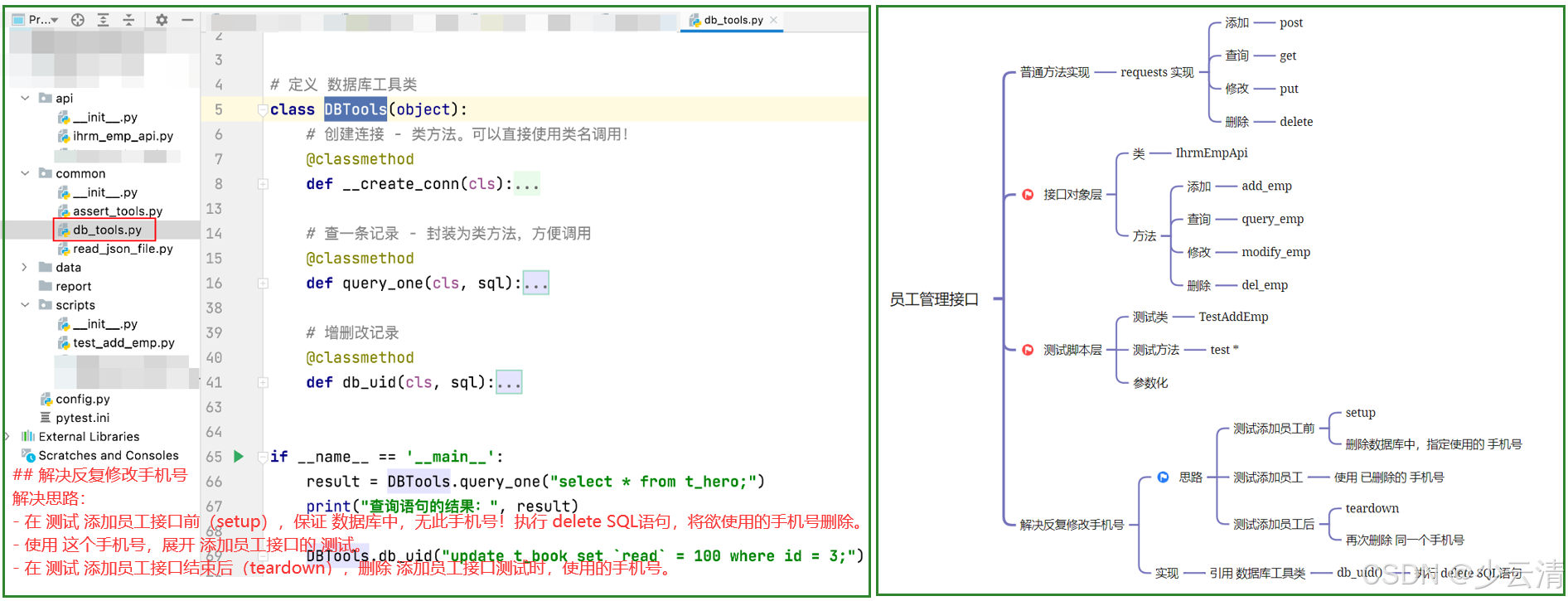
解决思路:
- 在 测试 添加员工接口前(setup),保证 数据库中,无此手机号!执行 delete SQL语句,将欲使用的手机号删除。
- 使用 这个手机号,展开 添加员工接口的 测试。
- 在 测试 添加员工接口结束后(teardown),删除 添加员工接口测试时,使用的手机号。
实现流程:
-
将 数据库操作 工具类,添加项目代码中,存入 common/ 下。
-
在 测试脚本代码中,添加 setup方法,写入 SQL语句,执行 指定一个手机号删除。
def setup(self):
    del_sql = f"delete from bs_user where mobile='1350001111';"
    DBTools.db_uid(del_sql)
- 在 测试脚本代码中,添加 teardown 方法,写入 SQL语句,执行 指定同一个手机号删除。
def teardown(self):
    del_sql = f"delete from bs_user where mobile='1350001111';"
    DBTools.db_uid(del_sql)
- 保证,我们测试方法中,使用的 手机号也是 1350001111
【扩展】:
- 在 config.py 中,定义一个 全局变量 统一管理 测试使用的 手机号。
# config.py 文件中

# 定义全局变量,测试用的手机号
TEL = "13500001111"
- 在 测试脚本中使用手机号的位置,使用 TEL 代替。
    def setup(self):
        del_sql = f"delete from bs_user where mobile='{TEL}';"
        DBTools.db_uid(del_sql)

    def teardown(self):
        del_sql = f"delete from bs_user where mobile='{TEL}';"
        DBTools.db_uid(del_sql)
整体代码:
from common.assert_tools import common_assert
from api.ihrm_emp_api import IhrmEmpApi
from common.db_tools import DBTools
from config import TEL


# 定义测试类
class TestAddEmp(object):
    def setup(self):
        del_sql = f"delete from bs_user where mobile='{TEL}';"
        DBTools.db_uid(del_sql)

    def teardown(self):
        del_sql = f"delete from bs_user where mobile='{TEL}';"
        DBTools.db_uid(del_sql)

    # 定义测试方法 - 添加成功
    def test01_add_ok(self):
        # 调用自己封装的 api,发送 添加员工请求
        req_header = {"Authorization": "58ad27cc-cb05-48f4-9812-becaa72308e5"}
        req_data = {
            "username": "user87655430",
            "mobile": TEL,
            "workNumber": "9527890aa"
        }
        resp = IhrmEmpApi.add_emp(req_header, req_data)
        print("必选-添加成功:", resp.json())
        # 断言
        common_assert(resp, 200, True, 10000, "操作成功")

    def test02_add_ok_all(self):
        # 调用自己封装的 api,发送 添加员工请求
        req_header = {"Authorization": "58ad27cc-cb05-48f4-9812-becaa72308e5"}
        req_data = {
            "username": "齐天小圣朱小姐001",
            "mobile": TEL,
            "timeOfEntry": "2022-02-01",
            "formOfEmployment": 1,
            "workNumber": "9009",
            "departmentName": "研发部",
            "departmentId": "1480198742740082688",
            "correctionTime": "2022-02-27T16:00:00.000Z"
        }
        resp = IhrmEmpApi.add_emp(req_header, req_data)
        print("全部-添加成功:", resp.json())
        # 断言
        common_assert(resp, 200, True, 10000, "操作成功")

    def test03_username_None(self):
        # 调用自己封装的 api,发送 添加员工请求
        req_header = {"Authorization": "58ad27cc-cb05-48f4-9812-becaa72308e5"}
        req_data = {
            "username": None,
            "mobile": TEL,
            "timeOfEntry": "2022-02-01",
            "formOfEmployment": 1,
            "workNumber": "9009",
            "departmentName": "研发部",
            "departmentId": "1480198742740082688",
            "correctionTime": "2022-02-27T16:00:00.000Z"
        }
        resp = IhrmEmpApi.add_emp(req_header, req_data)
        print("用户名为空:", resp.json())
        # 断言
        common_assert(resp, 200, False, 20002, "新增员工失败")
3.2.2 方法2-test_add_emp_params.py 添加员工参数化实现
import pytest

from common.assert_tools import common_assert
from api.ihrm_emp_api import IhrmEmpApi
from common.db_tools import DBTools
from common.read_json_file import read_json_data
from config import TEL, BASE_DIR


# 定义测试类 - 实现参数化
class TestAddEmpParams(object):
    def setup(self):
        del_sql = f"delete from bs_user where mobile='{TEL}';"
        DBTools.db_uid(del_sql)

    def teardown(self):
        del_sql = f"delete from bs_user where mobile='{TEL}';"
        DBTools.db_uid(del_sql)
    # 项目路径+文件路径
    filename = BASE_DIR + "/data/add_emp_data.json"

    # 定义通用测试方法 - 测试 添加员工 参数化
    @pytest.mark.parametrize("desc, req_data, status_code, success, code, message", read_json_data(filename))
    def test_add_emp(self, desc, req_data, status_code, success, code, message):

        req_header = {"Authorization": "6cdc1ac4-4198-4e77-9177-d93c4035ba57"}
        # 调用自己封装的 api,发送 添加员工请求
        resp = IhrmEmpApi.add_emp(req_header, req_data)
        print(desc, ":", resp.json())
        # 断言
        common_assert(resp, status_code, success, code, message)
3.2.3 方法1进阶版-test_add_emp.py
from common.assert_tools import common_assert
from api.ihrm_emp_api import IhrmEmpApi
from common.db_tools import DBTools
from common.get_header import get_header
from config import TEL


# 定义测试类
class TestAddEmp(object):
    req_header = None

    def setup_class(self): # 下面的三个方法都用同一个令牌
        self.req_header = get_header()

    def setup(self):
        del_sql = f"delete from bs_user where mobile='{TEL}';"
        DBTools.db_uid(del_sql)

    def teardown(self):
        del_sql = f"delete from bs_user where mobile='{TEL}';"
        DBTools.db_uid(del_sql)

    # 定义测试方法 - 添加成功
    def test01_add_ok(self):
        # 调用自己封装的 api,发送 添加员工请求
        req_data = {
            "username": "user87655430",
            "mobile": TEL,
            "workNumber": "9527890aa"
        }
        resp = IhrmEmpApi.add_emp(self.req_header, req_data)
        print("必选-添加成功:", resp.json())
        # 断言
        common_assert(resp, 200, True, 10000, "操作成功")

    def test02_add_ok_all(self):
        # 调用自己封装的 api,发送 添加员工请求
        req_data = {
            "username": "齐天小圣朱小姐001",
            "mobile": TEL,
            "timeOfEntry": "2022-02-01",
            "formOfEmployment": 1,
            "workNumber": "9009",
            "departmentName": "研发部",
            "departmentId": "1480198742740082688",
            "correctionTime": "2022-02-27T16:00:00.000Z"
        }
        resp = IhrmEmpApi.add_emp(self.req_header, req_data)
        print("全部-添加成功:", resp.json())
        # 断言
        common_assert(resp, 200, True, 10000, "操作成功")

    def test03_username_None(self):
        # 调用自己封装的 api,发送 添加员工请求
        req_data = {
            "username": None,
            "mobile": TEL,
            "timeOfEntry": "2022-02-01",
            "formOfEmployment": 1,
            "workNumber": "9009",
            "departmentName": "研发部",
            "departmentId": "1480198742740082688",
            "correctionTime": "2022-02-27T16:00:00.000Z"
        }
        resp = IhrmEmpApi.add_emp(self.req_header, req_data)
        print("用户名为空:", resp.json())
        # 断言
        common_assert(resp, 200, False, 20002, "新增员工失败")
3.2.4 方法2进阶版-test_add_emp_params.py
import pytest

from common.assert_tools import common_assert
from api.ihrm_emp_api import IhrmEmpApi
from common.db_tools import DBTools
from common.get_header import get_header
from common.read_json_file import read_json_data
from config import TEL, BASE_DIR


# 定义测试类 - 实现参数化
class TestAddEmpParams(object):
    req_header = None

    def setup_class(self):
        self.req_header = get_header()

    def setup(self):
        del_sql = f"delete from bs_user where mobile='{TEL}';"
        DBTools.db_uid(del_sql)

    def teardown(self):
        del_sql = f"delete from bs_user where mobile='{TEL}';"
        DBTools.db_uid(del_sql)

    filename = BASE_DIR + "/data/add_emp_data.json"

    # 定义通用测试方法 - 测试 添加员工 参数化
    @pytest.mark.parametrize("desc, req_data, status_code, success, code, message", read_json_data(filename))
    def test_add_emp(self, desc, req_data, status_code, success, code, message):
        # 调用自己封装的 api,发送 添加员工请求
        resp = IhrmEmpApi.add_emp(self.req_header, req_data)
        print(desc, ":", resp.json())
        # 断言
        common_assert(resp, status_code, success, code, message)
3.3 common
3.3.1 assert_tools.py
"""
定义 通用的 工具函数,实现断言
"""


def common_assert(resp, status_code, success, code, message):
    assert status_code == resp.status_code
    assert success is resp.json().get("success")
    assert code == resp.json().get("code")
    assert message in resp.json().get("message")
3.3.2 db_tools.py
import pymysql


# 定义 数据库工具类
class DBTools(object):
    # 创建连接 - 类方法。可以直接使用类名调用!
    @classmethod
    def __create_conn(cls):
        conn = pymysql.connect(host="211.103.136.244", port=7061, user="student", password="iHRM_student_2021",
                               database="ihrm", charset="utf8")
        # 不能遗漏
        return conn

    # 查一条记录 - 封装为类方法,方便调用
    @classmethod
    def query_one(cls, sql):
        my_conn = None
        my_cursor = None
        res = None
        try:
            # 创建连接, 借助类名,调用 类方法 create_conn
            my_conn = DBTools.__create_conn()
            # 创建游标
            my_cursor = my_conn.cursor()
            # 执行 sql 语句,做查询
            my_cursor.execute(sql)
            # 提取一条记录
            res = my_cursor.fetchone()
        except Exception as err:
            print("执行查询SQL失败:", str(err))
        finally:
            # 关闭游标
            my_cursor.close()
            # 关闭连接
            my_conn.close()
            # 返回查询结果
            return res

    # 增删改记录
    @classmethod
    def db_uid(cls, sql):
        my_conn = None
        my_cursor = None
        try:
            # 创建连接
            my_conn = DBTools.__create_conn()
            # 创建游标
            my_cursor = my_conn.cursor()
            # 执行 增删改 语句
            my_cursor.execute(sql)
            print("Affected rows:", my_conn.affected_rows())
            # 提交事务
            my_conn.commit()
        except Exception as err:
            print("执行 增删改 SQL 失败:", str(err))
            # 回滚事务
            my_conn.rollback()
        finally:
            # 关闭游标
            my_cursor.close()
            # 关闭连接
            my_conn.close()


if __name__ == '__main__':
    result = DBTools.query_one("select * from t_hero;")
    print("查询语句的结果:", result)

    DBTools.db_uid("update t_book set `read` = 100 where id = 3;")
3.3.3 get_header.py
1、在 common/ 下创建文件 get_header.py
2、文件中添加 代码,获取请求头,并测试无误
"""
定义 函数,获取登录成功令牌,组织请求头
"""
from api.ihrm_login_api import IhrmLoginApi


def get_header():
    req_data = {"mobile": "13800000002", "password": "123456"}   # 登录成功:固定数据
    resp = IhrmLoginApi.login(req_data)
    header = {"Authorization": resp.json().get("data")}
    return header


if __name__ == '__main__':
    ret = get_header()
    print(ret)
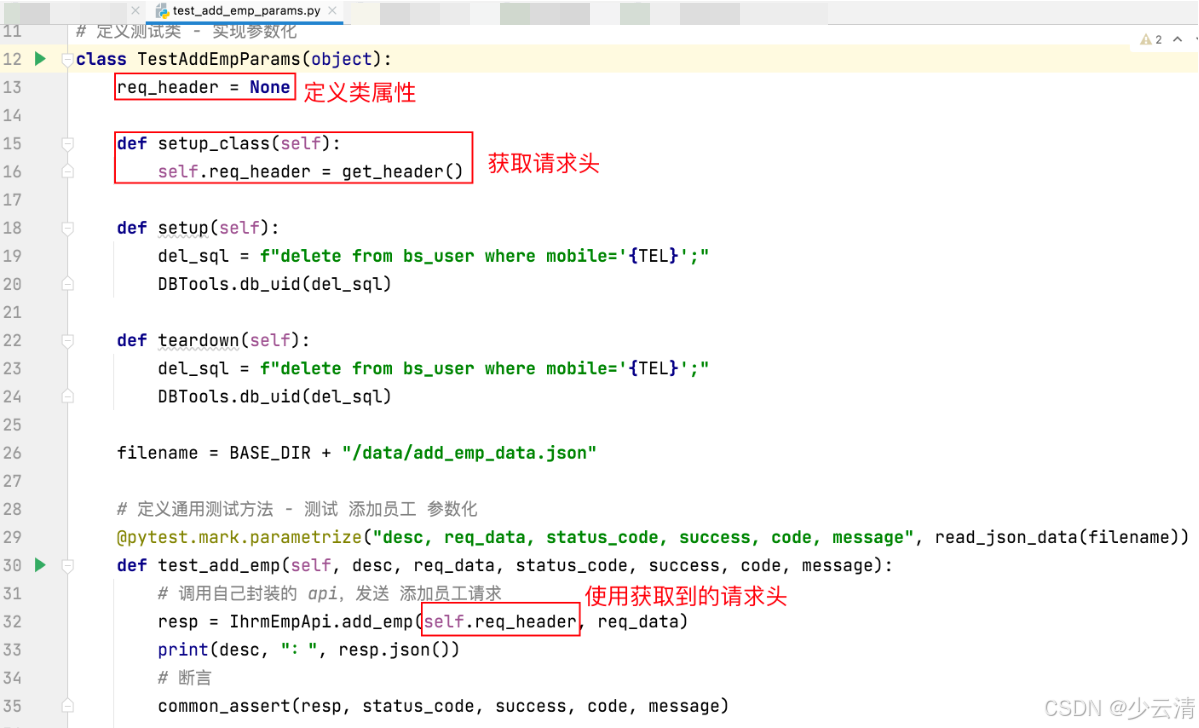
3、在 scripts/ 测试脚本代码中,添加 setup_class() 调用 获取请求头的方法 get_header()
3.3.4 read_json_file.py
import json
from config import BASE_DIR


# 定义工具函数,读取json文件中的数据,转换成 [(),(),()] 格式数据
def read_json_data(filename):
    with open(filename, "r", encoding="utf8") as f:
        json_data = json.load(f)
        login_list = []
        for data in json_data:
            tmp = tuple(data.values())
            login_list.append(tmp)

        return login_list


if __name__ == '__main__':
    # res = read_json_data("../data/login_data.json")
    filename = BASE_DIR + "/data/login_data.json"
    res = read_json_data(filename)
    print(res)
3.4 data
3.4.1add_emp_data.json
[
  {
    "desc": "必选参数-添加成功",
    "req_data": {
      "username": "user87655430",
      "mobile": "18648390001",
      "workNumber": "9527890aa"
    },
    "status_code": 200,
    "success": true,
    "code": 10000,
    "message": "操作成功"
  },
  {
    "desc": "全部参数-添加成功",
    "req_data": {
      "username": "齐天小圣朱小姐001",
      "mobile": "18648390001",
      "timeOfEntry": "2022-02-01",
      "formOfEmployment": 1,
      "workNumber": "9009",
      "departmentName": "研发部",
      "departmentId": "1480198742740082688",
      "correctionTime": "2022-02-27T16:00:00.000Z"
    },
    "status_code": 200,
    "success": true,
    "code": 10000,
    "message": "操作成功"
  },
  {
    "desc": "用户名为空",
    "req_data": {
      "username": null,
      "mobile": "18648390001",
      "timeOfEntry": "2022-02-01",
      "formOfEmployment": 1,
      "workNumber": "9009",
      "departmentName": "研发部",
      "departmentId": "1480198742740082688",
      "correctionTime": "2022-02-27T16:00:00.000Z"
    },
    "status_code": 200,
    "success": false,
    "code": 20002,
    "message": "新增员工失败"
  }
]
3.5 report
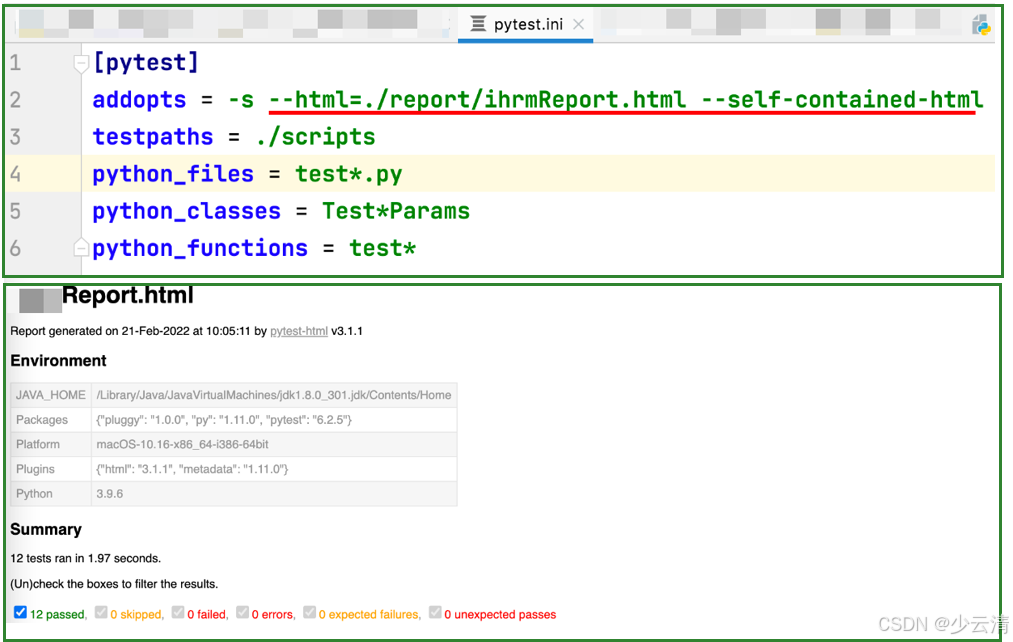
1、修改 pytest.ini 文件,addopts 添加 参数。 --html=./report/报告名.html --self-contained-html
2、执行 pytest 命令,自动生成测试报告,存入 report目录中
3.6 config.py
import os

# 定义全局变量,获取项目路径
BASE_DIR = os.path.dirname(__file__)

# 定义全局变量,测试用的手机号
TEL = "18648390001"
3.7 pytest.ini
[pytest]
addopts = -s
testpaths = ./scripts
python_files = test*.py
python_classes = TestAdd*Params
python_functions = test*
手机号已经存在的测试用例,参数化测试不了。






 扫一扫
扫一扫


 1650
1650

 被折叠的 条评论
为什么被折叠?
被折叠的 条评论
为什么被折叠?
 到【灌水乐园】发言





