PCL点云处理之分层切片法计算树冠投影面积 (一百七十四)

本文介绍了使用PCL库通过分层切片法来精确计算树冠投影面积的方法。首先,概述了算法原理,然后详细说明了包括设置切片层数、计算层高等步骤,接着展示了代码实现和实验效果。最后,对算法使用时的注意事项进行了总结,强调了点云层数不宜过多以及投影面积计算可采用二维凸包算法。

摘要生成于 C知道 ,由 DeepSeek-R1 满血版支持, 前往体验 >

PCL点云处理之分层切片法计算树冠投影面积 (一百七十四)

一、算法介绍

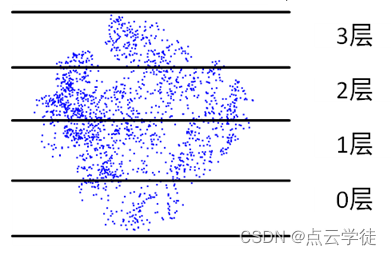
在这里插入图片描述

在上一节中,通过树冠整体投影到同一水平面后,计算凸包面积,粗略估计了树冠投影面积,但在通常的研究学习中,这种方法较为笼统,大部分的树冠投影面积计算是通过将整个树冠分层切片后,逐一计算比较切片点云面积,将最大面积作为树冠投影面积,这一计算结果相对更合理准确,但其计算过程稍微复杂一些,这里对此进行实现,具体的实现方法和代码,以及效果如下所示意:

二、方法流程

1、人工选择切片层数,预设置点云容器
2、计算点云高程最值,最大与最小
3、根据高差和切片数量,计算层高
4、遍历点云,依次确定每个点的所在层数,放入对应容器
5、使用二维凸包面积计算,对每层点云进行面积计算
6、比较确定最大面积,作为最终的投影面积

三、具体实验

1.代码

#include <pcl/io/

### 手写实现 PCL 点云处理 #### 主成分分析 (PCA) 计算点云最小包围盒 为了计算点云的最小包围盒,可以利用主成分分析(Principal Component Analysis, PCA),这种方适用于小场景物体(如人、树、车辆等)并具有较高的效率。以下是具体实现过程: 1. **加载点云数据** 需要先读取或生成目标点云数据。 2. **中心化点云** 将点云中的所有点平移到原点附近,以便后续计算更加稳定。 3. **构建协方差矩阵** 使用点云坐标构建协方差矩阵,并对其进行特征分解以获得主方向。 4. **旋转点云至标准姿态** 利用主方向对齐点云到新的坐标系下。 5. **计算边界框尺寸** 在新坐标系中找到最大和最小值作为包围盒的边长。 ```cpp #include <iostream> #include <Eigen/Dense> // Eigen库用于线性代数运算 #include <pcl/point_cloud.h> #include <pcl/point_types.h> void computeBoundingBox(const pcl::PointCloud<pcl::PointXYZ>::Ptr& cloud) { // 中心化点云 Eigen::Vector4f centroid; pcl::compute3DCentroid(*cloud, centroid); for(auto& point : cloud->points){ point.x -= centroid[0]; point.y -= centroid[1]; point.z -= centroid[2]; } // 构建协方差矩阵 Eigen::Matrix3f covariance_matrix = Eigen::Matrix3f::Zero(); pcl::computeCovarianceMatrixNormalized(*cloud, centroid, covariance_matrix); // 特征分解得到主方向 Eigen::SelfAdjointEigenSolver<Eigen::Matrix3f> eigen_solver(covariance_matrix); Eigen::Matrix3f eigenvectors = eigen_solver.eigenvectors(); // 创建变换矩阵 Eigen::Matrix4f rotation = Eigen::Matrix4f::Identity(); rotation.block<3, 3>(0, 0) = eigenvectors.transpose(); // 应用变换 pcl::PointCloud<pcl::PointXYZ>::Ptr rotated_cloud(new pcl::PointCloud<pcl::PointXYZ>()); pcl::transformPointCloud(*cloud, *rotated_cloud, rotation); // 寻找包围盒大小 float min_x = std::numeric_limits<float>::max(), max_x = -std::numeric_limits<float>::max(); float min_y = std::numeric_limits<float>::max(), max_y = -std::numeric_limits<float>::max(); float min_z = std::numeric_limits<float>::max(), max_z = -std::numeric_limits<float>::max(); for(auto const &pt : rotated_cloud->points){ if(pt.x < min_x){min_x= pt.x;} if(pt.x > max_x){max_x= pt.x;} if(pt.y < min_y){min_y= pt.y;} if(pt.y > max_y){max_y= pt.y;} if(pt.z < min_z){min_z= pt.z;} if(pt.z > max_z){max_z= pt.z;} } } int main(){ pcl::PointCloud<pcl::PointXYZ>::Ptr cloud(new pcl::PointCloud<pcl::PointXYZ>()); // 假设此处已填充点云数据... computeBoundingBox(cloud); } ``` 上述代码实现了基于 PCA 的点云最小包围盒计算[^1]。 --- #### 直通滤波器的应用 对于去除不需要的部分点云区域,可以通过直通滤波器完成这一操作。以下是一个简单的 C++ 实现示例: ```cpp #include <pcl/filters/passthrough.h> void passThroughFilter(pcl::PointCloud<pcl::PointXYZ>::Ptr inputCloud, pcl::PointCloud<pcl::PointXYZ>::Ptr outputCloud, const std::string& filterField, double lowerLimit, double upperLimit) { pcl::PassThrough<pcl::PointXYZ> pass; pass.setInputCloud(inputCloud); // 设置输入点云 pass.setFilterFieldName(filterField.c_str()); // 设置过滤字段名(X,Y,Z) pass.setFilterLimits(lowerLimit, upperLimit);// 设定上下限 pass.filter(*outputCloud); // 输出结果 } int main() { pcl::PointCloud<pcl::PointXYZ>::Ptr inputCloud(new pcl::PointCloud<pcl::PointXYZ>()); pcl::PointCloud<pcl::PointXYZ>::Ptr filteredCloud(new pcl::PointCloud<pcl::PointXYZ>()); // 调用函数执行滤波 passThroughFilter(inputCloud, filteredCloud, "z", 0.0, 1.0); return 0; } ``` 这段代码展示了如何使用 `pcl::PassThrough` 类来移除指定范围内不符合条件的点云部分[^2]。 --- #### 圆锥形点云生成 如果需要生成特定形状的点云(例如圆锥体),则可以根据几何关系手动定义其顶点分布。下面提供了一个生成圆锥面点云的例子: ```cpp #include <cmath> #include <vector> #include <pcl/point_cloud.h> #include <pcl/point_types.h> pcl::PointCloud<pcl::PointXYZ>::Ptr generateCone(float baseRadius, float height, int resolution) { pcl::PointCloud<pcl::PointXYZ>::Ptr coneCloud(new pcl::PointCloud<pcl::PointXYZ>()); for(int i = 0; i <=resolution;i++){ float h = static_cast<float>(i)/resolution*height; // 当前高度比例 float r = baseRadius*(1-h/height); // 半径随高度变化 for(int j =0 ;j<=resolution;j++) { // 绘制一圈上的点 float theta = 2*M_PI/static_cast<float>(resolution)*j;// 角度 pcl::PointXYZ p(r*cos(theta),r*sin(theta),h); // 定义三维空间位置 coneCloud->push_back(p); } } return coneCloud; } int main(){ auto cone = generateCone(1.0, 2.0, 100); } ``` 以上程序能够按照给定分辨率生成一个近似圆锥结构的点云集[^3]。 ---
评论
添加红包

请填写红包祝福语或标题

红包个数最小为10个

红包金额最低5元

当前余额3.43前往充值 >
需支付:10.00
成就一亿技术人!
领取后你会自动成为博主和红包主的粉丝 规则
hope_wisdom
发出的红包

打赏作者

点云学徒

你的鼓励将是我创作的最大动力

¥1 ¥2 ¥4 ¥6 ¥10 ¥20
扫码支付:¥1
获取中
扫码支付

您的余额不足,请更换扫码支付或充值

打赏作者

实付
使用余额支付
点击重新获取
扫码支付
钱包余额 0

抵扣说明:

1.余额是钱包充值的虚拟货币,按照1:1的比例进行支付金额的抵扣。
2.余额无法直接购买下载,可以购买VIP、付费专栏及课程。

余额充值