2023-简单点-树莓派-camera module 3介绍

本文介绍了如何在RaspberryPiBullseye系统中使用libcamera驱动的CameraModule3,包括安装升级、预览窗口设置、拍摄静态图片、bayerraw图像获取、超长曝光和raw视频流等内容,以及相关注意事项和配置方法。

介绍

树莓派镜像在Bullseye版本之后,底层的树莓派驱动由Raspicam切换成libcamera。libcamera是一个开源的软件栈(后面会称为驱动,方便理解),方便于第三方移植和开发自己的摄像头驱动。截止到20230207,官方已经针对libcamera提供了pycamera2库,方便用户使用Python程序调用。
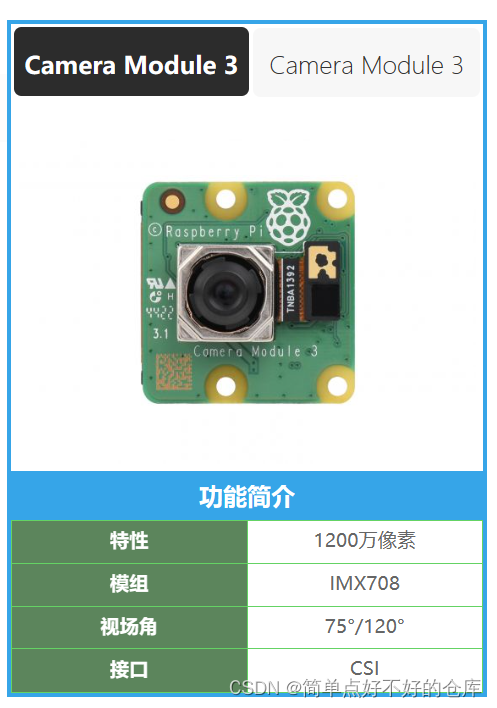
在这里插入图片描述

开头先说,注意事项

  1. 该摄像头不支持buster系统,我一般用bullseye系统

  2. Camera module 3,会开启自动对焦功能

libcamera

在libcamera内核的下面,树莓派提供了一个定制的pipe handler,libcamera使用这个layer来驱动树莓派本身的传感器和ISP(图像信号处理器)。

ISP包含了很多算法,是个算法集合,例如IPAs(图像处理算法),如AEC/AGC(自动曝光/增益控制),AWB(自动白平衡),ALSC(自动镜头阴影校正)等。

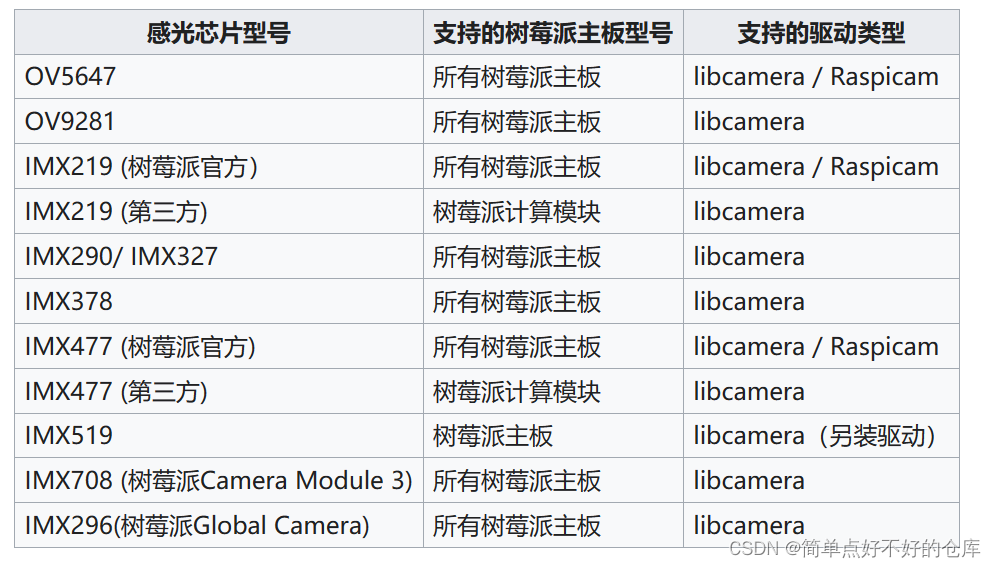
感光芯片和驱动的兼容图
在这里插入图片描述

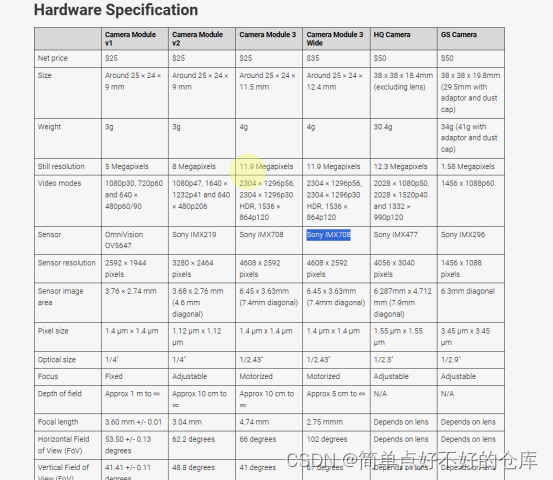
额外:不同module的对应的参数图

在这里插入图片描述

用bullseye系统测试摄像头

如果使用的是最新的Raspberry Pi Camera Module 3 或者Raspberry Pi Global Shutter Camera,需要运行以下指令进行系统更新(需要联网操作).注意,只支持最新的bullseye系统

sudo apt-get update -y
sudo apt-get upgrade -y

如果使用的是OV9281, IMX290, IMX378, 或者非树莓派官方的IMX219IMX477 摄像头需要另外配置config.txt 文件

### Raspberry Pi Camera Module 3 MIPI-CSI Interface Overview The Raspberry Pi Camera Module 3 uses the MIPI CSI (Camera Serial Interface) standard to communicate with the host processor on the Raspberry Pi board[^1]. This interface is designed specifically for connecting camera sensors, providing a high-speed serial link that supports multiple data lanes. #### Key Features of MIPI-CSI Interface - **High-Speed Data Transfer**: The MIPI-CSI interface can operate at speeds up to several gigabits per second depending on the number of active data lanes used. - **Low Power Consumption**: Designed to minimize power usage while maintaining performance efficiency. - **Flexible Configuration**: Supports configuration options such as varying numbers of data lanes and different pixel formats which are crucial for optimizing image quality versus bandwidth requirements[^2]. #### Electrical Specifications For electrical characteristics, the MIPI-CSI interface operates using differential signaling pairs. Each lane consists of two wires carrying complementary signals to reduce electromagnetic interference and improve signal integrity over longer distances or higher frequencies[^3]. ```python # Example Python code snippet showing how one might configure a camera module via its MIPI-CSI interface import picamera with picamera.PiCamera() as camera: camera.resolution = (1920, 1080) camera.framerate = 30 # Start recording video into an H.264 file camera.start_recording('video.h264') camera.wait_recording(5) camera.stop_recording() ``` #### Mechanical Considerations Mechanically speaking, the connector design ensures robust connections between the camera sensor PCB and the mainboard through a flexible flat cable terminated by a small form factor pluggable connector system compatible with industry standards like FFC/FPC connectors found commonly in mobile devices today[^4].
评论
添加红包

请填写红包祝福语或标题

红包个数最小为10个

红包金额最低5元

当前余额3.43前往充值 >
需支付:10.00
成就一亿技术人!
领取后你会自动成为博主和红包主的粉丝 规则
hope_wisdom
发出的红包

打赏作者

万物琴弦光锥之外

给个0.1,恭喜老板发财

¥1 ¥2 ¥4 ¥6 ¥10 ¥20
扫码支付:¥1
获取中
扫码支付

您的余额不足,请更换扫码支付或充值

打赏作者

实付
使用余额支付
点击重新获取
扫码支付
钱包余额 0

抵扣说明:

1.余额是钱包充值的虚拟货币,按照1:1的比例进行支付金额的抵扣。
2.余额无法直接购买下载,可以购买VIP、付费专栏及课程。

余额充值