





 本文介绍如何使用Spark Streaming与Spark SQL进行实时词频统计,通过读取网络socket流数据,转换为DataFrame并执行SQL查询,实现词频的动态统计与展示。
package com.kinglone.streaming

import org.apache.spark.SparkConf
import org.apache.spark.rdd.RDD
import org.apache.spark.sql.SparkSession
import org.apache.spark.streaming.{Seconds, StreamingContext, Time}

/**
  * Spark Streaming整合Spark SQL完成词频统计操作
  */
object SqlNetworkWordCount {

  def main(args: Array[String]): Unit = {
    val sparkConf = new SparkConf().setAppName("ForeachRDDApp").setMaster("local[2]")
    val ssc = new StreamingContext(sparkConf, Seconds(5))

    val lines = ssc.socketTextStream("192.168.16.137", 6789)
    val words = lines.flatMap(_.split(" "))

    // Convert RDDs of the words DStream to DataFrame and run SQL query
    words.foreachRDD { (rdd: RDD[String], time: Time) =>
      val spark = SparkSessionSingleton.getInstance(rdd.sparkContext.getConf)
      import spark.implicits._

      // Convert RDD[String] to RDD[case class] to DataFrame
      val wordsDataFrame = rdd.map(w => Record(w)).toDF()

      // Creates a temporary view using the DataFrame
      wordsDataFrame.createOrReplaceTempView("words")

      // Do word count on table using SQL and print it
      val wordCountsDataFrame =
        spark.sql("select word, count(*) as total from words group by word")
      println(s"========= $time =========")
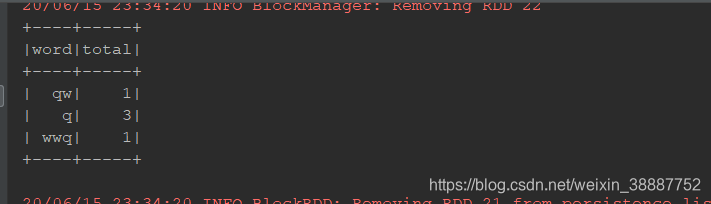
      wordCountsDataFrame.show()
    }


    ssc.start()
    ssc.awaitTermination()
  }


  /** Case class for converting RDD to DataFrame */
  case class Record(word: String)


  /** Lazily instantiated singleton instance of SparkSession */
  object SparkSessionSingleton {

    @transient  private var instance: SparkSession = _

    def getInstance(sparkConf: SparkConf): SparkSession = {
      if (instance == null) {
        instance = SparkSession
          .builder
          .config(sparkConf)
          .getOrCreate()
      }
      instance
    }
  }
}
运行:
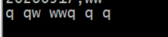
nc -lk 6789





 扫一扫
扫一扫


 966
966

 被折叠的 条评论
为什么被折叠?
被折叠的 条评论
为什么被折叠?
 到【灌水乐园】发言





