



 本文介绍了GPT和MBR两种硬盘分区表的区别,包括它们如何支持不同的磁盘大小和分区数量。同时,文章解释了UEFI启动过程及Windows Vista的启动流程,并讨论了如何检查硬盘使用的是GPT还是MBR分区表。
-
GPT
- GUID Partition Table
- GPT forms a part of the Unified Extensible Firmware Interface (UEFI) replacement for the PC BIOS.
- GPTs use logical block addressing (LBA) in place of the historical cylinder-head-sector (CHS) addressing. UEFI
- a specification that defines a software interface between an operating system and platform firmware. UEFI replaces the BIOS firmware interface.
- most UEFI firmware implementations providing legacy support for BIOS services.
MBR issues
- MBR works with disks up to 2 TB in size, but it can’t handle disks with more than 2 TB of space.
- MBR also only supports up to four primary partitions — if you want more, you have to make one of your primary partitions an “extended partition” and create logical partitions inside it. This is a silly little hack and shouldn’t be necessary.
Tell whether the disk is GPT
Windows boot process
-
Vista boot sequence
- BIOS > IPL > PBR > bootmgr > winload.exe > Windows.
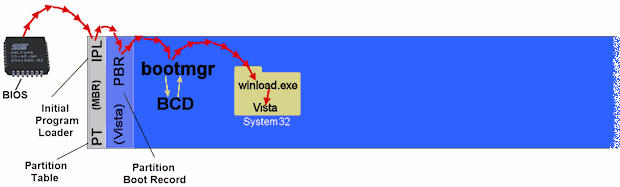
- The
MBRcontains the partition table and the necessary boot execution code. This code searches the partition table to find the active partition and passes control to the boot sector on the active partition. The boot code loads the new Windows Boot Manager program (Bootmgr). - The Windows Boot Manager program parses the Boot Configuration Data(BCD) file, enumerates the installed operating systems, and then displays the boot menu.
- A Guide to the Multiboot Process(1)
- In old WinNT the
ntldrwas both bootmanager and bootloader, but from Vista these two functions have been separated out into two different programs. The bootmanager function of finding and selecting the OS to be started is now calledbootmgr. The bootloader function of actually starting the OS is now a new file calledwinload.exe. - The
bootmgrprogram stays in the root of the partition andwinload.exehas been placed inside theSystem32folder alongside the Windows OS it has to start.
- In old WinNT the
- Windows Vista startup process
References
- What’s the Difference Between GPT and MBR When Partitioning a Drive?
- Use Bootrec.exe in the Windows RE to troubleshoot startup issues
- How to remove Ubuntu and put Windows back on?
- Bootsect Command-Line Options
- This is an amazing site can make you totally understand Windows booting. ↩





 扫一扫
扫一扫


 1021
1021

 被折叠的 条评论
为什么被折叠?
被折叠的 条评论
为什么被折叠?
 到【灌水乐园】发言





