


 本文介绍了一个用于Unity编辑器的线程管理解决方案,通过自定义的EditorLoom类实现主线程和子线程的交叉调用。该方案提供了线程控制、线程中断和线程安全等功能,同时演示了如何在编辑器环境下使用该类创建和销毁线程。
上一篇:
Unity主线程和子线程交叉调用(一)
-
针对编辑器,用该事件模拟Update EditorApplication.update += Update; 这个update触发频率和MonoBehaviour的Update是完全不一样的,自己可以根据需求在update中修改降低update中方法的执行频率
-
针对线程控制 不用系统线程池,自己维护一个线程次,因为线程池下的线程控制有诸多限制。 同时提供一些中断线程的方法即可,因为是编辑器下运行,如果要终止某个操作必须中断所有线程
-
线程安全 这个脚本不是100%线程安全的,一个线程强制中断后,已经排队的主线程逻辑会继续排队等待运行,未排队的则不会运行;如果销毁整个Loom,已经在排队的主线程逻辑不会运行;无论何种情况,中断线程操作后,正在被消费的主线程函数,都会被运行完毕.
上代码
using
UnityEngine
;
using
System
.
Collections
;
using
System
.
Collections
.
Generic
;
using
System
;
using
System
.
Threading
;
using
System
.
Linq
;
using
UnityEditor
;
public
class
EditorLoom
{
public
struct
MainThreadTask
{
//何时运行该函数
public
System
.
DateTime
time
;
public
Action
action
;
}
private
List
<
Thread
>
threads
;
private
static
EditorLoom
current
;
private
static
readonly
object
lockObj
=
new
object
(
)
;
private
static
void
CheckInit
(
)
{
if
(
current
==
null
)
{
lock
(
lockObj
)
{
if
(
current
==
null
)
{
current
=
new
EditorLoom
(
)
;
}
}
}
}
private
EditorLoom
(
)
{
threads
=
new
List
<
Thread
>
(
)
;
EditorApplication
.
update
+=
Update
;
}
public
static
void
RunOnMainThread
(
Action
action
,
float
time
=
0
)
{
CheckInit
(
)
;
if
(
time
<
0
)
{
Debug
.
LogError
(
"time参数错误 函数不会被执行"
)
;
return
;
}
if
(
time
!=
0
)
{
lock
(
current
.
allDelayed
)
{
current
.
allDelayed
.
Add
(
new
MainThreadTask
{
time
=
System
.
DateTime
.
Now
.
AddSeconds
(
time
)
,
action
=
action
}
)
;
}
}
else
{
lock
(
current
.
allNoDelayed
)
{
current
.
allNoDelayed
.
Add
(
new
MainThreadTask
{
time
=
System
.
DateTime
.
Now
,
action
=
action
}
)
;
}
}
}
private
static
Thread
loomThread
;
public
static
Thread
RunOnAsync
(
Action
active
)
{
CheckInit
(
)
;
loomThread
=
new
Thread
(
new
ParameterizedThreadStart
(
RunAction
)
)
;
loomThread
.
Name
=
"Loom线程:"
+
System
.
Guid
.
NewGuid
(
)
.
ToString
(
)
;
Debug
.
Log
(
"创建任务线程:"
+
loomThread
.
Name
)
;
loomThread
.
Priority
=
System
.
Threading
.
ThreadPriority
.
Lowest
;
loomThread
.
Start
(
active
)
;
current
.
threads
.
Add
(
loomThread
)
;
return
loomThread
;
}
private
static
void
RunAction
(
object
action
)
{
try
{
(
(
Action
)
action
)
(
)
;
}
catch
(
Exception
e
)
{
Debug
.
LogError
(
e
.
ToString
(
)
)
;
}
finally
{
current
.
threads
.
Remove
(
Thread
.
CurrentThread
)
;
}
}
public
static
void
Sleep
(
int
time
)
{
if
(
current
==
null
)
return
;
if
(
Thread
.
CurrentThread
==
loomThread
)
{
Thread
.
Sleep
(
time
)
;
}
}
public
static
void
StopCurrent
(
)
{
lock
(
lockObj
)
{
if
(
current
==
null
||
loomThread
==
null
)
{
Debug
.
Log
(
"线程已经全部销毁或当前线程不存在"
)
;
return
;
}
string
name
=
loomThread
.
Name
;
try
{
current
.
threads
.
Remove
(
loomThread
)
;
loomThread
.
Abort
(
)
;
}
catch
(
Exception
e
)
{
Debug
.
Log
(
e
.
ToString
(
)
)
;
}
finally
{
loomThread
=
null
;
Debug
.
Log
(
"当前线程已经销毁:"
+
name
)
;
}
}
}
public
static
void
DestoryLoom
(
)
{
if
(
current
==
null
)
{
Debug
.
Log
(
"线程已经全部销毁"
)
;
return
;
}
EditorApplication
.
update
-=
current
.
Update
;
lock
(
lockObj
)
{
if
(
current
==
null
)
return
;
for
(
int
i
=
0
;
i
<
current
.
threads
.
Count
;
i
++
)
{
Thread
t
=
current
.
threads
[
i
]
;
string
name
=
t
.
Name
;
try
{
t
.
Abort
(
)
;
}
catch
(
Exception
e
)
{
Debug
.
Log
(
e
.
ToString
(
)
)
;
}
finally
{
Debug
.
Log
(
"销毁线程:"
+
name
)
;
t
=
null
;
}
}
current
.
threads
.
Clear
(
)
;
current
.
allDelayed
.
Clear
(
)
;
current
.
allNoDelayed
.
Clear
(
)
;
current
=
null
;
Debug
.
Log
(
"线程已经全部销毁"
)
;
}
}
//延时和不延时区分开来的目的是保证不延时的函数立即执行 且减少linq查询
private
List
<
MainThreadTask
>
allDelayed
=
new
List
<
MainThreadTask
>
(
)
;
private
List
<
MainThreadTask
>
currentDelayed
=
new
List
<
MainThreadTask
>
(
)
;
private
List
<
MainThreadTask
>
allNoDelayed
=
new
List
<
MainThreadTask
>
(
)
;
private
List
<
MainThreadTask
>
currentNoDelayed
=
new
List
<
MainThreadTask
>
(
)
;
// 消费主线程任务
private
void
Update
(
)
{
if
(
allNoDelayed
.
Count
>
0
)
{
lock
(
allNoDelayed
)
{
currentNoDelayed
.
Clear
(
)
;
currentNoDelayed
.
AddRange
(
allNoDelayed
)
;
allNoDelayed
.
Clear
(
)
;
}
for
(
int
i
=
0
;
i
<
currentNoDelayed
.
Count
;
i
++
)
{
currentNoDelayed
[
i
]
.
action
(
)
;
}
}
if
(
allDelayed
.
Count
>
0
)
{
lock
(
allDelayed
)
{
currentDelayed
.
Clear
(
)
;
currentDelayed
.
AddRange
(
allDelayed
.
Where
(
d
=>
d
.
time
<=
System
.
DateTime
.
Now
)
)
;
for
(
int
i
=
0
;
i
<
currentDelayed
.
Count
;
i
++
)
{
allDelayed
.
Remove
(
currentDelayed
[
i
]
)
;
}
}
for
(
int
i
=
0
;
i
<
currentDelayed
.
Count
;
i
++
)
{
currentDelayed
[
i
]
.
action
(
)
;
}
}
}
}
上测试用例
     using

     System
     .
     Collections
     ;


     using

     System
     .
     Collections
     .
     Generic
     ;


     using

     UnityEngine
     ;


     using

     UnityEditor
     ;


     public

     class

     TestEditLoom


     {


     [
     MenuItem
     (
     "Tool/创建一个任务1"
     )
     ]


     public

     static

     void

     Create1
     (
     )


     {

        EditorLoom
     .
     RunOnAsync
     (
     MainFun1
     )
     ;


     }


     [
     MenuItem
     (
     "Tool/创建一个任务2"
     )
     ]


     public

     static

     void

     Create2
     (
     )


     {

        EditorLoom
     .
     RunOnAsync
     (
     MainFun2
     )
     ;


     }


     [
     MenuItem
     (
     "Tool/销毁当前任务"
     )
     ]


     public

     static

     void

     Destory
     (
     )


     {

        EditorLoom
     .
     StopCurrent
     (
     )
     ;


     }


     [
     MenuItem
     (
     "Tool/销毁所有任务"
     )
     ]


     public

     static

     void

     DestoryAll
     (
     )


     {

        EditorLoom
     .
     DestoryLoom
     (
     )
     ;


     }


     public

     static

     void

     MainFun1
     (
     )


     {

        EditorLoom
     .
     RunOnMainThread
     (
     FirstTest
     )
     ;

        EditorLoom
     .
     Sleep
     (
     5000
     )
     ;

        EditorLoom
     .
     RunOnMainThread
     (
     (
     )

     =>

     {

     Test
     (
     "2"
     )
     ;

     }
     )
     ;

        EditorLoom
     .
     RunOnMainThread
     (
     (
     )

     =>

     {

     Test
     (
     "3"
     )
     ;

     }
     ,

     2f
     )
     ;


     }


     public

     static

     void

     MainFun2
     (
     )


     {

        EditorLoom
     .
     Sleep
     (
     2000
     )
     ;

        EditorLoom
     .
     RunOnMainThread
     (
     (
     )

     =>

     {

     Test
     (
     "4"
     )
     ;

     }
     )
     ;

        EditorLoom
     .
     RunOnMainThread
     (
     (
     )

     =>

     {

     Test
     (
     "5"
     )
     ;

     }
     ,

     2f
     )
     ;


     }


     private

     static

     void

     FirstTest
     (
     )


     {


     GameObject
      go
     =
      GameObject
     .
     CreatePrimitive
     (
     PrimitiveType
     .
     Cube
     )
     ;

        go
     .
     name
     =

     "1"
     ;

        Debug
     .
     Log
     (
     go
     .
     name
     )
     ;


     }


     private

     static

     void

     Test
     (
     string
      time
     )


     {


     GameObject
      go
     =
      GameObject
     .
     CreatePrimitive
     (
     PrimitiveType
     .
     Cube
     )
     ;

        go
     .
     name
     =
      time
     ;

        Debug
     .
     Log
     (
     go
     .
     name
     )
     ;


     }


     }
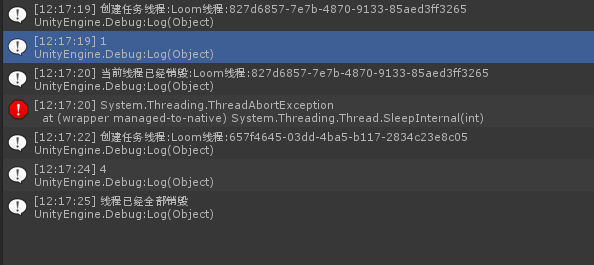
在菜单上依次点击 "创建任务1"->"销毁当前任务"->"创建任务2"->"销毁所有任务" 手速不同执行的结果也不同





 扫一扫
扫一扫


 被折叠的 条评论
为什么被折叠?
被折叠的 条评论
为什么被折叠?
 到【灌水乐园】发言





