


 博客主要介绍了Lua语言的深层魅力,还分享了在引擎编辑中进行JsonToLua的数据快速转换实战内容,聚焦于Lua语言相关的技术探索与应用。
-
第一部分:初探Lua 语言的深层魅力
Lua语言来源于巴西里约热内卢天主教大学里的一个研究小组开发的一门轻量小巧的动态脚本语言,麻雀虽小,但是五脏俱全,确实是一门非常有研究价值的语言。因为轻量级和可扩展性的优秀特性,也一直深受大家在实际项目中深度应用。所以今天小编就与大家一起探索学习。
2、LuaPerfect 是一款专业级的Lua集成开发环境的调试工具:
https://luaperfect.net/article/ReleaseNotes/
3、腾讯xLua 开源源码:
https://github.com/Tencent/xLua
4、基于xlua的MVVM框架,支持Addressables, 统一渲染管线等Unity新特性:
https://github.com/Justin-sky/Nice-Lua
-
第二部分:在引擎编辑中实战JsonToLua的数据快速转换
其实在Lua 语言编程开发中,我们经常会遇到json和Lua table之间进行互转的问题。所以小编也分享一下在Unity Editor自定义转换实现哈!
1、在Unity 引擎中可以直接新增Editor 文件夹,然后JsonToLuaWindows.cs 组件类。
using
System
.
IO
;
using
UnityEditor
;
using
UnityEngine
;
/// <summary>
/// 基于Unity3D编辑器中实现Json文件转化为Lua文件
/// </summary>
public
class
JsonToLuaWindows
:
EditorWindow
{
string
jsonPath
=
"Assets/testjson.txt"
;
string
jsonToLuaPath
=
"genatelua.txt"
;
//自定义编辑器窗口
JsonToLuaWindows
(
)
{
this
.
titleContent
=
new
GUIContent
(
"JsonToLua Window"
)
;
}
[
MenuItem
(
"Tool/JsonToLua Window"
)
]
static
void
ShowWindow
(
)
{
EditorWindow
.
GetWindow
(
typeof
(
JsonToLuaWindows
)
)
;
}
void
OnGUI
(
)
{
EditorGUILayout
.
BeginVertical
(
)
;
GUILayout
.
Space
(
10
)
;
GUI
.
skin
.
label
.
fontSize
=
24
;
GUI
.
skin
.
label
.
alignment
=
TextAnchor
.
MiddleCenter
;
GUILayout
.
Label
(
"JsonToLua Window"
)
;
GUILayout
.
Space
(
20
)
;
jsonPath
=
EditorGUILayout
.
TextField
(
"Json文件设置"
,
jsonPath
)
;
GUILayout
.
Space
(
20
)
;
jsonToLuaPath
=
EditorGUILayout
.
TextField
(
"Json生成Lua文件设置"
,
jsonToLuaPath
)
;
EditorGUILayout
.
Space
(
10
)
;
if
(
GUILayout
.
Button
(
"JsonToLua"
)
)
{
ConvertToLua
(
)
;
}
GUILayout
.
EndVertical
(
)
;
}
/// <summary>
/// Json转换为Lua操作
/// </summary>
private
void
ConvertToLua
(
)
{
var
jsonStr
=
AssetDatabase
.
LoadAssetAtPath
<
TextAsset
>
(
jsonPath
)
;
string
sb
=
ConvertLua
(
jsonStr
.
text
)
;
var
bytes
=
System
.
Text
.
Encoding
.
UTF8
.
GetBytes
(
sb
.
ToString
(
)
)
;
File
.
WriteAllBytes
(
jsonToLuaPath
,
bytes
)
;
}
static
string
ConvertLua
(
string
jsonStr
)
{
//去掉所有空格
jsonStr
=
jsonStr
.
Replace
(
" "
,
string
.
Empty
)
;
string
lua
=
"return"
;
lua
+=
ConvertJsonType
(
jsonStr
)
;
return
lua
;
}
static
string
ConvertJsonType
(
string
jsonStr
)
{
string
tempStr
=
jsonStr
.
Replace
(
"\n"
,
""
)
.
Replace
(
"\r"
,
""
)
;
string
firstChar
=
""
;
try
{
firstChar
=
tempStr
.
Substring
(
0
,
2
)
;
}
catch
(
System
.
Exception
)
{
Debug
.
Log
(
tempStr
)
;
}
if
(
firstChar
==
"[{"
)
{
return
ConvertJsonArray
(
jsonStr
)
;
}
else
if
(
firstChar
[
0
]
==
'{'
)
{
return
ConvertJsonArray
(
jsonStr
)
;
}
else
{
return
ConvertJsonArrayNoKey
(
jsonStr
)
;
}
}
/// <summary>
/// 过滤key 例如[1,2,3]
/// </summary>
/// <returns></returns>
static
string
ConvertJsonArrayNoKey
(
string
jsonStr
)
{
string
lastJsonStr
=
jsonStr
.
Replace
(
"["
,
"{"
)
.
Replace
(
"]"
,
"}"
)
;
return
lastJsonStr
;
}
static
string
ConvertJsonArray
(
string
jsonStr
)
{
string
lastJsonStr
=
""
;
var
separatorIndex
=
jsonStr
.
IndexOf
(
':'
)
;
//通过:取得所有对象
while
(
separatorIndex
>=
0
)
{
separatorIndex
+=
1
;
//加上冒号
string
cutStr
=
jsonStr
.
Substring
(
0
,
separatorIndex
)
;
string
tempKey
=
""
;
string
tempValue
=
""
;
for
(
int
i
=
0
;
i
<
cutStr
.
Length
;
I
++
)
{
char
c
=
cutStr
[
I
]
;
if
(
c
==
'['
)
{
c
=
'{'
;
}
else
if
(
c
==
'"'
)
{
continue
;
}
else
if
(
c
==
':'
)
{
c
=
'='
;
}
tempKey
+=
c
;
}
jsonStr
=
jsonStr
.
Substring
(
separatorIndex
)
;
int
index
=
0
;
for
(
int
i
=
0
;
i
<
jsonStr
.
Length
;
I
++
)
{
char
c
=
jsonStr
[
I
]
;
if
(
c
==
','
)
{
break
;
}
else
if
(
c
==
'{'
)
{
string
surplusStr
=
jsonStr
.
Substring
(
index
)
;
int
bracketNum
=
0
;
for
(
int
j
=
0
;
j
<
surplusStr
.
Length
;
j
++
)
{
if
(
surplusStr
[
j
]
==
'{'
)
{
bracketNum
++
;
}
else
if
(
surplusStr
[
j
]
==
'}'
)
{
if
(
bracketNum
==
1
)
{
string
tempStr
=
jsonStr
.
Substring
(
index
,
index
+
j
+
1
)
;
string
strResult
=
ConvertJsonType
(
tempStr
)
;
tempValue
+=
strResult
;
index
=
index
+
j
;
break
;
}
bracketNum
--
;
}
}
i
=
index
;
continue
;
}
else
if
(
c
==
'['
)
{
string
surplusStr
=
jsonStr
.
Substring
(
index
)
;
int
bracketNum
=
0
;
for
(
int
j
=
0
;
j
<
surplusStr
.
Length
;
j
++
)
{
if
(
surplusStr
[
j
]
==
'['
)
{
bracketNum
++
;
}
else
if
(
surplusStr
[
j
]
==
']'
)
{
if
(
bracketNum
==
1
)
{
string
tempStr
=
jsonStr
.
Substring
(
index
,
index
+
j
+
1
)
;
string
strResult
=
ConvertJsonType
(
tempStr
)
;
tempValue
+=
strResult
;
index
=
index
+
j
;
break
;
}
bracketNum
--
;
}
}
i
=
index
;
continue
;
}
else
if
(
c
==
']'
)
{
c
=
'}'
;
}
index
=
I
;
tempValue
+=
c
;
}
lastJsonStr
+=
tempKey
+
tempValue
;
jsonStr
=
jsonStr
.
Substring
(
index
+
1
)
;
separatorIndex
=
jsonStr
.
IndexOf
(
':'
)
;
}
return
lastJsonStr
;
}
}
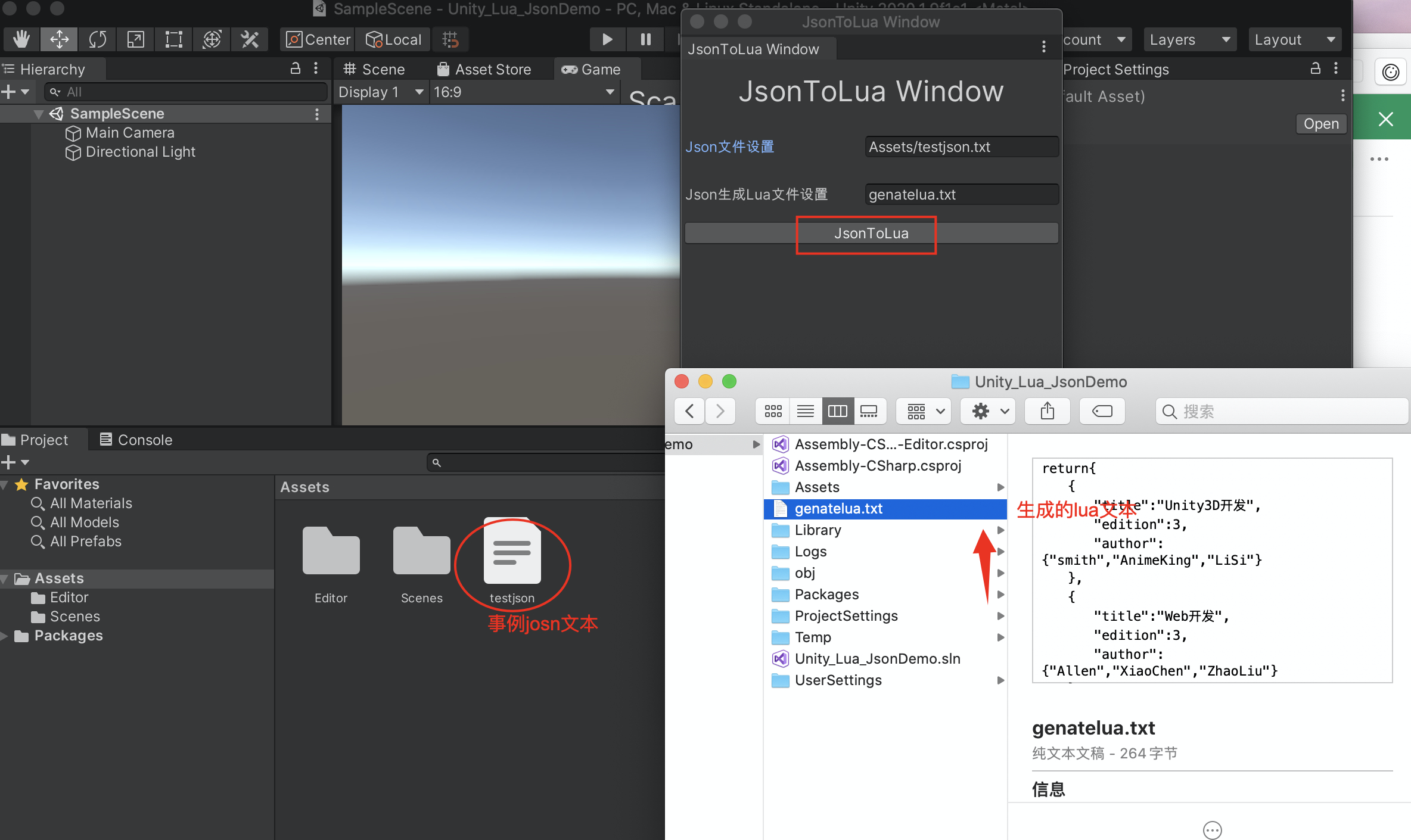
2、testjosn.txt 文件可以放置Assets 目录下。Json数据:
     [


     {


     "title"
     :
     "Unity3D 开发"
     ,


     "edition"
     :
     3
     ,


     "author"
     :
     [
     "smith"
     ,
     "AnimeKing"
     ,
     "LiSi"
     ]


     }
     ,


     {


     "title"
     :
     "Web 开发"
     ,


     "edition"
     :
     3
     ,


     "author"
     :
     [
     "Allen"
     ,
     "XiaoChen"
     ,
     "ZhaoLiu"
     ]


     }


     ]
3、直接在编辑器工具栏上Tool/JsonToLuaWindows,打开编辑窗口,点击JosnToLua按钮即可。
最后,发现其他大神的分享也很赞,小编这边直接给大家分享资源链接哈!
1、用lua实现的json和table互转方式:
https://github.com/rxi/json.lua
2、利用cjson库,用C实现的。其转换效率比传统做法会更高。 文章链接:
https://blog.youkuaiyun.com/fengbingchun/article/details/81606432
cjson库开源项目:
http://sourceforge.net/projects/cjson/





 扫一扫
扫一扫


 被折叠的 条评论
为什么被折叠?
被折叠的 条评论
为什么被折叠?
 到【灌水乐园】发言





