


 本文详细介绍图像处理中的关键概念和技术,包括图像直方图的绘制、直方图均衡化的实现及效果展示,以及高斯模糊的应用。通过Python代码实例,深入浅出地讲解了图像处理的基本操作,适合初学者入门。
第一章 基本的图像操作和处理
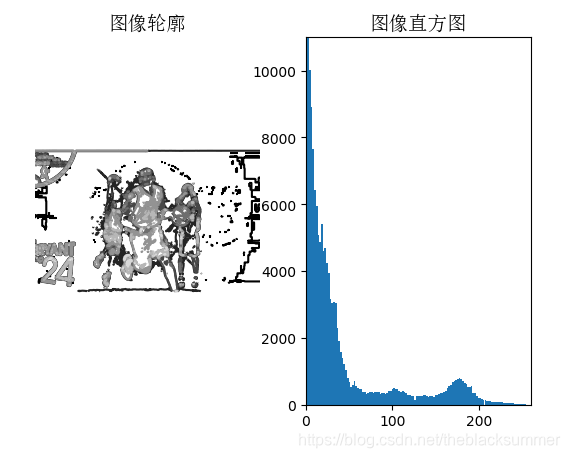
(一)图像直方图
图像的直方图用来表征该图像像素值得分布情况。
代码:
from PIL import Image
from pylab import *
from matplotlib.font_manager import FontProperties
font = FontProperties(fname=r"c:\windows\fonts\SimSun.ttc", size=14)
im = array(Image.open(‘X.jpg’).convert(‘L’)) # 打开图像,并转成灰度图像
figure()
subplot(121)
gray()
contour(im, origin=‘image’)
axis(‘equal’)
axis(‘off’)
title(u’图像轮廓’, fontproperties=font)
subplot(122)
hist(im.flatten(), 128)
title(u’图像直方图’, fontproperties=font)
plt.xlim([0,260])
plt.ylim([0,11000])
show()
python和matlab之间的区别。在matlab中使用imshow就可以直接将图片显示出来,而在python中,需要写一个函数show来显示图片
运行结果如下:
(二)直方图均衡化
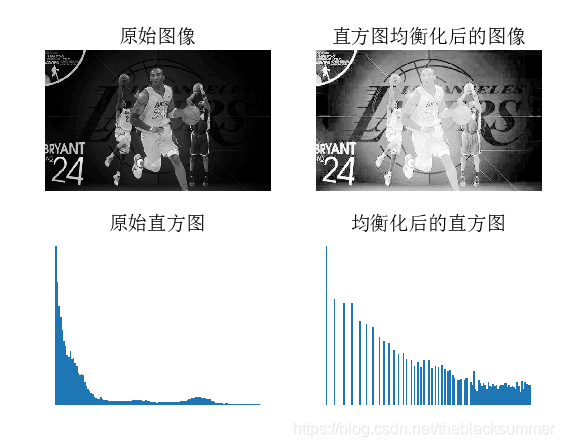
直方图均衡化是指将一幅图像的灰度直方图变平,使变换后的图像中每个灰度值的分布概率都相同。
代码:
from PIL import Image
from pylab import *
from PCV.tools import imtools
from matplotlib.font_manager import FontProperties
font = FontProperties(fname=r"c:\windows\fonts\SimSun.ttc", size=14)
im = array(Image.open(‘X.jpg’).convert(‘L’)) # 打开图像,并转成灰度图像
#im = array(Image.open(‘X.jpg’).convert(‘L’))
im2, cdf = imtools.histeq(im)
figure()
subplot(2, 2, 1)
axis(‘off’)
gray()
title(u’原始图像’, fontproperties=font)
imshow(im)
subplot(2, 2, 2)
axis(‘off’)
title(u’直方图均衡化后的图像’, fontproperties=font)
imshow(im2)
subplot(2, 2, 3)
axis(‘off’)
title(u’原始直方图’, fontproperties=font)
#hist(im.flatten(), 128, cumulative=True, normed=True)
hist(im.flatten(), 128, normed=True)
subplot(2, 2, 4)
axis(‘off’)
title(u’均衡化后的直方图’, fontproperties=font)
#hist(im2.flatten(), 128, cumulative=True, normed=True)
hist(im2.flatten(), 128, normed=True)
show()
运行结果如下:
(三)高斯模糊
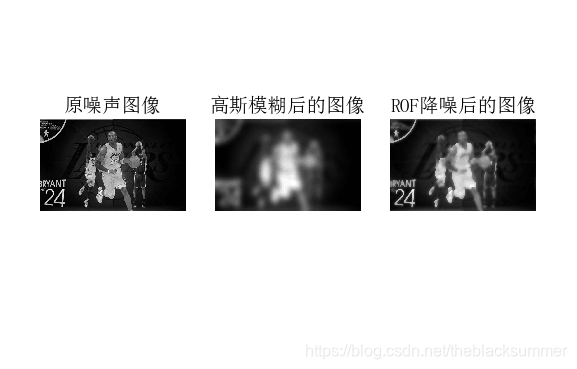
图像的高斯模糊是一个非常经典的图像卷积例子。
代码:
from PIL import Image
from pylab import *
from numpy import *
from numpy import random
from scipy.ndimage import filters
from scipy.misc import imsave
from PCV.tools import rof
“”" This is the de-noising example using ROF in Section 1.5. “”"
font = FontProperties(fname=r"c:\windows\fonts\SimSun.ttc", size=14)
im = array(Image.open(‘X.jpg’).convert(‘L’))
U,T = rof.denoise(im,im)
G = filters.gaussian_filter(im,10)
#imsave(‘synth_original.pdf’,im)
#imsave(‘synth_rof.pdf’,U)
#imsave(‘synth_gaussian.pdf’,G)
figure()
gray()
subplot(1,3,1)
imshow(im)
#axis(‘equal’)
axis(‘off’)
title(u’原噪声图像’, fontproperties=font)
subplot(1,3,2)
imshow(G)
#axis(‘equal’)
axis(‘off’)
title(u’高斯模糊后的图像’, fontproperties=font)
subplot(1,3,3)
imshow(U)
#axis(‘equal’)
axis(‘off’)
title(u’ROF降噪后的图像’, fontproperties=font)
show()
运行结果如下:





 扫一扫
扫一扫


 17万+
17万+

 被折叠的 条评论
为什么被折叠?
被折叠的 条评论
为什么被折叠?
 到【灌水乐园】发言





