



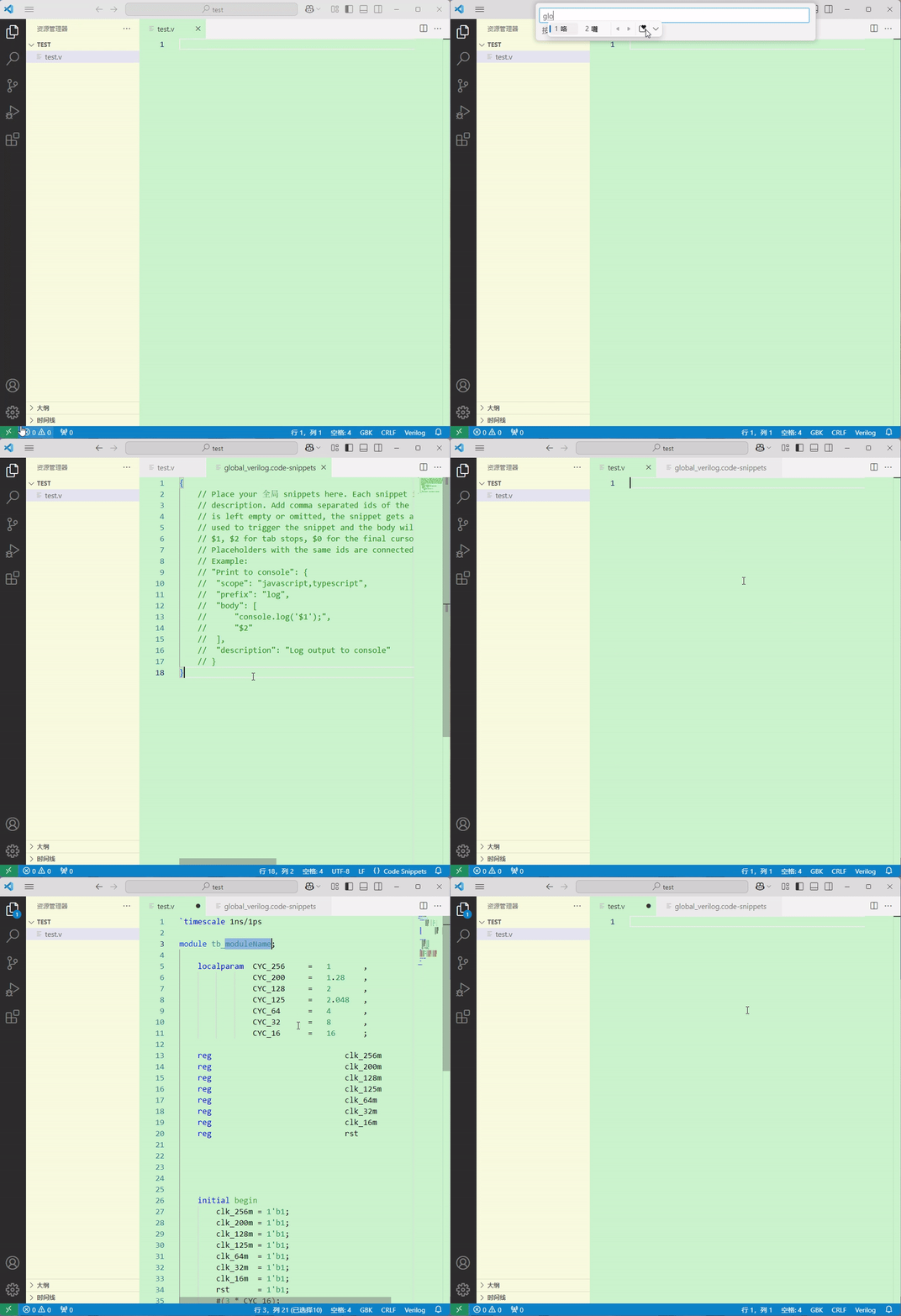
1、操作方式
①点击左下角【齿轮】打开【代码片段】;
②输入文件名(无后缀)并按Enter
③粘贴用户代码片段,并保存
2、代码
{
    // Verilog主代码
    // module 初始化
    "module_zcj": {
        "scope": "verilog, systemverilog",
        "prefix": "module_zcj",
        "body": [
            "`timescale 1ns/1ps",
            "",
            "module ${1:moduleName} (",
            "    input                       clk             ,",
            "    input                       rst             ,",
            "",
            "    ",
            ");",
            "",
            "",
            "",
            "",
            "",
            "endmodule"
        ],
        "description": "Custom modules"
    },
    // input 片段
    "input_1b_zcj": {
        "scope": "verilog, systemverilog",
        "prefix": "input_1b_zcj",
        "body": "input                       ${1:Interface},",
        "description": "Custom input"
    },
    "input_xb_zcj": {
        "scope": "verilog, systemverilog",
        "prefix": "input_xb_zcj",
        "body": "input               [ x:0]  ${1:Interface},",
        "description": "Custom input"
    },
    // output 片段
    "output_reg_1b_zcj": {
        "scope": "verilog, systemverilog",
        "prefix": "output_reg_1b_zcj",
        "body": "output  reg                 ${1:Interface}",
        "description": "Custom output"
    },
    "output_reg_xb_zcj": {
        "scope": "verilog, systemverilog",
        "prefix": "output_reg_xb_zcj",
        "body": "output  reg         [ x:0]  ${1:Interface}",
        "description": "Custom output"
    },
    "output_wire_1b_zcj": {
        "scope": "verilog, systemverilog",
        "prefix": "output_wire_1b_zcj",
        "body": "output                      ${1:Interface}",
        "description": "Custom output"
    },
    "output_wire_xb_zcj": {
        "scope": "verilog, systemverilog",
        "prefix": "output_wire_xb_zcj",
        "body": "output              [ x:0]  ${1:Interface}",
        "description": "Custom output"
    },
    // reg 片段
    "reg_1b_zcj": {
        "scope": "verilog, systemverilog",
        "prefix": "reg_1b_zcj",
        "body": "reg                             ${1:signal};",
        "description": "Custom reg"
    },
    "reg_xb_zcj": {
        "scope": "verilog, systemverilog",
        "prefix": "reg_xb_zcj",
        "body": "reg                 [ x:0]      ${1:signal};",
        "description": "Custom reg"
    },
    "reg_xb_signed_zcj": {
        "scope": "verilog, systemverilog",
        "prefix": "reg_xb_signed_zcj",
        "body": "reg     signed      [ x:0]      ${1:signal};",
        "description": "Custom reg"
    },
    // wire 片段
    "wire_1b_zcj": {
        "scope": "verilog, systemverilog",
        "prefix": "wire_1b_zcj",
        "body": "wire                            ${1:signal};",
        "description": "Custom wire"
    },
    "wire_xb_zcj": {
        "scope": "verilog, systemverilog",
        "prefix": "wire_xb_zcj",
        "body": "wire                [ x:0]      ${1:signal};",
        "description": "Custom wire"
    },
    "wire_xb_signed_zcj": {
        "scope": "verilog, systemverilog",
        "prefix": "wire_xb_signed_zcj",
        "body": "wire    signed      [ x:0]      ${1:signal};",
        "description": "Custom reg"
    },
    // 逻辑描述片段
    "Sequential logic circuit high": {
        "scope": "verilog, systemverilog",
        "prefix": "shixu_high_zcj",
        "body": [
            "always @(posedge clk or posedge rst) begin",
            "    if (rst) begin",
            "        ${1:varName} <= 'd0;",
            "    end",
            "    else if ($2) begin",
            "        $3",
            "    end",
            "    else begin",
            "        $4",
            "    end",
            "end"
        ],
        "description": "Sequential logic circuit"
    },
    // 逻辑描述片段
    "Sequential logic circuit low": {
        "scope": "verilog, systemverilog",
        "prefix": "shixu_low_zcj",
        "body": [
            "always @(posedge clk or negedge rst_n) begin",
            "    if (!rst_n) begin",
            "        ${1:varName} <= 'd0;",
            "    end",
            "    else if ($2) begin",
            "        $3",
            "    end",
            "    else begin",
            "        $4",
            "    end",
            "end"
        ],
        "description": "Sequential logic circuit"
    },
    "Combinatorial logic circuit": {
        "scope": "verilog, systemverilog",
        "prefix": "zuhe_zcj",
        "body": [
            "always @(*) begin",
            "    ${1:body}",
            "end"
        ],
        "description": "Combinatorial logic circuit"
    },
    "if-else_zcj": {
        "scope": "verilog, systemverilog",
        "prefix": "ifel_zcj",
        "body": [
            "if (${1:condition}) begin",
            "    $2",
            "end",
            "else begin",
            "    $3",
            "end",
        ],
        "description": "if-else"
    },
    "if-elseif_zcj": {
        "scope": "verilog, systemverilog",
        "prefix": "ifelif_zcj",
        "body": [
            "if (${1:condition}) begin",
            "    $2",
            "end",
            "else if ($3) begin",
            "    $4",
            "end",
            "else begin",
            "    $5",
            "end"
        ],
        "description": "if-elseif"
    },
    "elseif_zcj": {
        "scope": "verilog, systemverilog",
        "prefix": "elif_zcj",
        "body": [
            "else if (${1:condition}) begin",
            "    $2",
            "end",
        ],
        "description": "else if"
    },
    "else_zcj": {
        "scope": "verilog, systemverilog",
        "prefix": "else_zcj",
        "body": [
            "else begin",
            "    $1",
            "end",
        ],
        "description": "else"
    },
    "assign_zcj": {
        "scope": "verilog, systemverilog",
        "prefix": "assign_zcj",
        "body": [
            "assign $1 = $2;"
        ],
        "description": "assign"
    },
    "jishu_high": {
        "scope": "verilog, systemverilog",
        "prefix": "jishu_high_zcj",
        "body": [
            "reg                 [ x:0]      cnt_demo;",
            "wire                            add_cnt_demo;",
            "wire                            end_cnt_demo;",
            "",
            "always @(posedge clk or posedge rst) begin",
            "    if (rst) begin",
            "        cnt_demo <= 'd0;",
            "    end",
            "    else if (add_cnt_demo) begin",
            "        if (end_cnt_demo) begin",
            "            cnt_demo <= 'd0;",
            "        end",
            "        else begin",
            "            cnt_demo <= cnt_demo + 1'b1;",
            "        end",
            "    end",
            "    else begin",
            "        cnt_demo <= 'd0;",
            "    end",
            "end",
            "assign add_cnt_demo = ;",
            "assign end_cnt_demo = add_cnt_demo && cnt_demo >= ;"
        ],
        "description": "Sequential logic circuit"
    },
    "jishu_low": {
        "scope": "verilog, systemverilog",
        "prefix": "jishu_low_zcj",
        "body": [
            "reg                 [ x:0]      cnt_demo;",
            "wire                            add_cnt_demo;",
            "wire                            end_cnt_demo;",
            "",
            "always @(posedge clk or negedge rst_n) begin",
            "    if (!rst_n) begin",
            "        cnt_demo <= 'd0;",
            "    end",
            "    else if (add_cnt_demo) begin",
            "        if (end_cnt_demo) begin",
            "            cnt_demo <= 'd0;",
            "        end",
            "        else begin",
            "            cnt_demo <= cnt_demo + 1'b1;",
            "        end",
            "    end",
            "    else begin",
            "        cnt_demo <= 'd0;",
            "    end",
            "end",
            "assign add_cnt_demo = ;",
            "assign end_cnt_demo = add_cnt_demo && cnt_demo >= ;"
        ],
        "description": "Sequential logic circuit"
    },
    // 仿真文件
    "module_tb_zcj": {
        "scope": "verilog, systemverilog",
        "prefix": "module_tb_zcj",
        "body": [
            "`timescale 1ns/1ps",
            "",
            "module tb_${1:moduleName};",
            "",
            "    localparam  CYC_256     =   1       ,",
            "                CYC_200     =   1.28    ,",
            "                CYC_128     =   2       ,",
            "                CYC_125     =   2.048   ,",
            "                CYC_64      =   4       ,",
            "                CYC_32      =   8       ,",
            "                CYC_16      =   16      ;",
            "",
            "    reg                             clk_256m        ;",
            "    reg                             clk_200m        ;",
            "    reg                             clk_128m        ;",
            "    reg                             clk_125m        ;",
            "    reg                             clk_64m         ;",
            "    reg                             clk_32m         ;",
            "    reg                             clk_16m         ;",
            "    reg                             rst             ;",
            "",
            "",
            "",
            "",
            "",
            "    initial begin",
            "        clk_256m = 1'b1;",
            "        clk_200m = 1'b1;",
            "        clk_128m = 1'b1;",
            "        clk_125m = 1'b1;",
            "        clk_64m  = 1'b1;",
            "        clk_32m  = 1'b1;",
            "        clk_16m  = 1'b1;",
            "        rst      = 1'b1;",
            "        #(3 * CYC_16);",
            "        rst      = 1'b0;",
            "    end",
            "    always #(0.5  ) clk_256m = ~clk_256m;",
            "    always #(0.64 ) clk_200m = ~clk_200m;",
            "    always #(1    ) clk_128m = ~clk_128m;",
            "    always #(1.024) clk_125m = ~clk_125m;",
            "    always #(2    ) clk_64m  = ~clk_64m;",
            "    always #(4    ) clk_32m  = ~clk_32m;",
            "    always #(8    ) clk_16m  = ~clk_16m;",
            "",
            "    initial begin",
            "        ",
            "        ",
            "    end",
            "",
            "",
            "",
            "endmodule"
        ],
        "description": "Custom simulation modules"
    },
    "task_zcj": {
        "scope": "verilog, systemverilog",
        "prefix": "task_zcj",
        "body": [
            "task ${1:name};",
            "    begin",
            "        $2",
            "    end",
            "endtask"
        ],
        "description": "task"
    },
    "fork-join": {
        "scope": "verilog, systemverilog",
        "prefix": "fork-join",
        "body": [
            "fork",
            "    $1",
            "join"
        ],
        "description": "task"
    },
    // 管脚分配
    "set_pin": {
        "scope": "verilog, systemverilog",
        "prefix": "guanjiao_zcj",
        "body": [
            "set_location_assignment PIN_E1  -to clk",
            "set_location_assignment PIN_E15 -to rst_n",
            "set_location_assignment PIN_${1:x} -to ",
        ],
        "description": "task"
    },
    // 注释
    "note1": {
        "scope": "verilog, systemverilog",
        "prefix": "zhushi_main_zcj",
        "body": [
            "//=======================================================//",
            "// ${1:note}",
            "//=======================================================//"
        ],
        "description": "note1"
    },
    "note2": {
        "scope": "verilog, systemverilog",
        "prefix": "zhushi_minor_zcj",
        "body": [
            "//------------------- "
        ],
        "description": "note2"
    }
}





 扫一扫
扫一扫


 229
229

 被折叠的 条评论
为什么被折叠?
被折叠的 条评论
为什么被折叠?
 到【灌水乐园】发言





