





 本文展示了Flink实现WordCount的多个示例,包括批处理和流处理方式,使用了flatMap、map、keyBy和reduce操作。此外,还通过链式编程和Lambda表达式简化代码,并利用FlinkTableAPI和SQL进行单词统计。
案例一:Flink 程序实现Wordcount单词统计(批处理)
package day01;

import org.apache.flink.api.common.RuntimeExecutionMode;
import org.apache.flink.api.common.functions.FlatMapFunction;
import org.apache.flink.api.common.functions.MapFunction;
import org.apache.flink.api.common.functions.ReduceFunction;
import org.apache.flink.api.java.functions.KeySelector;
import org.apache.flink.api.java.tuple.Tuple2;
import org.apache.flink.streaming.api.datastream.DataStreamSource;
import org.apache.flink.streaming.api.datastream.KeyedStream;
import org.apache.flink.streaming.api.datastream.SingleOutputStreamOperator;
import org.apache.flink.streaming.api.environment.StreamExecutionEnvironment;
import org.apache.flink.util.Collector;

/**
 * @desc: Flink 程序实现Wordcount单词统计(批处理)
 */
public class Demo01_WordCountBatch {
    public static void main(String[] args) throws Exception {
        //1.构建流式执行环境
        StreamExecutionEnvironment env = StreamExecutionEnvironment.getExecutionEnvironment();
        env.setParallelism(1);
        env.setRuntimeMode(RuntimeExecutionMode.BATCH);
        //2.数据输入(数据源)
        DataStreamSource<String> source = env.readTextFile("D:\\coding\\workspace4\\gz_flinkbase\\data\\words.txt");
        //3.数据处理,匿名内部类 new 接口类(){}
        //3.1 flatMap进行扁平化处理
        SingleOutputStreamOperator<String> flatMapStream = source.flatMap(new FlatMapFunction<String, String>() {
            @Override
            public void flatMap(String value, Collector<String> out) throws Exception {
                String[] words = value.split(",");
                for (String word : words) {
                    out.collect(word);
                }
            }
        });
        //3.2 使用map方法,进行转换(单词,1)int -> Integer
        SingleOutputStreamOperator<Tuple2<String, Integer>> mapStream = flatMapStream.map(new MapFunction<String, Tuple2<String, Integer>>() {
            @Override
            public Tuple2<String, Integer> map(String value) throws Exception {
                return Tuple2.of(value, 1);
            }
        });
        //3.3 使用keyBy算子进行单词分组 (hello,1)
        KeyedStream<Tuple2<String, Integer>, String> keyedStream = mapStream.keyBy(new KeySelector<Tuple2<String, Integer>, String>() {
            @Override
            public String getKey(Tuple2<String, Integer> value) throws Exception {
                return value.f0;
            }
        });
        //3.4进行reduce(sum)操作(hello,1),(hello,1)
        SingleOutputStreamOperator<Tuple2<String, Integer>> result = keyedStream.reduce(new ReduceFunction<Tuple2<String, Integer>>() {
            @Override
            public Tuple2<String, Integer> reduce(Tuple2<String, Integer> value1, Tuple2<String, Integer> value2) throws Exception {
                return Tuple2.of(value1.f0, value1.f1 + value2.f1);
            }
        });
        //4.数据输出
        result.print();
        //5.启动流式任务
        env.execute();
    }
}
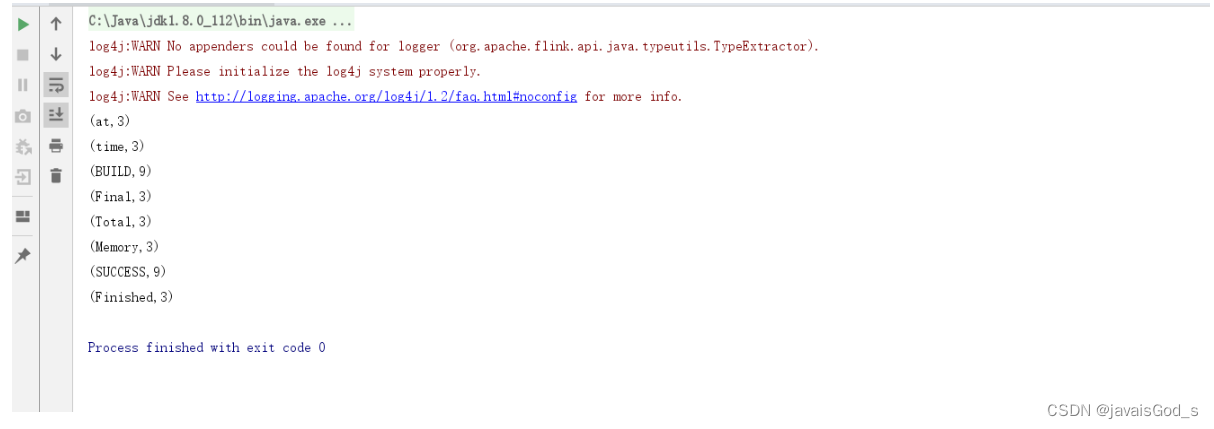
运行结果如下:
案例二:Flink 代码实现流处理,进行单词统计。数据源来自于socket数据
package day01;

import org.apache.flink.api.common.RuntimeExecutionMode;
import org.apache.flink.api.common.functions.FlatMapFunction;
import org.apache.flink.api.common.functions.MapFunction;
import org.apache.flink.api.java.functions.KeySelector;
import org.apache.flink.api.java.tuple.Tuple2;
import org.apache.flink.streaming.api.datastream.DataStreamSource;
import org.apache.flink.streaming.api.datastream.KeyedStream;
import org.apache.flink.streaming.api.datastream.SingleOutputStreamOperator;
import org.apache.flink.streaming.api.environment.StreamExecutionEnvironment;
import org.apache.flink.util.Collector;

/**
 * @desc: Flink 代码实现流处理,进行单词统计。数据源来自于socket数据。
 */
public class Demo02_WordCountStream {
    public static void main(String[] args) throws Exception {
        //1.构建流式执行环境
        StreamExecutionEnvironment env = StreamExecutionEnvironment.getExecutionEnvironment();
        env.setRuntimeMode(RuntimeExecutionMode.STREAMING);
        env.setParallelism(1);
        //2.数据输入(数据源)
        //从socket读取数据,socket = hostname + port
        DataStreamSource<String> source = env.socketTextStream("node1", 9999);
        //3.数据处理
        //3.1 使用flatMap进行扁平化处理
        SingleOutputStreamOperator<String> flatMapStream = source.flatMap(new FlatMapFunction<String, String>() {
            @Override
            public void flatMap(String value, Collector<String> out) throws Exception {
                String[] words = value.split(" ");
                for (String word : words) {
                    out.collect(word);
                }
            }
        });
        //3.2 使用map进行转换,转换成(单词,1)
        SingleOutputStreamOperator<Tuple2<String, Integer>> mapStream = flatMapStream.map(new MapFunction<String, Tuple2<String, Integer>>() {
            @Override
            public Tuple2<String, Integer> map(String value) throws Exception {
                return Tuple2.of(value, 1);
            }
        });
        //3.3使用keyBy进行单词分组
        KeyedStream<Tuple2<String, Integer>, String> keyedStream = mapStream.keyBy(new KeySelector<Tuple2<String, Integer>, String>() {
            @Override
            public String getKey(Tuple2<String, Integer> value) throws Exception {
                return value.f0;
            }
        });
        //3.4 使用reduce(sum)进行聚合操作,sum:就是根据第一个元素(Integer)进行sum操作
        SingleOutputStreamOperator<Tuple2<String, Integer>> result = keyedStream.sum(1);
        //4.数据输出
        result.print();
        //5.启动流式任务
        env.execute();
    }
}
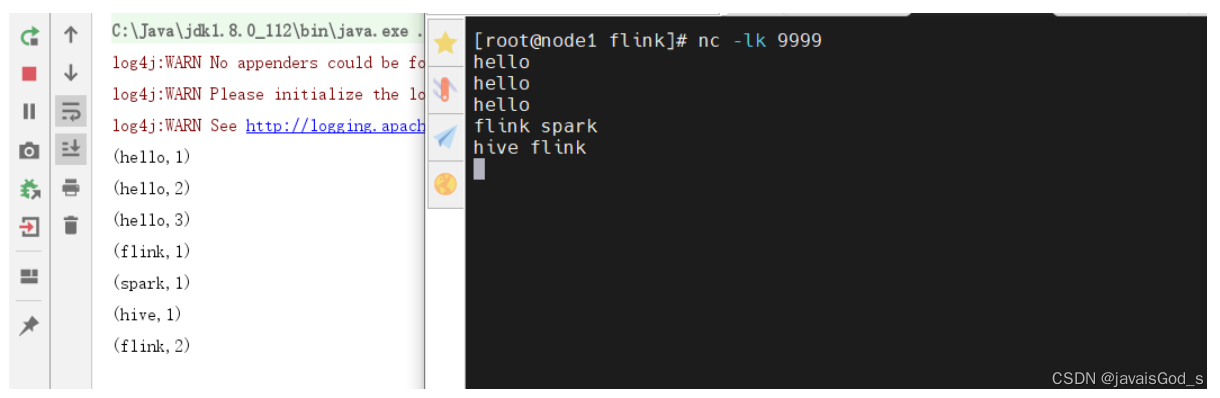
运行结果如下:
案例三:采用链式编程的方式实现Flink的Wordcount案例。
package day01;

import org.apache.flink.api.common.functions.FlatMapFunction;
import org.apache.flink.api.common.functions.MapFunction;
import org.apache.flink.api.java.tuple.Tuple2;
import org.apache.flink.streaming.api.datastream.DataStreamSource;
import org.apache.flink.streaming.api.datastream.SingleOutputStreamOperator;
import org.apache.flink.streaming.api.environment.StreamExecutionEnvironment;
import org.apache.flink.util.Collector;

/**
 * @desc: 采用链式编程的方式实现Flink的Wordcount案例。
 */
public class Demo03_WordCountStream_02 {
    public static void main(String[] args) throws Exception {
        //1.构建流式执行环境
        StreamExecutionEnvironment env = StreamExecutionEnvironment.getExecutionEnvironment();
        env.setParallelism(1);
        //2.数据输入
        DataStreamSource<String> source = env.socketTextStream("node1", 9999);
        //3.数据处理
        SingleOutputStreamOperator<Tuple2<String, Integer>> result = source.flatMap(new FlatMapFunction<String, String>() {
            @Override
            public void flatMap(String value, Collector<String> out) throws Exception {
                String[] words = value.split(" ");
                for (String word : words) {
                    out.collect(word);
                }
            }
        }).map(new MapFunction<String, Tuple2<String, Integer>>() {
            @Override
            public Tuple2<String, Integer> map(String value) throws Exception {
                // word -> (word,1)
                return Tuple2.of(value, 1);
            }
        }).keyBy(0)//根据第0个元素进行分组(单词)
                .sum(1);
        //4.数据输出
        result.print();
        //5.启动流式任务
        env.execute();
    }
}
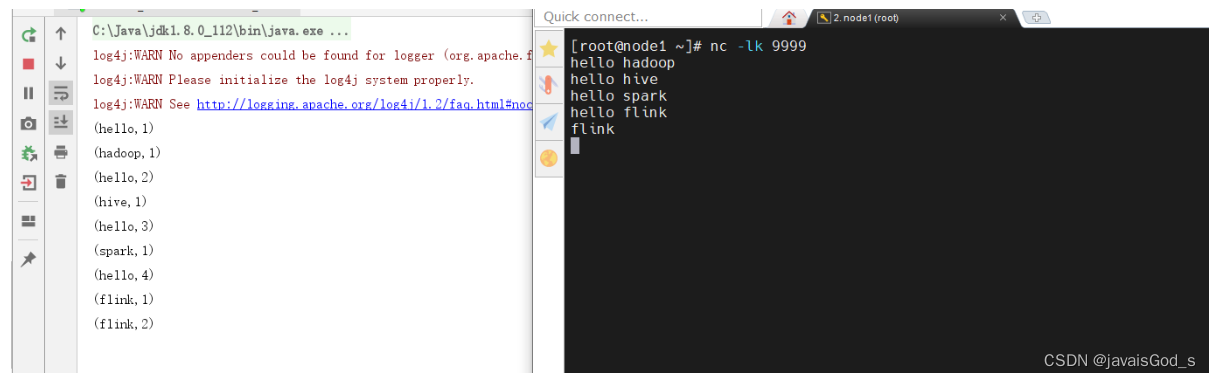
运行结果如下:
案例四:采用Lambda表达式的方式来编写Flink wordcount入门案例
package day01;

import org.apache.flink.api.common.typeinfo.Types;
import org.apache.flink.api.java.tuple.Tuple2;
import org.apache.flink.streaming.api.datastream.DataStreamSource;
import org.apache.flink.streaming.api.datastream.SingleOutputStreamOperator;
import org.apache.flink.streaming.api.environment.StreamExecutionEnvironment;
import org.apache.flink.util.Collector;

/**
 * @desc: 扩展2:采用Lambda表达式的方式来编写Flink  wordcount入门案例
 */
public class Demo04_WordCountStream_03 {
    public static void main(String[] args) throws Exception {
        //1.构建流式执行环境
        StreamExecutionEnvironment env = StreamExecutionEnvironment.getExecutionEnvironment();
        env.setParallelism(1);
        //2.数据输入
        DataStreamSource<String> source = env.socketTextStream("node1", 9999);
        //3.数据处理
        SingleOutputStreamOperator<Tuple2<String, Integer>> result = source.flatMap((String value, Collector<String> out) -> {
            String[] words = value.split(" ");
            for (String word : words) {
                out.collect(word);
            }
        }).returns(Types.STRING).map(value -> Tuple2.of(value, 1))
                .returns(Types.TUPLE(Types.STRING,Types.INT))
                .keyBy(value -> value.f0)
                .sum(1);
        //4.数据输出
        result.print();
        //5.启动流式任务
        env.execute();
    }
}
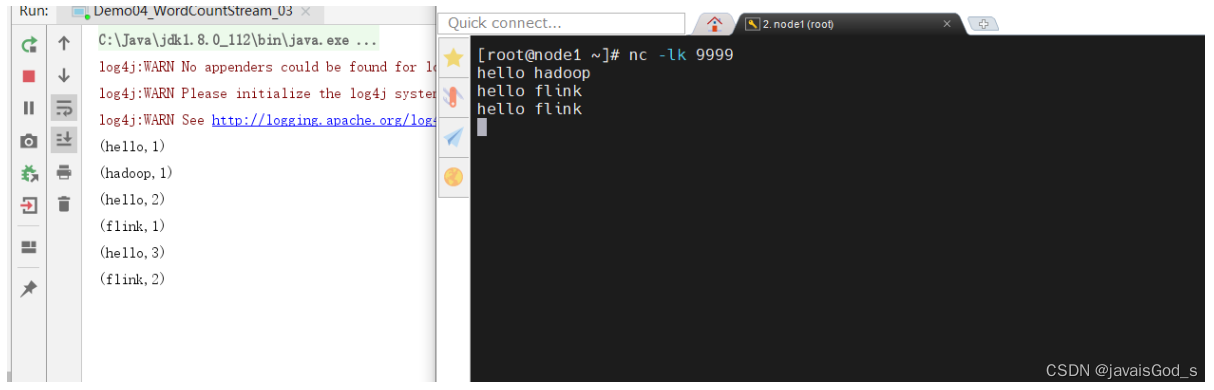
运行结果如下:
案例五:采用Lambda表达式的方式来编写Flink wordcount入门案例
package day01;

import org.apache.flink.api.common.typeinfo.Types;
import org.apache.flink.api.java.tuple.Tuple2;
import org.apache.flink.streaming.api.datastream.DataStreamSource;
import org.apache.flink.streaming.api.datastream.SingleOutputStreamOperator;
import org.apache.flink.streaming.api.environment.StreamExecutionEnvironment;
import org.apache.flink.util.Collector;

import java.util.Arrays;

/**
 * @desc: 扩展3:采用Lambda表达式的方式来编写Flink  wordcount入门案例
 */
public class Demo04_WordCountStream_04 {
    public static void main(String[] args) throws Exception {
        //1.构建流式执行环境
        StreamExecutionEnvironment env = StreamExecutionEnvironment.getExecutionEnvironment();
        env.setParallelism(1);
        //2.数据输入
        DataStreamSource<String> source = env.socketTextStream("node1", 9999);
        //3.数据处理
        SingleOutputStreamOperator<Tuple2<String, Integer>> result = source.flatMap((String value, Collector<String> out) -> {
            Arrays.stream(value.split(" ")).forEach(out::collect);
        }).returns(Types.STRING).map(value -> Tuple2.of(value, 1))
                .returns(Types.TUPLE(Types.STRING,Types.INT))
                .keyBy(value -> value.f0)
                .sum(1);
        //4.数据输出
        result.print();
        //5.启动流式任务
        env.execute();
    }
}
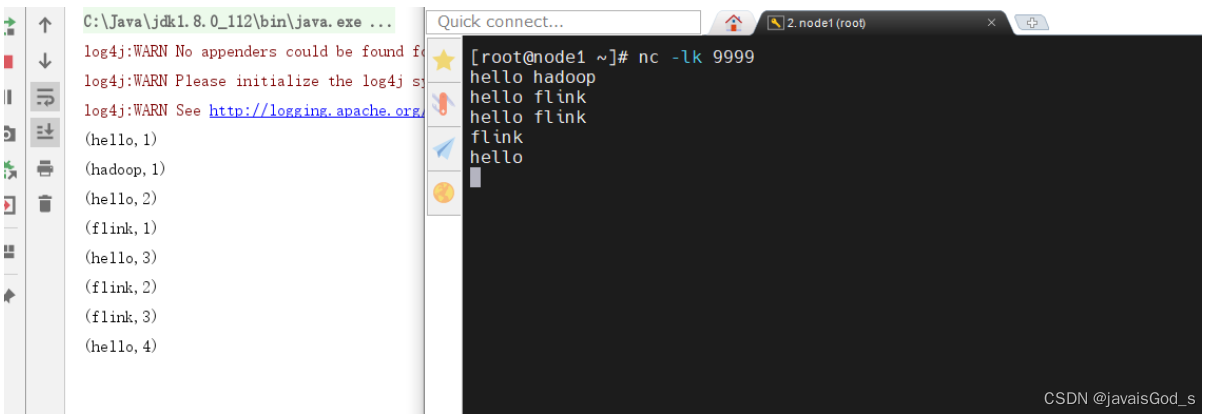
运行结果如下:
案例六:使用Flink Table API进行wordcount单词统计。
package day01;

import org.apache.flink.streaming.api.environment.StreamExecutionEnvironment;
import org.apache.flink.table.api.DataTypes;
import org.apache.flink.table.api.Expressions;
import org.apache.flink.table.api.Schema;
import org.apache.flink.table.api.TableDescriptor;
import org.apache.flink.table.api.bridge.java.StreamTableEnvironment;

import java.util.concurrent.ExecutionException;

/**
 * @desc: 使用Flink Table API进行wordcount单词统计。
 */
public class Demo05_WordCountTable {
    public static void main(String[] args) throws Exception {
        //1.构建流式执行环境
        //env 对象是基于DataStream API构建的,如果需要使用Table API/SQL来提交Flink任务,则需要使用Flink里的StreamTableEnvironment对象
        StreamExecutionEnvironment env = StreamExecutionEnvironment.getExecutionEnvironment();
        StreamTableEnvironment t_env = StreamTableEnvironment.create(env);
        t_env.getConfig().set("parallelism.default","1");
        //2.数据输入(数据输入表)
        /**
         * createTemporaryTable(String tableName,TableDescriptor tableDescriptor);
         * tableName:表名
         * tableDescriptor:描述表的schema,column等信息的
         * connector: 就类似于jdbc的驱动类,但是Flink不叫驱动包(驱动类),Flink叫做Connector,连接器。
         * 连接器:就是用来连接外部数据源的。
         */

        /**
         *      |    word   |
         *      |   hello   |
         *      |   hive    |
         *      |   flink   |
         */
        t_env.createTemporaryTable("source", TableDescriptor.forConnector("datagen")
                .schema(Schema.newBuilder()
                        .column("word", DataTypes.STRING()).build())
                .option("rows-per-second","1")
                .option("fields.word.kind","random")
                .option("fields.word.length","1")
                .build());
        //3.数据输出(数据输出表)
        /**
         *      |   word   |    counts    |
         *      |     a    |      2       |
         *      |     1    |      3       |
         */
        t_env.createTemporaryTable("sink",TableDescriptor.forConnector("print")
                .schema(Schema.newBuilder()
                        .column("word",DataTypes.STRING())
                        .column("counts",DataTypes.BIGINT()).build())
                .build());
        //4.数据处理(基于数据输入表、数据输出表进行业务处理(单词统计)
        /**
         * 处理逻辑:
         * 首先从源表把数据读取出来,根据单词进行分组,然后按照分组后的字段(word,count(*))进行统计。
         * from:从源表读取数据
         * groupBy:根据xx字段分组
         * select:分组后选择需要的数据,选择的数据&类型需要和目标表匹配
         * executeInsert:把最终结果插入到目标表中去
         * insert into sink
         * select word ,count(*) from source group by word
         */
        t_env.from("source")
                .groupBy(Expressions.$("word"))
                .select(Expressions.$("word"),Expressions.lit(1).count())
                .executeInsert("sink")
                .await();

        //5.启动流式任务
        env.execute();
    }
}
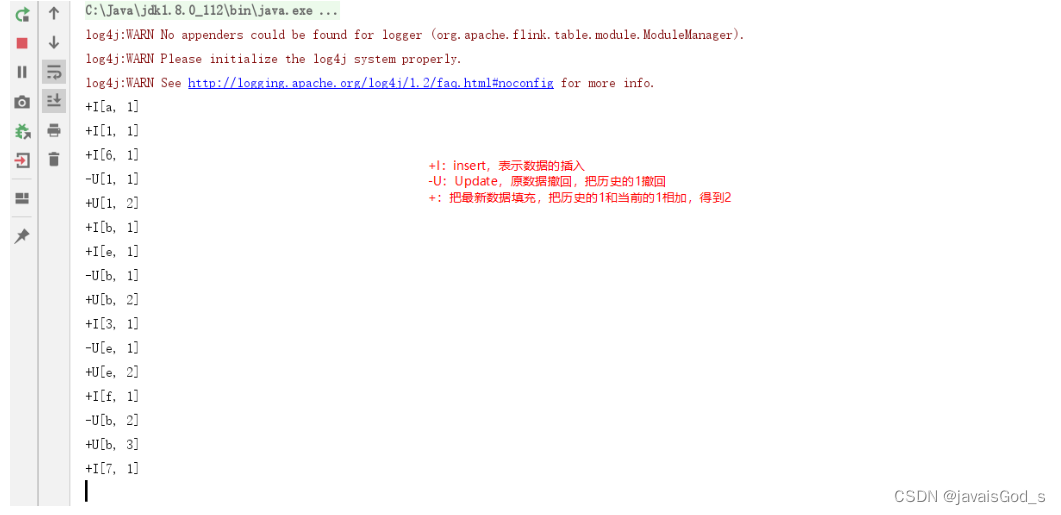
运行结果如下:
案例七: 使用Flink SQL完成单词统计
package day01;

import org.apache.flink.streaming.api.environment.StreamExecutionEnvironment;
import org.apache.flink.table.api.bridge.java.StreamTableEnvironment;

import java.util.concurrent.ExecutionException;

/**
 * @desc: 使用Flink SQL完成单词统计
 */
public class Demo06_WordCountSQL {
    public static void main(String[] args) throws Exception {
        //1.构建流式执行环境
        StreamExecutionEnvironment env = StreamExecutionEnvironment.getExecutionEnvironment();
        StreamTableEnvironment t_env = StreamTableEnvironment.create(env);
        t_env.getConfig().set("parallelism.default","1");

        //2.构建数据源表(数据输入)
        /**
         *      |     word    |
         *      |     hello   |
         *      |     hive    |
         *      |     spark   |
         *      |     flink   |
         */
        t_env.executeSql("create table source(" +
                "word varchar" +
                ") with (" +
                "'connector' = 'datagen'," +
                "'rows-per-second' = '1'," +
                "'fields.word.kind' = 'random'," +
                "'fields.word.length' = '1'" +
                ")");

        //3.构建数据输出表(数据输出)
        /**   表结构如下:
         *       |    word    |   counts    |
         *       |    hello   |     1       |
         *       |    hive    |     2       |
         *       |    flink   |     3       |
         */
        t_env.executeSql("create table sink(" +
                "word varchar," +
                "counts bigint" +
                ") with (" +
                "'connector' = 'print'" +
                ")");

        //4.数据处理
        /**
         * 数据处理逻辑SQL如下:
         *  insert into sink select word,count(*) from source group by word
         */
        t_env.executeSql("insert into sink select word,count(*) from source group by word")
                .await();
        //5.启动流式任务
        env.execute();
    }
}
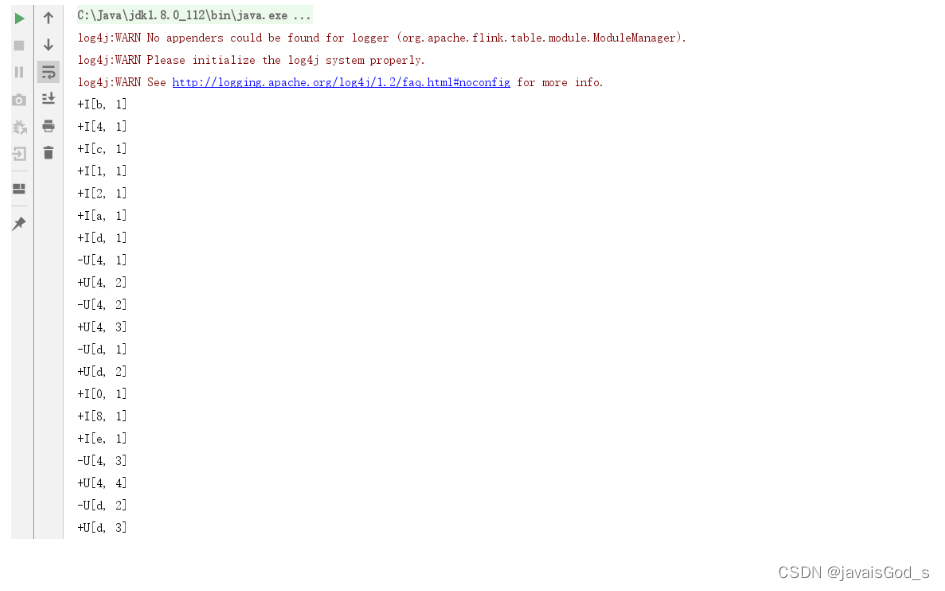
运行结果如下:






 扫一扫
扫一扫


 1531
1531


 到【灌水乐园】发言




