


一、概述
dify官方提供的安装方式是docker-compose方式部署的,单机运行。
但是在企业生产环境,单机没法提供冗余,一旦故障,就很麻烦了。
如果有大量的APP用户,那么单机承受不住这么多并发,也会出现故障。
很多小伙伴们,想在k8s中运行dify,解决冗余以及并发问题,直接扩容节点即可。
注意:只有企业版会提供k8s部署,社区版是没有的。
对于我们这种个人开发者来说,囊中羞涩,不愿意花费这笔钱。企业版还得联系商务,提供企业相关信息,特别麻烦。
对于在k8s中部署dify,确实比较难。几个月前一筹莫展,经过不懈的努力,终于搞定了。
二、准备工作
前提条件
硬件
CPU:建议至少 4 核。
内存:建议至少 8GB,推荐 16GB。
存储:建议至少 20GB 可用空间。
操作系统:推荐 Ubuntu 22.04+ 或 WSL(Windows 子系统)。
软件依赖:需要 Docker(版本 20.10.5 或更高)和 Docker Compose(版本 2.0.0 或更高)
软件
Docker,Docker Compose,参考文章:
https://www.cnblogs.com/xiao987334176/p/18809253
Harbor,参考文章:
https://www.cnblogs.com/xiao987334176/p/18809269
如果有现成的私有仓库,可以忽略
如果有现成的NFS,可以忽略
符合以上条件,就可以部署了
镜像推送
下载镜像
docker pull postgres:15-alpine
docker pull redis:6-alpine
docker pull semitechnologies/weaviate:1.19.0
docker pull nginx:latest
docker pull langgenius/dify-plugin-daemon:0.0.6-local
docker pull langgenius/dify-sandbox:0.2.11
docker pull ubuntu/squid:latest
docker pull langgenius/dify-api:1.1.3
docker pull langgenius/dify-web:1.1.3
推送镜像
这里使用shell脚本完成
#!/bin/bash

images="postgres:15-alpine
redis:6-alpine
semitechnologies/weaviate:1.19.0
nginx:latest
langgenius/dify-plugin-daemon:0.0.6-local
langgenius/dify-sandbox:0.2.11
ubuntu/squid:latest
langgenius/dify-api:1.1.3
langgenius/dify-web:1.1.3"

# 遍历镜像列表,并推送到harbor
for line in $images; do
    #echo "$line"
    docker tag $line harbor.qq.com:8083/dify/$line
    docker push harbor.qq.com:8083/dify/$line
done
注意修改harbor的的地址为实际访问地址
登录到harbor,查看镜像
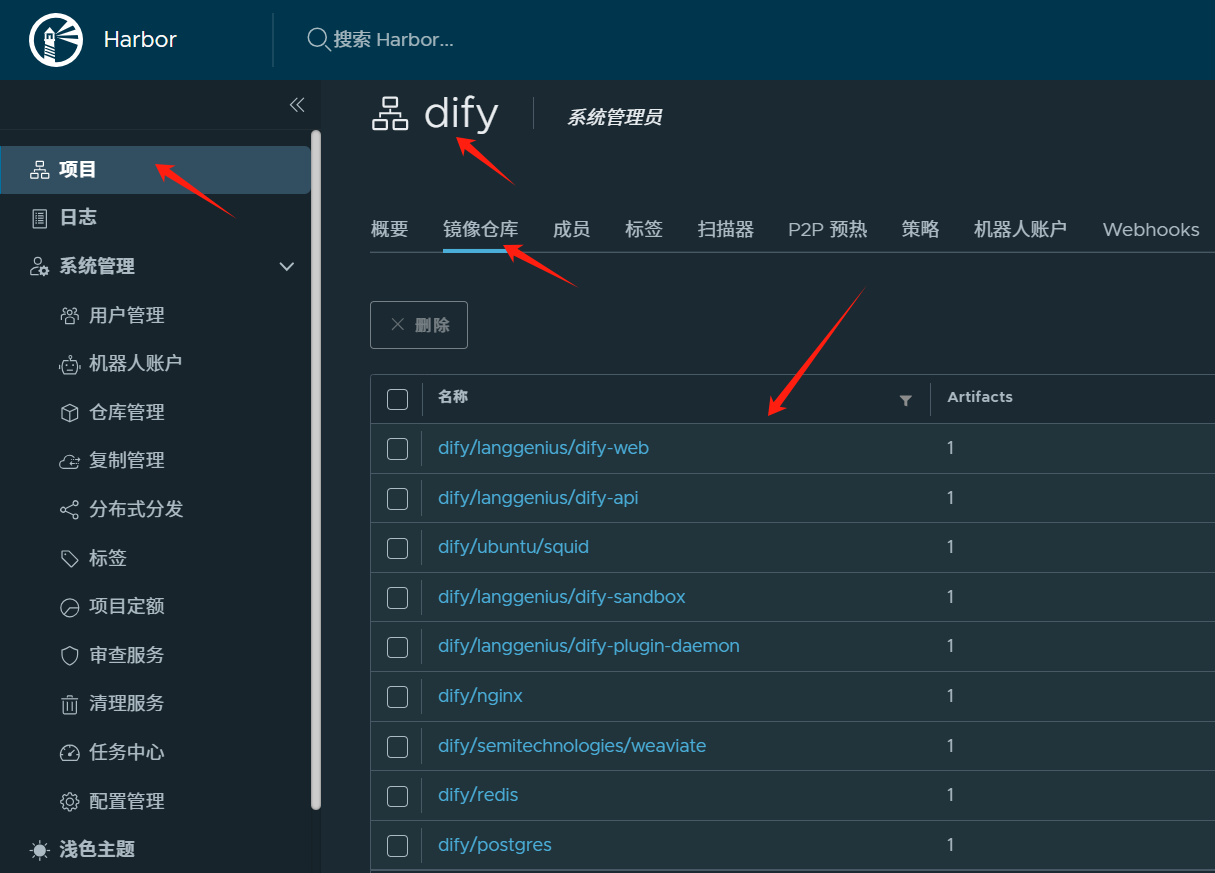
创建命名空间以及密钥
创建命名空间dify
kubectl create namespace dify
创建拉取镜像需要的密钥
kubectl create secret docker-registry harbor-key --docker-server=harbor.qq.com:8083 --docker-username=devops --docker-password=1sB5r9UShgK5 --namespace=dify
注意:修改harbor地址,用户名,密码。
下载部署yaml
yaml已经写好了,推送到我个人的github,地址:https://github.com/987334176/dify-k8s
下载项目后,进入文件夹1.1.3
目录结构
env --> 全局环境变量
pvc --> 所有组件,统一使用一个pvc来进行持久化存储
databases --> 数据库相关:postgresql,redis,weaviate
middleware --> 中间件相关:plugin-daemon,sandox,ssf-proxy,nginx
services --> 服务相关:api,web,worker
三、创建全局环境变量
这里有500个多个变量,直接一键运行
kubectl apply -f env/env.yaml
四、创建pv和pvc
创建storageClass,因为pv和pvc必须是同一个storageClass才能绑定成功
kubectl apply -f pvc/storageClass.yaml
注意:修改NFS 服务端的共享路径,provisioner必须指定为nfs-client
nfs-client是一个外部的动态存储供给器(Provisioner),用于在 Kubernetes 集群中动态创建和管理基于 NFS(Network File System)的 PersistentVolumes(PV)。它是 Kubernetes 社区提供的一个解决方案,用于支持 NFS 存储的动态供给。
创建pv,pvc。注意:这里的pv是自建的NFS,请根据实际情况修改
kubectl apply -f pvc/pv.yaml
kubectl apply -f pvc/pvc.yaml
查看pvc状态,注意:请确保pvc状态为Bound
# kubectl -n dify get pvc
NAME       STATUS   VOLUME   CAPACITY   ACCESS MODES   STORAGECLASS   VOLUMEATTRIBUTESCLASS   AGE
dify-pvc   Bound    dify     10Gi       RWX            nfs-storage    <unset>                 12m
服务器已经挂载好了NFS,进入到NFS根目录
cd /mnt/nfs_share
创建dify相关持久化文件,并设置权限
mkdir -p dify/volumes/db/data
mkdir -p dify/volumes/redis/data
mkdir -p dify/volumes/weaviate
mkdir -p dify/volumes/plugin_daemon
mkdir -p dify/volumes/app/storage
chmod 777 -R dify
五、数据库相关
postgresql
PostgreSQL 是一个功能强大的开源关系型数据库管理系统(RDBMS),以其稳定性、扩展性和对 SQL 标准的严格遵循而闻名。它支持复杂查询、事务、触发器、视图、存储过程等功能,适用于各种规模的应用程序。
自从MySQL被Oracle收购以后,PostgreSQL逐渐成为开源关系型数据库的首选。
修改文件postgres-StatefulSet.yaml
vi databases/postgresql/postgres-StatefulSet.yaml
修改红色部分,增加了密钥,改了镜像地址
spec:
imagePullSecrets:
- name: harbor-key
terminatio 最低0.47元/天 解锁文章






 扫一扫
扫一扫


 14万+
14万+

 被折叠的 条评论
为什么被折叠?
被折叠的 条评论
为什么被折叠?
 到【灌水乐园】发言





