





 本文深入探讨Python数据科学中Pandas库的Series和DataFrame数据结构。展示了如何从Series创建DataFrame,以及二者之间的关系。通过实例解析了Series的特性,包括其数据类型、索引和内容,并提供了DataFrame的迭代展示,强调了每一行的结构和类型。
import numpy as np
import pandas as pd
from pandas import Series, DataFrame
data = {"Country":["Belgium","India","Brazil"],
        "Capital":["Brussels","New Delhi","Brasilia"],
        "Population":[11190846,130317135,207847528]}
Series
s1 = pd.Series(data["Country"])
s1
0 Belgium
1 India
2 Brazil
dtype: object
s1.values
array([‘Belgium’, ‘India’, ‘Brazil’], dtype=object)
s1.index
RangeIndex(start=0, stop=3, step=1)
s1 = pd.Series(data["Country"],index=["A","B","C"])
s1
A Belgium
B India
C Brazil
dtype: object
s1.index
Index([‘A’, ‘B’, ‘C’], dtype=‘object’)
dataframe
df1 = pd.DataFrame(data)
df1
| Capital | Country | Population | |
|---|---|---|---|
| 0 | Brussels | Belgium | 11190846 |
| 1 | New Delhi | India | 130317135 |
| 2 | Brasilia | Brazil | 207847528 |
cou = df1["Country"]
cou
0 Belgium
1 India
2 Brazil
Name: Country, dtype: object
type(cou)
pandas.core.series.Series
df1.iterrows()
<generator object DataFrame.iterrows at 0x0000022D19901C50>
for row in df1.iterrows():
    print(row)
(0, Capital Brussels
Country Belgium
Population 11190846
Name: 0, dtype: object)
(1, Capital New Delhi
Country India
Population 130317135
Name: 1, dtype: object)
(2, Capital Brasilia
Country Brazil
Population 207847528
Name: 2, dtype: object)
for row in df1.iterrows():
    print(type(row)),print(len(row))
    print("------row[0]------------------------------------------"),print(row[0])
    print("-------------------------------------type(row[0])----------"),print(type(row[0]))
    print("------row[1]------------------------------------------"),print(row[1])
    print("-------------------------------------type(row[1]))---------"),print(type(row[1]))
    break
<class ‘tuple’>
2
------row[0]------------------------------------------
0
-------------------------------------type(row[0])----------
<class ‘numpy.int64’>
------row[1]------------------------------------------
Capital Brussels
Country Belgium
Population 11190846
Name: 0, dtype: object
-------------------------------------type(row[1]))---------
<class ‘pandas.core.series.Series’>
通过series创建dataframe
data
{'Country': ['Belgium', 'India', 'Brazil'],
 'Capital': ['Brussels', 'New Delhi', 'Brasilia'],
 'Population': [11190846, 130317135, 207847528]}
s1 = pd.Series(data["Capital"])
s2 = pd.Series(data["Country"])
s3 = pd.Series(data["Population"])
df_new = pd.DataFrame([s1,s2,s3])
df_new
| 0 | 1 | 2 | |
|---|---|---|---|
| 0 | Brussels | New Delhi | Brasilia |
| 1 | Belgium | India | Brazil |
| 2 | 11190846 | 130317135 | 207847528 |
df1
| Capital | Country | Population | |
|---|---|---|---|
| 0 | Brussels | Belgium | 11190846 |
| 1 | New Delhi | India | 130317135 |
| 2 | Brasilia | Brazil | 207847528 |
df_new = df_new.T  #转置
df_new
| 0 | 1 | 2 | |
|---|---|---|---|
| 0 | Brussels | Belgium | 11190846 |
| 1 | New Delhi | India | 130317135 |
| 2 | Brasilia | Brazil | 207847528 |
df_new = pd.DataFrame([s1,s2,s3],index=["Capital","Country","Population"]).T
df_new       #这样就跟df1完全一致了
| Capital | Country | Population | |
|---|---|---|---|
| 0 | Brussels | Belgium | 11190846 |
| 1 | New Delhi | India | 130317135 |
| 2 | Brasilia | Brazil | 207847528 |
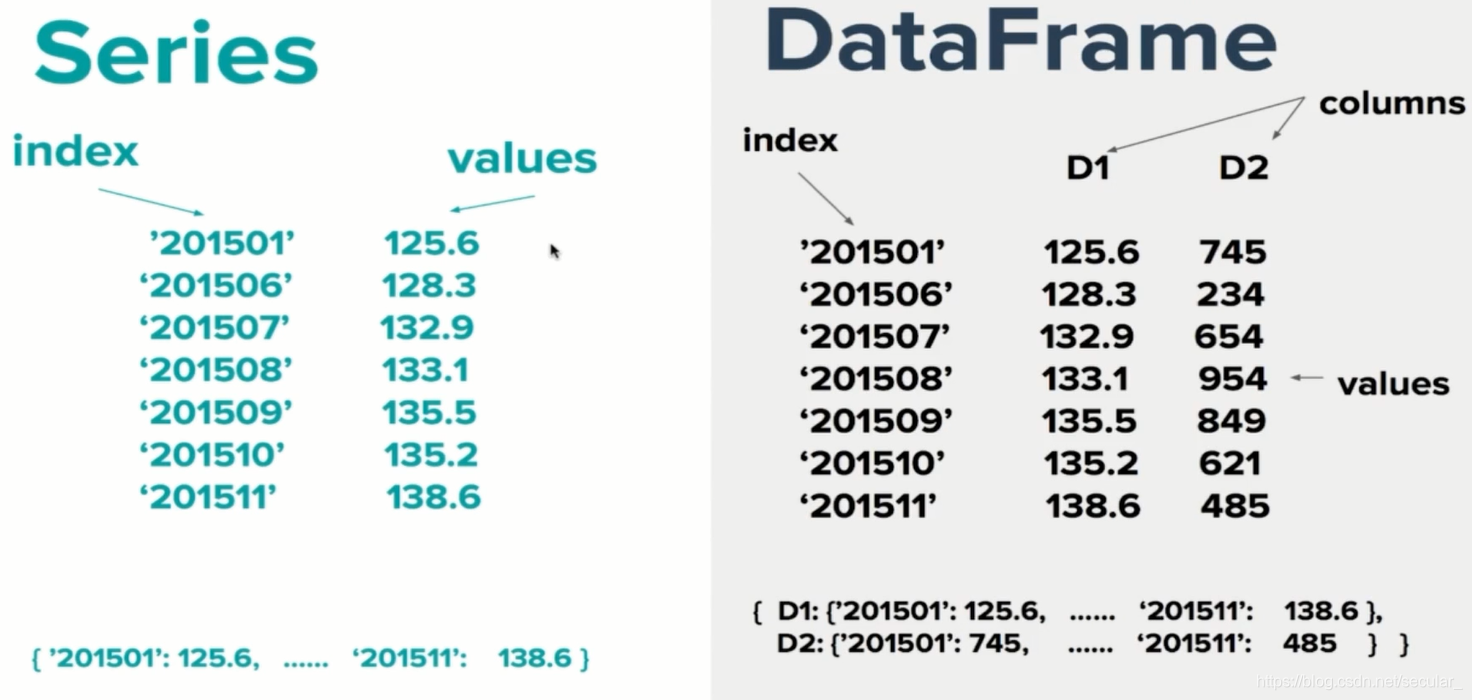
Series与DataFrame关系





 扫一扫
扫一扫


 17万+
17万+


 到【灌水乐园】发言



