

虚拟机Ubuntu 18.04安装dpdk18.11

在一台使用2核2G内存的虚拟机上,通过停用2个网卡并下载DPDK18.11版本进行安装。接着安装libnuma-dev,然后利用dpdk-setup.sh设置IGBUIO,分配256个hugepages,并绑定Intel网卡。在遇到问题时修改igb_uio.c源码并重新编译。最后,通过testpmd进行网络转发测试,观察并分析端口统计信息。

1 虚拟机用了2个核,2G内存,3个网卡

2 去http://core.dpdk.org/download/下载了18.11

3 安装apt-get install libnuma-dev

4 运行ifconfig down ***停掉2个网卡,方便后面添加到dpdk

5 解压后,进入usertools,运行dpdk-setup.sh。系统是64位的,所以选择x86_64-native-linuxapp-gcc。

运行成功:
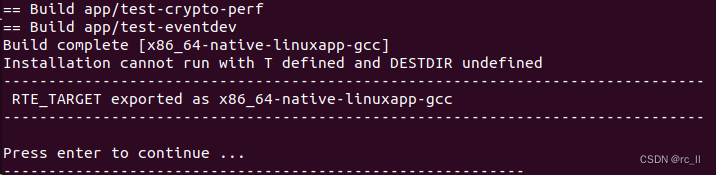
 其中 .......cannot run with T defined .......暂时不管

6 根据提示的选项,安装IGB UIO

7 根据提示的选项设置hugepages,这里设置256

8 根据提示的选项绑定之前停用的网卡,这里都是intel的网卡

9 根据提示的选项,运行testpmd。如果报EAL Error reading from file descriptor 23 Input output error  则需要修改dpdk目录下的kernel/igb_uio/igb_uio.c,将

将文件中该行修改
pci_intx_mask_supported(dev)
修改为
pci_intx_mask_supported(dev)||true
再重新编译。

10 运行:

testpmd> start                # 开始转发命令

testpmd> stop                # 停止转发命令,结束时会显示转发的汇总(收、发、drop)

testpmd> quit                 # 退出testpmd

testpmd> show port stats all                 # 显示所有端口的收发包信息

2. DPDK Release 18.08 2.1. New Features Added support for Hyper-V netvsc PMD. The new netvsc poll mode driver provides native support for networking on Hyper-V. See the Netvsc poll mode driver NIC driver guide for more details on this new driver. Added Flow API support for CXGBE PMD. Flow API support has been added to CXGBE Poll Mode Driver to offload flows to Chelsio T5/T6 NICs. Support added for: Wildcard (LE-TCAM) and Exact (HASH) match filters. Match items: physical ingress port, IPv4, IPv6, TCP and UDP. Action items: queue, drop, count, and physical egress port redirect. Added ixgbe preferred Rx/Tx parameters. Rather than applications providing explicit Rx and Tx parameters such as queue and burst sizes, they can request that the EAL instead uses preferred values provided by the PMD, falling back to defaults within the EAL if the PMD does not provide any. The provision of such tuned values now includes the ixgbe PMD. Added descriptor status check support for fm10k. The rte_eth_rx_descriptor_status and rte_eth_tx_descriptor_status APIs are now supported by fm10K. Updated the enic driver. Add low cycle count Tx handler for no-offload Tx. Add low cycle count Rx handler for non-scattered Rx. Minor performance improvements to scattered Rx handler. Add handlers to add/delete VxLAN port number. Add devarg to specify ingress VLAN rewrite mode. Updated mlx5 driver. Updated the mlx5 driver including the following changes: Added port representors support. Added Flow API support for e-switch rules. Added support for ACTION_PORT_ID, ACTION_DROP, ACTION_OF_POP_VLAN, ACTION_OF_PUSH_VLAN, ACTION_OF_SET_VLAN_VID, ACTION_OF_SET_VLAN_PCP and ITEM_PORT_ID. Added support for 32-bit compilation. Added TSO support for the mlx4 driver. Added TSO support for the mlx4 drivers from MLNX_OFED_4.4 and above. SoftNIC PMD rework. The SoftNIC PMD infrastructure has been restructured to use the Packet Framework, which makes it more flexible, modular and easier to add new functionality in the future. Updated the AESNI MB PMD. The AESNI MB PMD has been updated with additional support for: 3DES for 8, 16 and 24 byte keys. Added a new compression PMD using Intel’s QuickAssist (QAT) device family. Added the new QAT compression driver, for compression and decompression operations in software. See the Intel(R) QuickAssist (QAT) Compression Poll Mode Driver compression driver guide for details on this new driver. Updated the ISA-L PMD. Added support for chained mbufs (input and output).
### Ubuntu 18.04 虚拟机上的一键 ROS 安装方法 在 Ubuntu 18.04虚拟机环境中实现 ROS (Robot Operating System) 的一键安装可以通过编写自动化脚本来完成。这种方法可以显著减少手动配置的时间和复杂度。 #### 自动化安装概述 ROS 提供了官方文档来指导如何在其支持的操作系统版本上进行安装[^1]。对于 Ubuntu 18.04 LTS,推荐使用 `apt` 包管理器来进行 ROS Melodic Morenia 版本的安装。通过创建一个 Bash 脚本文件并将其设置为可执行文件,能够简化整个过程。 以下是适用于 Ubuntu 18.04 上自动安装 ROS 的示例脚本: ```bash #!/bin/bash # 更新包列表 sudo apt update && sudo apt upgrade -y # 设置源密钥 sudo sh -c 'echo "deb http://packages.ros.org/ros/ubuntu $(lsb_release -sc) main" > /etc/apt/sources.list.d/ros-latest.list' sudo apt-key adv --keyserver hkp://ha.pool.sks-keyservers.net:80 --recv-key C1CF6E31E6BADE8868B172B4F42ED6FBAB17C654 # 再次更新包索引 sudo apt update # 安装桌面全功能版 sudo apt install -y ros-melodic-desktop-full # 初始化 rosdep 工具 sudo rosdep init rosdep update # 配置环境变量 echo "source /opt/ros/melodic/setup.bash" >> ~/.bashrc source ~/.bashrc # 安装依赖构建工具和其他常用工具 sudo apt install -y python-rosinstall python-rosinstall-generator python-wstool build-essential # 测试安装成功与否 rosversion -d ``` 此脚本涵盖了从添加 ROS 源到初始化必要工具以及测试安装是否成功的全过程[^2]。为了使该脚本生效,请按照以下方式操作: 1. 将上述代码保存至名为 `install_ros.sh` 的文件中。 2. 使用命令赋予其执行权限: ```bash chmod +x install_ros.sh ``` 3. 执行脚本以启动安装流程: ```bash ./install_ros.sh ``` #### 注意事项 尽管这个脚本能极大地方便 ROS 的部署工作,但在实际应用前仍需注意一些细节: - **网络连接**:确保虚拟机能正常访问互联网以便下载所需的软件包。 - **磁盘空间**:确认有足够的存储容量用于安装 ROS 及其相关组件。 - **兼容性验证**:由于不同硬件架构可能影响某些特定库的表现,建议先查阅目标平台的具体需求说明[^3]。 #### 进一步优化方向 如果希望进一步提升用户体验或者满足特殊场景下的定制化需求,则可以考虑加入更多高级特性,比如交互式选项让用户选择具体要安装的核心模块种类;或是集成额外驱动程序的支持等扩展功能。
评论
成就一亿技术人!
拼手气红包6.0元
还能输入1000个字符
 
红包 添加红包
表情包 插入表情
 条评论被折叠 查看
添加红包

请填写红包祝福语或标题

红包个数最小为10个

红包金额最低5元

当前余额3.43前往充值 >
需支付:10.00
成就一亿技术人!
领取后你会自动成为博主和红包主的粉丝 规则
hope_wisdom
发出的红包
实付
使用余额支付
点击重新获取
扫码支付
钱包余额 0

抵扣说明:

1.余额是钱包充值的虚拟货币,按照1:1的比例进行支付金额的抵扣。
2.余额无法直接购买下载,可以购买VIP、付费专栏及课程。

余额充值


