


 本文详细介绍了在VSCode中运行Python代码的常见问题及解决方案,包括如何避免“无法初始化设备PRN”错误,探讨了Python中名称错误的两种常见情况,并提供了字符串操作、拼接及空白处理的实用技巧。此外,还深入讲解了如何使用str()函数避免类型错误,以及Python之禅的内容。
- vs code 中直接输入代码运行,会报错:无法初始化设备 PRN。这时的解决办法是:先在命令行输入python,回车后运行代码就可以了。
- 名称错误的两种情况:1使用变量前忘记了给它赋值。 2输入变量名时拼写不正确。
使用方法修改字符串的大小写:
变量名.title() /全部首字母改为大写
变量名.upper() /全部字母改为大写
变量名.lower() /全部字母改为小写
使用+加号进行变量的拼接
添加空白的命令
使用\t添加制表符,在输出的语句时相贴着上一行输出的字符最后一位输出。如下图所示:
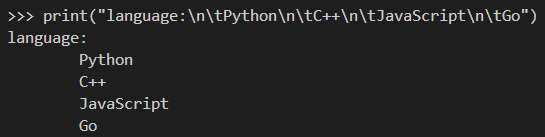
使用\n添加换行符,让字符串自动换到下一行。
而\n\t可以同时使用,效果也是两者的叠加。
关于删除字符串的方法:
str.rstrip([chars]) \删除字符串右边指定的字符,为空时即为删除空白符
str.lstrip([chars]) \删除字符串左边指定的字符,为空时同上
str.strip([chars]) \删除字符串两边指定的字符,为空同上。
使用函数str()避免类型错误
age=23
print("Happy "+str(age)+"rd Birthday")
这里的str()就是将这个整数用作字符串
python之禅
>>> import this
The Zen of Python, by Tim Peters

Beautiful is better than ugly.
Explicit is better than implicit.
Simple is better than complex.
Complex is better than complicated.
Flat is better than nested.
Sparse is better than dense.
Readability counts.
Special cases aren't special enough to break the rules.
Although practicality beats purity.
Errors should never pass silently.
Unless explicitly silenced.
In the face of ambiguity, refuse the temptation to guess.
There should be one-- and preferably only one --obvious way to do it.
Although that way may not be obvious at first unless you're Dutch.
Now is better than never.
Although never is often better than *right* now.
If the implementation is hard to explain, it's a bad idea.
If the implementation is easy to explain, it may be a good idea.
Namespaces are one honking great idea -- let's do more of those!





 扫一扫
扫一扫


 3546
3546

 被折叠的 条评论
为什么被折叠?
被折叠的 条评论
为什么被折叠?
 到【灌水乐园】发言





