


 本文通过实例演示了逻辑回归在sklearn中的应用,包括数据准备、模型训练、预测及评估,详细解析了逻辑回归原理及其在多分类问题中的应用。
第一部分 准备知识
使用一个小Demo讲解了可视化的过程,以及如何使用sklearn的方法进行逻辑回归分类。
1.1 需要导入的库函数
##  基础函数库
import numpy as np

## 导入画图库
import matplotlib.pyplot as plt
import seaborn as sns

## 导入逻辑回归模型函数
from sklearn.linear_model import LogisticRegression
1.2 训练逻辑回归模型
##Demo演示LogisticRegression分类

## 构造数据集
x_fearures = np.array([[-1, -2], [-2, -1], [-3, -2], [1, 3], [2, 1], [3, 2]])
y_label = np.array([0, 0, 0, 1, 1, 1])

## 调用逻辑回归模型
lr_clf = LogisticRegression()

## 用逻辑回归模型拟合构造的数据集
lr_clf = lr_clf.fit(x_fearures, y_label) #其拟合方程为 y=w0+w1*x1+w2*x2
sklearn调用逻辑回归模型很简单,调用模型后使用fit()方法训练,后续会讲解原理。
这里输入参数有两个,因此会有W1,W2两个参数,以及偏置项W0,我们可以查看这几个数值。
##查看其对应模型的w
print('the weight of Logistic Regression:',lr_clf.coef_)
##查看其对应模型的w0
print('the intercept(w0) of Logistic Regression:',lr_clf.intercept_)
##the weight of Logistic Regression:[[0.73462087 0.6947908]]
##the intercept(w0) of Logistic Regression:[-0.03643213]
其中W1,W2又叫权重参数,W0又叫截距项。
1.3 可视化
首先是可视化数据样本,使用plt.scatter()的方法绘制散点图即可,需要理解的是如何绘制决策边界。
我自己的理解是使用训练好的模型,去预测一定区域的全部点,虽然每个单独的预测结果都是一个点,但是只要数量足够就能形成线段,也就是决策边界,下面看一下代码:
# 可视化决策边界
plt.figure()
plt.scatter(x_fearures[:,0],x_fearures[:,1], c=y_label, s=50, cmap='viridis')
plt.title('Dataset')

nx, ny = 200, 100
x_min, x_max = plt.xlim()
y_min, y_max = plt.ylim()
x_grid, y_grid = np.meshgrid(np.linspace(x_min, x_max, nx),np.linspace(y_min, y_max, ny))

z_proba = lr_clf.predict_proba(np.c_[x_grid.ravel(), y_grid.ravel()])
z_proba = z_proba[:, 1].reshape(x_grid.shape)
plt.contour(x_grid, y_grid, z_proba, [0.5], linewidths=2., colors='blue')

plt.show()
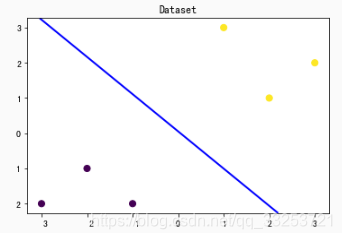
代码的第二部分使用了三个不同的函数,下面分别对其进行解释。
 最低0.47元/天 解锁文章






 扫一扫
扫一扫


 1294
1294

 被折叠的 条评论
为什么被折叠?
被折叠的 条评论
为什么被折叠?
 到【灌水乐园】发言





