



 博客介绍了GLFW回调函数,如窗口大小、关闭、按键等回调,可使用lambda函数。以按键回调为例,展示如何通过回调实现键盘控制及关闭窗口。还回到Hazel项目,为窗口添加各种事件回调函数,通过事件分发器将事件分配到不同处理函数,运行后可捕捉各类事件。
Cherno视频:https://www.youtube.com/watch?v=r74WxFMIEdU&list=PLlrATfBNZ98dC-V-N3m0Go4deliWHPFwT&index=12
完整代码:https://github.com/DXT00/Hazel_study/tree/master/Window%20Events
整体架构(Application,Window和Event的关系)
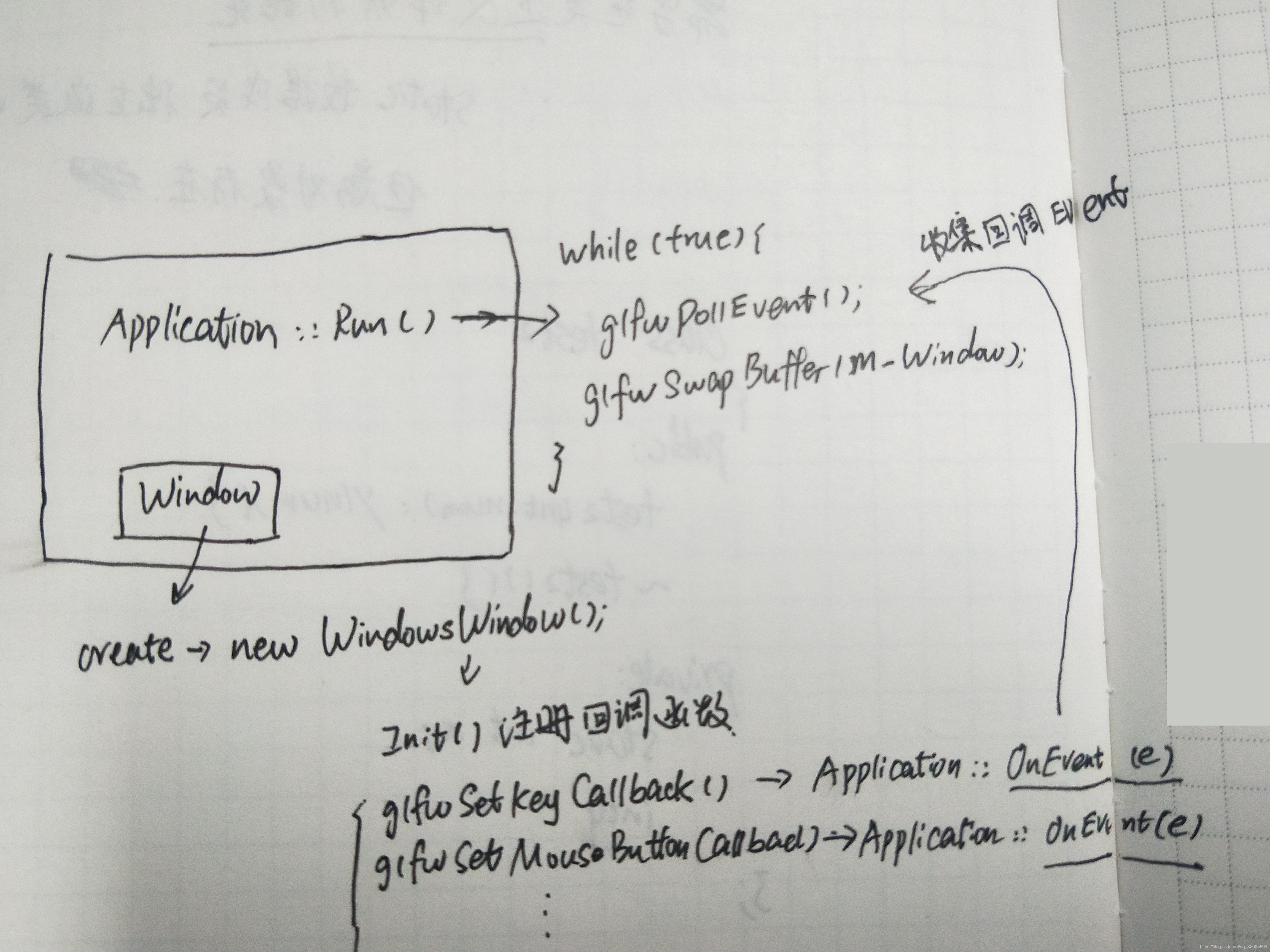
GLFW回调函数:
glfwSetWindowSizeCallback(GLFWwindow* handle,GLFWwindowsizefun cbfun)
glfwSetWindowCloseCallback(GLFWwindow* handle,GLFWwindowclosefun cbfun)
glfwSetKeyCallback(GLFWwindow* handle, GLFWkeyfun cbfun)
glfwSetMouseButtonCallback(GLFWwindow* handle,GLFWmousebuttonfun cbfun)
glfwSetScrollCallback(GLFWwindow* handle, GLFWscrollfun cbfun)
glfwSetCursorPosCallback(GLFWwindow* handle,GLFWcursorposfun cbfun)
cbfun可用lambda函数
输入
我们同样也希望能够在GLFW中实现一些键盘控制,这可以通过使用GLFW的回调函数(Callback Function)来完成。回调函数事实上是一个函数指针,当我们设置好后,GLWF会在合适的时候调用它。按键回调(KeyCallback)是众多回调函数中的一种。当我们设置了按键回调之后,GLFW会在用户有键盘交互时调用它。该回调函数的原型如下所示:
void key_callback(GLFWwindow* window, int key, int scancode, int action, int mode);按键回调函数接受一个GLFWwindow指针作为它的第一个参数;第二个整形参数用来表示按下的按键;
action参数表示这个按键是被按下还是释放;最后一个整形参数表示是否有Ctrl、Shift、Alt、Super等按钮的操作。GLFW会在合适的时候调用它,并为各个参数传入适当的值。void key_callback(GLFWwindow* window, int key, int scancode, int action, int mode) { // 当用户按下ESC键,我们设置window窗口的WindowShouldClose属性为true // 关闭应用程序 if(key == GLFW_KEY_ESCAPE && action == GLFW_PRESS) glfwSetWindowShouldClose(window, GL_TRUE); }在我们(新创建的)key_callback函数中,我们检测了键盘是否按下了Escape键。如果键的确按下了(不释放),我们使用glfwSetwindowShouldClose函数设定
WindowShouldClose属性为true从而关闭GLFW。main函数的while循环下一次的检测将为失败,程序就关闭了。最后一件事就是通过GLFW注册我们的函数至合适的回调,代码是这样的:
glfwSetKeyCallback(window, key_callback);除了按键回调函数之外,我们还能我们自己的函数注册其它的回调。例如,我们可以注册一个回调函数来处理窗口尺寸变化、处理一些错误信息等。我们可以在创建窗口之后,开始游戏循环之前注册各种回调函数。
回到Hazel项目 ,给window添加各种事件的回调函数:
WindowsWindow.cpp
#include "hzpch.h"
#include "WindowsWindow.h"
#include"Hazel/Event/ApplicationEvent.h"
#include"Hazel/Event/KeyEvent.h"
#include"Hazel/Event/MouseEvent.h"
namespace Hazel {

	static bool s_GLFWInitialized = false;

	Window* Window::Create(const WindowProps& prop) {

		return new WindowsWindow(prop);
	}

	static void GLFWErrorCallback(int error, const char* description) {

		HZ_CORE_ERROR("GLFW Error ({0}),{1}", error, description);
	}

	WindowsWindow::WindowsWindow(const WindowProps& props)
	{
		Init(props);
	}

	WindowsWindow::~WindowsWindow()
	{
		Shutdown();
	}

	void WindowsWindow::OnUpdate()
	{
		glfwPollEvents();
		glfwSwapBuffers(m_Window);
	}

	void WindowsWindow::SetVSync(bool enabled)
	{
		if (enabled) {
			glfwSwapInterval(1);
		}
		else
			glfwSwapInterval(0);

		m_Data.VSync = enabled;
	}

	bool WindowsWindow::IsVSync() const
	{
		return m_Data.VSync;
	}

	void WindowsWindow::Init(const WindowProps & props)
	{
		m_Data.Title = props.Title;
		m_Data.Height = props.Height;
		m_Data.Width = props.Width;
		HZ_CORE_INFO("Creating window {0} ({1},{2})", props.Title, props.Width, props.Height);

		if (!s_GLFWInitialized) {
			int success = glfwInit();
			HZ_CORE_ASSET(success, "Could not initialize GLFW!");
			glfwSetErrorCallback(GLFWErrorCallback);
			s_GLFWInitialized = true;
		}

		m_Window = glfwCreateWindow((int)m_Data.Width, (int)m_Data.Height, m_Data.Title.c_str(), nullptr, nullptr);
		glfwMakeContextCurrent(m_Window);
		glfwSetWindowUserPointer(m_Window, &m_Data);
		SetVSync(true);

		//Set GLFW callbacks
		glfwSetWindowSizeCallback(m_Window, [](GLFWwindow* window, int width, int height) {

			WindowData& data = *(WindowData*)glfwGetWindowUserPointer(window);
			data.Width = width;
			data.Height = height;

			WindowResizeEvent event(width, height);
			data.EventCallback(event);
		});

		glfwSetWindowCloseCallback(m_Window, [](GLFWwindow* window) {

			WindowData& data = *(WindowData*)glfwGetWindowUserPointer(window);
			WindowCloseEvent event;
			data.EventCallback(event);
		});
		glfwSetKeyCallback(m_Window, [](GLFWwindow* window, int key, int scancode, int action, int mods) {
			WindowData& data = *(WindowData*)glfwGetWindowUserPointer(window);

			switch (action) {
				case GLFW_PRESS: {

					KeyPressedEvent event(key, 0);
					data.EventCallback(event);
					break;
				}

				case GLFW_RELEASE: {
					KeyReleasedEvent event(key);
					data.EventCallback(event);
					break;

				}

				case GLFW_REPEAT: {
					KeyPressedEvent event(key, 1);
					data.EventCallback(event);
					break;
				}

			}
		});
		glfwSetMouseButtonCallback(m_Window, [](GLFWwindow* window, int button, int action, int mods) {

			WindowData& data = *(WindowData*)glfwGetWindowUserPointer(window);
			switch (action) {
				case GLFW_PRESS: {
					MouseButtonPressedEvent event(button);
					data.EventCallback(event);
					break;
				}

				case GLFW_RELEASE: {
					MouseButtonReleaseEvent event(button);
					data.EventCallback(event);
					break;
				}

			}
		});

		glfwSetScrollCallback(m_Window, [](GLFWwindow *window, double xoffset, double yoffset) {
			WindowData& data = *(WindowData*)glfwGetWindowUserPointer(window);
			MouseScrolledEvent event((float)xoffset, (float)yoffset);
			data.EventCallback(event);
		});

		glfwSetCursorPosCallback(m_Window, [](GLFWwindow *window, double xpos, double ypos) {
			WindowData& data = *(WindowData*)glfwGetWindowUserPointer(window);
			MouseMovedEvent event((float)xpos, (float)ypos);
			data.EventCallback(event);

		});
	}

	void WindowsWindow::Shutdown()
	{
		glfwDestroyWindow(m_Window);
	}


}
WindowsWindow.h
#pragma once
#include"Hazel/Window.h"
#include<GLFW/glfw3.h>


namespace Hazel {

	class WindowsWindow :public Window
	{
	public:
		WindowsWindow(const WindowProps& props);
		virtual ~WindowsWindow();
		void OnUpdate() override;
		inline unsigned int GetWidth()const override { return m_Data.Width; }
		inline unsigned int GetHeight()const override { return m_Data.Height; }

		//Windows attributes
		inline void SetEventCallback(const EventCallbackFn& callback) override { m_Data.EventCallback = callback; }
		void SetVSync(bool enabled) override;
		bool IsVSync() const override;


	private:
		virtual void Init(const WindowProps& props);
		virtual void Shutdown();
	private:

		GLFWwindow* m_Window;

		struct WindowData {
			std::string Title;
			unsigned int Height;
			unsigned int Width;
			bool VSync;


			EventCallbackFn EventCallback;
		};

		WindowData m_Data;


	};


}
Application.h
#pragma once
#include "Core.h"
#include "Event/Event.h"
#include "Window.h"
namespace Hazel {

	class HAZEL_API Application
	{
	public:
		Application();
		virtual ~Application();

		void Run();

		void OnEvent(Event& e);
	private:
		std::unique_ptr<Window> m_Window;
		bool m_Running = true;
	};

	//To be define in a client
	 Application *CreateApplication();
}
Application.cpp
#include "hzpch.h"
#include "Application.h"
#include "Hazel/Event/ApplicationEvent.h"
#include "GLFW/glfw3.h"

namespace Hazel {

	Application::Application()
	{
		m_Window = std::unique_ptr<Window>(Window::Create());
		m_Window->SetEventCallback(std::bind(&Application::OnEvent, this, std::placeholders::_1));
		//std::placeholders::_1 占位符-->表示OnEvent(e)的第一个参数,也就是e
	}


	Application::~Application()
	{
	}

	void Application::OnEvent(Event & e)
	{
		HZ_CORE_INFO("{0}", e);
	}


	void Application:: Run() {
	/*	WindowResizeEvent e(1280, 720);
		HZ_TRACE(e);
		while (true);*/


		while (m_Running) {
			glClearColor(1, 0, 1, 1);
			glClear(GL_COLOR_BUFFER_BIT);
			m_Window->OnUpdate();
		}
	}

}
一个Application对应一个Window,我们用一个unique_ptr指向m_Window
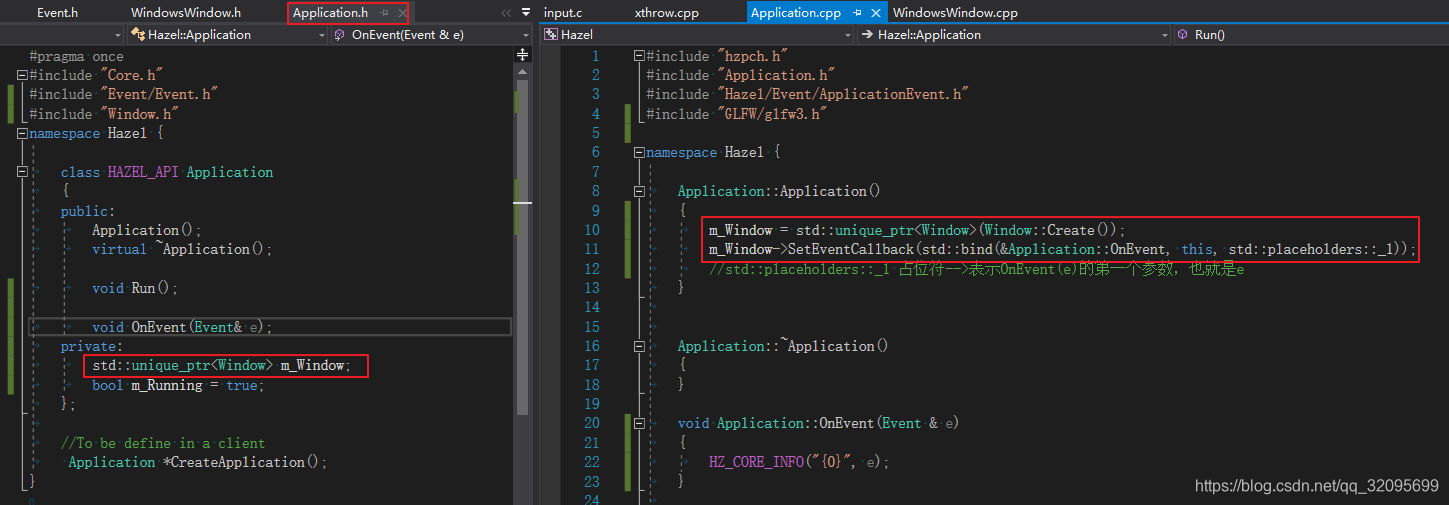
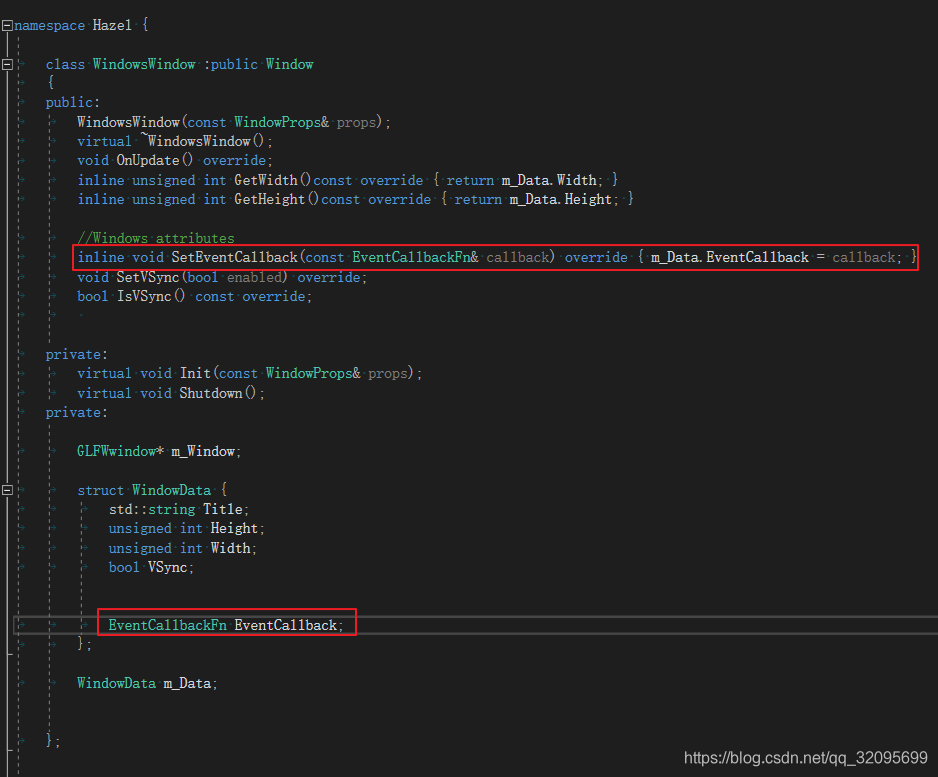
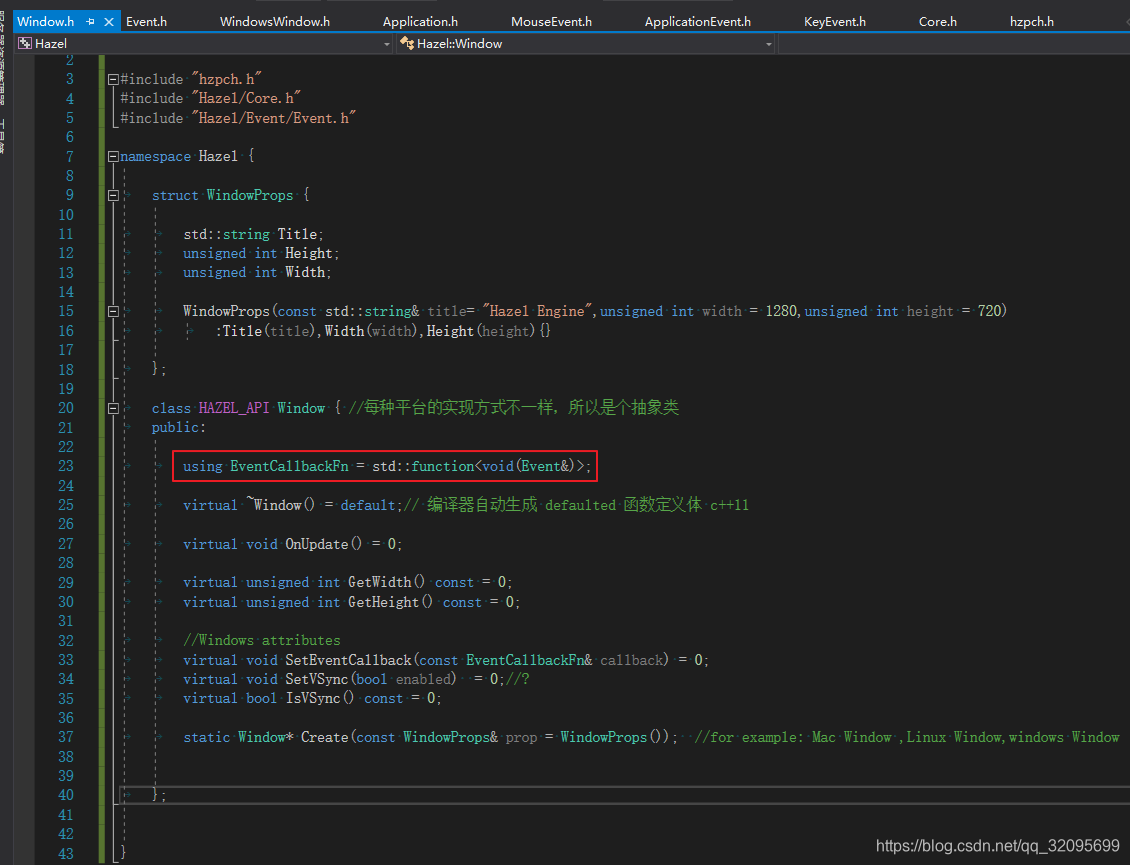
相当于
std::function<void(Event&)> m_Data.EventCallback = std::bind(&Application::OnEvent, this, std::placeholders::_1)
在Application::OnEvent ()中调用 EventDispatcher.Dispatch()把event分配到不同的event处理函数
class EventDispatcher:
class EventDispatcher
	{
		template<typename T>
		using EventFn = std::function<bool(T&)>; //输入参数类型 (T&),返回参数类型 bool
	public:
		EventDispatcher(Event& event)
			:m_Event(event){}

		template<typename T>
		bool Dispatch(EventFn<T> func) {
			if (m_Event.GetEventype() == T::GetStaticType()) {
				m_Event.m_Handled = func(*(T*)&m_Event);
				return true;
			}
			return false;
		}

	private:
		Event &m_Event;
	};
#define BIND_EVENT_FN(x) std::bind(&Application::x, this, std::placeholders::_1)
void Application::OnEvent(Event& e)
{
EventDispatcher dispatcher(e);
dispatcher.Dispatch<WindowCloseEvent>(BIND_EVENT_FN(OnWindowClose));
HZ_CORE_INFO("{0}", e);
}
bool Application::OnWindowClose(WindowCloseEvent& e)
{
m_Running = false;
return true;
}同理,dispatcher.Dispatch 也可以用lambda函数:
	void Application::OnEvent(Event& e)
	{
		EventDispatcher dispatcher(e);
		//dispatcher.Dispatch<WindowCloseEvent>(BIND_EVENT_FN(OnWindowClose));
		dispatcher.Dispatch<WindowCloseEvent>([&](WindowCloseEvent& e) {
			m_Running = false;
			return true;
		});

		HZ_CORE_INFO("{0}", e);
	}
完整的Application.cpp
#include "hzpch.h"
#include "Application.h"

#include "GLFW/glfw3.h"

namespace Hazel {
#define BIND_EVENT_FN(x) std::bind(&Application::x, this, std::placeholders::_1)
	Application::Application()
	{
		m_Window = std::unique_ptr<Window>(Window::Create());
		m_Window->SetEventCallback(BIND_EVENT_FN(OnEvent));
		//std::placeholders::_1 占位符-->表示OnEvent(e)的第一个参数,也就是e
		// m_Data.EventCallback = std::bind(&Application::OnEvent, this, std::placeholders::_1)
		//data.EventCallback(event);
		//相当于--》Application::OnEvent(event)

	}


	Application::~Application()
	{
	}

	void Application::OnEvent(Event& e)
	{
		EventDispatcher dispatcher(e);
		//dispatcher.Dispatch<WindowCloseEvent>(BIND_EVENT_FN(OnWindowClose));
		dispatcher.Dispatch<WindowCloseEvent>([&](WindowCloseEvent& e) {
			m_Running = false;
			return true;
		});

		HZ_CORE_INFO("{0}", e);
	}

	bool Application::OnWindowClose(WindowCloseEvent& e)
	{
		m_Running = false;
		return true;
	}


	void Application:: Run() {


		while (m_Running) {
			glClearColor(1, 0, 1, 1);
			glClear(GL_COLOR_BUFFER_BIT);
			m_Window->OnUpdate();
		}
	}

}
F5运行:Application已经可以捕捉到各种event了
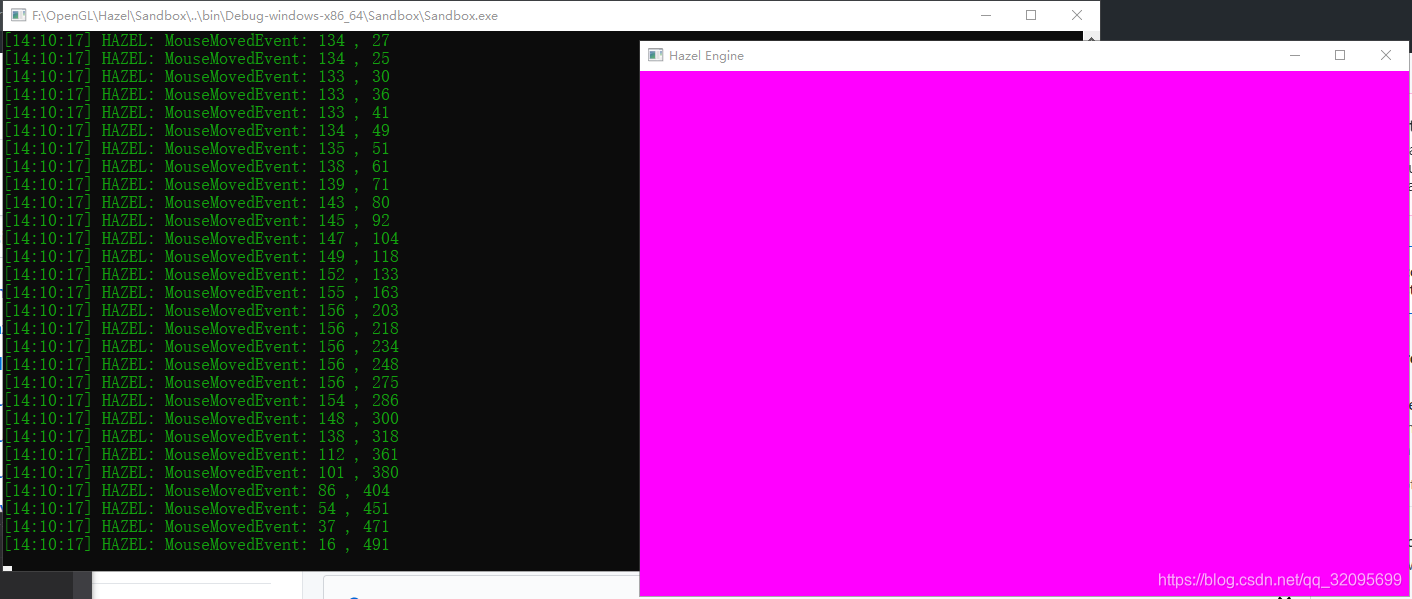
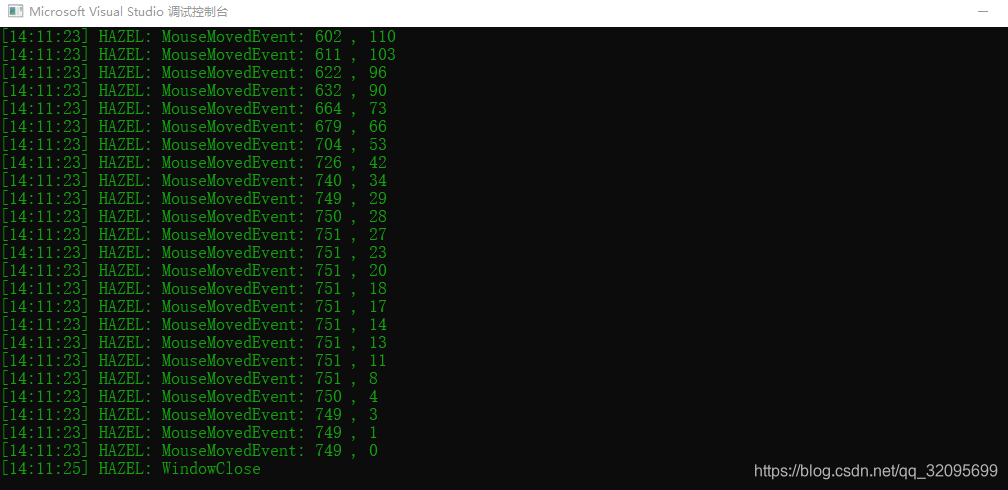
叉掉粉色窗口:捕捉到WindowCloseEvent-->m_Running = false,Appliction停止,窗口关闭
void Application::OnEvent(Event& e)
	{
		EventDispatcher dispatcher(e);
		//dispatcher.Dispatch<WindowCloseEvent>(BIND_EVENT_FN(OnWindowClose));
		dispatcher.Dispatch<WindowCloseEvent>([&](WindowCloseEvent& e) {
			m_Running = false;
			return true;
		});

		HZ_CORE_INFO("{0}", e);
	}





 扫一扫
扫一扫


 3421
3421

 被折叠的 条评论
为什么被折叠?
被折叠的 条评论
为什么被折叠?
 到【灌水乐园】发言





