





 本文介绍如何使用模块化方式在Linux环境下注册一个平台设备。通过创建并编译两个独立的模块,实现设备与驱动的匹配过程。文章详细展示了平台设备结构体的定义及设备注册、注销的过程。
我们刚刚在《六、linux虚拟平台设备注册》中,介绍了如何注册一个设备,但是呢,那种方式适合在程序定型之后那样做。当我们前期调试时,如果每一次都要编译内核,那很浪费时间,所以,今天我们来讲以模块方式注册设备。
我们先回顾一下刚刚注册设备时使用的结构体(vim include/linux/platform_device.h):
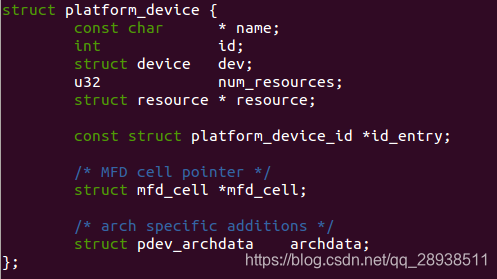
那么我们首先要创建一个platform_device类型的结构体变量,并把这个变量通过platform_device_register注册到内核中。
#include <linux/init.h>
#include <linux/module.h>

/*驱动注册的头文件,包含驱动的结构体和注册和卸载的函数*/
#include <linux/platform_device.h>

#define DRIVER_NAME "hello_ctl"

MODULE_LICENSE("Dual BSD/GPL");
MODULE_AUTHOR("TOPEET");

static void	leds_release(struct device *dev)
{
	printk("leds_release");
}

struct platform_device platform_device_led = {
	.name   = "my_code_led",
	.id     = -1,
	.dev = {
		.release = leds_release,
	}
};

static int hello_init(void)
{
	platform_device_register(&platform_device_led);
	return 0;
}

static void hello_exit(void)
{
	platform_device_unregister(&platform_device_led);
}

module_init(hello_init);
module_exit(hello_exit);
我们创建了一个name为"my_code_led"的驱动,接下来我们要创建一个名字跟他匹配的驱动:
#include <linux/init.h>
#include <linux/module.h>

/*驱动注册的头文件,包含驱动的结构体和注册和卸载的函数*/
#include <linux/platform_device.h>

#define DRIVER_NAME "my_code_led"

MODULE_LICENSE("Dual BSD/GPL");
MODULE_AUTHOR("TOPEET");

static int hello_probe(struct platform_device *pdv){

	printk(KERN_EMERG "\tinitialized\n");

	printk("pdv->name is %s\n",pdv->name);
	printk("pdv->id is %d\n",pdv->id);

	pdv->dev.release(&pdv->dev);

	return 0;
}

static int hello_remove(struct platform_device *pdv){

	return 0;
}

static void hello_shutdown(struct platform_device *pdv){

	;
}

static int hello_suspend(struct platform_device *pdv){

	return 0;
}

static int hello_resume(struct platform_device *pdv){

	return 0;
}

struct platform_driver hello_driver = {
	.probe = hello_probe,
	.remove = hello_remove,
	.shutdown = hello_shutdown,
	.suspend = hello_suspend,
	.resume = hello_resume,
	.driver = {
		.name = DRIVER_NAME,
		.owner = THIS_MODULE,
	}
};


static int hello_init(void)
{
	int DriverState;

	printk(KERN_EMERG "HELLO WORLD enter!\n");
	DriverState = platform_driver_register(&hello_driver);

	printk(KERN_EMERG "\tDriverState is %d\n",DriverState);
	return 0;
}

static void hello_exit(void)
{
	printk(KERN_EMERG "HELLO WORLD exit!\n");

	platform_driver_unregister(&hello_driver);
}

module_init(hello_init);
module_exit(hello_exit);
然后,分别编译成两个模块。记得先加载设备模块,然后再加载驱动模块,不然驱动模块加载时,没有匹配到对应设备名称,将无法执行hello_probe。
命名有点乱,学习就先不管了。
再留下一个思考:如果设备有对应的参数,我们应该怎么体现出来呢?





 扫一扫
扫一扫


 1316
1316

 被折叠的 条评论
为什么被折叠?
被折叠的 条评论
为什么被折叠?
 到【灌水乐园】发言





