



 本文介绍了如何使用QT调用外部exe程序并进行参数传递。首先,展示了外部exe程序如何接受输入参数,通过获取QT提供的参数进行处理。接着,详细解释了QT如何输出参数到exe,并演示了在QT界面中点击按钮执行exe后,成功接收并显示参数的实例。

1-外部exe程序接受输入参数
以下是需要调用的exe程序的源码,主要思路就是获取QT输入的参数,当输入参数为1是时便输出Hello CodeLab!
这里主要要关注一下int argc, char* argv[]这两个参数,其中argc表示的是输入参数的个数, argv[]则表示输入的具体参数,要注意的是默认会输入一个exe程序文件路径的参数,所以自定义参数下标是从1开始的。
#include <iostream>

int main(int argc, char* argv[]) {
    std::cout << <<argc << std::endl;//输出参数的个数
    for(int i = 0;i<argc;i++){
        std::cout<<argv[i]<<std::endl;//输出具体参数
    }
    if(*argv[1] == '1'){//提取第一个参数,
        std::cout << "Hello CodeLab!" << std::endl;
    }
    return 0;
}
2-QT输出参数到exe并接收参数显示
这里的方法和QT之调用cmd并执行ping命令是类似,只不过这里调用的是自定义exe程序文件,源码如下:
#include "mainwindow.h"
#include "ui_mainwindow.h"
#include <qdebug.h>
#include <qprocess.h>

MainWindow::MainWindow(QWidget *parent) :
    QMainWindow(parent),
    ui(new Ui::MainWindow){
    ui->setupUi(this);
}
MainWindow::~MainWindow(){
    delete ui;
}
void MainWindow::on_btnPing_clicked(){
    qDebug()<<QStringLiteral("开始点击");
    ui->textBrowser->clear();
    ui->textBrowser->setText(QStringLiteral("请等待"));
    ui->textBrowser->update();
    QProcess myProcess(this);
    QString program =  "C:\\test.exe";
    QStringList arguments;
    arguments<<"1";//传递到exe的参数
    myProcess.start(program,arguments);
    while (myProcess.waitForFinished(100) == false) {
        QByteArray qByteRead = myProcess.readAllStandardOutput();
        if (!qByteRead.isEmpty()) {
            ui->textBrowser->append(QString::fromLocal8Bit(qByteRead));
            repaint();
        }
    }
    QByteArray qByteRead = myProcess.readAllStandardOutput();
    ui->textBrowser->append(QString::fromLocal8Bit(qByteRead));
    qDebug()<<QString::fromLocal8Bit(qByteRead);
    qDebug()<<"结束点击";
}
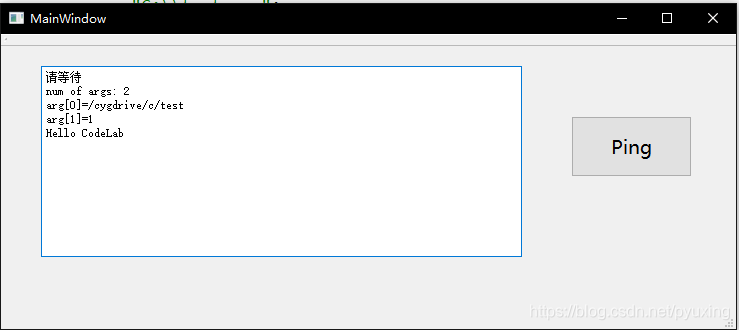
运行QT界面并点击ping可以得到如下的结果:





 扫一扫
扫一扫


 1283
1283

 被折叠的 条评论
为什么被折叠?
被折叠的 条评论
为什么被折叠?
 到【灌水乐园】发言





