



ElasticSearch Quick Start

local Install
elastic/start-local: Try Elasticsearch and Kibana locally
Start a single-node cluster in Docker | Elastic Docs
-
If you don’t have Docker installed, download and install Docker Desktop for your operating system.
-
If you’re using Microsoft Windows, then install Windows Subsystem for Linux (WSL).
-
download file : https://elastic.co/start-local
-
sh ./ start-local -s -- -v 8.19
设置ssl和用户名密码
input {
  file {
    path => "/home/nginx.log"
    start_position => "beginning"
    sincedb_path => "/dev/null"
  }
}

filter {
  json {
    source => "message"
  }
  geoip {
    source => "remote_ip"
	  target => "geoip"
    ecs_compatibility => "v1"
  }
  useragent {
    source => "agent"
    target => "useragent"
  }
}

output {
  elasticsearch {
    hosts => ["http://elasticsearch:9200"]
    index => "nginx"
    user => "elastic"
    password => "123456"
  }
  stdout {
    codec => rubydebug
  }
}
services:
  elasticsearch:
    image: elasticsearch:8.19.2
    container_name: es
    environment:
      discovery.type: single-node
      ES_JAVA_OPTS: "-Xms512m -Xmx512m"
      ELASTIC_PASSWORD: "123456"
      xpack.security.http.ssl.enabled: "false"
    ports:
      - "9200:9200"
      - "9300:9300"
    healthcheck:
      test: ["CMD-SHELL", "curl --silent --fail localhost:9200/_cluster/health || exit 1"]
      interval: 10s
      timeout: 10s
      retries: 3
    networks:
      - elastic
  logstash:
    image: logstash:8.19.2
    container_name: log
    environment:
      ELASTICSEARCH_USERNAME: elastic
      ELASTICSEARCH_PASSWORD: 123456
      discovery.seed_hosts: logstash
      LS_JAVA_OPTS: "-Xms512m -Xmx512m"
    volumes:
      - ./logstash/pipeline/logstash-nginx.config:/usr/share/logstash/pipeline/logstash-nginx.config
      - ./logstash/nginx.log:/home/nginx.log
    ports:
      - "5000:5000/tcp"
      - "5000:5000/udp"
      - "5044:5044"
      - "9600:9600"
    depends_on:
      - elasticsearch
    networks:
      - elastic
    command: logstash -f /usr/share/logstash/pipeline/logstash-nginx.config
  kibana:
    image: kibana:8.19.2
    container_name: kib
    ports:
      - "5601:5601"
    depends_on:
      - elasticsearch
    networks:
      - elastic
    environment:
      # If you want to use the hanlin user, you need to create this user first using the API or Kibana, and assign a password and roles. Otherwise, you can only log in with the elastic user.
#    curl --request POST \
#    --url http://localhost:9200/_security/user/kibana_user \
#    --header 'Authorization: Basic ZWxhc3RpYzoxMjM0NTY=' \
#    --header 'content-type: application/json' \
#    --data '{
#    "password": "123456",
#    "roles": [ "kibana_system" ],
#    "full_name": "kibana_user"
#    }'
      - "ELASTICSEARCH_USERNAME=kibana_user"
      - "ELASTICSEARCH_PASSWORD=123456"
networks:
  elastic:
    driver: bridge
curl --request POST \
  --url http://localhost:9200/_security/user/kibana_user \
  --header 'Authorization: Basic ZWxhc3RpYzoxMjM0NTY=' \
  --header 'content-type: application/json' \
  --data '{
  "password" : "123456",
  "roles" : [ "kibana_system" ],
  "full_name" : "kibana_user"
}'
localhost access
kibanna: http://localhost:5601/app/discover#/
http://localhost:5601/app/dev_tools#/console/shell
# Welcome to the Dev Tools Console!
#
# You can use Console to explore the Elasticsearch API. See the Elasticsearch API reference to learn more:
# https://www.elastic.co/guide/en/elasticsearch/reference/current/rest-apis.html
#
# Here are a few examples to get you started.


# Create an index
PUT /my-index


# Add a document to my-index
POST /my-index/_doc
{
    "id": "park_rocky-mountain",
    "title": "Rocky Mountain",
    "description": "Bisected north to south by the Continental Divide, this portion of the Rockies has ecosystems varying from over 150 riparian lakes to montane and subalpine forests to treeless alpine tundra."
}


# Perform a search in my-index
GET /my-index/_search?q="rocky mountain"


GET /nginx/_search
{
  "query": {
    "match_all": {}
  }
}


GET /nginx/_search
{
  "query": {
    "match": {
      "geoip.ip.keyword": "93.180.71.3"
    }
  }
}
es: http://localhost:9200/_nodes
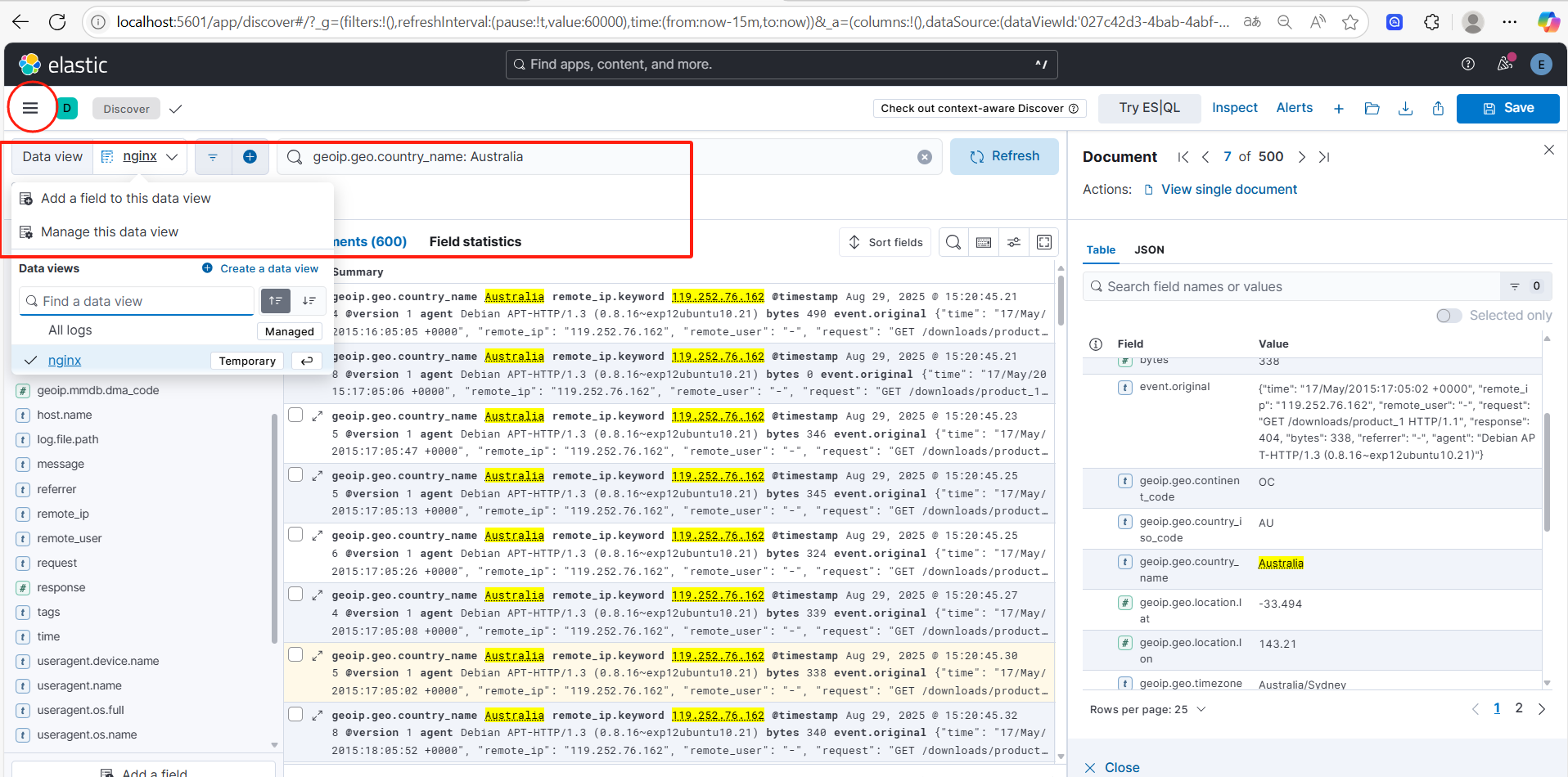
quick start
Elasticsearch Java Client release notes | Java
Srpingboot 3.x.x Integration ES 8.19.2 Demo
package com.hanson.dao;

import com.hanson.document.NGLogsDoc;
import org.springframework.data.elasticsearch.annotations.Highlight;
import org.springframework.data.elasticsearch.annotations.HighlightField;
import org.springframework.data.elasticsearch.annotations.HighlightParameters;
import org.springframework.data.elasticsearch.core.SearchHit;
import org.springframework.data.elasticsearch.repository.ElasticsearchRepository;
import org.springframework.stereotype.Repository;
import java.util.List;

@Repository
public interface NGLogsRepository extends ElasticsearchRepository<NGLogsDoc, Integer> {

    /**
     * 查询内容标题查询
     * @param title 标题
     * @param content 内容
     * @return 返回关键字高亮的结果集
     */
    @Highlight(
            fields = {@HighlightField(name = "title"), @HighlightField(name = "content")},
            parameters = @HighlightParameters(preTags = {"<span style='color:red'>"}, postTags = {"</span>"}, numberOfFragments = 0)
    )
    List<SearchHit<NGLogsDoc>> findByTitleOrContent(String title, String content);

}
package com.hanson.document;

import lombok.Data;
import org.springframework.data.annotation.Id;
import org.springframework.data.elasticsearch.annotations.Document;
import org.springframework.data.elasticsearch.annotations.Field;
import org.springframework.data.elasticsearch.annotations.FieldType;
//@Document 文档对象 (索引信息、文档类型 )
@Document(indexName="hanlin-nglogs")
@Data
public class NGLogsDoc {

    //@Id 文档主键 唯一标识
    @Id
    //@Field 每个文档的字段配置(类型、是否分词、是否存储、分词器 )
    @Field(store=true, index = false,type = FieldType.Integer)
    private Integer id;

//    @Field(index=true,analyzer="ik_smart",store=true,searchAnalyzer="ik_smart",type = FieldType.Text)
    private String title;

//    @Field(index=true,analyzer="ik_smart",store=true,searchAnalyzer="ik_smart",type = FieldType.Text)
    private String content;

    @Field(index=true,store=true,type = FieldType.Double)
    private Double price;
}
package com.hanson.service;

import com.hanson.document.NGLogsDoc;
import org.springframework.data.elasticsearch.core.SearchHit;

import java.util.List;

public interface NGLogsDocService {

    //保存和修改
    void save(NGLogsDoc article);
    //查询id
    NGLogsDoc findById(Integer id);
    //删除指定ID数据
    void   deleteById(Integer id);

    long count();

    boolean existsById(Integer id);

    List<SearchHit<NGLogsDoc>> findByTitleOrContent(String title, String content);

}
package com.hanson.service;

import com.hanson.dao.NGLogsRepository;
import com.hanson.document.NGLogsDoc;
import jakarta.annotation.Resource;
import org.springframework.data.elasticsearch.core.SearchHit;
import org.springframework.stereotype.Service;

import java.util.List;

@Service
public class NGLogsDocServiceImpl implements NGLogsDocService {
    @Resource
    private NGLogsRepository NGLogsDocRepository;


    @Override
    public void save(NGLogsDoc NGLogsDoc) {
        NGLogsDocRepository.save(NGLogsDoc);
    }

    @Override
    public NGLogsDoc findById(Integer id) {
        return NGLogsDocRepository.findById(id).orElse(new NGLogsDoc());
    }

    @Override
    public void deleteById(Integer id) {
        NGLogsDocRepository.deleteById(id);
    }

    @Override
    public long count() {
        return NGLogsDocRepository.count();
    }

    @Override
    public boolean existsById(Integer id) {
        return NGLogsDocRepository.existsById(id);
    }

    @Override
    public List<SearchHit<NGLogsDoc>> findByTitleOrContent(String title, String content) {
        return NGLogsDocRepository.findByTitleOrContent(title,content);
    }
}
package com.hanson;

import org.springframework.boot.SpringApplication;
import org.springframework.boot.autoconfigure.SpringBootApplication;

@SpringBootApplication
public class EsSpikeApplication {

    public static void main(String[] args) {
        SpringApplication.run(EsSpikeApplication.class, args);
    }

}
import com.hanson.EsSpikeApplication;
import com.hanson.document.NGLogsDoc;
import com.hanson.service.NGLogsDocService;
import jakarta.annotation.Resource;
import org.junit.jupiter.api.Test;
import org.junit.runner.RunWith;
import org.springframework.boot.test.context.SpringBootTest;
import org.springframework.data.elasticsearch.client.elc.ElasticsearchTemplate;
import org.springframework.data.elasticsearch.core.SearchHit;
import org.springframework.test.context.junit4.SpringRunner;

import java.util.List;

@SpringBootTest(classes = EsSpikeApplication.class)
public class SearchNGLogsTest {

    @Resource
    private NGLogsDocService NGLogsDocService;

    @Resource
    private ElasticsearchTemplate elasticsearchTemplate;
    /**创建索引和映射*/
    @Test
    public void createIndex() {
        elasticsearchTemplate.indexOps(NGLogsDoc.class).create();
        elasticsearchTemplate.indexOps(NGLogsDoc.class).putMapping();
    }

    /**添加文档或者修改文档(以id为准)*/
    @Test
    public void saveNGLogsDoc(){
        NGLogsDoc NGLogsDoc = new NGLogsDoc();
        NGLogsDoc.setId(1);
        NGLogsDoc.setTitle("SpringData NGLogsDoc");
        NGLogsDoc.setContent("Spring Data NGLogsDoc 基于 spring data API 简化 NGLogsDoc操作,将原始操作NGLogsDoc的客户端API 进行封装 \n" +
                "    Spring Data为NGLogsDoc NGLogsDoc项目提供集成搜索引擎");
        NGLogsDocService.save(NGLogsDoc);
    }
    @Test
    public void findById(){
        NGLogsDoc byId = NGLogsDocService.findById(1);
        System.out.println(byId);
    }
    @Test
    public void deleteById(){
        NGLogsDocService.deleteById(100);

    }
    @Test
    public void count(){
        long count = NGLogsDocService.count();
        System.out.println(count);
    }
    @Test
    public void existsById(){
        boolean b = NGLogsDocService.existsById(102);

        System.out.println(b);
    }
    @Test
    public void findByTitleOrContent(){
        List<SearchHit<NGLogsDoc>> byTitleOrContent = NGLogsDocService.findByTitleOrContent("xxxxxxSpringData","NGLogsDoc");
        for (SearchHit<NGLogsDoc> NGLogsDocService : byTitleOrContent) {
            List<String> title = NGLogsDocService.getHighlightField("title");
            System.out.println(title);
            List<String> content = NGLogsDocService.getHighlightField("content");
            System.out.println(content);

        }
    }
}
spring:
  elasticsearch:
    uris: http://127.0.0.1:9200
    password: 123456
    username: elastic
    connection-timeout: 5s
    socket-timeout: 3s
<?xml version="1.0" encoding="UTF-8"?>
<project xmlns="http://maven.apache.org/POM/4.0.0"
         xmlns:xsi="http://www.w3.org/2001/XMLSchema-instance"
         xsi:schemaLocation="http://maven.apache.org/POM/4.0.0 http://maven.apache.org/xsd/maven-4.0.0.xsd">
    <modelVersion>4.0.0</modelVersion>

    <parent>
        <groupId>org.springframework.boot</groupId>
        <artifactId>spring-boot-starter-parent</artifactId>
        <version>3.5.5</version>
        <relativePath/> <!-- lookup parent from repository -->
    </parent>

    <groupId>com.hanson</groupId>
    <artifactId>springboot-es-spike</artifactId>
    <version>1.0-SNAPSHOT</version>

    <properties>
        <maven.compiler.source>21</maven.compiler.source>
        <maven.compiler.target>21</maven.compiler.target>
        <project.build.sourceEncoding>UTF-8</project.build.sourceEncoding>
    </properties>

    <dependencies>
        <dependency>
            <groupId>org.springframework.boot</groupId>
            <artifactId>spring-boot-starter-data-elasticsearch</artifactId>
        </dependency>

        <dependency>
            <groupId>org.projectlombok</groupId>
            <artifactId>lombok</artifactId>
            <optional>true</optional>
        </dependency>

        <dependency>
            <groupId>org.springframework.boot</groupId>
            <artifactId>spring-boot-starter-test</artifactId>
            <scope>test</scope>
        </dependency>
        <dependency>
            <groupId>junit</groupId>
            <artifactId>junit</artifactId>
            <version>4.13.1</version>
            <scope>test</scope>
        </dependency>
    </dependencies>

    <build>
        <plugins>
            <plugin>
                <groupId>org.springframework.boot</groupId>
                <artifactId>spring-boot-maven-plugin</artifactId>
            </plugin>
        </plugins>
    </build>

</project>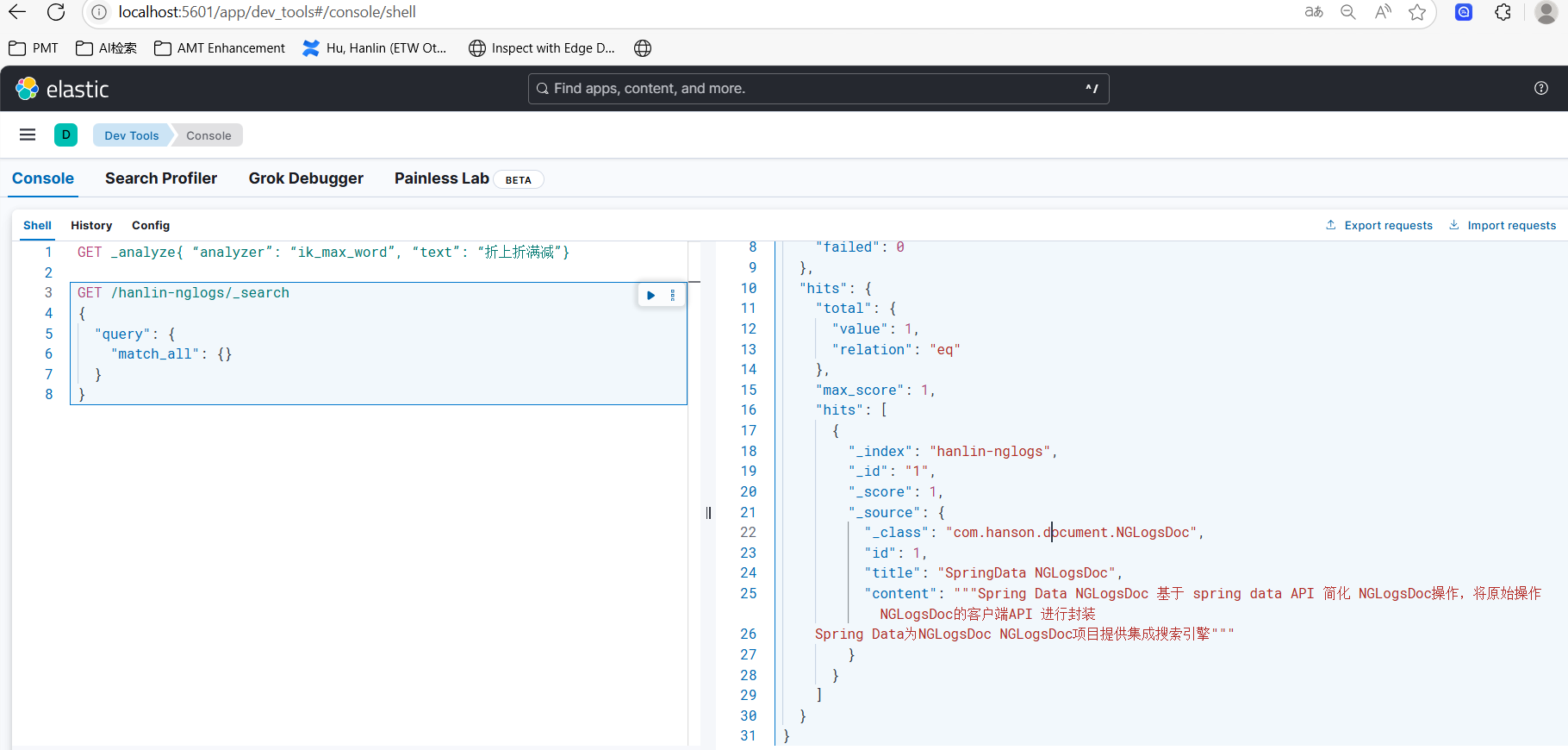
Enjoy it.





 扫一扫
扫一扫


 1360
1360

 被折叠的 条评论
为什么被折叠?
被折叠的 条评论
为什么被折叠?
 到【灌水乐园】发言





