


 本文详细介绍了如何使用Terraform在GoogleCloudPlatform(GCP)上创建实例模板和基于模板的VM,包括使用`google_compute_instance_template`和`google_compute_instance_from_template`资源。着重展示了如何配置实例模板以及如何覆盖模板默认设置以满足特定需求。
本人在上一篇的文章中已经介绍了如何去创建 google cloud的 vm 的image 和 instance template了
url:
快速构建自定义配置好的VM - 使用GCP instance-template 和 custom-image
但是里面的操作是基于gcloud CLI的。
在实际项目上, 我们对google cloud infra的change 更常有的是terraform。 这里也简单介绍下如何利用terraform去创建vm instance template 和对应的vm
下面的内容都是参考自官方terraform 文档:
https://registry.terraform.io/providers/hashicorp/google/latest/docs/resources/compute_instance_from_template
创建 实例模板 vm instance template
首先在terraform的vm module里新建1个tf 文件 instance_template.tf, 其实terraform的module folder 内是支持把内容写在多个文件的, 比起单一的main.tf 来讲更加容易管理
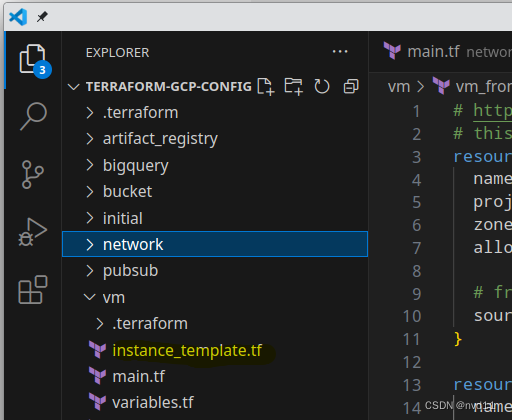
接下来就简单了, 我们可以把vm module原来了定义vm的代码块抄过来, 只是下面的部分需要注意修改:
resource "google_compute_instance_template" "vm-template-vpc0-subnet0-e2-small-tomcat" {


  name         = "vm-template-vpc0-subnet0-e2-small-tomcat"
  machine_type = "e2-small"

  disk {


    source_image = "https://compute.googleapis.com/compute/v1/projects/jason-hsbc/global/images/e2-small-tomcat-image"
    auto_delete  = true
    disk_size_gb = 20
    boot         = true
  }

  network_interface {


    network =  var.vpc0
    subnetwork =  var.vpc0_subnet0
  }

 service_account {


    email  = "vm-common@jason-hsbc.iam.gserviceaccount.com"
    scopes = ["https://www.googleapis.com/auth/cloud-platform"]
  }

  # https://registry.terraform.io/providers/hashicorp/google/latest/docs/resources/compute_instance#provisioning_model
  # to reduce cost
  scheduling {


    automatic_restart = false # Scheduling must have preemptible be false when AutomaticRestart is true.
    provisioning_model = "SPOT"
    preemptible         = true
    instance_termination_action = "STOP"
  }

  can_ip_forward = false
}
注意修改的部分:
- resource 是google_compute_instance_template 而不是 google_compute_instance
- source image 记得改成你自定义的image, 如果你需要预安装配置某些软件的话(jdk/tomcat…)
当执行玩terraform 一套命令后(init/plan/apply) , 1个新的vm instance template 就会被创建vm-template-vpc0-subnet0-e2-small-tomcat
[ 最低0.47元/天 解锁文章






 扫一扫
扫一扫


 1758
1758

 被折叠的 条评论
为什么被折叠?
被折叠的 条评论
为什么被折叠?
 到【灌水乐园】发言





