


 本文介绍如何在WPF项目中使用WinForm的PictureBox控件,并指导读者如何加载WindowsFormsIntegration和System.Windows.Forms依赖,以及在XAML中正确配置控件。
前言
由于最近在写视频播放界面,sdk文档上的方法中提到需要获取到控件的手柄,但wpf里this.Handle代表的是整个窗体的手柄,sdk的demo是使用winform的控件PictureBox,但在wpf里没有这个控件,在网上查找资料时发现wpf里可以使用winform的控件。一:加载winform的依赖
1.WindowsFormsIntegration.dll,System.Windows.Forms.dll。
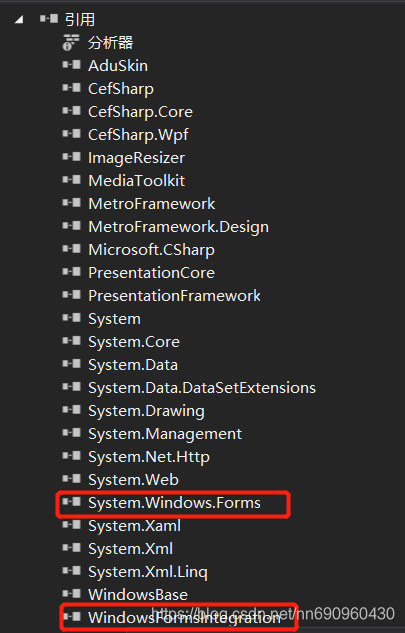
二:在xmal里加入需要引入的xml和控件
1.在xmal里加入依赖
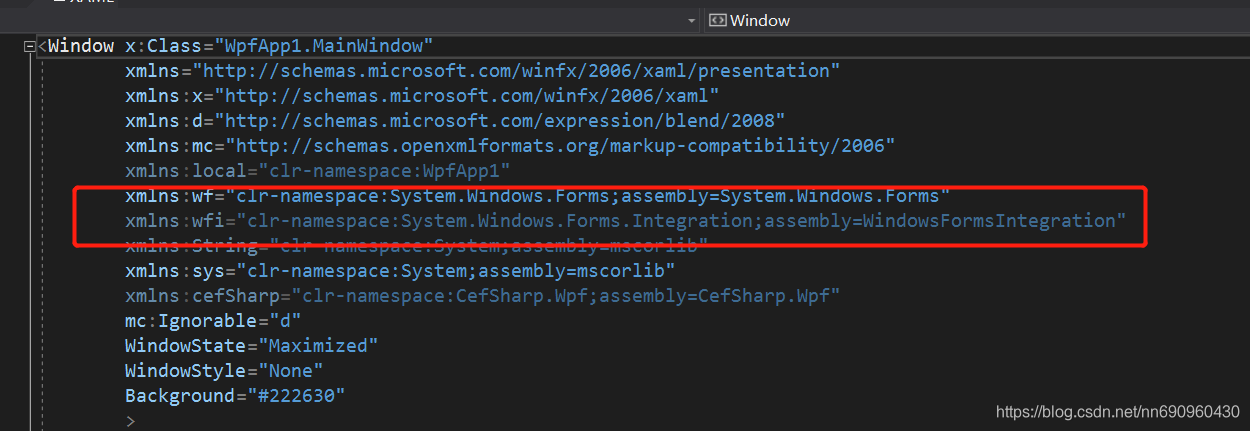
xmlns:wfh="clr-namespace:System.Windows.Forms.Integration;assembly=WindowsFormsIntegration"
xmlns:wfc="clr-namespace:System.Windows.Forms;assembly=System.Windows.Forms"
2.加入控件
<WindowsFormsHost x:Name="form4" Grid.Row="2" Grid.Column="2" Background="Black" >
                    <wf:PictureBox x:Name="userCtrl4" MouseDoubleClick="BWinForms_DocumentTitleChanged3"/>
</WindowsFormsHost>





 扫一扫
扫一扫


 1286
1286

 被折叠的 条评论
为什么被折叠?
被折叠的 条评论
为什么被折叠?
 到【灌水乐园】发言





