



NextPilot 基于RT-Thread实时操作系统而打造的,为了更高效的进行 NextPilot 项目开发,技术团队在 RT-Thread env-windows 基础上重新制作了nextpilot-windows-toolchain(github | gitee) 和nextpilot-ubuntu-toolchain(github | gitee),他们相当于 RT-Thread env-windows 的定制升级版,做到开箱即用。
nextpilot-windows/ubuntu-toolchain 集成或自动安全以下工具:
- python 3:集成了scons,kconfiglib,mkdocs,pyulog等软件包
- gcc-arm-none-eabi:用于编译飞控固件
- qemu-system-aram:硬件模拟器,用于虚拟飞行仿真
- git:软件版本管理
- CoEmu:Windows终端控制台(集成clink),比CMD.exe更好用
Windows环境下
下载工具链
下载/克隆nextpilot-windows-toolchain(github | gitee) 到C:\nextpilot-windows-toolchain文件夹。
git clone --depth=1 https://github.com/nextpilot/nextpilot-windows-toolchain.git
注意:暂时工具链只能保存到
C:\nextpilot-windows-toolchain文件夹,否则会提示找不到python.exe。
原因是:安装pip软件包时会将python绝对路径的写入exe文件中,工具链中预装pip包时用的路径是 C:\nextpilot-windows-toolchain,如果将toolchain安装到其它路径(比如D:\nextpilot-windows-toolchai),运行 scons.exe 等工具的时候会提示找不到 c:\nextpilot-windows-toolchain\toolchain\python\python-3.11.9-amd64\python.exe,告警信息如下:
Fatal error in launcher: Unable to create process using '"C:\nextpilot-windows-toolchain\toolchain\python\python-3.11.9-amd64\python.exe" "D:\nextpilot-windows-toolchain\toolchain\python\python-3.11.9-amd64\Scripts\scons.exe" ': ???????????
添加右键菜单
双击 Nextpilot-windows-toolchain/start.bat 脚本启动 ConEmu 终端,然后在 ConEmu > Settings... 设置页面,按照下图所示添加右键快捷菜单:
- Menu item:NextPilot Here
- Command:{cmd} -cur_console:n
- Icon file:C:\nextpilot-windows-toolchain\toolchain\conemu\ConEmuPack.230724\ConEmu64.exe,0
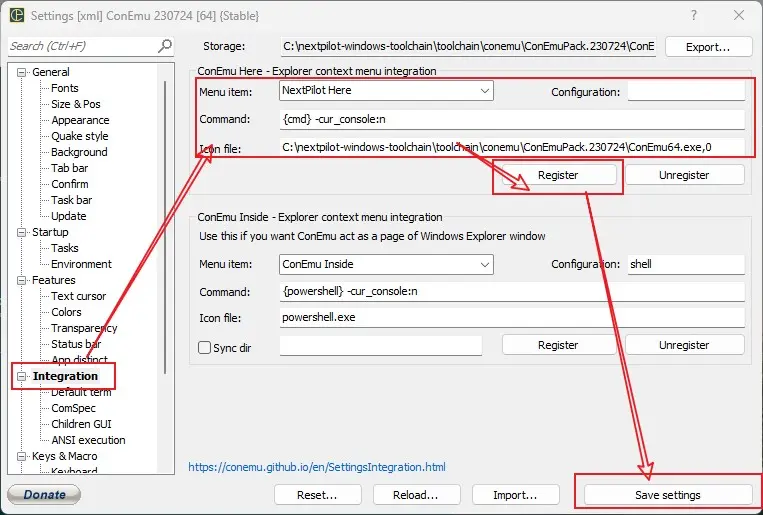
当然如果您已经安装 Windows Terminal,那么已将 NextPilot 添加到 Windows Terminal。打开Windows Termial > 设置设置页面,选择添加新配置文件,按照如下填写:
- 名称:
NextPilot Windows Toolchain - 命令行:
cmd.exe /k C:\nextpilot-windows-toolchain\init.bat - 其它设置,全部保持默认即可
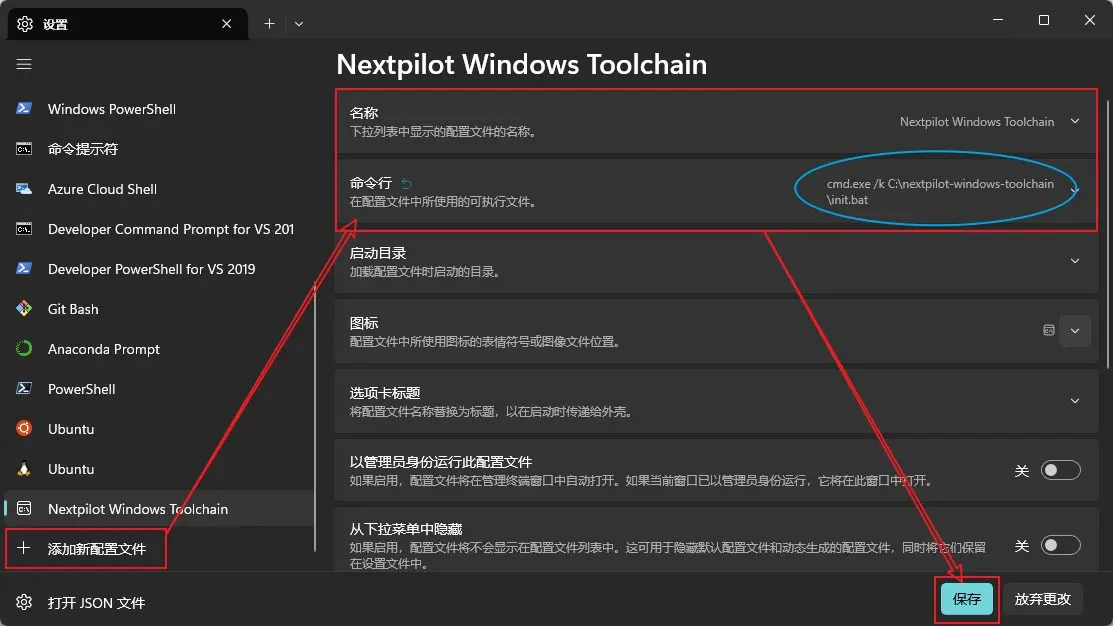
为了方便使用,建议将 NextPilot Windows Toolchain 设置为默认终端,设置方式是: Windows Terminal > 设置 > 启动 > 默认配置文件。
启动开发终端
在 nextpilot 工程的 bsps 子文件夹中,比如bsps/sitl/qemu文件夹上点击鼠标右键选择NextPilot Here方式启动终端。
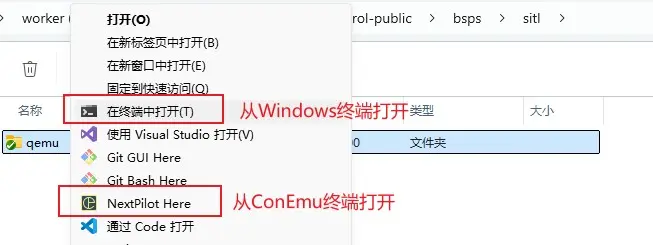
启动 ConEmu 终端后,会显示如下信息:
******************************************************************
*      _   __             __   ____   _  __        __
*     / | / /___   _  __ / /_ / __ \ (_)/ /____   / /_
*    /  |/ // _ \ | |/_// __// /_/ // // // __ \ / __/
*   / /|  //  __/_>  < / /_ / ____// // // /_/ // /_
*  /_/ |_/ \___//_/|_| \__//_/    /_//_/ \____/ \__/
*
* Copyright All Reserved (C) 2015-2024 NextPilot Development Team
******************************************************************

Clink v1.6.14 is available.
- To apply the update, run 'clink update'.
- To stop checking for updates, run 'clink set clink.autoupdate off'.
- To view the release notes, visit the Releases page:
  https://github.com/chrisant996/clink/releases

LaterComer@DESKTOP-JTKLBS9 C:\nextpilot-flight-control-public\bsps\sitl\qemu
Ubuntu环境下
下载工具链
请下载/克隆nextpilot-ubuntu-toolchain(github | gitee)到任意不包含中文的目录。
git clone --depth=1 https://github.com/nextpilot/nextpilot-ubunut-toolchain.git ~/.ndt激活工具链
首次运行 ~/.ndt/init.bat 时会创建python venv环境并安装必要的工具。
source ~/.ndt/init.sh编译NextPilot工程
在cmd中切换到nextpilot-flight-control的bsp目录,然后执行配置、编译、仿真等
rem 切换到sitl虚拟飞行仿真目录
cd nextpilot-flight-control\bsps\sitl\qemu

rem 配置编译模块,非必须
scons --menuconfig
scons default --menuconfig

rem 生成keil工程
scons --target=mdk5
scons default --target=mdk5

rem 编译固件
scons -j10
scons default -j10

rem 启动仿真
qemu.bat
注意:bsps/sitl/qemu/config/文件夹下面保存了很多*.config文件(比如default.config),scons default表示使用default.config配置文件。
关于NextPilot飞控
NextPilot飞控系统是一款基于px4和rt-thread的国产开源自动驾驶仪,由NextPilot开发团队(nextpilot@qq.com)负责维护。它能够便捷的应用于教育、研究和工业等领域,让工程师专注于自己的擅长领域(比如嵌入式、控制算法、应用业务)进行高效的开发。





 扫一扫
扫一扫


 1184
1184

 被折叠的 条评论
为什么被折叠?
被折叠的 条评论
为什么被折叠?
 到【灌水乐园】发言





