


一 Nano Banana 介绍
谷歌最近发布了,这是一种强大的图像生成和编辑新模型,代号为 Nano Banana。该模型引入了用于创建和作图像的最先进的功能,解锁了广泛的新应用程序。Gemini 2.5 Flash Image
二 功能介绍
核心功能:
图像创建
图片编辑
照片修复
多个输入图像
对话式图像编辑
三 代码实践
来自谷歌自身的《如何使用 Nano Banana 进行构建:完整的开发人员教程》文章。 下面会用python代码调用API,需要先安装依赖库,以python为例:
pip install -U google-genai
# Install the Pillow library for image manipulation
pip install Pillow
3.1 图像创建
使用 Nano Banana 从描述性文本提示生成一个或多个图像。对所有 API 请求使用模型 ID gemini-2.5-flash-image-preview。
代码:
from google import genai
from PIL import Image
from io import BytesIO

# Configure the client with your API key
client = genai.Client(api_key="YOUR_API_KEY")

prompt = """Create a photorealistic image of an orange cat
with a green eyes, sitting on a couch."""

# Call the API to generate content
response = client.models.generate_content(
    model="gemini-2.5-flash-image-preview",
    contents=prompt,
)

# The response can contain both text and image data.
# Iterate through the parts to find and save the image.
for part in response.candidates[0].content.parts:
    if part.text is not None:
        print(part.text)
    elif part.inline_data is not None:
        image = Image.open(BytesIO(part.inline_data.data))
        image.save("cat.png")
生成图: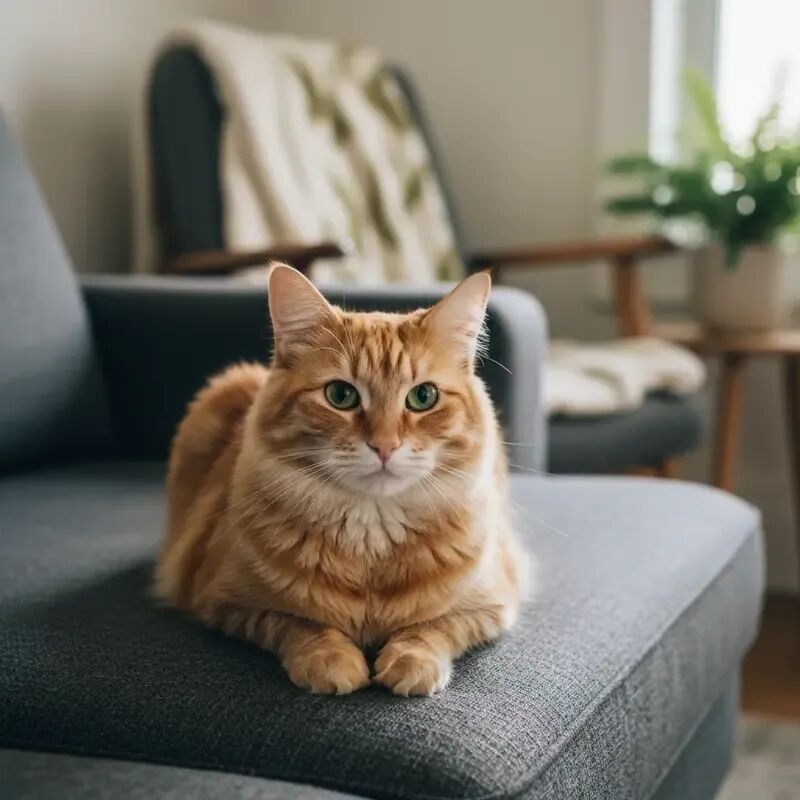
3.2 使用文本和图像输入进行图像编辑
提供现有图像以及执行编辑的文本提示。该模型擅长保持输入图像的字符和内容一致性。
代码:
from google import genai
from PIL import Image
from io import BytesIO

client = genai.Client(api_key="YOUR_API_KEY")

prompt = """Using the image of the cat, create a photorealistic,
street-level view of the cat walking along a sidewalk in a
New York City neighborhood, with the blurred legs of pedestrians
and yellow cabs passing by in the background."""

image = Image.open("cat.png")

# Pass both the text prompt and the image in the 'contents' list
response = client.models.generate_content(
    model="gemini-2.5-flash-image-preview",
    contents=[prompt, image],
)

for part in response.candidates[0].content.parts:
    if part.text is not None:
        print(part.text)
    elif part.inline_data is not None:
        image = Image.open(BytesIO(part.inline_data.data))
        image.save("cat2.png")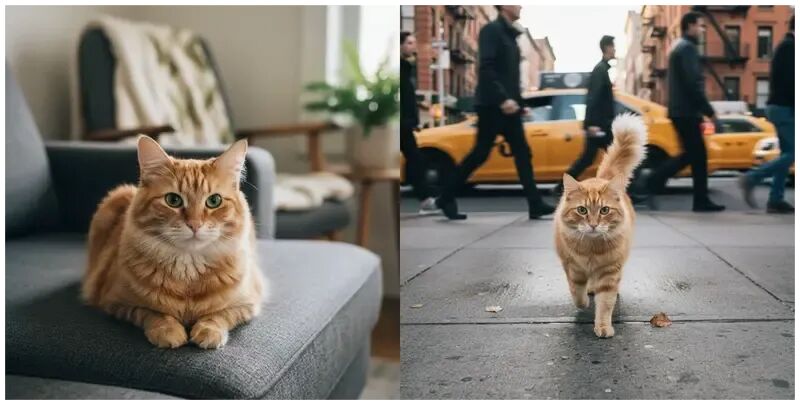
3.3 用 Nano Banana 修复照片
该模型的强大应用之一是照片修复。只需一个简单的提示,它就可以恢复和着色旧照片,并获得令人印象深刻的效果。
代码:
from google import genai
from PIL import Image
from io import BytesIO

client = genai.Client(api_key="YOUR_API_KEY")

prompt = "Restore and colorize this image from 1932"

image = Image.open("lunch.jpg")  # "Lunch atop a Skyscraper, 1932"

response = client.models.generate_content(
    model="gemini-2.5-flash-image-preview",
    contents=[prompt, image],
)

for part in response.candidates[0].content.parts:
    if part.text is not None:
        print(part.text)
    elif part.inline_data is not None:
        image = Image.open(BytesIO(part.inline_data.data))
        image.save("lunch-restored.png")
修复图前后对比: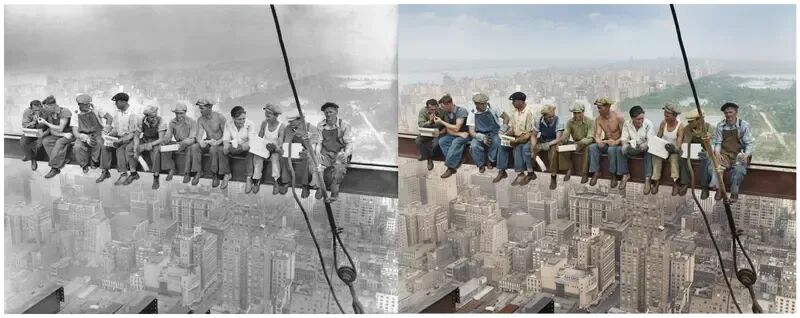
3.4 使用多个输入图像
您可以提供多个图像作为输入,以执行更复杂的编辑任务。
from google import genai
from PIL import Image
from io import BytesIO

client = genai.Client(api_key="YOUR_API_KEY")

prompt = "Make the girl wear this t-shirt. Leave the background unchanged."

image1 = Image.open("girl.png")
image2 = Image.open("tshirt.png")

response = client.models.generate_content(
    model="gemini-2.5-flash-image-preview",
    contents=[prompt, image1, image2],
)

for part in response.candidates[0].content.parts:
    if part.text is not None:
        print(part.text)
    elif part.inline_data is not None:
        image = Image.open(BytesIO(part.inline_data.data))
        image.save("girl-with-tshirt.png")
合成图: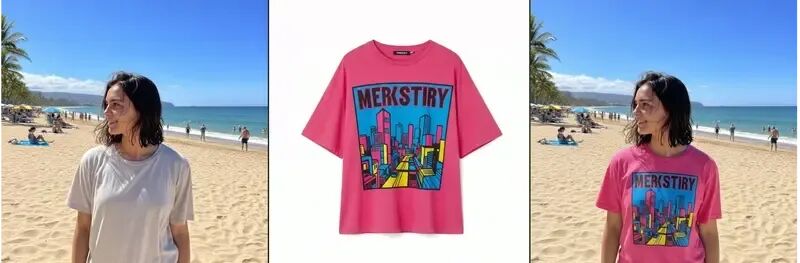
3.5 对话式图像编辑
为了进行迭代优化,可以使用聊天会话来维护多个请求的上下文。这允许您以对话方式编辑图像。
from google import genai
from PIL import Image
from io import BytesIO

client = genai.Client(api_key="YOUR_API_KEY")

# Create a chat
chat = client.chats.create(
    model="gemini-2.5-flash-image-preview"
)

# Make the first image edit
response1 = chat.send_message(
    [
        "Change the cat to a bengal cat, leave everything else the same",
        Image.open("cat.png"),
    ]
)
# display / save image...

# Continue chatting and editing
response2 = chat.send_message("The cat should wear a funny party hat")
# display / save image...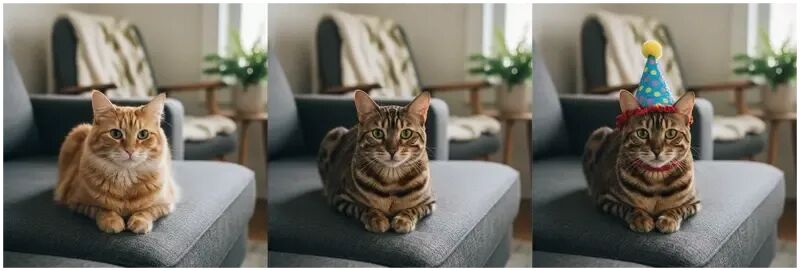
四 最佳实践提示
超具体: 您提供的有关主题、颜色、照明和构图的详细信息越多,您对输出的控制就越多。
提供背景和意图: 解释图像的目的或期望的情绪。模型对上下文的理解将影响其创意选择。
迭代和完善: 不要期望第一次尝试就完美。使用模型的对话功能进行增量更改并完善您的图像。
使用分步说明: 对于复杂的场景,将提示分解为一系列清晰、连续的说明。
使用正面描述: 不要像“没有汽车”这样的负面提示,而是积极地描述所需的场景:“一条空旷、荒凉的街道,没有交通迹象。
控制相机: 使用摄影和电影术语来指导构图,例如“广角拍摄”、“微距拍摄”或“低角度透视”。






 扫一扫
扫一扫


 692
692

 被折叠的 条评论
为什么被折叠?
被折叠的 条评论
为什么被折叠?
 到【灌水乐园】发言





