



 博客介绍了TensorFlow在图像处理方面的功能。包括图像翻转,如上下、左右、对角线翻转及随机翻转;还涵盖图像色彩调整,涉及亮度、对比度、色相、饱和度的调整与随机调整,以及归一化操作,运行代码可查看效果。
https://blog.youkuaiyun.com/chaipp0607/article/details/73089910
图像翻转
tf.image.flip_up_down:上下翻转
tf.image.flip_left_right:左右翻转
tf.image.transpose_image:对角线翻转
除此之外,TensorFlow还提供了随机翻转的函数,保证了样本的样本的随机性:
tf.image.random_flip_up_down:随机上下翻转图片
tf.image.random_flip_left_right:随机左右翻转图片
import matplotlib.pyplot as plt
import tensorflow as tf
import numpy as np

image_raw_data = tf.gfile.FastGFile('.//image//1.jpg','rb').read()

with tf.Session() as sess:
     img_data = tf.image.decode_jpeg(image_raw_data)
     plt.imshow(img_data.eval())
     plt.show()

     # 上下翻转
     flipped1 = tf.image.flip_up_down(img_data)
     plt.imshow(flipped1.eval())
     plt.show()
     # 左右翻转
     flipped2 = tf.image.flip_left_right(img_data)
     plt.imshow(flipped2.eval())
     plt.show()
     #对角线翻转
     transposed = tf.image.transpose_image(img_data)
     plt.imshow(transposed.eval())
     plt.show()

     # 以一定概率上下翻转图片。
     #flipped = tf.image.random_flip_up_down(img_data)
     # 以一定概率左右翻转图片。
     #flipped = tf.image.random_flip_left_right(img_data)
- 1
- 2
- 3
- 4
- 5
- 6
- 7
- 8
- 9
- 10
- 11
- 12
- 13
- 14
- 15
- 16
- 17
- 18
- 19
- 20
- 21
- 22
- 23
- 24
- 25
- 26
- 27
- 28
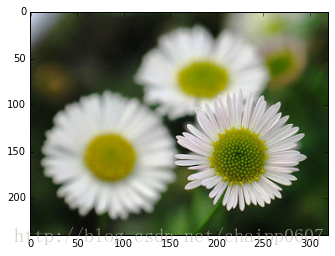
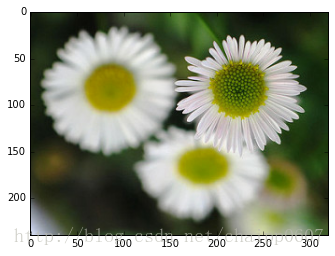
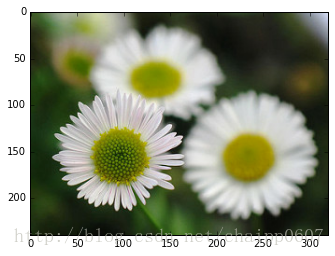
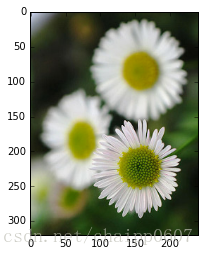
图像色彩调整
亮度:
tf.image.adjust_brightness:调整图片亮度
tf.image.random_brightness:在某范围随机调整图片亮度
对比度:
tf.image.adjust_contrast:调整图片对比度
tf.image.random_contrast:在某范围随机调整图片对比度
色相:
tf.image.adjust_hue:调整图片色相
tf.image.random_hue:在某范围随机调整图片色相
饱和度:
tf.image.adjust_saturation:调整图片饱和度
tf.image.random_saturation:在某范围随机调整图片饱和度
归一化:
per_image_standardization:三维矩阵中的数字均值变为0,方差变为1。在以前的版本中,它其实叫做per_image_whitening,也就是白化操作。
import matplotlib.pyplot as plt
import tensorflow as tf

image_raw_data = tf.gfile.FastGFile('.//image//1.jpg','rb').read()

with tf.Session() as sess:
     img_data = tf.image.decode_jpeg(image_raw_data)
     plt.imshow(img_data.eval())
     plt.show()

     # 将图片的亮度-0.5。
     adjusted = tf.image.adjust_brightness(img_data, -0.5)
     plt.imshow(adjusted.eval())
     plt.show()

     # 将图片的亮度0.5
     adjusted = tf.image.adjust_brightness(img_data, 0.5)
     plt.imshow(adjusted.eval())
     plt.show()
     # 在[-max_delta, max_delta)的范围随机调整图片的亮度。
     adjusted = tf.image.random_brightness(img_data, max_delta=0.5)
     plt.imshow(adjusted.eval())
     plt.show()
     # 将图片的对比度-5
     adjusted = tf.image.adjust_contrast(img_data, -5)
     plt.imshow(adjusted.eval())
     plt.show()
     # 将图片的对比度+5
     adjusted = tf.image.adjust_contrast(img_data, 5)
     plt.imshow(adjusted.eval())
     plt.show()
     # 在[lower, upper]的范围随机调整图的对比度。
     adjusted = tf.image.random_contrast(img_data, 0.1, 0.6)
     plt.imshow(adjusted.eval())
     plt.show()

     #调整图片的色相
     adjusted = tf.image.adjust_hue(img_data, 0.1)
     plt.imshow(adjusted.eval())
     plt.show()

     # 在[-max_delta, max_delta]的范围随机调整图片的色相。max_delta的取值在[0, 0.5]之间。
     adjusted = tf.image.random_hue(img_data, 0.5)
     plt.imshow(adjusted.eval())
     plt.show()


     # 将图片的饱和度-5。
     adjusted = tf.image.adjust_saturation(img_data, -5)
     plt.imshow(adjusted.eval())
     plt.show()


     # 在[lower, upper]的范围随机调整图的饱和度。
     adjusted = tf.image.random_saturation(img_data, 0, 5)

     # 将代表一张图片的三维矩阵中的数字均值变为0,方差变为1。
     adjusted = tf.image.per_image_standardization(img_data)
- 1
- 2
- 3
- 4
- 5
- 6
- 7
- 8
- 9
- 10
- 11
- 12
- 13
- 14
- 15
- 16
- 17
- 18
- 19
- 20
- 21
- 22
- 23
- 24
- 25
- 26
- 27
- 28
- 29
- 30
- 31
- 32
- 33
- 34
- 35
- 36
- 37
- 38
- 39
- 40
- 41
- 42
- 43
- 44
- 45
- 46
- 47
- 48
- 49
- 50
- 51
- 52
- 53
- 54
- 55
- 56
- 57
- 58
图片有点多,不贴图了,大家运行一下就能看到效果了。






 扫一扫
扫一扫


 654
654

 被折叠的 条评论
为什么被折叠?
被折叠的 条评论
为什么被折叠?
 到【灌水乐园】发言





