


学习如何将大型语言模型连接到外部工具。
介绍
函数调用允许您将模型如gpt-4o与外部工具和系统连接起来。这对于许多事情都很有用,比如为AI助手赋能,或者在你的应用程序与模型之间建立深度集成。
在2024年8月,我们推出了结构化输出功能。当你在函数定义中通过设置strict: true来开启时,结构化输出确保模型为函数调用生成的参数完全符合你在函数定义中提供的JSON架构。
使用场景示例
函数调用在许多用例中都非常有用,例如:
使助手能够获取数据:当用户询问“我的最近订单是什么?”时,AI助手需要从内部系统中获取最新的客户数据,然后才能生成回应给用户。
使助手能够采取行动:AI助手需要根据用户的偏好和日历的空闲时间来安排会议。
使助手能够执行计算:一个数学辅导助手需要执行数学计算。
构建丰富的流程:一个数据提取管道首先获取原始文本,然后将其转换为结构化数据并保存到数据库中。
修改应用程序的UI:你可以使用函数调用根据用户输入更新UI,例如,在地图上渲染一个标记点。
函数调用的生命周期
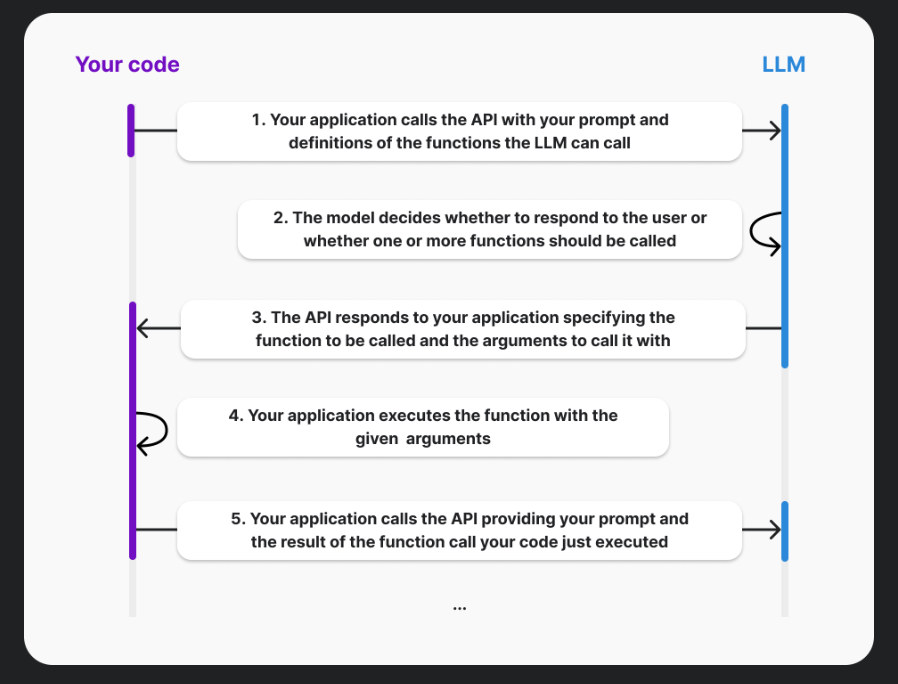
当您使用具有函数调用的OpenAI API时,模型实际上从不自行执行函数,而是在第3步中,模型仅生成可以用来调用您的参数,您的代码可以选择如何处理,很可能是通过调用指示的函数。您的应用程序始终完全掌控。
如何使用函数调用
在聊天补全API、助手API以及批量API中都支持函数调用。本指南重点介绍使用聊天补全API进行函数调用。我们还有一个单独的指南介绍使用助手API进行函数调用。
以下示例中,我们将构建一个对话助手,它能够帮助用户处理他们的配送订单。与让用户与典型表单互动不同,用户可以与一个由AI驱动的助手进行聊天。为了使这个助手更有帮助,我们希望它能够查询订单并回复用户订单的真实数据。
步骤1:在您的代码库中选择一个模型应该能够调用的函数
对于这个例子,让我们假设你希望允许模型生成调用你代码库中get_delivery_date函数所需的参数。该函数接受一个order_id并查询你的数据库,以确定给定包裹的发货日期。你的函数可能看起来像下面的样子。
# This is the function that we want the model to be able to call
def get_delivery_date(order_id: str) -> datetime:
    # Connect to the database
    conn = sqlite3.connect('ecommerce.db')
    cursor = conn.cursor()
    # ...
步骤2:向模型描述你的函数,以便它知道如何调用它
现在我们知道我们希望允许模型调用的功能,我们将创建一个“函数定义”,向模型描述该函数。这个定义既描述了函数的作用(以及可能调用它的时机),也说明了调用该函数所需的参数。
函数定义中的参数部分应该使用JSON Schema来描述。如果模型生成了函数调用,它将根据您提供的架构来生成参数。
在此示例中,它可能看起来像这样:
{


    "name": "get_delivery_date",
    "description": "Get the delivery date for a customer's order. Call this whenever you need to know the delivery date, for example when a customer asks 'Where is my package'",
    "parameters": {


        "type": "object",
        "properties": {


            "order_id": {


                "type": "string",
                "description": "The customer's order ID.",
            },
        },
        "required": ["order_id"],
        "additionalProperties": false,
    }
}
步骤3:将您的函数定义作为可用的“工具”传递给模型,同时附上消息内容
接下来,在调用聊天完成API时,我们需要在提供的“工具”数组中给出我们的函数定义。
与往常一样,我们将提供一个“消息”数组,其中可能包含你的提示或用户与助手之间的完整对话往复。
此示例展示了如何调用聊天完成API,为处理商店客户咨询的助手提供相关的函数和消息。
tools = [
    {


        "type": "function",
        "function": {


            "name": "get_delivery_date",
            "description": "Get the delivery date for a customer's order. Call this whenever you need to know the delivery date, for example when a customer asks 'Where is my package'",
            "parameters": {


                "type": "object",
                "properties": {


                    "order_id": {


                        "type": "string",
                        "description": "The customer's order ID.",
                    },
                },
                "required": ["order_id"],
                "additionalProperties": False,
            },
        }
    }
]

messages = [
    {

   "role": "system", "content": "You are a helpful customer support assistant. Use the supplied tools to assist the user."},
    {

   "role": "user", "content": "Hi, can you tell me the delivery date for my order?"}
]

response = openai.chat.completions.create(
    model="gpt-4o",
    messages=messages,
    tools=tools,
)
步骤4:接收并处理模型响应
如果模型决定不调用任何函数
如果模型没有生成函数调用,那么响应将包含一个直接的回复给用户,就像Chat Completions通常做的那样。
例如,在这种情况下,chat_response.choices[0].message 可能包含:
chat.completionsMessage(content='Hi there! I can help with that. Can you please provide your order ID?', role='assistant', function_call=None, tool_calls=None)
在助手使用场景中,你通常会希望向用户展示这个回应,并让他们对其进行回复,在这种情况下,你将再次调用API(将助手的最新回应和用户的回应都追加到消息中)。
假设我们的用户回应了他们的订单号,我们向API发送了以下请求。
tools = [
{
"type": "function",
"function": {
"name": "get_delivery_date",
"description": "Get the delivery date for a customer's order. Call this whenever you need to know the delivery date, for example when a customer asks 'Where is my package'",
"parameters": {
"type": "object",
"properties": {
"order_id": {
"type": "string",
"description": "The customer's order ID."
}
},
"required": ["order_id"],
"additionalProperties": False
}
}
}
]
messages = []
messages.append({
"role": "system", "content":  最低0.47元/天 解锁文章






 扫一扫
扫一扫


 3331
3331

 被折叠的 条评论
为什么被折叠?
被折叠的 条评论
为什么被折叠?
 到【灌水乐园】发言





