
matplotlib部件(widgets)之子图工具(plt.subplot_tool()与Subplottool类)

本文介绍了matplotlib的SubplotTool类和subplot_tool函数,用于调整图像子图的布局参数。SubplotTool包含6个滑动条和1个重置按钮,通过滑动条改变子图的边距、间距等,并通过targetfig.subplots_adjust()方法更新。subplot_tool()函数创建SubplotTool实例,若targetfig未指定,则默认为当前图像。案例展示了如何创建并使用SubplotTool和subplot_tool。

子图工具Subplottool类概述

matplotlib部件(widgets)提供了子图工具(Subplottool类)用于调整子图的相关参数(边距、间距)。
子图工具实现定义为matplotlib.widgets.Subplottool类,继承关系为:Widget->AxesWidget->Subplottool
Subplottool类的签名为class matplotlib.widgets.SubplotTool(targetfig, toolfig)

Subplottool类构造函数的参数为:

  • targetfig:子图工具控制的图像,类型为matplotlib.figure.Figure的实例。
  • toolfig:子图工具所在的图像,类型为matplotlib.figure.Figure的实例。

子图工具由6个滑动条和1个重置按钮构成。

  • Subplottool类通过6个滑动条调整图像子图的边距、间距等参数。Subplottool类通过将targetfig.subplots_adjust()方法与滑动条的on_changed(func)方法绑定实现对图像子图参数的调整。
  • Subplottool类的重置按钮回调函数的基本功能其实就是滑动条的reset()方法

plt.subplot_tool()原理

pyplot模块提供了subplot_tool()函数用于快速构造子图工具。

subplot_tool()函数的签名为def subplot_tool(targetfig=None) -> SubplotTool(targetfig, toolfig)
subplot_tool()函数的参数为targetfig,即需要调整子图的图像,类型为matplotlib.figure.Figure的实例,默认值为None
subplot_tool()函数的返回值为SubplotTool(targetfig, toolfig)

根据subplot_tool()函数可知,如果targetfig参数为None,那么targetfig = gcf(),即当前图像。subplot_tool()函数随后创建一个没有工具栏的图像toolfig,完成SubplotTool()实例的构造。

案例:官方示例

https://matplotlib.org/gallery/subplots_axes_and_figures/subplot_toolbar.html
Figure2为直接使用Subplottool类创建的工具,Figure3为使用subplot_tool函数创建的工具。
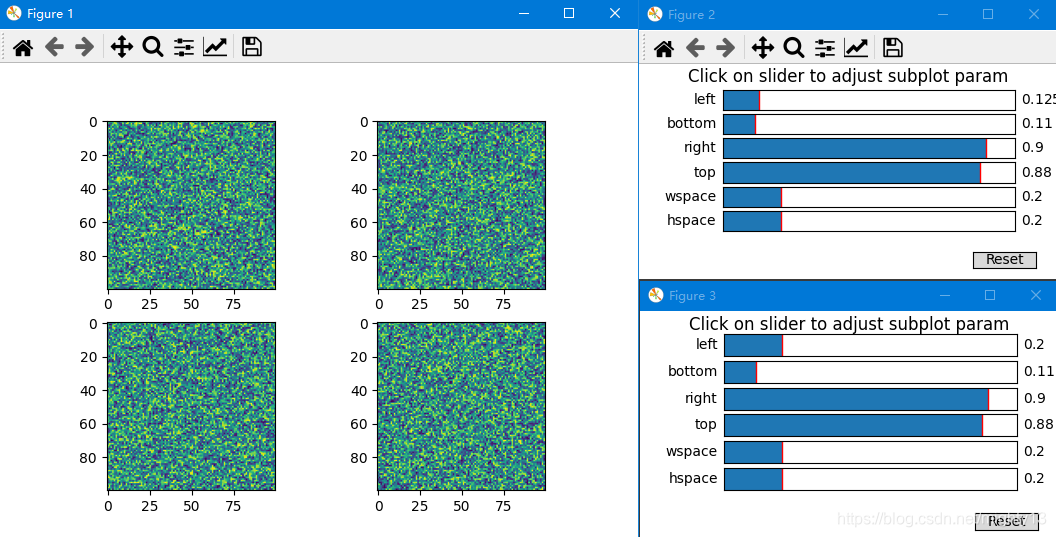
在这里插入图片描述

import matplotlib.pyplot as plt
import numpy as np
from matplotlib.widgets import SubplotTool

np.random.seed(19680801)
fig, axs = plt.subplots(2, 2)
axs[0, 0].imshow(np.random.random((100, 100)))
axs[0, 1].imshow(np.random.random((100, 100)))
axs[1, 0].imshow(np.random.random((100, 100)))
axs[1, 1].imshow(np.random.random((100, 100)))

# 使用SubplotTool类创建工具
fig_tool = plt.figure(figsize=(6, 3))
tool = SubplotTool(fig,fig_tool)
# 使用subplot_tool函数创建工具
plt.subplot_tool()
plt.show()

源码

plt.subplot_tool()源码

 def subplot_tool(targetfig=None):
    """
    Launch a subplot tool window for a figure.

    A :class:`matplotlib.widgets.SubplotTool` instance is returned.
    """
    if targetfig is None:
        targetfig = gcf()

    with rc_context({'toolbar': 'None'}):  # No nav toolbar for the toolfig.
        toolfig = figure(figsize=(6, 3))
    toolfig.subplots_adjust(top=0.9)

    if hasattr(targetfig.canvas, "manager"):  # Restore the current figure.
        _pylab_helpers.Gcf.set_active(targetfig.canvas.manager)

    return SubplotTool(targetfig, toolfig)

Subplottool类部分源码

 self._sliders = []
names = ["left", "bottom", "right", "top", "wspace", "hspace"]
# The last subplot, removed below, keeps space for the "Reset" button.
for name, ax in zip(names, toolfig.subplots(len(names) + 1)):
    ax.set_navigate(False)
    slider = Slider(ax, name,
                    0, 1, getattr(targetfig.subplotpars, name))
    slider.on_changed(self._on_slider_changed)
    self._sliders.append(slider)
    
    
with cbook._setattr_cm(toolfig.subplotpars, validate=False):
    self.buttonreset.on_clicked(self._on_reset)
        
def _on_slider_changed(self, _):
    self.targetfig.subplots_adjust(
        **{slider.label.get_text(): slider.val
            for slider in self._sliders})
    if self.drawon:
        self.targetfig.canvas.draw()

def _on_reset(self, event):
    with ExitStack() as stack:
        # Temporarily disable drawing on self and self's sliders.
        stack.enter_context(cbook._setattr_cm(self, drawon=False))
        for slider in self._sliders:
            stack.enter_context(cbook._setattr_cm(slider, drawon=False))
        # Reset the slider to the initial position.
        for slider in self._sliders:
            slider.reset()
    # Draw the canvas.
    if self.drawon:
        event.canvas.draw()
        self.targetfig.canvas.draw()
import cv2 import numpy as np import matplotlib.pyplot as plt from matplotlib.widgets import Slider import time # 读取图像 image = cv2.imread('D:\jiaodian\kuai.jpg') if image is None: raise FileNotFoundError("无法读取图像文件,请检查路径") # 转换为灰度图 gray = cv2.cvtColor(image, cv2.COLOR_BGR2GRAY) # 创建降采样版本(例如缩小到原图的1/4),用于实时交互 downsample_ratio = 0.25 gray_small = cv2.resize(gray, None, fx=downsample_ratio, fy=downsample_ratio) # 存储上一次更新时间,用于防抖 last_update_time = time.time() update_interval = 0.5 # 更新间隔(秒) # 二值化处理函数(支持降采样图像) def apply_global_threshold(img, threshold_value): _, binary = cv2.threshold(img, threshold_value, 255, cv2.THRESH_BINARY) return binary def apply_adaptive_threshold(img, block_size, C): block_size = block_size if block_size % 2 == 1 else block_size + 1 binary = cv2.adaptiveThreshold( img, 255, cv2.ADAPTIVE_THRESH_GAUSSIAN_C, cv2.THRESH_BINARY, block_size, C ) return binary # 特征检测函数(同样支持降采样图像) def detect_harris_corners(binary_img): binary_float = np.float32(binary_img) dst = cv2.cornerHarris(binary_float, blockSize=2, ksize=3, k=0.04) dst = cv2.dilate(dst, None) marked_img = cv2.cvtColor(binary_img, cv2.COLOR_GRAY2BGR) marked_img[dst > 0.01 * dst.max()] = [0, 0, 255] return marked_img def detect_shi_tomasi_corners(binary_img): corners = cv2.goodFeaturesToTrack(binary_img, maxCorners=100, qualityLevel=0.01, minDistance=10) marked_img = cv2.cvtColor(binary_img, cv2.COLOR_GRAY2BGR) if corners is not None: corners = np.int0(corners) for corner in corners: x, y = corner.ravel() cv2.circle(marked_img, (x, y), 5, (0, 255, 0), -1) return marked_img def detect_canny_edges(binary_img, low_threshold=50, high_threshold=150): blurred = cv2.GaussianBlur(binary_img, (5, 5), 0) edges = cv2.Canny(blurred, low_threshold, high_threshold) return edges # 初始参数值 global_thresh = 127 adaptive_block_size = 15 adaptive_C = 2 canny_low = 50 canny_high = 150 # 创建图形 plt.figure(figsize=(15, 12)) plt.subplots_adjust(left=0.1, bottom=0.35) # 创建图 ax_orig = plt.subplot(331) ax_global = plt.subplot(332) ax_adaptive = plt.subplot(333) ax_harris = plt.subplot(334) ax_shi = plt.subplot(335) ax_canny = plt.subplot(336) # 添加滑块 ax_global_slider = plt.axes([0.1, 0.25, 0.35, 0.03]) ax_block_slider = plt.axes([0.1, 0.2, 0.35, 0.03]) ax_c_slider = plt.axes([0.1, 0.15, 0.35, 0.03]) ax_canny_low_slider = plt.axes([0.1, 0.1, 0.35, 0.03]) ax_canny_high_slider = plt.axes([0.1, 0.05, 0.35, 0.03]) slider_global = Slider(ax_global_slider, 'quanjuyuzhi', 0, 255, valinit=global_thresh, valstep=1) slider_block = Slider(ax_block_slider, 'linyu', 3, 51, valinit=adaptive_block_size, valstep=2) slider_C = Slider(ax_c_slider, 'C', 0, 20, valinit=adaptive_C, valstep=1) slider_canny_low = Slider(ax_canny_low_slider, 'Cannydi', 0, 255, valinit=canny_low, valstep=1) slider_canny_high = Slider(ax_canny_high_slider, 'Cannygao', 0, 255, valinit=canny_high, valstep=1) # 记录当前显示的图像是降采样还是原图 use_full_resolution = False # 初始时使用降采样图像 # 更新函数(使用降采样图像进行实时更新,最后再更新一次原图) def update(val): global last_update_time, use_full_resolution current_time = time.time() # 如果距离上次更新时间小于间隔,并且当前是降采样图像,则跳过(防抖) if current_time - last_update_time < update_interval and not use_full_resolution: return # 获取当前参数 global_thresh = int(slider_global.val) adaptive_block_size = int(slider_block.val) adaptive_C = int(slider_C.val) canny_low = int(slider_canny_low.val) canny_high = int(slider_canny_high.val) # 使用降采样图像进行快速预览 img_to_use = gray_small if use_full_resolution: img_to_use = gray # 如果已经停止滑动,则使用原图 # 应用二值化 global_binary = apply_global_threshold(img_to_use, global_thresh) adaptive_binary = apply_adaptive_threshold(img_to_use, adaptive_block_size, adaptive_C) # 特征检测 harris_global = detect_harris_corners(global_binary) shi_global = detect_shi_tomasi_corners(global_binary) canny_global = detect_canny_edges(global_binary, canny_low, canny_high) # 更新图像 ax_orig.clear() if use_full_resolution: ax_orig.imshow(cv2.cvtColor(image, cv2.COLOR_BGR2RGB)) else: ax_orig.imshow( cv2.cvtColor(cv2.resize(image, None, fx=downsample_ratio, fy=downsample_ratio), cv2.COLOR_BGR2RGB)) ax_orig.set_title('yuanshi') ax_orig.axis('off') ax_global.clear() ax_global.imshow(global_binary, cmap='gray') ax_global.set_title(f'quanju (yuzhi={global_thresh})') ax_global.axis('off') ax_adaptive.clear() ax_adaptive.imshow(adaptive_binary, cmap='gray') ax_adaptive.set_title(f'quanju (linyu={adaptive_block_size}, C={adaptive_C})') ax_adaptive.axis('off') ax_harris.clear() ax_harris.imshow(harris_global) ax_harris.set_title('Harris') ax_harris.axis('off') ax_shi.clear() ax_shi.imshow(shi_global) ax_shi.set_title('Shi-Tomasi') ax_shi.axis('off') ax_canny.clear() ax_canny.imshow(canny_global, cmap='gray') ax_canny.set_title(f'Canny (di={canny_low}, gao={canny_high})') ax_canny.axis('off') plt.draw() last_update_time = current_time # 如果当前正在使用降采样图像,我们设置一个定时事件,在停止滑动一段时间后使用原图更新一次 if not use_full_resolution: # 取消之前的定时事件(如果存在) if hasattr(update, 'timer_id'): plt.gcf().canvas.mpl_disconnect(update.timer_id) # 设置新的定时事件 def on_timeout(event): global use_full_resolution use_full_resolution = True update(val) # 用原图更新一次 use_full_resolution = False # 重置为降采样模式,以便下次滑动时快速响应 # 设置定时器,在update_interval秒后触发 update.timer_id = plt.gcf().canvas.mpl_connect('timer_event', on_timeout) plt.gcf().canvas.start_timer(update_interval * 1000) # 毫秒 # 注册更新函数 slider_global.on_changed(update) slider_block.on_changed(update) slider_C.on_changed(update) slider_canny_low.on_changed(update) slider_canny_high.on_changed(update) # 初始更新(使用降采样图像) update(None) plt.tight_layout() plt.show() 帮我把全局阈值去掉,仅采用自适应阈值
11-13
import numpy as np import matplotlib.pyplot as plt from matplotlib import cm from matplotlib.animation import FuncAnimation from mpl_toolkits.mplot3d import Axes3D import ipywidgets as widgets from IPython.display import display plt.rcParams['axes.unicode_minus'] = False # 解决负号显示问题 plt.rcParams["font.family"] = "SimHei" # 设置中文字体 # 物理常数 c = 3e8 # 光速 (m/s) class RawFDAArraySimulator: def __init__(self, f0=24e8, delta_f=100e3, N=16): """ 去归一化FDA阵列仿真器 f0: 中心频率 (Hz) delta_f: 频率增量 (Hz) - 关键FDA参数 N: 阵元数量 """ self.f0 = f0 self.delta_f = delta_f self.N = N self.d = 0.5 * c / f0 # 阵元间距 (半波长) # 仿真参数 - 无归一化处理 self.theta = np.linspace(-90, 90, 181) # 方位角 () self.R = np.linspace(100, 10000, 101) # 距离 () self.time_points = np.linspace(0, 1e-3, 100) # 时间序列 () self.theta_rad = np.deg2rad(self.theta) # 转换为弧度 def calculate_fda_beam(self, t): """ 计算FDA阵列因,体现空间-时间耦合特性 - 无归一化 参数: t: 时间点 () 返回: 原始阵列因幅度 (距离 × 角度) """ # 初始化阵列因矩阵 AF = np.zeros((len(self.R), len(self.theta)), dtype=complex) for m in range(self.N): # 遍历每个阵元 # 计算当前阵元的频率 f_m = self.f0 + m * self.delta_f # 空间相位分量 (角度相关) space_phase = 2 * np.pi * f_m * (m * self.d * np.sin(self.theta_rad)) / c # 时间相位分量 (时间相关) time_phase = 2 * np.pi * self.delta_f * m * t # 距离相位分量 (距离相关) range_phase = 2 * np.pi * f_m * self.R[:, None] / c # 综合阵列因 - 体现空间-时间耦合 AF += np.exp(1j * (space_phase - range_phase + time_phase)) return np.abs(AF) # 直接返回幅度值,无归一化 def plot_spatio_temporal_coupling(self, t=0.5e-3): """ 可视化空间-时间耦合特性 - 无归一化 """ fig = plt.figure(figsize=(15, 10)) # 计算波束方向图 beam_pattern = self.calculate_fda_beam(t) # 1. 距离-角度热力图 - 使用原始幅度值 plt.subplot(2, 2, 1) plt.imshow(beam_pattern, # 直接使用幅度值 extent=[self.theta.min(), self.theta.max(), self.R.min() / 1000, self.R.max() / 1000], aspect='auto', cmap='jet', origin='lower') plt.colorbar(label='阵列因幅度') plt.xlabel('方位角 ()') plt.ylabel('距离 (km)') plt.title(f'FDA空间-时间耦合特性 (t={t * 1000:.1f}ms)') # 2. 固定距离的切面 - 使用原始幅度值 plt.subplot(2, 2, 2) fixed_range_idx = 50 # 选择中间距离 plt.plot(self.theta, beam_pattern[fixed_range_idx, :]) plt.xlabel('方位角 ()') plt.ylabel('阵列因幅度') plt.title(f'固定距离{self.R[fixed_range_idx] / 1000:.1f}km的波束方向图') plt.grid(True) # 3. 固定角度的切面 - 使用原始幅度值 plt.subplot(2, 2, 3) fixed_angle_idx = 90 # 选择0度方向 plt.plot(self.R / 1000, beam_pattern[:, fixed_angle_idx]) plt.xlabel('距离 (km)') plt.ylabel('阵列因幅度') plt.title(f'固定方位角{self.theta[fixed_angle_idx]:.0f}°的波束方向图') plt.grid(True) # 4. 空间-时间耦合示意图 - 使用原始幅度值 plt.subplot(2, 2, 4) # 在固定距离和角度上观察幅度随时间变化 fixed_range = 5000 # 固定距离5km fixed_angle = 0 # 固定角度0度 r_idx = np.argmin(np.abs(self.R - fixed_range)) a_idx = np.argmin(np.abs(self.theta - fixed_angle)) # 计算时间序列上的幅度变化 time_amplitude = [] for time_point in self.time_points: beam = self.calculate_fda_beam(time_point) time_amplitude.append(beam[r_idx, a_idx]) plt.plot(self.time_points * 1000, time_amplitude) plt.xlabel('时间 (ms)') plt.ylabel('阵列因幅度') plt.title(f'固定点(θ={fixed_angle}°, R={fixed_range / 1000:.1f}km)的幅度随时间变化') plt.grid(True) plt.tight_layout() plt.show() def animate_auto_scanning(self): """ 创建自动扫描特性的动画 - 无归一化 """ fig = plt.figure(figsize=(10, 8)) ax = fig.add_subplot(111, projection='3d') # 创建网格 T, R_grid = np.meshgrid(self.theta, self.R / 1000) # 初始化空图 beam = self.calculate_fda_beam(0) surf = ax.plot_surface(T, R_grid, beam, cmap=cm.jet, alpha=0.8) # 设置坐标轴标签 ax.set_xlabel('方位角 ()') ax.set_ylabel('距离 (km)') ax.set_zlabel('阵列因幅度') ax.set_title('FDA自动扫描特性 (t=0 ms)') ax.set_zlim(0, self.N) # 幅度范围0到N # 更新函数用于动画 def update(frame): ax.clear() t = self.time_points[frame] beam = self.calculate_fda_beam(t) surf = ax.plot_surface(T, R_grid, beam, cmap=cm.jet, alpha=0.8) ax.set_xlabel('方位角 ()') ax.set_ylabel('距离 (km)') ax.set_zlabel('阵列因幅度') ax.set_title(f'FDA自动扫描特性 (t={t * 1000:.1f} ms)') ax.set_zlim(0, self.N) # 保持幅度范围一致 return surf, # 创建动画 ani = FuncAnimation(fig, update, frames=len(self.time_points), interval=50, blit=False) plt.tight_layout() plt.show() return ani def interactive_parameter_analysis(self): """ 交互式参数分析界面 - 无归一化 """ style = {'description_width': 'initial'} # 创建交互控件 delta_f_slider = widgets.FloatLogSlider( value=self.delta_f, min=3, max=6, step=0.1, description='频率增量Δf (Hz):', readout_format='.0f', style=style ) time_slider = widgets.FloatSlider( value=0, min=0, max=1e-3, step=1e-5, description='时间 t (s):', readout_format='.5f', style=style ) angle_slider = widgets.FloatSlider( value=0, min=-90, max=90, step=1, description='固定角度θ ():', style=style ) range_slider = widgets.FloatSlider( value=5000, min=100, max=10000, step=100, description='固定距离R (m):', style=style ) # 更新函数 def update_plots(delta_f_val, t_val, fixed_angle, fixed_range): # 临时创建新的仿真器实例 temp_simulator = RawFDAArraySimulator( f0=self.f0, delta_f=delta_f_val, N=self.N ) # 计算波束方向图 beam_pattern = temp_simulator.calculate_fda_beam(t_val) # 创建图形 fig, axs = plt.subplots(1, 2, figsize=(15, 6)) # 1. 距离-角度热力图 - 使用原始幅度值 im = axs[0].imshow(beam_pattern, extent=[self.theta.min(), self.theta.max(), self.R.min() / 1000, self.R.max() / 1000], aspect='auto', cmap='jet', origin='lower') fig.colorbar(im, ax=axs[0], label='阵列因幅度') axs[0].set_xlabel('方位角 ()') axs[0].set_ylabel('距离 (km)') axs[0].set_title(f'FDA波束方向图 (Δf={delta_f_val / 1000:.1f}kHz, t={t_val * 1000:.2f}ms)') # 2. 固定角度和距离的幅度变化 r_idx = np.argmin(np.abs(self.R - fixed_range)) a_idx = np.argmin(np.abs(self.theta - fixed_angle)) # 计算时间序列上的幅度变化 time_amplitude = [] for time_point in self.time_points: temp_beam = temp_simulator.calculate_fda_beam(time_point) time_amplitude.append(temp_beam[r_idx, a_idx]) axs[1].plot(self.time_points * 1000, time_amplitude) axs[1].axvline(x=t_val * 1000, color='r', linestyle='--', label=f'当前时间: {t_val * 1000:.2f}ms') axs[1].set_xlabel('时间 (ms)') axs[1].set_ylabel('阵列因幅度') axs[1].set_title(f'固定点(θ={fixed_angle}°, R={fixed_range / 1000:.1f}km)的幅度随时间变化') axs[1].grid(True) axs[1].legend() plt.tight_layout() plt.show() # 创建交互界面 widgets.interactive( update_plots, delta_f_val=delta_f_slider, t_val=time_slider, fixed_angle=angle_slider, fixed_range=range_slider ) # ========== 主执行函数 ========== if __name__ == "__main__": print("频控阵天线(FDA)波束特性仿真 (去归一化)") # 创建FDA仿真器实例 fda_simulator = RawFDAArraySimulator() print("1. 空间-时间耦合特性 (无归一化)") fda_simulator.plot_spatio_temporal_coupling() print("\n2. 自动扫描特性 (无归一化动画展示)") fda_simulator.animate_auto_scanning() print("\n3. 交互式参数分析 (无归一化)") fda_simulator.interactive_parameter_analysis()
07-27
评论 2
成就一亿技术人!
拼手气红包6.0元
还能输入1000个字符
 
红包 添加红包
表情包 插入表情
 条评论被折叠 查看
添加红包

请填写红包祝福语或标题

红包个数最小为10个

红包金额最低5元

当前余额3.43前往充值 >
需支付:10.00
成就一亿技术人!
领取后你会自动成为博主和红包主的粉丝 规则
hope_wisdom
发出的红包
实付
使用余额支付
点击重新获取
扫码支付
钱包余额 0

抵扣说明:

1.余额是钱包充值的虚拟货币,按照1:1的比例进行支付金额的抵扣。
2.余额无法直接购买下载,可以购买VIP、付费专栏及课程。

余额充值


