






什么是管道
- 管道 | pipes 最早最清晰的陈述来源于
McIlroy由1964年写的一份内部文件.这份文件提出像花园的水管那样把程序连接在一起.文档全文内容如下:
    Summary--what's most important.
        To put my strongest concerns into a nutshell:
    1. We should have some ways of coupling programs like
    garden hose--screw in another segment when it becomes when
    it becomes necessary to massage data in another way.
    This is the way of IO also.
    2. Our loader should be able to do link-loading and
    controlled establishment.
    3. Our library filing scheme should allow for rather
    general indexing, responsibility, generations, data path
    switching.
    4. It should be possible to get private system components
    (all routines are system components) for buggering around with.

                                                    M. D. McIlroy
                                                    October 11, 1964
Unix的缔造者肯.汤普森只花了一个小时就在操作系统中实现了管道的系统调用.他自己说这是简直小菜一碟,因为I/O的重定向机制是管道的实现基础,但效果确是很震撼.管道的本质是I/O的重定向,是对数据的不断编辑,不断流动,只有这样的数据才有价值.- 在文件概念篇中提到过,
Unix"一切皆文件"的说法是源于输入输出的共性,只要涵盖这两个特性都可以也应当被抽象成文件统一管理和流动. 拿跟城市的发展来举例,越是人口流动和资金流动频繁的城市一定是越发达的城市.这个道理请仔细品,城市的规划应该让流动的成本变低,时间变短,而不是到处查身份证,查户口本.对内核设计者来说也是一样,能让数据流动的成本变得极为简单,方便的系统也一定是好的架构,Unix能做到多年强盛不衰其中一个重要原因是它仅用一个|符号实现了文件之间的流动性问题.这是一种伟大的创举,必须用专门的章篇对其大书特书.
管道符号 |
管道符号是两个命令之间的一道竖杠 |,简单而优雅,例如,ls用于显示某个目录中文件,wc用于统计行数.
ls | wc 则代表统计某个目录下的文件数量
再看个复杂的:
$ < colors.txt sort | uniq -c | sort -r | head -3 > favcolors.txt
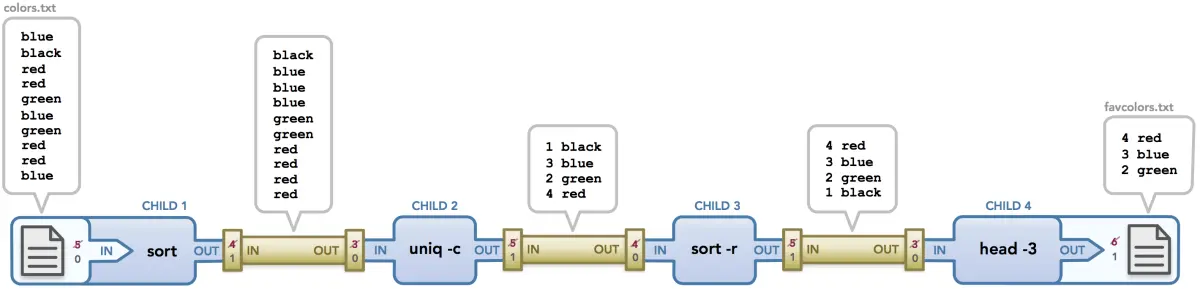
colors.txt为原始的文件内容,输出给sort处理sort对colors.txt内容进行顺序编辑后输出给uniq处理uniq对 内容进行去重编辑后输出给sort -r处理sort -r对内容进行倒序编辑后输出给head -3处理head -3对 内容进行取前三编辑后输出到favcolors.txt文件保存.- 最后
cat favcolors.txt查看结果
    $ cat favcolors.txt
        4 red
        3 blue
        2 green
经典管道案例
以下是linux官方对管道的经典案例. 查看 pipe
#include <sys/types.h>
#include <sys/wait.h>
#include <stdio.h>
#include <stdlib.h>
#include <unistd.h>
#include <string.h>
int main(int argc, char *argv[])
{
    int pipefd[2];
    pid_t cpid;
    char buf;

    if (argc != 2) {
        fprintf(stderr, "Usage: %s <string>\n", argv[0]);
        exit(EXIT_FAILURE);
    }

    if (pipe(pipefd) == -1) {
        perror("pipe");
        exit(EXIT_FAILURE);
    }

    cpid = fork();
    if (cpid == -1) {
        perror("fork");
        exit(EXIT_FAILURE);
    }

    if (cpid == 0) {    /* Child reads from pipe */
        close(pipefd[1]);          /* Close unused write end */

        while (read(pipefd[0], &buf, 1) > 0)
            write(STDOUT_FILENO, &buf, 1);

        write(STDOUT_FILENO, "\n", 1);
        close(pipefd[0]);
        _exit(EXIT_SUCCESS);

    } else {            /* Parent writes argv[1] to pipe */
        close(pipefd[0]);          /* Close unused read end */
        write(pipefd[1], argv[1], strlen(argv[1]));
        close(pipefd[1]);          /* Reader will see EOF */
        wait(NULL);                /* Wait for child */
        exit(EXIT_SUCCESS);
    }
}
解读
pipe(pipefd)为系统调用,申请了两个文件句柄,并对这两个文件进行了管道绑定. 在鸿蒙管道的系统调用为SysPipe,具体实现往下看.main进程fork()了一个子进程,具体的fork过程请前往 [v45.xx (Fork篇) | 一次调用,两次返回 ] 翻看.子进程将复制父进程的文件资源.所以子进程cpid也拥有了pipefd两个句柄,背后的含义就是可以去操作pipefd对应的文件if (cpid == 0)代表的是子进程的返回,close(pipefd[1])关闭了pipefd[1]文件句柄,因为程序设计成子进程负责读文件操作,它并不需要操作pipefd[1]while (read(pipefd[0], &buf, 1)子进程不断的读取文件pipefd[0]的内容.- 按理说能不断的读取
pipefd[0]数据说明有进程在不断的往pipefd[0]中写入数据.但管道的思想是往pipefd[1]中写入数据,数据却能跑到pipefd[0]中.
(cpid > 0)也就是代码中的} else {代表的是父进程main的返回.close(pipefd[0])关闭了pipefd[0]文件句柄,因为程序设计成父进程负责写文件,它并不需要操作pipefd[0]write(pipefd[1], argv[1], strlen(argv[1]))父进程往pipefd[1]中写入数据.数据将会出现在pipefd[0]中供子进程读取.
鸿蒙实现
管道的实现函数级调用关系如下:
SysPipe //系统调用
    AllocProcessFd  //分配两个进程描述符
    pipe    //底层管道的真正实现
        pipe_allocate   //分配管道
        "/dev/pipe%d"   //生成创建管道文件路径,用于创建两个系统文件句柄
        pipecommon_allocdev //分配管道共用的空间
        register_driver //注册管道设备驱动程序
        open    //打开两个系统文件句柄
        fs_getfilep //获取两个系统文件句柄的实体对象 `file`
    AssociateSystemFd //进程和系统文件句柄的绑定
其中最关键的是pipe,它才是真正实现管道思想的落地代码,代码稍微有点多,但看明白了这个函数就彻底明白了管道是怎么回事了,看之前先建议看文件系统相关篇幅,有了铺垫再看代码和解读就很容易明白.
int pipe(int fd[2])
{
  struct pipe_dev_s *dev = NULL;
  char devname[16];
  int pipeno;
  int errcode;
  int ret;
  struct file *filep = NULL;
  size_t bufsize = 1024;

  /* Get exclusive access to the pipe allocation data */

  ret = sem_wait(&g_pipesem);
  if (ret < 0)
    {
      errcode = -ret;
      goto errout;
    }

  /* Allocate a minor number for the pipe device */

  pipeno = pipe_allocate();
  if (pipeno < 0)
    {
      (void)sem_post(&g_pipesem);
      errcode = -pipeno;
      goto errout;
    }

  /* Create a pathname to the pipe device */

  snprintf_s(devname, sizeof(devname), sizeof(devname) - 1, "/dev/pipe%d", pipeno);

  /* No.. Allocate and initialize a new device structure instance */

  dev = pipecommon_allocdev(bufsize, devname);
  if (!dev)
    {
      (void)sem_post(&g_pipesem);
      errcode = ENOMEM;
      goto errout_with_pipe;
    }

  dev->d_pipeno = pipeno;

  /* Check if the pipe device has already been created */

  if ((g_pipecreated & (1 << pipeno)) == 0)
    {
      /* Register the pipe device */

      ret = register_driver(devname, &pipe_fops, 0660, (void *)dev);
      if (ret != 0)
        {
          (void)sem_post(&g_pipesem);
          errcode = -ret;
          goto errout_with_dev;
        }

      /* Remember that we created this device */

       g_pipecreated |= (1 << pipeno);
    }
  else
    {
       UpdateDev(dev);
    }
  (void)sem_post(&g_pipesem);

  /* Get a write file descriptor */

  fd[1] = open(devname, O_WRONLY);
  if (fd[1] < 0)
    {
      errcode = -fd[1];
      goto errout_with_driver;
    }

  /* Get a read file descriptor */

  fd[0] = open(devname, O_RDONLY);
  if (fd[0] < 0)
    {
      errcode = -fd[0];
      goto errout_with_wrfd;
    }

  ret = fs_getfilep(fd[0], &filep);
  filep->ops = &pipe_fops;

  ret = fs_getfilep(fd[1], &filep);
  filep->ops = &pipe_fops;

  return OK;

errout_with_wrfd:
  close(fd[1]);

errout_with_driver:
  unregister_driver(devname);

errout_with_dev:
  if (dev)
    {
      pipecommon_freedev(dev);
    }

errout_with_pipe:
  pipe_free(pipeno);

errout:
  set_errno(errcode);
  return VFS_ERROR;
}
解读
- 在鸿蒙管道多少也是有限制的,也由位图来管理,最大支持32个,用一个32位的变量
g_pipeset就够了,位图如何管理请自行翻看位图管理篇.要用就必须申请,由pipe_allocate负责.
      #define MAX_PIPES 32    //最大支持管道数
      static sem_t  g_pipesem       = {NULL};
      static uint32_t g_pipeset     = 0;  //管道位图管理器
      static uint32_t g_pipecreated = 0;

      static inline int pipe_allocate(void)
      {
      int pipeno;
      int ret = -ENFILE;

      for (pipeno = 0; pipeno < MAX_PIPES; pipeno++)
          {
          if ((g_pipeset & (1 << pipeno)) == 0)
              {
              g_pipeset |= (1 << pipeno);
              ret = pipeno;
              break;
              }
          }
      return ret;
      }
- 管道对外表面上看似对两个文件的操作,其实是对一块内存的读写操作.操作内存就需要申请内存块,鸿蒙默认用了
1024 | 1K内存,操作文件就需要文件路径/dev/pipe%d.
    size_t bufsize = 1024;
    snprintf_s(devname, sizeof(devname), sizeof(devname) - 1, "/dev/pipe%d", pipeno);
    dev = pipecommon_allocdev(bufsize, devname);
- 紧接着就是要提供操作文件
/dev/pipe%d的VFS,即注册文件系统的驱动程序,上层的读写操作,到了底层真正的读写是由pipecommon_read和pipecommon_write落地.
    ret = register_driver(devname, &pipe_fops, 0660, (void *)dev);
    static const struct file_operations_vfs pipe_fops =
    {
    .open = pipecommon_open,      /* open */
    .close = pipe_close,          /* close */
    .read = pipecommon_read,      /* read */
    .write = pipecommon_write,    /* write */
    .seek = NULL,                 /* seek */
    .ioctl = NULL,                /* ioctl */
    .mmap = pipe_map,             /* mmap */
    .poll = pipecommon_poll,      /* poll */
    #ifndef CONFIG_DISABLE_PSEUDOFS_OPERATIONS
    .unlink = pipe_unlink,        /* unlink */
    #endif
    };
pipecommon_read代码有点多,此处不放出来,代码中加了很多的信号量,目的就是确保对这块共享内存能正常操作.
- 要操作两个文件句柄就必须都要打开文件,只不过打开方式一个是读,一个是写,
pipe默认是对fd[1]为写入,fd[0]为读取,这里可翻回去看下经典管道案例的读取过程.
    fd[1] = open(devname, O_WRONLY);
    fd[0] = open(devname, O_RDONLY);
- 最后绑定
file的文件接口操作,在文件句柄篇中已详细说明,应用程序操作的是fd | 文件句柄,到了内核是需要通过fd找到file,再找到file->ops才能真正的操作文件.
    ret = fs_getfilep(fd[0], &filep);
    filep->ops = &pipe_fops;

    ret = fs_getfilep(fd[1], &filep);
    filep->ops = &pipe_fops;
鸿蒙全栈开发全新学习指南
也为了积极培养鸿蒙生态人才,让大家都能学习到鸿蒙开发最新的技术,针对一些在职人员、0基础小白、应届生/计算机专业、鸿蒙爱好者等人群,整理了一套纯血版鸿蒙(HarmonyOS Next)全栈开发技术的学习路线【包含了大厂APP实战项目开发】。
本路线共分为四个阶段:
第一阶段:鸿蒙初中级开发必备技能

第二阶段:鸿蒙南北双向高工技能基础:gitee.com/MNxiaona/733GH

第三阶段:应用开发中高级就业技术

第四阶段:全网首发-工业级南向设备开发就业技术:gitee.com/MNxiaona/733GH

《鸿蒙 (Harmony OS)开发学习手册》(共计892页)
如何快速入门?
1.基本概念
2.构建第一个ArkTS应用
3.……

开发基础知识:gitee.com/MNxiaona/733GH
1.应用基础知识
2.配置文件
3.应用数据管理
4.应用安全管理
5.应用隐私保护
6.三方应用调用管控机制
7.资源分类与访问
8.学习ArkTS语言
9.……

基于ArkTS 开发
1.Ability开发
2.UI开发
3.公共事件与通知
4.窗口管理
5.媒体
6.安全
7.网络与链接
8.电话服务
9.数据管理
10.后台任务(Background Task)管理
11.设备管理
12.设备使用信息统计
13.DFX
14.国际化开发
15.折叠屏系列
16.……

鸿蒙开发面试真题(含参考答案):gitee.com/MNxiaona/733GH

鸿蒙入门教学视频:

美团APP实战开发教学:gitee.com/MNxiaona/733GH

写在最后
- 如果你觉得这篇内容对你还蛮有帮助,我想邀请你帮我三个小忙:
- 点赞,转发,有你们的 『点赞和评论』,才是我创造的动力。
- 关注小编,同时可以期待后续文章ing🚀,不定期分享原创知识。
- 想要获取更多完整鸿蒙最新学习资源,请移步前往小编:
gitee.com/MNxiaona/733GH





 扫一扫
扫一扫


 1098
1098

 被折叠的 条评论
为什么被折叠?
被折叠的 条评论
为什么被折叠?
 到【灌水乐园】发言





