



一、引言:
Halcon中自带的print_check.hdev用的是create_generic_shape_model,这种模板匹配优势在于速度快,但是精度没有create_shape_model高,因此对该案例进行了改编。
二、核心代码
read_image (Image, 'pen/pen-01')
get_image_size (Image, Width, Height)
dev_close_window ()
dev_open_window (0, 0, Width, Height, 'black', WindowHandle)
set_display_font (WindowHandle, 16, 'mono', 'true', 'false')
dev_set_color ('green')
dev_display (Image)
* Note: the shape model will be constructed from a ROI that is
* computed automatically based on a simple image segmentation.
threshold (Image, Region, 100, 255)
fill_up (Region, RegionFillUp)
difference (RegionFillUp, Region, RegionDifference)
*将输入区域转换为指定形状 凸包(Convex Hull)
shape_trans (RegionDifference, RegionTrans, 'convex')
dilation_circle (RegionTrans, RegionDilation, 8.5)
*注:此部分RegionDilation可以write_region保存到本地,方便后面检测时候调用
reduce_domain (Image, RegionDilation, ImageReduced)
create_shape_model (ImageReduced, 'auto', rad(0), rad(360), 'auto', 'auto', 'use_polarity', 'auto', 'auto', ModelID)
* 设置模型参数
* set_shape_model_param (ModelID, 'min_score', 0.8)
* set_shape_model_param (ModelID, 'greediness', 0.96)
* set_shape_model_param (ModelID, 'max_overlap', 0.0)
* set_shape_model_param (ModelID, 'num_matches', 1)
* 获取模型轮廓和参考位置
get_shape_model_contours (ModelContours, ModelID, 1)
area_center (RegionDilation, Area, ModelRow, ModelColumn)
*训练变分模型,用于检测图像中与正常模式显著偏离的灰度异常区域
*1为什么需要训练?前面章节的模板匹配,只可以定位,但是无法直接检测灰度
create_variation_model(Width, Height, 'byte', 'standard', VariationModelID)
for I := 1 to 15 by 1
read_image (Image, 'pen/pen-' + I$'02d')
find_scaled_shape_model (Image, ModelID, -0.39, 0.78, 0.95, 1.05, 0.5, 0, 0.5, 'least_squares', 0, 0.9, Row2, Column2, Angle1, Scale1, Score1)
if(|Score1|==1)
**注意点:移动原图片的仿射变换是模板匹配点到模板点!!!!这个是相反的操作!
vector_angle_to_rigid ( Row2, Column2, Angle1,ModelRow, ModelColumn, 0, HomMat2D1)
affine_trans_image (Image, ImageAffineTrans, HomMat2D1, 'constant', 'false')
train_variation_model (ImageAffineTrans, VariationModelID)
endif
endfor
write_shape_model (ModelID, 'C:/Users/10314/Desktop/shapemodel.shm')
write_variation_model (VariationModelID, 'C:/Users/10314/Desktop/variableModel.vmo')
clear_variation_model (VariationModelID)
clear_shape_model (ModelID)
read_shape_model ('C:/Users/10314/Desktop/shapemodel.shm', ModelID1)
read_variation_model ('C:/Users/10314/Desktop/variableModel.vmo', ModelID2)
* 必须显式调用! 20:绝对差异阈值 3:相对差异阈值
prepare_variation_model(ModelID2, 20, 3)
*对ROI区域进行腐蚀
erosion_rectangle1 (RegionFillUp, RegionROI, 1, 15)
dev_set_draw ('margin')
NumImages := 30
for I := 1 to NumImages by 1
read_image (Image, 'pen/pen-' + I$'02d')
find_shape_model (Image, ModelID1, rad(-2), rad(2), 0.5, 1, 0.5, 'least_squares', 0, 0.9, Row1, Column1, Angle2, Score)
if (|Score| == 1)
vector_angle_to_rigid ( Row1, Column1, Angle2,ModelRow, ModelColumn, 0, HomMat2D2)
affine_trans_image (Image, ImageAffineTrans1, HomMat2D2, 'constant', 'false')
reduce_domain (ImageAffineTrans1, RegionROI, ImageReduced1
*将图像与变体模型进行比较
compare_variation_model (ImageReduced1, Region1, ModelID2)
connection (Region1, ConnectedRegions)
select_shape (ConnectedRegions, SelectedRegions, 'area', 'and', 20, 99999)
count_obj (SelectedRegions, NumError)
dev_clear_window ()
dev_set_color ('red')
dev_display (ImageAffineTrans1)
if (NumError == 0)
dev_disp_text ('Clip OK', 'window', 20, 20, 'green', 'box', 'false')
else
dev_disp_text ('Clip not OK', 'window', 20, 20, 'red', 'box', 'false')
endif
endif
if (I < NumImages)
disp_continue_message (WindowHandle, 'black', 'true')
stop ()
endif
endfor
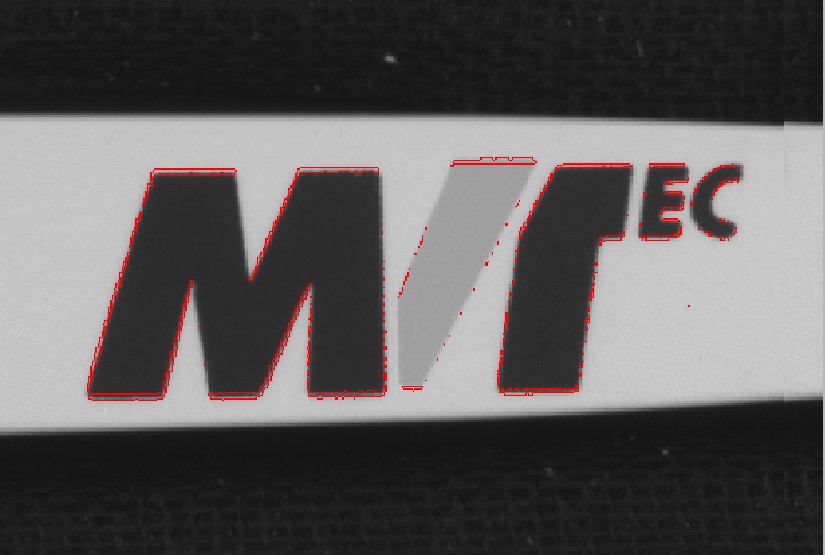
三、测试效果:





 扫一扫
扫一扫


 7879
7879

 被折叠的 条评论
为什么被折叠?
被折叠的 条评论
为什么被折叠?
 到【灌水乐园】发言





