


 本文展示了如何在Android应用中创建一个风扇动态旋转的UI界面,通过XML布局文件定义了ImageView用于显示风扇图片和两个Button分别控制风扇的开启和关闭。在MainActivity.java中,使用RotateAnimation配合LinearInterpolator实现风扇的平滑旋转,点击按钮即可启动或停止动画。
Android实现风扇旋转
最近参加比赛,要在界面显示风扇动态旋转,话不多说,上代码;
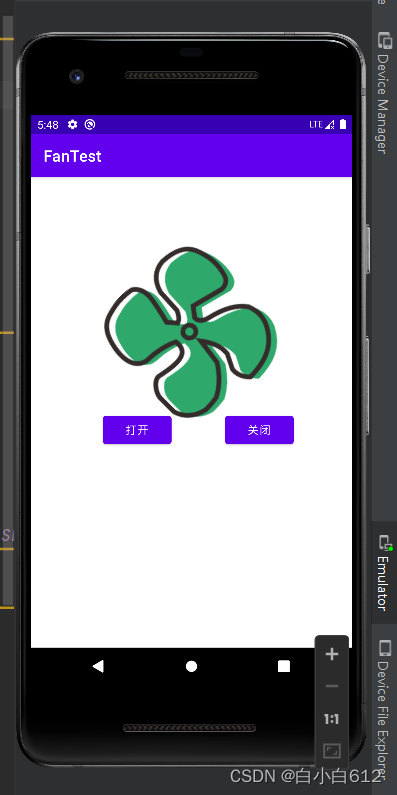
UI界面
<?xml version="1.0" encoding="utf-8"?>
<androidx.constraintlayout.widget.ConstraintLayout xmlns:android="http://schemas.android.com/apk/res/android"
    xmlns:app="http://schemas.android.com/apk/res-auto"
    xmlns:tools="http://schemas.android.com/tools"
    android:layout_width="match_parent"
    android:layout_height="match_parent"
    tools:context=".MainActivity">

    <ImageView
        android:id="@+id/imageView"
        android:layout_width="200dp"
        android:layout_height="200dp"
        android:layout_marginTop="100dp"
        app:layout_constraintEnd_toEndOf="parent"
        app:layout_constraintHorizontal_bias="0.513"
        app:layout_constraintStart_toStartOf="parent"
        app:layout_constraintTop_toTopOf="parent"
        app:srcCompat="@drawable/fan" />

    <Button
        android:id="@+id/button"
        android:layout_width="wrap_content"
        android:layout_height="wrap_content"
        android:layout_marginStart="92dp"
        android:layout_marginTop="300dp"
        android:onClick="OpenFan"
        android:text="打开"
        app:layout_constraintStart_toStartOf="parent"
        app:layout_constraintTop_toTopOf="parent" />

    <Button
        android:id="@+id/button2"
        android:layout_width="wrap_content"
        android:layout_height="wrap_content"
        android:layout_marginTop="300dp"
        android:onClick="CloseFan"
        android:text="关闭"
        app:layout_constraintEnd_toEndOf="parent"
        app:layout_constraintHorizontal_bias="0.769"
        app:layout_constraintStart_toStartOf="parent"
        app:layout_constraintTop_toTopOf="parent" />
</androidx.constraintlayout.widget.ConstraintLayout>
功能实现
public class MainActivity extends AppCompatActivity {
    private ImageView imageView;
    RotateAnimation rotateAnimation=null;
    LinearInterpolator linearInterpolator=null;

    @Override
    protected void onCreate(Bundle savedInstanceState) {
        super.onCreate(savedInstanceState);
        setContentView(R.layout.activity_main);
        InitView();
    }
    public void InitView(){
        imageView=findViewById(R.id.imageView);
        /**
         *开始旋转角度,结束角度,中心旋转,相对于自己来说
         *一半x,一半y
         */
        rotateAnimation=new RotateAnimation(0,360,Animation.RELATIVE_TO_SELF,0.5f,Animation.RELATIVE_TO_SELF,0.5f);
        linearInterpolator=new LinearInterpolator();//线性旋转初始化
        rotateAnimation.setDuration(1000);//设置动画的持续时间,决定了快慢
        rotateAnimation.setRepeatCount(-1);//设置重复的次数,-1代表无限次
        rotateAnimation.setInterpolator(linearInterpolator);//设置线性旋转还是非线性旋转

    }
    public void OpenFan(View view){
        imageView.startAnimation(rotateAnimation);//开始动画
    }
    public void CloseFan(View view){
        imageView.clearAnimation();
    }
}
效果显示





 扫一扫
扫一扫


 2356
2356


 被折叠的 条评论
为什么被折叠?
被折叠的 条评论
为什么被折叠?
 到【灌水乐园】发言




