


1。反射
Java的反射机制在运行状态中,对于任意一个类,都能够知道这个类的所有属性和方法。对任意对象,都能调用它的任意方法和变量。
1.1用途
- 可以查看某个类的所有属性和方法包括私有的
- 反射最重要的用途就是开发各种通用框架
1.2反射基本信息
Person p = new Student()
- p在编译时类型为Person
- p在运行时类型为Student
1.3反射相关的类
| 类名 | 用途 |
|---|---|
| Class类 | 代表类的实体,在运行的Java应用程序中表示类和接口 |
| Field类 | 代表类的成员变量/类的属性 |
| Method类 | 代表类的方法 |
| Constructor类 | 代表类的构造方法 |
1.4Class类
代表类的实体,在运行的Java应用程序中表示类和接口 ,反射机制用.class文件在JVM生成的对象去获得甚至去添加改变这个类的属性和动作。
Class类中的相关方法
| 方法 | 用途 |
|---|---|
| getClassLoader() | 获得类的加载器 |
| getDeclaredClasses() | 返回一个数组,数组中包含该类中所有类和接口类的对象(包括私有的) |
| forName(String className) | 根据类名返回类的对象 |
| newInstance() | 创建类的实例 |
| getName() | 获得类的完整路径名字 |
常用获得类中属性相关的方法
| 方法 | 用途 |
|---|---|
| getField(String name) | 获得某个公有的属性对象 |
| getFields() | 获得所有公有的属性对象 |
| getDeclaredField(String name) | 获得某个属性对象 |
| getDeclaredFields() | 获得所有属性对象 |
获得类中注解相关的方法
| 方法 | 用途 |
|---|---|
getAnnotation(Class annotationClass) | 返回该类中与参数类型匹配的公有注解对象 |
getAnnotations() | 返回该类所有的公有注解对象 |
getDeclaredAnnotation(Class annotationClass) | 返回该类中与参数类型匹配的所有注解对象 |
getDeclaredAnnotations() | 返回该类所有的注解对象 |
获得类中构造器相关的方法
| 方法 | 用途 |
|---|---|
getConstructor(Class...<?> parameterTypes) | 获得该类中与参数类型匹配的公有构造方法 |
getConstructors() | 获得该类的所有公有构造方法 |
getDeclaredConstructor(Class...<?> parameterTypes) | 获得该类中与参数类型匹配的构造方法 |
getDeclaredConstructors() | 获得该类所有构造方法 |
获得类中方法相关的方法
| 方法 | 用途 |
|---|---|
getMethod(String name, Class...<?> parameterTypes) | 获得该类某个公有的方法 |
getMethods() | 获得该类所有公有的方法 |
getDeclaredMethod(String name, Class...<?> parameterTypes) | 获得该类某个方法 |
getDeclaredMethods() | 获得该类所有方法 |
1.5获得Class对象的三种方式
- 使用 Class.forName(“类的全路径名”); 静态方法。(前提:已明确类的全路径名。)
- 使用 .class 方法。(仅适合在编译前就已经明确要操作的 Class)
- 使用类对象的 getClass() 方法
class Student{

}
public class TestDemo {
    public static void main(String[] args) {
        //1.通过getClass获取Class对象
        Student s1 = new Student();
        Class c1 = s1.getClass();
        //2.直接通过 类名.class 的方式得到,该方法最为安全可靠,程序性能更高
        //这说明任何一个类都有一个隐含的静态成员变量 class
        Class c2 = Student.class;
       // 3、通过 Class 对象的 forName() 静态方法来获取,用的最多,但可能抛出 ClassNotFoundException 异常
        Class c3 = null;
        try {
            //注意这里是类的全路径,如果有包需要加包的路径
			c3 = Class.forName("Student");
       } catch (ClassNotFoundException e) {
            e.printStackTrace();
       }
        //一个类在 JVM 中只会有一个 Class 实例,即我们对上面获取的
        //c1,c2,c3进行 equals 比较,发现都是true
        System.out.println(c1.equals(c2));
        System.out.println(c1.equals(c3));
        System.out.println(c2.equals(c3));
   }
}
1.6反射的使用
注意:所有和反射相关的包都在 import java.lang.reflect 包下面。
public class Test {
    public static void reflectNewInstance(){
        try {
            //使用 Class.forName获得class对象
            Class<?> c1 = Class.forName("reflectdemo.Student");
			//创建类的实例
            Student s = (Student) c1.newInstance();
            System.out.println(s);
        } catch (ClassNotFoundException e) {
            throw new RuntimeException(e);
        } catch (InstantiationException e) {
            throw new RuntimeException(e);
        } catch (IllegalAccessException e) {
            throw new RuntimeException(e);
        }

    }
    public static void reflectPrivateField(){
        try {
            //使用 Class.forName获得class对象
            Class<?> c1 = Class.forName("reflectdemo.Student");
            //获得name属性对象
            Field field = c1.getDeclaredField("name");
            //设置为true后可修改访问权限
            field.setAccessible(true);

            Student s = (Student) c1.newInstance();
            field.set(s,"poll");

            System.out.println(s);

        } catch (ClassNotFoundException e) {
            throw new RuntimeException(e);
        } catch (NoSuchFieldException e) {
            throw new RuntimeException(e);
        } catch (InstantiationException e) {
            throw new RuntimeException(e);
        } catch (IllegalAccessException e) {
            throw new RuntimeException(e);
        }
    }
    public static void reflectPrivateConstructor(){
        try {
            //使用 Class.forName获得class对象

            Class<?> c1 = Class.forName("reflectdemo.Student");
            //注意传入对应的参数
            Constructor<Student> constructor = (Constructor<Student>) c1.getDeclaredConstructor(String.class,int.class);

            constructor.setAccessible(true);

            Student student = constructor.newInstance("zhangsan",22);
            System.out.println(student);

        } catch (ClassNotFoundException e) {
            throw new RuntimeException(e);
        } catch (InvocationTargetException e) {
            throw new RuntimeException(e);
        } catch (NoSuchMethodException e) {
            throw new RuntimeException(e);
        } catch (InstantiationException e) {
            throw new RuntimeException(e);
        } catch (IllegalAccessException e) {
            throw new RuntimeException(e);
        }
    }
    public static void reflectPrivateMethod(){
        try {
            Class<?> c1 = Class.forName("reflectdemo.Student");
            Method method = c1.getDeclaredMethod("function",String.class);
            method.setAccessible(true);
            Student student = (Student) c1.newInstance();
            method.invoke(student, "我是一个参数。。。。");


        } catch (ClassNotFoundException e) {
            throw new RuntimeException(e);
        } catch (InvocationTargetException e) {
            throw new RuntimeException(e);
        } catch (NoSuchMethodException e) {
            throw new RuntimeException(e);
        } catch (InstantiationException e) {
            throw new RuntimeException(e);
        } catch (IllegalAccessException e) {
            throw new RuntimeException(e);
        }

    }
1.7反 射 优 点 和 缺 点
优点:
- 可以调用任意一个类的所有属性和方法
- 增加程序的灵活性和扩展性,降低耦合性,提高自适应能力
- 反射已经运用要很多流行框架
缺点:
- 使用反射会有效率问题。会导致程序效率降低。
- 反射技术绕过了源代码的技术,因而会带来维护问题。反射代码比相应的直接代码更复杂 。
2.枚举
它允许一个变量从一组预先定义好的值(枚举值)中的一个进行定义,使其能够更好统一管理
2.1使用
switch语句
常见方法
| 方法名称 | 描述 |
|---|---|
values() | 以数组形式返回枚举类型的所有成员 |
ordinal() | 获取枚举成员的索引位置 |
valueOf() | 将普通字符串转换为枚举实例 |
compareTo() | 比较两个枚举成员在定义时的顺序 |
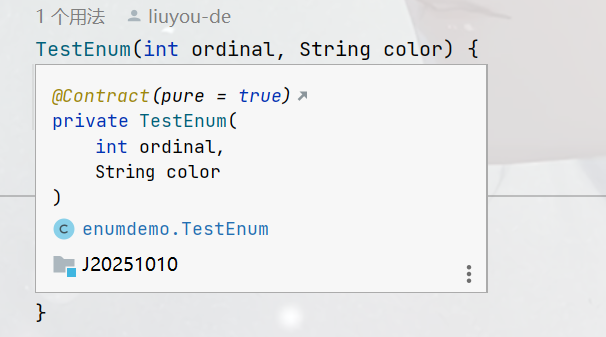
重要:枚举的构造方法默认是私有的
2.2优缺点
优点:
- 枚举常量更简单安全 。
- 枚举具有内置方法 ,代码更优雅
缺点:
- 不可继承,无法扩展
2.3枚举和反射
枚举是否可以通过反射,拿到实例对象?
public class Test {
    public static void main(String[] args) {
        try {
            Class<?> c1 = Class.forName("enumdemo.TestEnum");
            Constructor<?> constructor =
                    c1.getDeclaredConstructor(int.class,String.class);
            constructor.setAccessible(true);
            TestEnum testEnum = (TestEnum)constructor.newInstance(9,"WHITEBLACK");
            System.out.println(testEnum);
        } catch (ClassNotFoundException e) {
            throw new RuntimeException(e);
        } catch (NoSuchMethodException e) {
            throw new RuntimeException(e);
        } catch (InvocationTargetException e) {
            throw new RuntimeException(e);
        } catch (InstantiationException e) {
            throw new RuntimeException(e);
        } catch (IllegalAccessException e) {
            throw new RuntimeException(e);
        }

    }
}

执行上面那段代码时居然报错了
异常信息:java.lang.NoSuchMethodException: enumdemo.TestEnum.(int,java.lang.String)表明没有找到对应的构造方法,而我们所给的构造方法参数为String和Integer。原因是所有的枚举类都继承于ava.lang.Enum不仅要完成自己构造的方法,还要实现父类的构造方法,而且枚举比较特殊,虽然我们写的构造方法是两个,她默认还添加了两个参数
protected Enum(String name, int ordinal) {
     this.name = name;
     this.ordinal = ordinal;
}
我们应在给4个参数
public static void main(String[] args) {
        try {
            Class<?> c1 = Class.forName("enumdemo.TestEnum");
            Constructor<?> constructor =
                    c1.getDeclaredConstructor(String.class,int.class,int.class,String.class);
            constructor.setAccessible(true);
            TestEnum testEnum = (TestEnum)constructor.newInstance(9,"WHITEBLACK");
            System.out.println(testEnum);
        } catch (ClassNotFoundException e) {
            throw new RuntimeException(e);
        } catch (NoSuchMethodException e) {
            throw new RuntimeException(e);
        } catch (InvocationTargetException e) {
            throw new RuntimeException(e);
        } catch (InstantiationException e) {
            throw new RuntimeException(e);
        } catch (IllegalAccessException e) {
            throw new RuntimeException(e);
        }

    }

而此时还有错误,实际这就是最终答案枚举过滤通过反射获取枚举的实例,不能通过反射获取枚举类的实例!
3.Lambda表达式
基本语法: (parameters) -> expression 或 (parameters) ->{ statements; }
3.1函数式接口
一个接口有且只有一个抽象方法 ,
如果在接口上声明了@FunctionalInterface注释,编译器会自动检测
3.2基本使用
@FunctionalInterface
interface IA{
    void test();
//    void test2();
    default void test2(){}
    public static void test3(){}

}
//无返回值无参数
@FunctionalInterface
interface NoParameterNoReturn {
    void test();
}
//无返回值一个参数
@FunctionalInterface
interface OneParameterNoReturn {
    void test(int a);
}

//无返回值多个参数
@FunctionalInterface
interface MoreParameterNoReturn {
    void test(int a, int b);
}
//有返回值无参数
@FunctionalInterface
interface NoParameterReturn {
    int test();
}

//有返回值一个参数
@FunctionalInterface
interface OneParameterReturn {
    int test(int a);
}
//有返回值多参数
@FunctionalInterface
interface MoreParameterReturn {
    int test(int a,int b);
}
public class Test {

     public static void main9(String[] args) {
        OneParameterNoReturn oneParameterNoReturn = (int a) -> {
            System.out.println(a);
        };
        OneParameterNoReturn oneParameterNoReturn1 =(a) -> System.out.println(a);
        oneParameterNoReturn1.test(10);
    }

}
3.2语法精简
- 参数类型可以省略,如果需要省略,每个参数的类型都要省略。
- 参数的小括号里面只有一个参数,那么小括号可以省略
- 如果方法体当中只有一句代码,那么大括号可以省略
- 如果方法体中只有一条语句,且是return语句,那么大括号可以省略,且去掉return关键字。
3.3变量捕获
public static void main3(String[] args) {
        int count = 10;
        MoreParameterNoReturn moreParameterNoReturn = (int a,int b) -> {
            System.out.println(count);//编译出错
            System.out.println(a+b);
        };
//        count = 99;
    }
匿名内部类的变量捕获,代码中count这个变量,变量要不被final修饰,要不就是没有修改
3.4Lambda在集合当中的使用
| 对应的接 口 | 新增的方法 |
|---|---|
| Collection | removeIf() spliterator() stream() parallelStream() forEach() |
| List | replaceAll() sort() |
| Map | getOrDefault() forEach() replaceAll() putIfAbsent() remove() replace() computeIfAbsent() computeIfPresent() compute() merge() |
3.5Collection接口
forEach() 方法演示
public static void main2(String[] args) {
    ArrayList<String> arrayList = new ArrayList<>();
    arrayList.add("abcd");
    arrayList.add("jhjkhjk");
    arrayList.add("hello");

    arrayList.forEach(new Consumer<String>() {
        @Override
        public void accept(String s) {
            System.out.println(s);
        }
    });
}
3.6List接口
sort()方法的演示
 public static void main2(String[] args) {
    ArrayList<String> arrayList = new ArrayList<>();
    arrayList.add("abcd");
    arrayList.add("jhjkhjk");
    arrayList.add("hello")
 	arrayList.sort(new Comparator<String>() {
        @Override
        public int compare(String o1, String o2) {
            return o1.compareTo(o2);
        }
    });

    arrayList.sort(((o1, o2) -> o1.compareTo(o2)));
}
3.7Map接口
HashMap的forEach()
public static void main1(String[] args){
        HashMap<String,Integer> map = new HashMap<>();
        map.put("hello",3);
        map.put("abc",5);
        map.put("def",2);
//
//        map.forEach(new BiConsumer<String, Integer>() {
//            @Override
//            public void accept(String s, Integer integer) {
//                System.out.println("key: "+s + " val: "+integer);
//            }
//        });
        map.forEach((key,val)-> System.out.println("key: "+key + " val: "+val));
 }
3.8总结
-
Lambda表达式代码简洁,方便函数编程,但可读性变差,不容易调试
-
容易进行并行计算
-
非并行计算中,很多计算未必有传统的 for 性能要高





 扫一扫
扫一扫


 965
965

 被折叠的 条评论
为什么被折叠?
被折叠的 条评论
为什么被折叠?
 到【灌水乐园】发言





