



背景:
近来手机界最火爆的话题莫过于豆包手机助手
https://o.doubao.com/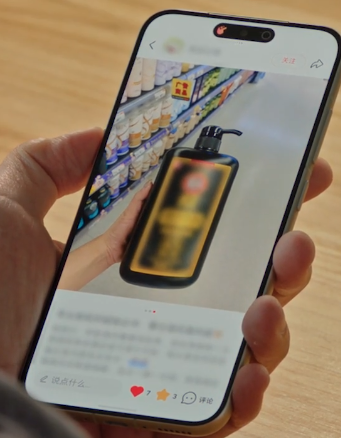
很多博主拿到豆包手机后也开始对豆包手机助手进行一系列的实现原理调研和猜想,比如调研时候就涉及几个我们系统fw和应用开发中常用的一些权限,CAPTURE_SECURE_VIDEO_OUTPUT(录取屏幕数据),INJECT_EVENTS(注入相关输入事件)。
其实这两个权限在我们投屏专题和input专题课程都有介绍过,不过课程讲解抓取屏幕权限那时候是CAPTURE_VIDEO_OUTPUT权限,而豆包用的是CAPTURE_SECURE_VIDEO_OUTPUT多了一个SECURE,那么这里的权限CAPTURE_SECURE_VIDEO_OUTPUT到底能用来干什么呢?
下面来详细剖析一下这个CAPTURE_SECURE_VIDEO_OUTPUT权限。
CAPTURE_SECURE_VIDEO_OUTPUT权限介绍
CAPTURE_SECURE_VIDEO_OUTPUT权限添加:
<uses-permission android:name="android.permission.CAPTURE_SECURE_VIDEO_OUTPUT" />
对应权限的定义:
frameworks/base/core/res/AndroidManifest.xml
      <!-- Allows an application to capture video output.
         <p>Not for use by third-party applications.</p>
          @hide
          @removed -->
    <permission android:name="android.permission.CAPTURE_VIDEO_OUTPUT"
        android:protectionLevel="signature" />

    <!-- Allows an application to capture secure video output.
         <p>Not for use by third-party applications.</p>
          @hide
          @removed -->
    <permission android:name="android.permission.CAPTURE_SECURE_VIDEO_OUTPUT"
        android:protectionLevel="signature" />
官方注释解释:
允许一个app可以抓取安全级别的视频内容,这个权限不是给第三方app用的,是需要系统签名的权限,保护级别也是android:protectionLevel=“signature”。
其实只看这个权限了解的话,大家还是会感觉比较空,只能理解到字面意思就是可以抓取安全级别的视频内容,所以要全面了解只看这一点注释还远远不够。
首先疑问就是什么是安全级别内容?有现实的案例来说明么,开发过程中哪些画面界面就是要设置这个安全级别内容。
安全Activity画面如何设置
当一个窗口被标记为 FLAG_SECURE 后,系统会认为它包含敏感内容,从而阻止或限制以下行为:
禁止常规截屏(包括adb shell screencap命令和大多数手机自带的截屏功能)。
禁止录屏(包括系统录屏工具和大多数录屏App)。
防止内容出现在不安全的显示输出上,例如通过MediaProjection API投屏、录屏,或显示在非受信的外部显示器上。
比如涉及到场景为:密码输入,手势输入,银行App登录、账户总览、交易密码输入、支付确认、付款二维码/条形码(包含金额)
实际案例
这里就以手机的手势设置画面来进行代码剖析。
按如下路径进行操作:
设置app —》 安全与隐私 —》设置锁屏 —》 手势密码设置
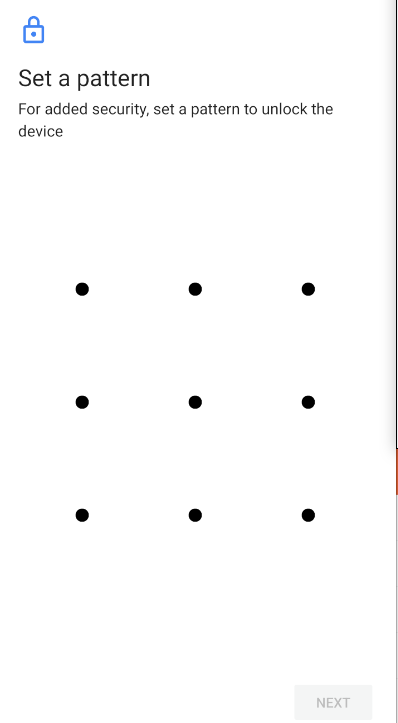
那么看看这个手势密码设置画面的详细情况,Activity画面在onCreate时候就把Activity设置成了FLAG_SECURE
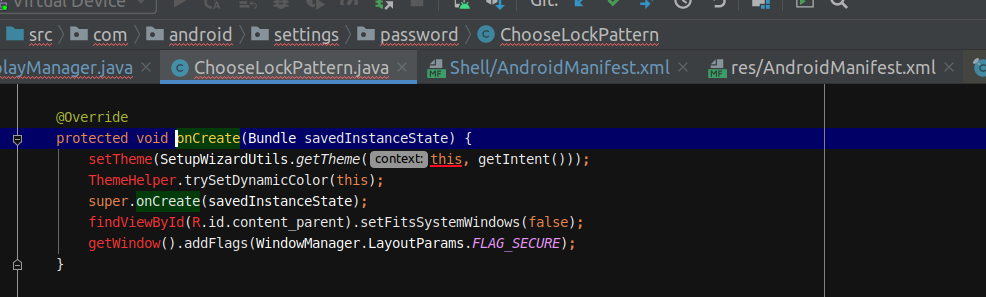 下面看看这个FLAG_SECURE
frameworks/base/core/java/android/view/WindowManager.java
    /** Window flag: treat the content of the window as secure, preventing
         * it from appearing in screenshots or from being viewed on non-secure
         * displays.
         *
         * <p>See {@link android.view.Display#FLAG_SECURE} for more details about
         * secure surfaces and secure displays.
         */
        public static final int FLAG_SECURE             = 0x00002000;
注释也比较详细,可以看出主要是把window的内容变成安全的,防止window内容展示在截图,或者不安全的display中(比如常见投屏录屏的虚拟屏)。
dumpsys SurfaceFlinger后查看相关输出如下:
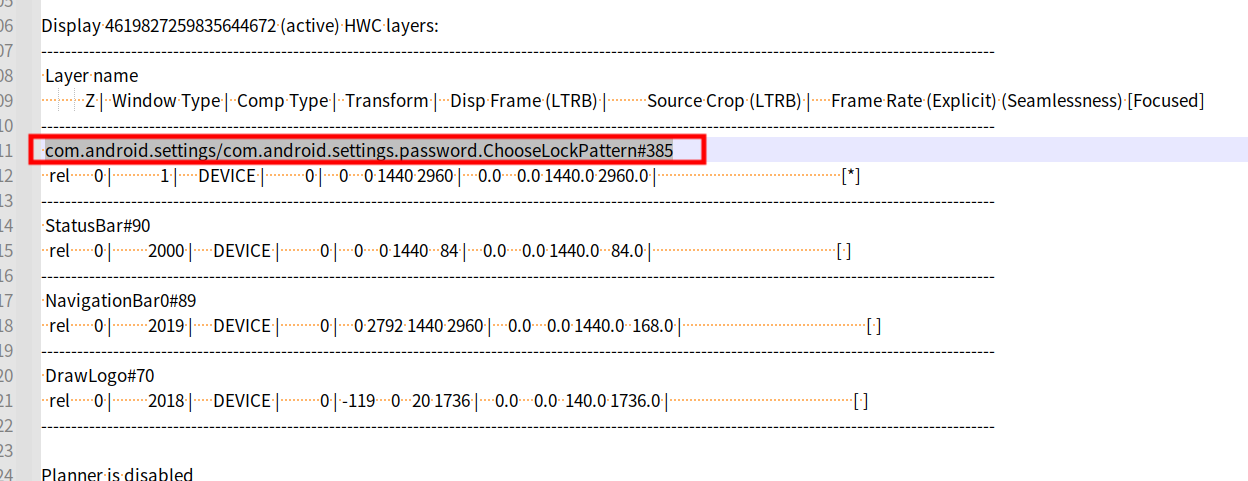 可以看到这里的ChooseLockPattern的Activity对应Layer实际上isSecure为true
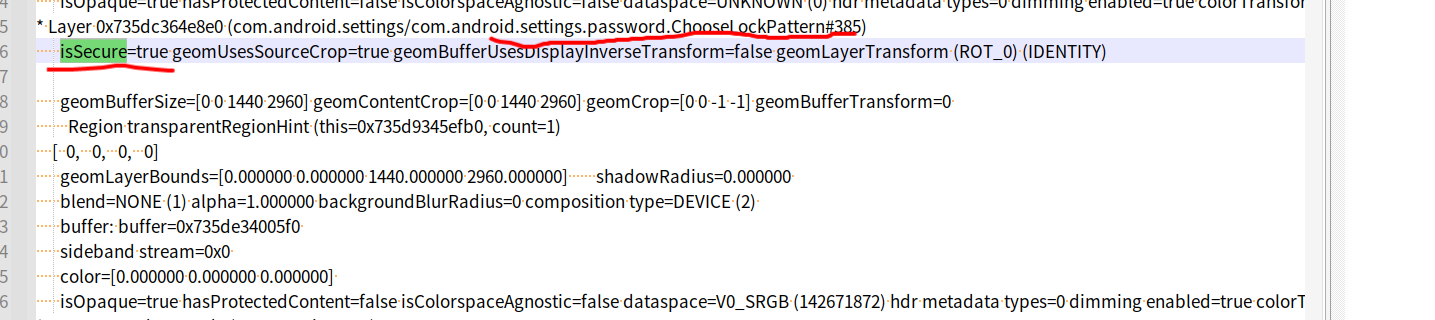
如果没有额外特别设置,则一般 isSecure=false。
* Layer 0x735dc3562330 (2ed9211 com.android.settings/com.android.settings.SubSettings#355)
      isSecure=false geomUsesSourceCrop=false geomBufferUsesDisplayInverseTransform=false geomLayerTransform (ROT_0) (IDENTITY)
那么上面也一直强调说不安全的display的,那么display的是否安全又是靠啥标识和控制呢?
这里接下来就需要看Display创建时候的对应flag了。
VIRTUAL_DISPLAY_FLAG_SECURE的Flag介绍:
创建虚拟屏幕这块已经在投屏课程有深入讲解,也有对这些flag进行剖析,这里主要看看VIRTUAL_DISPLAY_FLAG_SECURE这个flag的讲解。
frameworks/base/core/java/android/hardware/display/DisplayManager.java
    /**
     * Virtual display flag: Create a secure display.
     *
     * <h3>Secure virtual displays</h3>
     * <p>
     * When this flag is set, the virtual display is considered secure as defined
     * by the {@link Display#FLAG_SECURE} display flag.  The caller promises to take
     * reasonable measures, such as over-the-air encryption, to prevent the contents
     * of the display from being intercepted or recorded on a persistent medium.
     * </p><p>
     * Creating a secure virtual display requires the CAPTURE_SECURE_VIDEO_OUTPUT permission.
     * This permission is reserved for use by system components and is not available to
     * third-party applications.
     * </p>
     *
     * <h3>Non-secure virtual displays</h3>
     * <p>
     * When this flag is not set, the virtual display is considered unsecure.
     * The content of secure windows will be blanked if shown on this display.
     * </p>
     *
     * @see Display#FLAG_SECURE
     * @see #createVirtualDisplay
     */
    public static final int VIRTUAL_DISPLAY_FLAG_SECURE = 1 << 2;
frameworks/base/core/java/android/view/Display.java
    /**
     * Display flag: Indicates that the display has a secure video output and
     * supports compositing secure surfaces.
     * <p>
     * If this flag is set then the display device has a secure video output
     * and is capable of showing secure surfaces.  It may also be capable of
     * showing {@link #FLAG_SUPPORTS_PROTECTED_BUFFERS protected buffers}.
     * </p><p>
     * If this flag is not set then the display device may not have a secure video
     * output; the user may see a blank region on the screen instead of
     * the contents of secure surfaces or protected buffers.
     * </p><p>
     * Secure surfaces are used to prevent content rendered into those surfaces
     * by applications from appearing in screenshots or from being viewed
     * on non-secure displays.  Protected buffers are used by secure video decoders
     * for a similar purpose.
     * </p><p>
     * An application creates a window with a secure surface by specifying the
     * {@link WindowManager.LayoutParams#FLAG_SECURE} window flag.
     * Likewise, an application creates a {@link SurfaceView} with a secure surface
     * by calling {@link SurfaceView#setSecure} before attaching the secure view to
     * its containing window.
     * </p><p>
     * An application can use the absence of this flag as a hint that it should not create
     * secure surfaces or protected buffers on this display because the content may
     * not be visible.  For example, if the flag is not set then the application may
     * choose not to show content on this display, show an informative error message,
     * select an alternate content stream or adopt a different strategy for decoding
     * content that does not rely on secure surfaces or protected buffers.
     * </p>
     *
     * @see #getFlags
     */
    public static final int FLAG_SECURE = 1 << 1;
VIRTUAL_DISPLAY_FLAG_SECURE这个flag就是用来创建一个安全的虚拟屏幕,在创建虚拟屏时候设置了这个标志位后,对应的Display对象的flag就会带上FLAG_SECURE,带有安全的标志的屏幕就可以展示上面isSecure=true的Layer,但是创建这样一个secure的Display是需要有CAPTURE_SECURE_VIDEO_OUTPUT权限的,这个权限对第三方app不可以用。
如果没有VIRTUAL_DISPLAY_FLAG_SECURE创建非安全的Display是无法展示那些安全的要求Layer,所以一般我们看到现象就是一篇黑。这也就是可以解释支付一些界面无法截图,或者截图后是一片黑的现象。
Activity设置FLAG_SECURE后普通scrcpy展示情况:
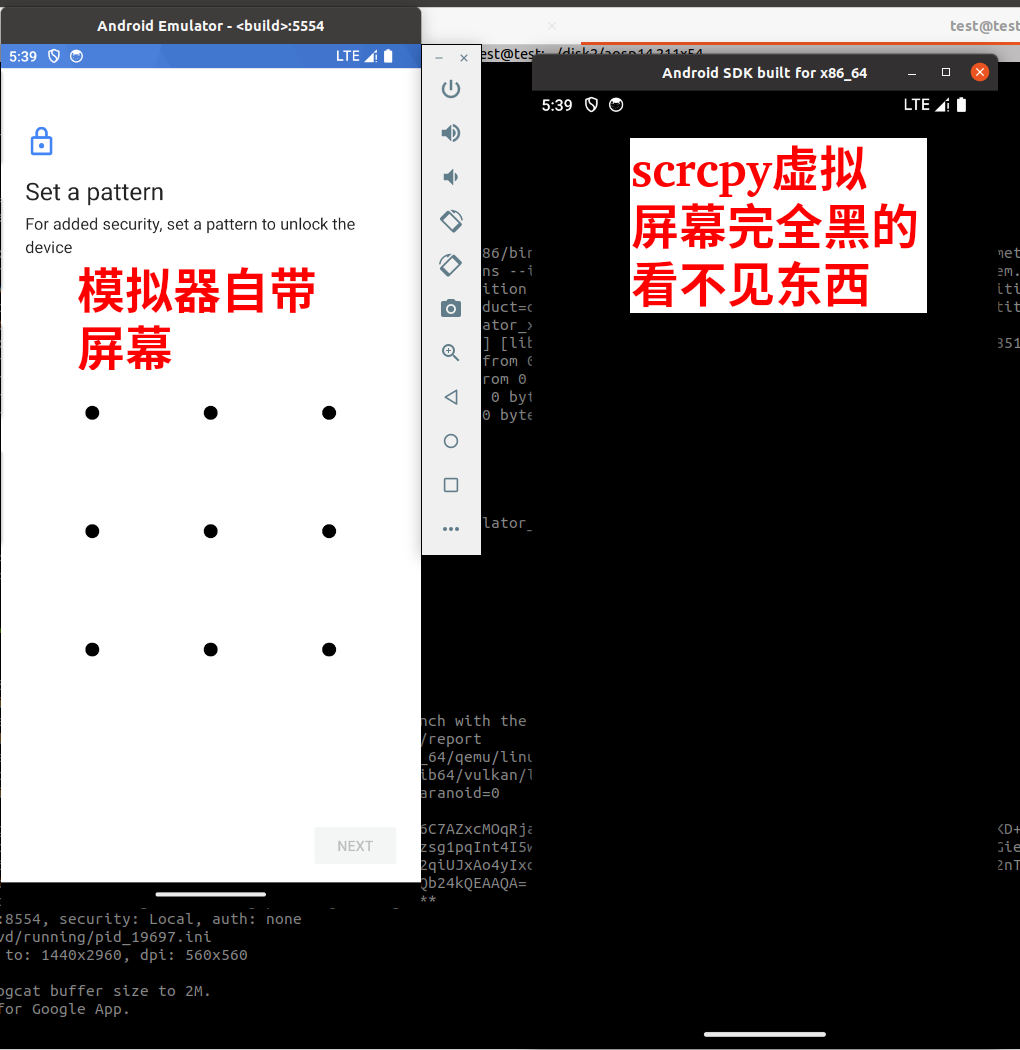
下面看看scrcpy默认情况下(关于scrcpy相关原理内容去看马哥投屏专题),展示手势密码设置界面情况如下:
默认scrcpy的虚拟屏未设置FLAG_SECURE
 dumpsys display看看相关display情况结果如下:
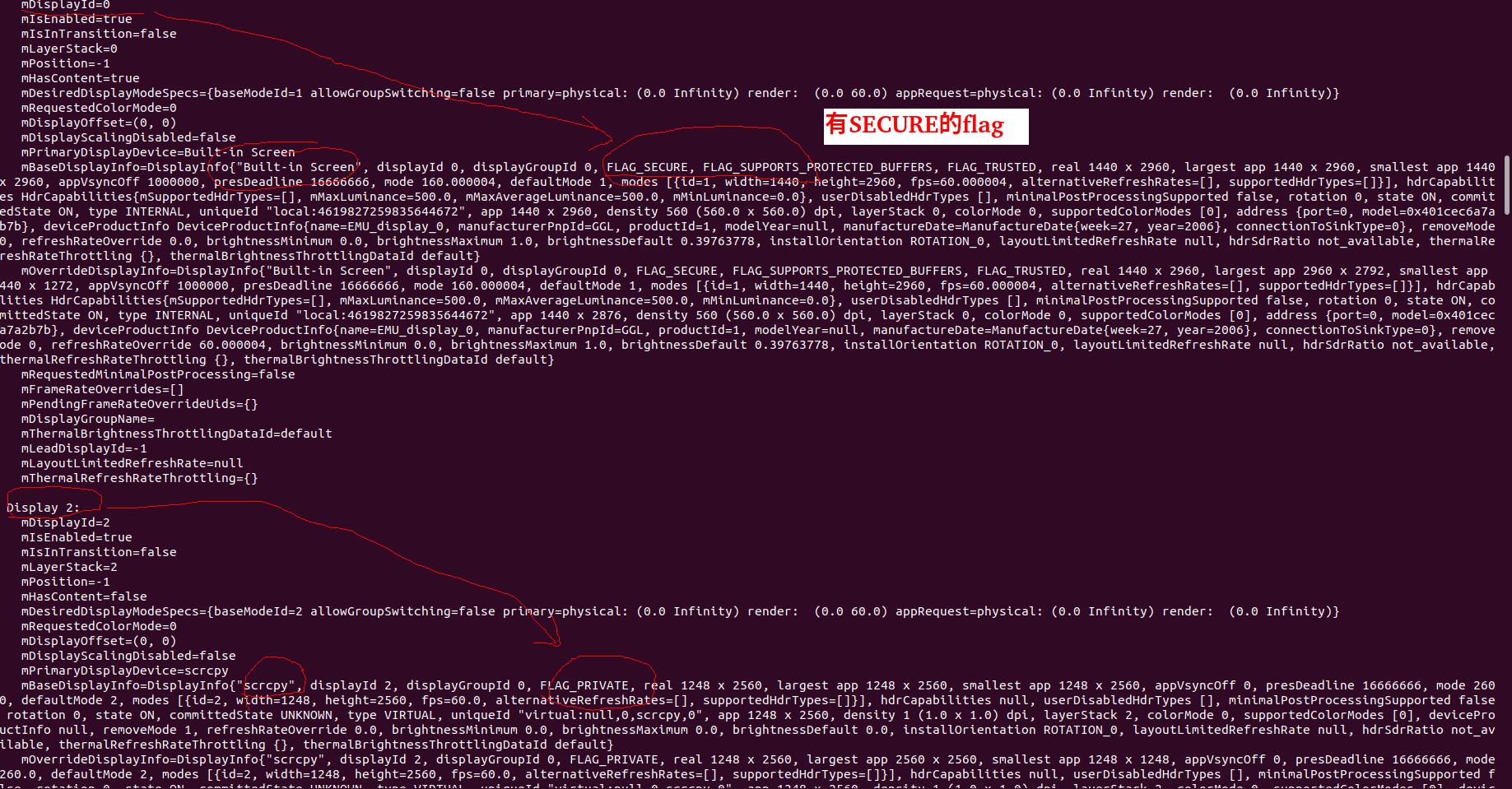
可以看出完全scrcpy的虚拟屏幕没有FLAG_SECURE的安全flag,所以自然无法展示出有secure为true的Layer。
设置FLAG_SECURE
具体设置的方法大概就是,调用DisplayManager的createVirtualDisplay时候传递flag要或上FLAG_SECURE这个掩码,具体在投屏课程也有demo。
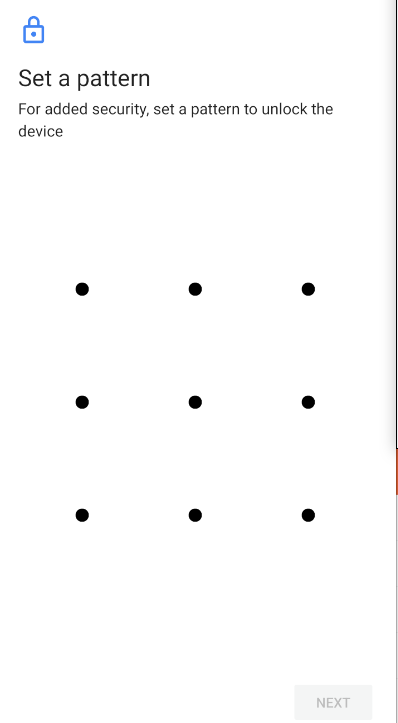
成功后效果如下:
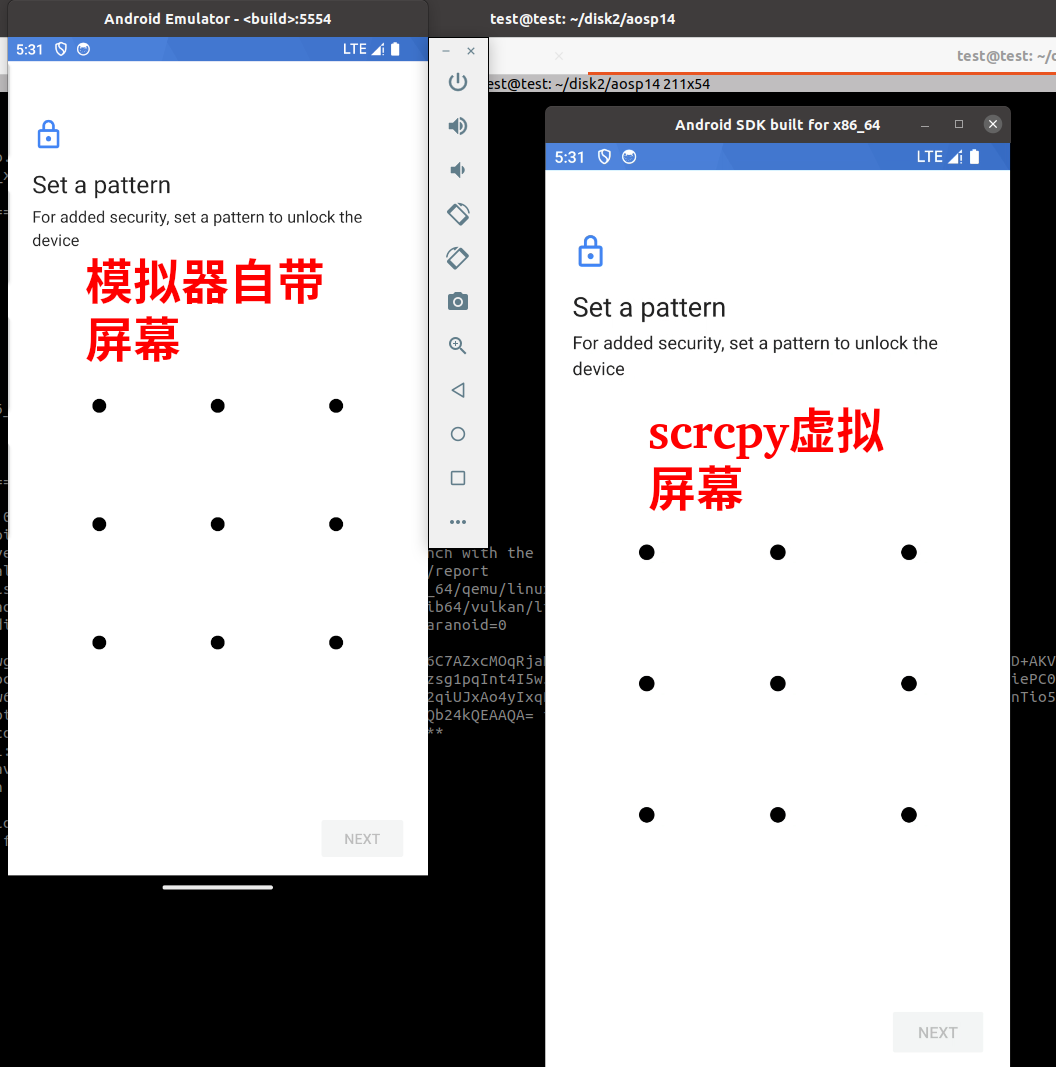
对应的dumpsys display看看scrcpy虚拟屏幕情况:
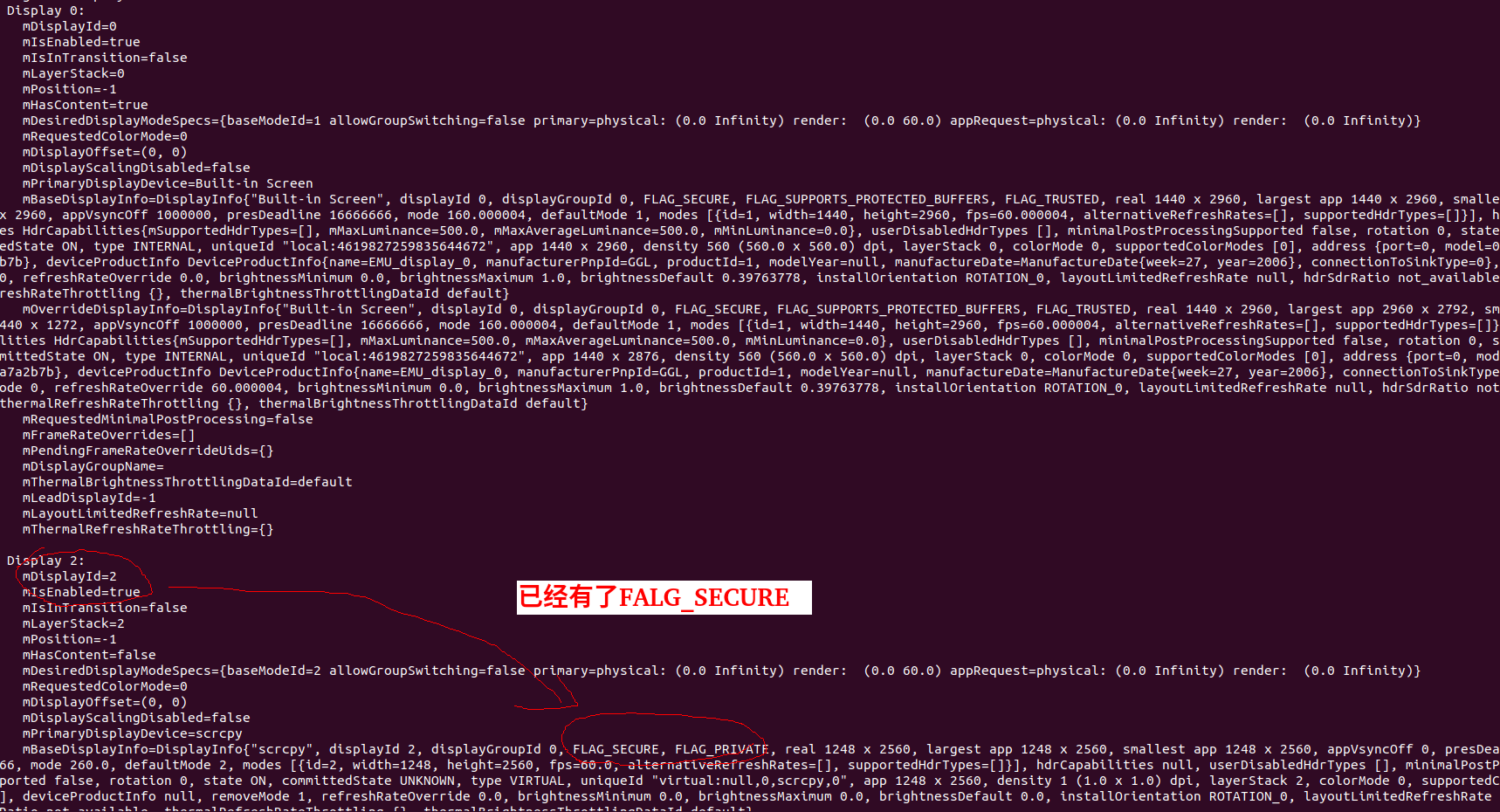
总结
上面有讲到权限,虚拟屏幕创建Display,app创建对于secure的Layer,下面总结一下他们关系:
1、应用通过Secure的flag创建Secure Layer,应用将帧数据绘制到Secure Layer。
2、SurfaceFlinger进行合成,它看到该Secure Layer的目标Display具有FLAG_SECURE。
3、创建目标Display具有FLAG_SECURE需要这个app具备CAPTURE_SECURE_VIDEO_OUTPUT权限。






 扫一扫
扫一扫


 187
187

 被折叠的 条评论
为什么被折叠?
被折叠的 条评论
为什么被折叠?
 到【灌水乐园】发言





