



Android Jank detection with FrameTimeline
NOTE: FrameTimeline requires Android 12(S) or higher
A frame is said to be janky if the time the frame was presented on screen does
not match the predicted present time given by the scheduler.
A jank can cause:
- Unstable frame rate
- Increased latency
FrameTimeline is a module within SurfaceFlinger that detects janks and reports
the source of the jank.
SurfaceViews
are currently not supported, but will be, in future.
UI
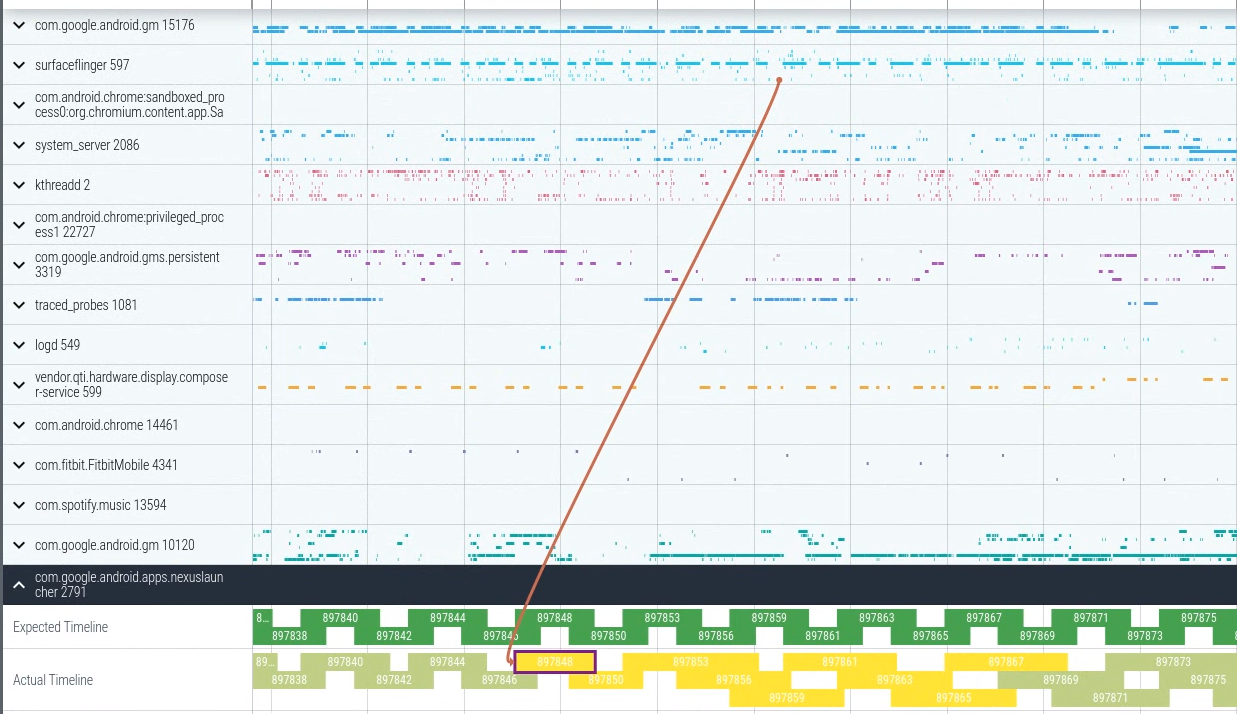
Two new tracks are added for every application that had at least one frame on
screen.

-
Expected Timeline
Each slice represents the time given to the app for rendering the
frame. To avoid janks in the system, the app is expected to finish within this
time frame. The start time is the time the Choreographer callback was scheduled to run. -
Actual Timeline
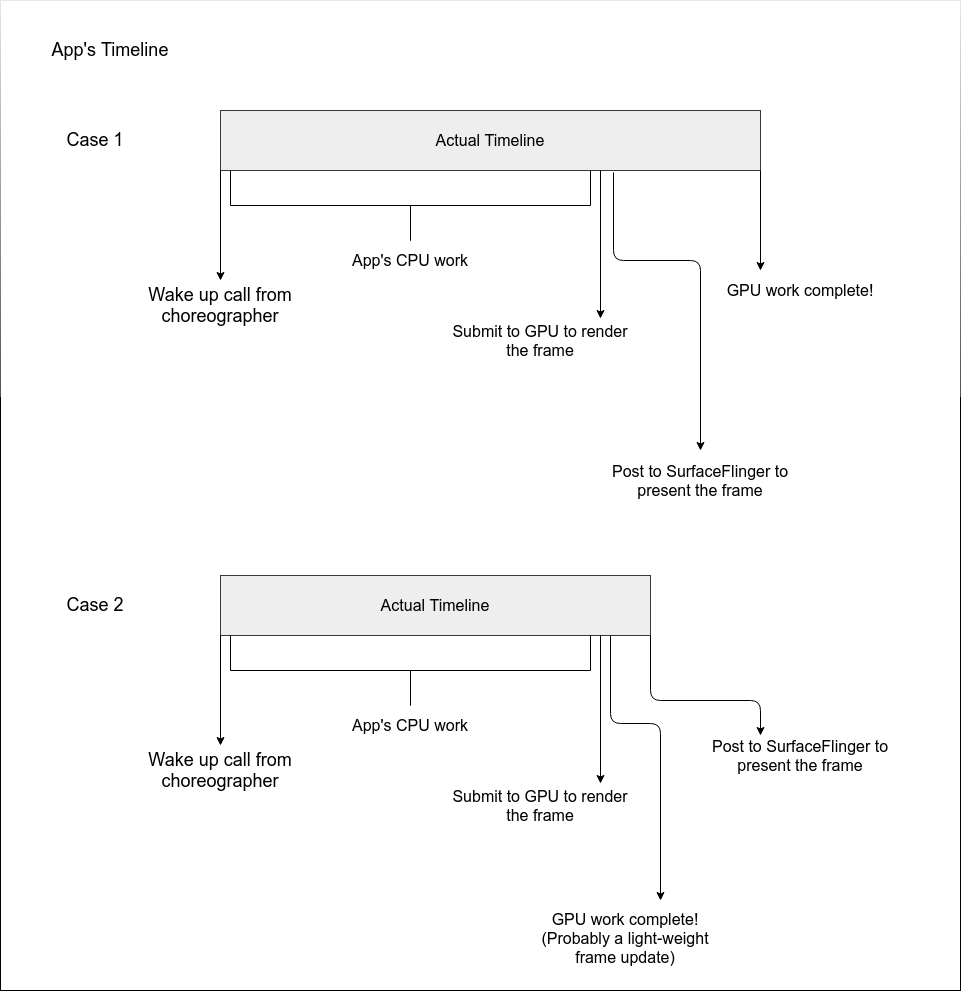
These slices represent the actual time an app took to complete the frame
(including GPU work) and send it to SurfaceFlinger for composition. The start time
is the time thatChoreographer#doFrameorAChoreographer_vsyncCallbackstarted to run.
The end time of the slices here representmax(gpu time, post time). Post time is the time the app’s frame was posted to
SurfaceFlinger.
Similarly, SurfaceFlinger also gets these two new tracks representing the
expected time it’s supposed to finish within, and the actual time it took to
finish compositing frames and presenting on-screen. Here, SurfaceFlinger’s work
represents everything underneath it in the display stack. This includes the
Composer and the DisplayHAL. So, the slices represent SurfaceFlinger main
thread’s start to on-screen update.
The names of the slices represent the token received from
choreographer.
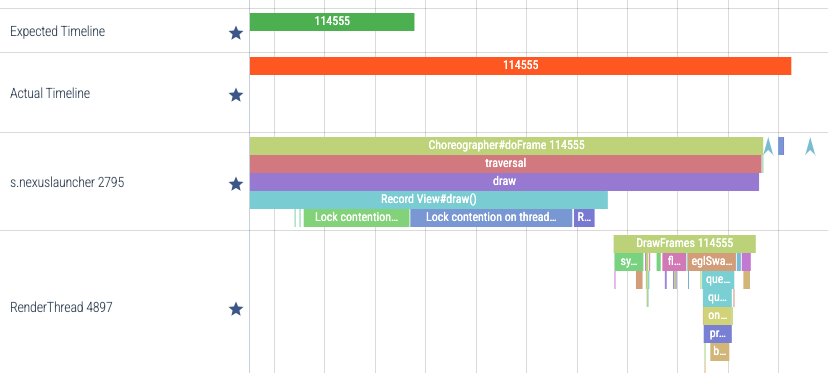
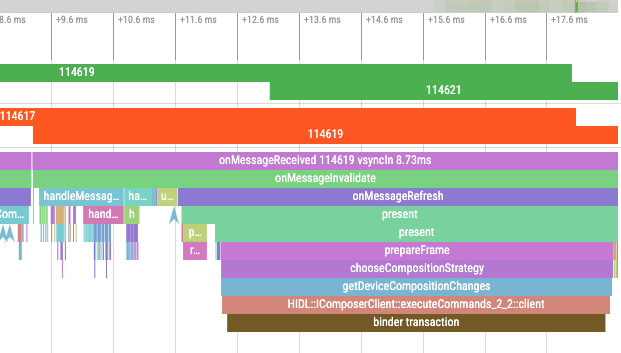
You can compare a slice in the actual timeline track to its corresponding slice
in the expected timeline track to see how the app performed compared to the
expectations. In addition, for debugging purposes, the token is added to the
app’s doFrame and RenderThread slices. For SurfaceFlinger, the same
token is shown in onMessageReceived.
Selecting an actual timeline slice
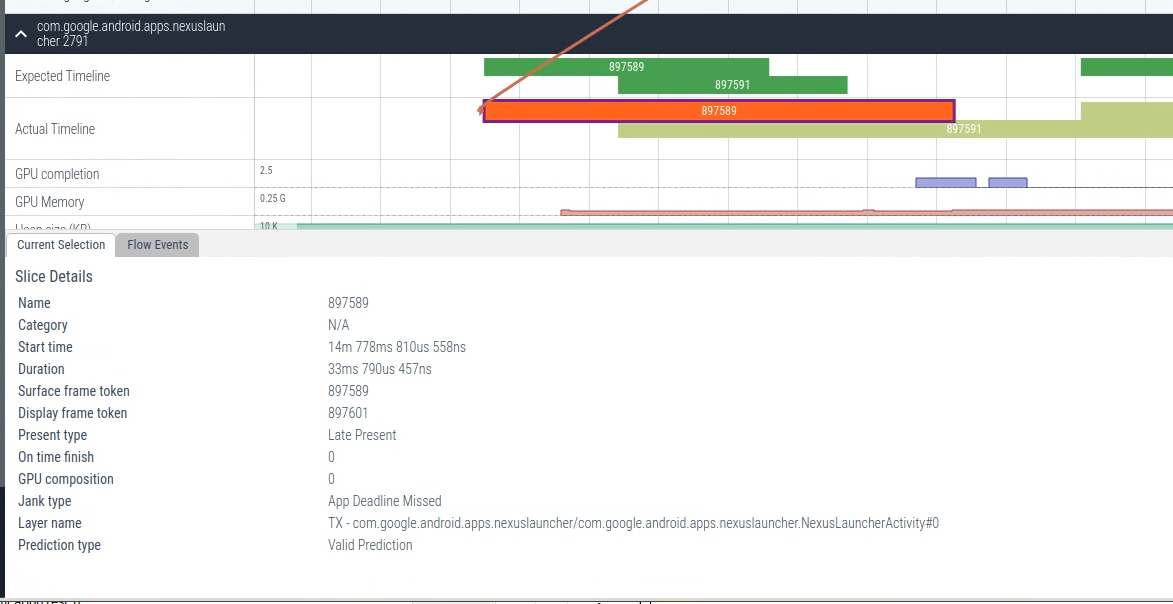
The selection details provide more information on what happened with the frame.
These include:
- Present Type
Was the frame early, on time or late.
- On time finish
Did the application finish its work for the frame on time?
- Jank Type
Was there a jank observed with this frame? If yes, this shows what type of jank
was observed. If not, the type would be None.
- Prediction type
Did the prediction expire by the time this frame was received by FrameTimeline?
If yes, this will say Expired Prediction. If not, Valid Prediction.
- GPU Composition
Boolean that tells if the frame was composited by the GPU or not.
- Layer Name
Name of the Layer/Surface to which the frame was presented. Some processes
update frames to multiple surfaces. Here, multiple slices with the same token
will be shown in the Actual Timeline. Layer Name can be a good way to
disambiguate between these slices.
- Is Buffer?
Boolean that tells if the frame corresponds to a buffer or an animation.
Flow events
Selecting an actual timeline slice in the app also draws a line back to the
corresponding SurfaceFlinger timeline slice.
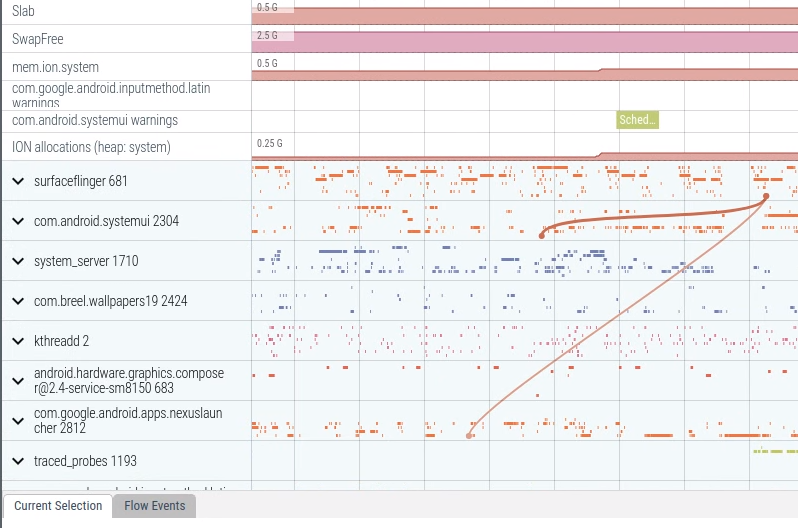
Since SurfaceFlinger can composite frames from multiple layers into a single
frame-on-screen (called a DisplayFrame), selecting a DisplayFrame draws
arrows to all the frames that were composited together. This can span over
multiple processes.

Color codes
| Color | Image | Description || :— | :—: | :— || Green |

| A good frame. No janks observed || Light Green |

| High latency state. The framerate is smooth but frames are presented late, resulting in an increased input latency.|| Red |

| Janky frame. The process the slice belongs to, is the reason for the jank. || Yellow |

| Used only by the apps. The frame is janky but app wasn’t the reason, SurfaceFlinger caused the jank. || Blue |

| Dropped frame. Not related to jank. The frame was dropped by SurfaceFlinger, preferring an updated frame over this. |
Janks explained
The jank types are defined in
JankInfo.h.
Since each app is written differently, there is no common way to go into the
internals of the apps and specify what the reason for the jank was. Our goal is
not to do this but rather, provide a quick way to tell if app was janky or if
SurfaceFlinger was janky.
None
All good. No jank with the frame. The ideal state that should be aimed for.
App janks
- AppDeadlineMissed
The app ran longer than expected causing a jank. The total time taken by the app
frame is calculated by using the choreographer wake-up as the start time and
max(gpu, post time) as the end time. Post time is the time the frame was sent to
SurfaceFlinger. Since the GPU usually runs in parallel, it could be that the gpu
finished later than the post time.
- BufferStuffing
This is more of a state than a jank. This happens if the app keeps sending new
frames to SurfaceFlinger before the previous frame was even presented. The
internal Buffer Queue is stuffed with buffers that are yet to be presented,
hence the name, Buffer Stuffing. These extra buffers in the queue are presented
only one after the other thus resulting in extra latency.
This can also result in a stage where there are no more buffers for the app to
use and it goes into a dequeue blocking wait.
The actual duration of work performed by the app might still be within the
deadline, but due to the stuffed nature, all the frames will be presented at
least one vsync late no matter how quickly the app finishes its work.
Frames will still be smooth in this state but there is an increased input
latency associated with the late present.
SurfaceFlinger Janks
There are two ways SurfaceFlinger can composite frames.
- Device Composition - uses a dedicated hardware
- GPU/Client composition - uses GPU to composite
An important thing to note is that performing device composition happens as a
blocking call on the main thread. However, GPU composition happens in parallel.
SurfaceFlinger performs the necessary draw calls and then hands over the gpu
fence to the display device. The display device then waits for the fence to be
signaled, and then presents the frame.
- SurfaceFlingerCpuDeadlineMissed
SurfaceFlinger is expected to finish within the given deadline. If the main
thread ran for longer than that, the jank is then
SurfaceFlingerCpuDeadlineMissed. SurfaceFlinger’s CPU time is the time spent on
the main thread. This includes the entire composition time if device composition
was used. If GPU composition was used, this includes the time to write the draw
calls and handing over the frame to the GPU.
- SurfaceFlingerGpuDeadlineMissed
The time taken by SurfaceFlinger’s main thread on the CPU + the GPU composition
time together were longer than expected. Here, the CPU time would have still
been within the deadline but since the work on the GPU wasn’t ready on time, the
frame got pushed to the next vsync.
- DisplayHAL
DisplayHAL jank refers to the case where SurfaceFlinger finished its work and
sent the frame down to the HAL on time, but the frame wasn’t presented on the
vsync. It was presented on the next vsync. It could be that SurfaceFlinger did
not give enough time for the HAL’s work or it could be that there was a genuine
delay in the HAL’s work.
- PredictionError
SurfaceFlinger’s scheduler plans ahead the time to present the frames. However,
this prediction sometimes drifts away from the actual hardware vsync time. For
example, a frame might have predicted present time as 20ms. Due to a drift in
estimation, the actual present time of the frame could be 23ms. This is called a
Prediction Error in SurfaceFlinger’s scheduler. The scheduler corrects itself
periodically, so this drift isn’t permanent. However, the frames that had a
drift in prediction will still be classified as jank for tracking purposes.
Isolated prediction errors are not usually perceived by the user as the
scheduler is quick to adapt and fix the drift.
Unknown jank
As the name suggests, the reason for the jank is unknown in this case. An
example here would be that SurfaceFlinger or the App took longer than expected
and missed the deadline but the frame was still presented early. The probability
of such a jank happening is very low but not impossible.
SQL
At the SQL level, frametimeline data is available in two tables
select ts, dur, surface_frame_token as app_token, display_frame_token as sf_token, process.name
from expected_frame_timeline_slice left join process using(upid)
| ts | dur | app_token | sf_token | name |
|---|---|---|---|---|
| 60230453475 | 20500000 | 3135 | 3142 | com.google.android.apps.nexuslauncher |
| 60241677540 | 20500000 | 3137 | 3144 | com.google.android.apps.nexuslauncher |
| 60252895412 | 20500000 | 3139 | 3146 | com.google.android.apps.nexuslauncher |
| 60284614241 | 10500000 | 0 | 3144 | /system/bin/surfaceflinger |
| 60295858299 | 10500000 | 0 | 3146 | /system/bin/surfaceflinger |
| 60297798913 | 20500000 | 3147 | 3150 | com.android.systemui |
| 60307075728 | 10500000 | 0 | 3148 | /system/bin/surfaceflinger |
| 60318297746 | 10500000 | 0 | 3150 | /system/bin/surfaceflinger |
| 60320236468 | 20500000 | 3151 | 3154 | com.android.systemui |
| 60329511401 | 10500000 | 0 | 3152 | /system/bin/surfaceflinger |
| 60340732956 | 10500000 | 0 | 3154 | /system/bin/surfaceflinger |
| 60342673064 | 20500000 | 3155 | 3158 | com.android.systemui |
select ts, dur, surface_frame_token as app_token, display_frame_token, jank_type, on_time_finish, present_type, layer_name, process.name
from actual_frame_timeline_slice left join process using(upid)
| ts | dur | app_token | sf_token | jank_type | on_time_finish | present_type | layer_name | name |
|---|---|---|---|---|---|---|---|---|
| 60230453475 | 26526379 | 3135 | 3142 | Buffer Stuffing | 1 | Late Present | TX - com.google.android.apps.nexuslauncher/com.google.android.apps.nexuslauncher.NexusLauncherActivity#0 | com.google.android.apps.nexuslauncher |
| 60241677540 | 28235805 | 3137 | 3144 | Buffer Stuffing | 1 | Late Present | TX - com.google.android.apps.nexuslauncher/com.google.android.apps.nexuslauncher.NexusLauncherActivity#0 | com.google.android.apps.nexuslauncher |
| 60252895412 | 2546525 | 3139 | 3142 | None | 1 | On-time Present | TX - NavigationBar0#0 | com.android.systemui |
| 60252895412 | 27945382 | 3139 | 3146 | Buffer Stuffing | 1 | Late Present | TX - com.google.android.apps.nexuslauncher/com.google.android.apps.nexuslauncher.NexusLauncherActivity#0 | com.google.android.apps.nexuslauncher |
| 60284808190 | 10318230 | 0 | 3144 | None | 1 | On-time Present | [NULL] | /system/bin/surfaceflinger |
| 60296067722 | 10265574 | 0 | 3146 | None | 1 | On-time Present | [NULL] | /system/bin/surfaceflinger |
| 60297798913 | 5239227 | 3147 | 3150 | None | 1 | On-time Present | TX - NavigationBar0#0 | com.android.systemui |
| 60307246161 | 10301772 | 0 | 3148 | None | 1 | On-time Present | [NULL] | /system/bin/surfaceflinger |
| 60318497204 | 10281199 | 0 | 3150 | None | 1 | On-time Present | [NULL] | /system/bin/surfaceflinger |
| 60320236468 | 2747559 | 3151 | 3154 | None | 1 | On-time Present | TX - NavigationBar0#0 | com.android.systemui |
TraceConfig
Trace Protos:
FrameTimelineEvent
Datasource:
data_sources {
    config {
        name: "android.surfaceflinger.frametimeline"
    }
}
原文地址:https://mp.weixin.qq.com/s/gOvEbqbQ0XNS5BeMEr6Kwg
更多framework实战干货,请关注下面“千里马学框架”





 扫一扫
扫一扫


 391
391

 被折叠的 条评论
为什么被折叠?
被折叠的 条评论
为什么被折叠?
 到【灌水乐园】发言





