





背景
在学习Perfetto/sf部分课程时候,经常分析一些问题时候会会涉及到线程的状态是running,sleep等情况。经常就需要看Perfetto的cpu部分的片段。
 那么cpu片段这块的信息到底如何看呢?今天带大家来看看官方文档是如何教我们看CPU Scheduling events部分内容的。
CPU Scheduling events
On Android and Linux Perfetto can gather scheduler traces via the Linux Kernel ftrace infrastructure.
This allows to get fine grained scheduling events such as:
Which threads were scheduled on which CPU core at any point in time, with nanosecond accuracy.
The reason why a running thread got descheduled (e.g. pre-emption, blocked on a mutex, blocking syscall or any other wait queue).
The point in time when a thread became eligible to be executed, even if it was not put immediately on any CPU run queue, together with the source thread that made it executable.
在 Android 和 Linux 上,Perfetto 可以通过 Linux 内核的 ftrace 基础设施收集调度器跟踪数据。
这允许我们获取细粒度的调度事件,例如:
a.在任何时间点,哪些线程被调度到了哪个 CPU 核心上运行,精度达到纳秒级。
b.正在运行的线程被取消调度(descheduled)的原因(例如,被抢占、在互斥锁上阻塞、阻塞式系统调用或任何其他等待队列)。
c.线程何时变得有资格执行(即使它没有立即被放入任何 CPU 运行队列),以及使其可执行的源线程(source thread)。
UI 展示
UI 将单个调度事件表示为切片(slices):
Clicking on a CPU slice shows the relevant information in the details panel:
点击一个 CPU 切片会在详情面板中显示相关信息:
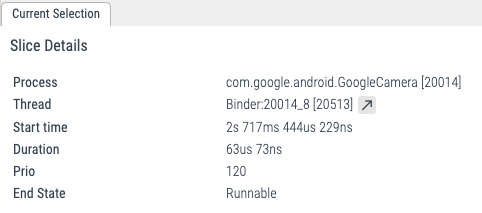
Scrolling down, when expanding individual processes, the scheduling events also create one track for each thread, which allows to follow the evolution of the state of individual threads:
向下滚动,在展开单个进程时,调度事件也会为每个线程创建一个轨道(track),从而可以跟踪单个线程状态的演变:

SQL
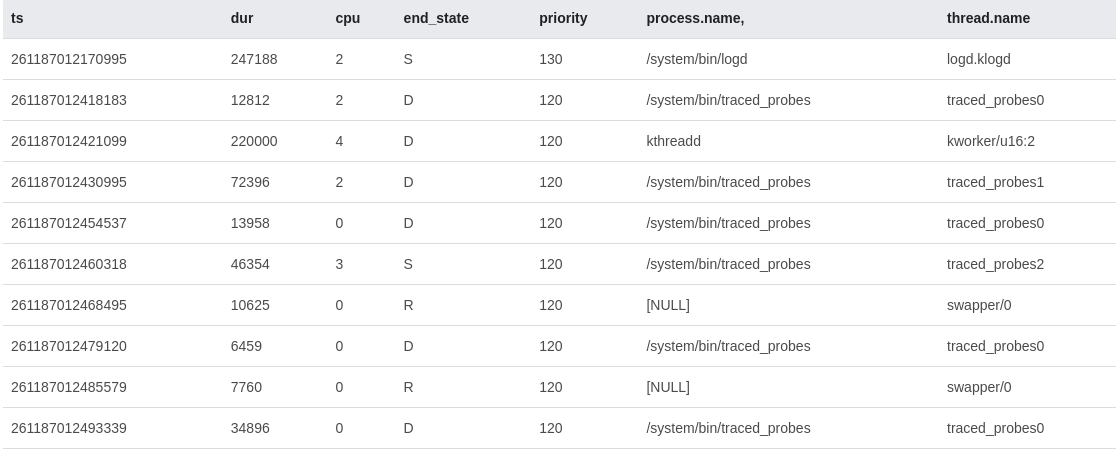
在 SQL 层面,调度数据暴露在 sched_slice
At the SQL level, the scheduling data is exposed in the sched_slice table.
select ts, dur, cpu, end_state, priority, process.name, thread.name
from sched_slice left join thread using(utid) left join process using(upid)
TraceConfig
To collect this data, include the following data sources:
要收集此数据,请在 TraceConfig 中包含以下数据源:
# Scheduling data from the kernel.
data_sources: {
  config {
    name: "linux.ftrace"
    ftrace_config {
      compact_sched: {
        enabled: true
      }
      ftrace_events: "sched/sched_switch"
      # optional: precise thread lifetime tracking:
      ftrace_events: "sched/sched_process_exit"
      ftrace_events: "sched/sched_process_free"
      ftrace_events: "task/task_newtask"
      ftrace_events: "task/task_rename"
    }
  }
}

# Adds full process names and thread<>process relationships:
data_sources: {
  config {
    name: "linux.process_stats"
  }
}
Scheduling wakeups and latency analysis
调度唤醒与延迟分析
By further enabling the following in the TraceConfig, the ftrace data source will record also scheduling wake up events:
通过在 TraceConfig 中进一步启用以下事件,ftrace 数据源还将记录调度唤醒事件:
  ftrace_events: "sched/sched_wakeup_new"
  ftrace_events: "sched/sched_waking"
While sched_switch events are emitted only when a thread is in the R(unnable) state AND is running on a CPU run queue, sched_waking events are emitted when any event causes a thread state to change.
sched_switch 事件仅在线程处于 R(可运行) 状态且正在 CPU 运行队列上运行时发出,而 sched_waking 事件则在任何导致线程状态改变的事件发生时发出。
Consider the following example:
考虑以下示例:
Thread A
condition_variable.wait()
                                     Thread B
                                     condition_variable.notify()
When Thread A suspends on the wait() it will enter the state S(sleeping) and get removed from the CPU run queue. When Thread B notifies the variable, the kernel will transition Thread A into the R(unnable) state. Thread A at that point is eligible to be put back on a run queue. However this might not happen for some time because, for instance:
All CPUs might be busy running some other thread, and Thread A needs to wait to get a run queue slot assigned (or the other threads have higher priority).
Some other CPUs other than the current one, but the scheduler load balancer might take some time to move the thread on another CPU.
Unless using real-time thread priorities, most Linux Kernel scheduler configurations are not strictly work-conserving. For instance the scheduler might prefer to wait some time in the hope that the thread running on the current CPU goes to idle, avoiding a cross-cpu migration which might be more costly both in terms of overhead and power.
NOTE: sched_waking and sched_wakeup provide nearly the same information. The difference lies in wakeup events across CPUs, which involve inter-processor interrupts. The former is always emitted on the source (wakee) CPU, the latter may be executed on either the source or the destination (waked) CPU depending on several factors. sched_waking is usually sufficient for latency analysis, unless you are looking into breaking down latency due to the scheduler’s wake up path, such as inter-processor signaling.
当线程 A 在 wait() 上挂起时,它将进入 S(睡眠) 状态并从 CPU 运行队列中移除。当线程 B 通知条件变量时,内核会将线程 A 转换到 R(可运行) 状态。此时线程 A 有资格被放回运行队列,但这可能不会立即发生,原因如下:
所有 CPU 可能正忙于运行其他线程,线程 A 需要等待获得运行队列位置(或其他线程具有更高优先级)
除了当前 CPU 外,调度器负载均衡器可能需要一些时间将线程迁移到其他 CPU
除非使用实时线程优先级,大多数 Linux 内核调度器配置并非严格的工作保守型。例如,调度器可能宁愿等待一段时间,希望当前 CPU 上运行的线程进入空闲状态,从而避免跨 CPU 迁移,这在开销和功耗方面可能代价更高
注意:sched_waking 和 sched_wakeup 提供几乎相同的信息。区别在于跨 CPU 的唤醒事件,这涉及处理器间中断。前者总是在源(唤醒者)CPU 上发出,后者可能根据多种因素在源或目标(被唤醒者)CPU 上执行。对于延迟分析,sched_waking 通常已足够,除非您正在研究调度器唤醒路径(如处理器间信令)导致的延迟分解。
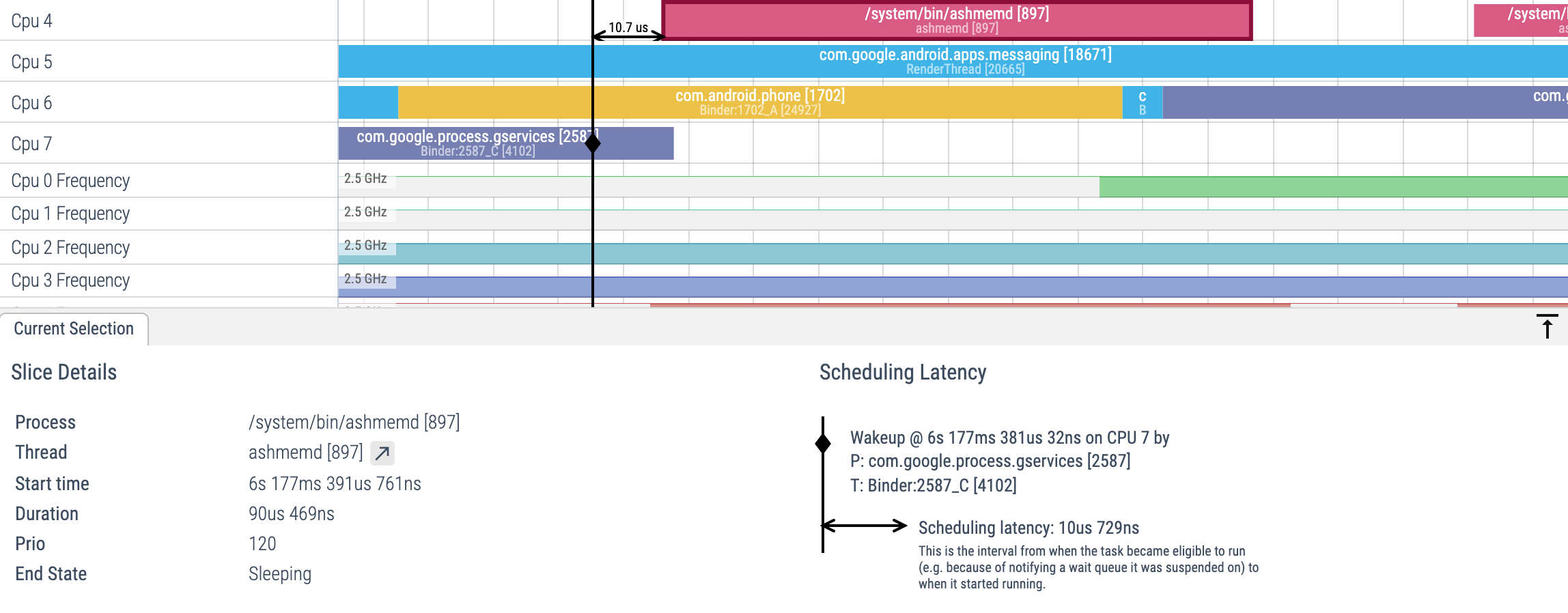
When enabling sched_waking events, the following will appear in the UI when selecting a CPU slice:
当启用 sched_waking 事件后,在 UI 中选择 CPU 切片时将显示以下信息:
Decoding end_state(解读end_state)
The sched_slice table contains information on scheduling activity of the system:
sched_slice 表包含了系统的调度活动信息:
> select * from sched_slice limit 1
id  type        ts          dur    cpu utid end_state priority
0   sched_slice 70730062200 125364 0   1    S         130
Each row of the table shows when a given thread (utid) began running (ts), on which core it ran (cpu), for how long it ran (dur), and why it stopped running: end_state.
end_state is encoded as one or more ascii characters. The UI uses the following translations to convert end_state into human readable text:
表中的每一行显示了特定线程(utid)开始运行的时间(ts)、在哪个核心上运行(cpu)、运行了多长时间(dur),以及它停止运行的原因:end_state。
end_state 编码为一个或多个 ASCII 字符。UI 使用以下转换规则将 end_state 转换为人类可读的文本:
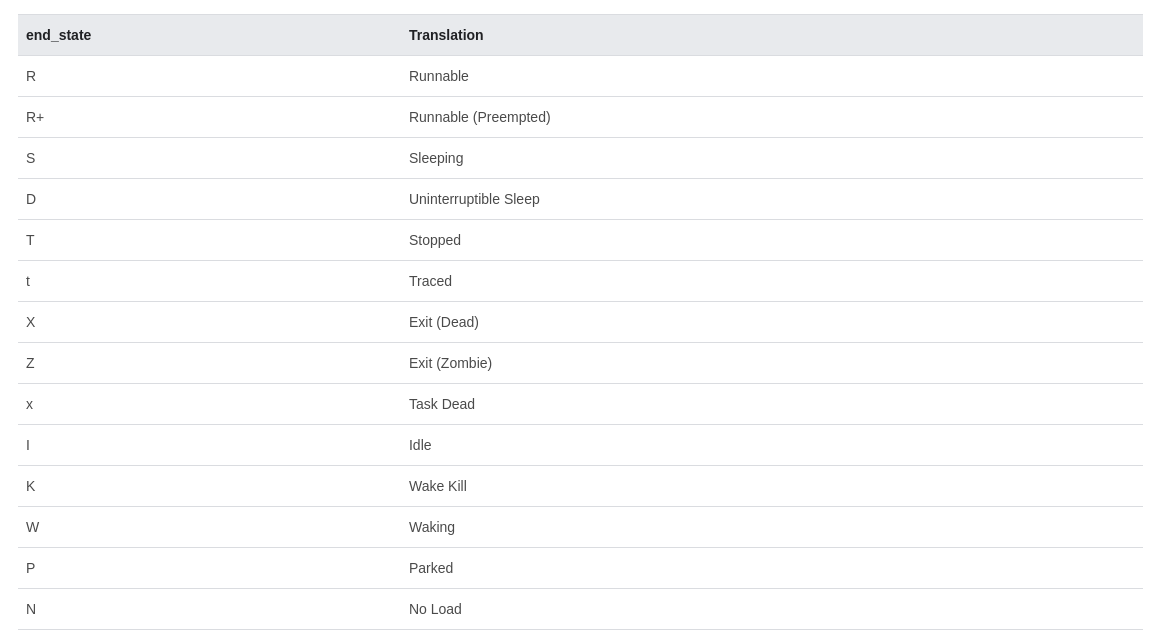
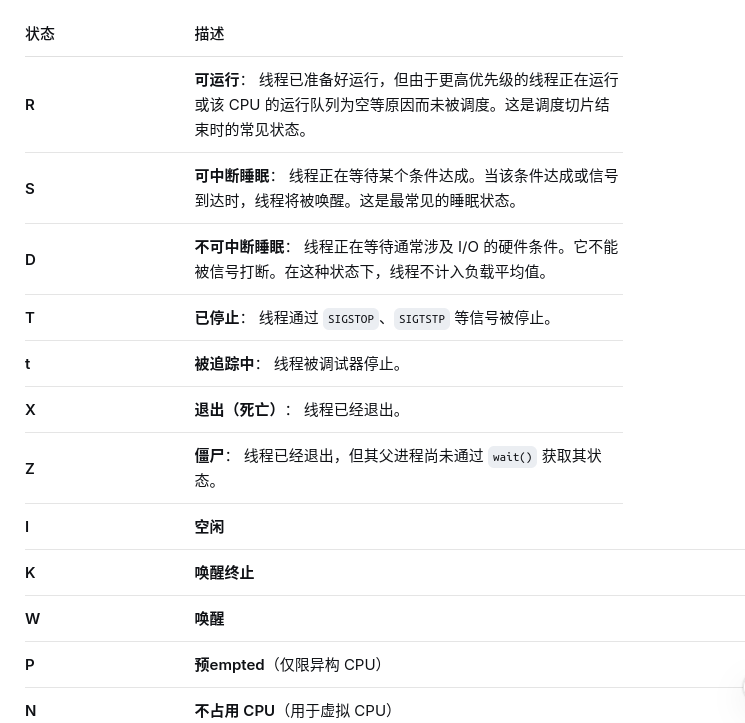
Not all combinations of characters are meaningful.
If we do not know when the scheduling ended (for example because the trace ended while the thread was still running) end_state will be NULL and dur will be -1.
并非所有的字符组合都具有实际意义。
如果我们无法确定调度何时结束(例如,由于跟踪结束时线程仍在运行),则 end_state 将为 NULL,且 dur 将为 -1。
官方文档地址:https://perfetto.dev/docs/data-sources/cpu-scheduling





 扫一扫
扫一扫


 999
999

 被折叠的 条评论
为什么被折叠?
被折叠的 条评论
为什么被折叠?
 到【灌水乐园】发言





