



背景:
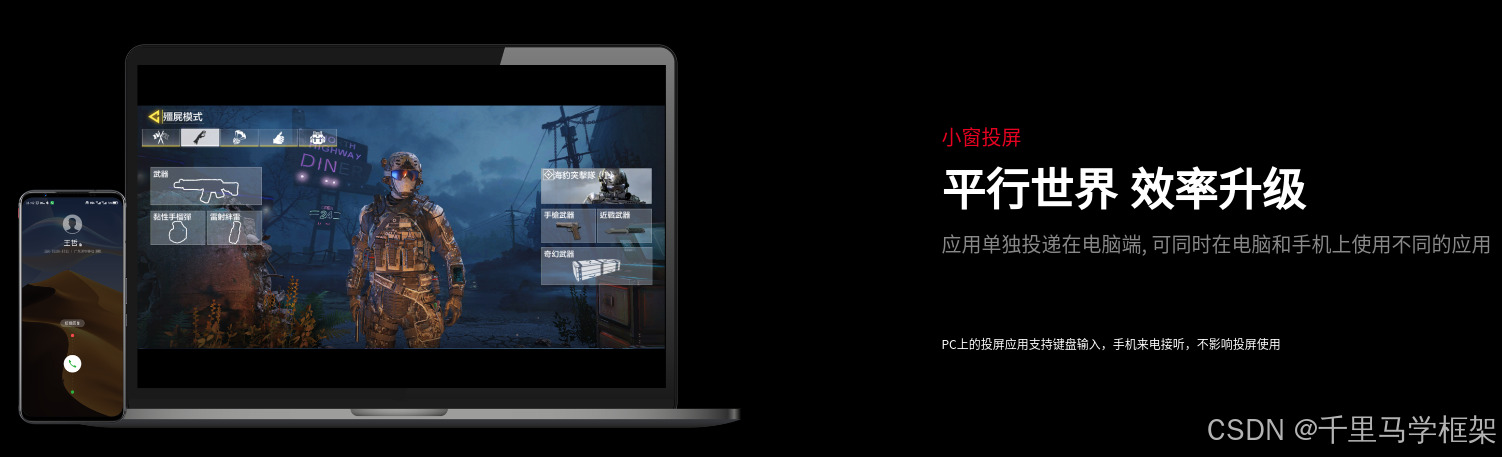
在做android投屏时候,如果知识简单的是实现一下类似scrcpy同屏幕大小传递,其实根本不需要深入了解啥VirtualDisplay相关源码的探索。但是现在车载投屏,手机游戏小窗投屏等高大上功能出现后,这个时候就不得不认认真真学习一下创建VirtualDisplay相关的知识。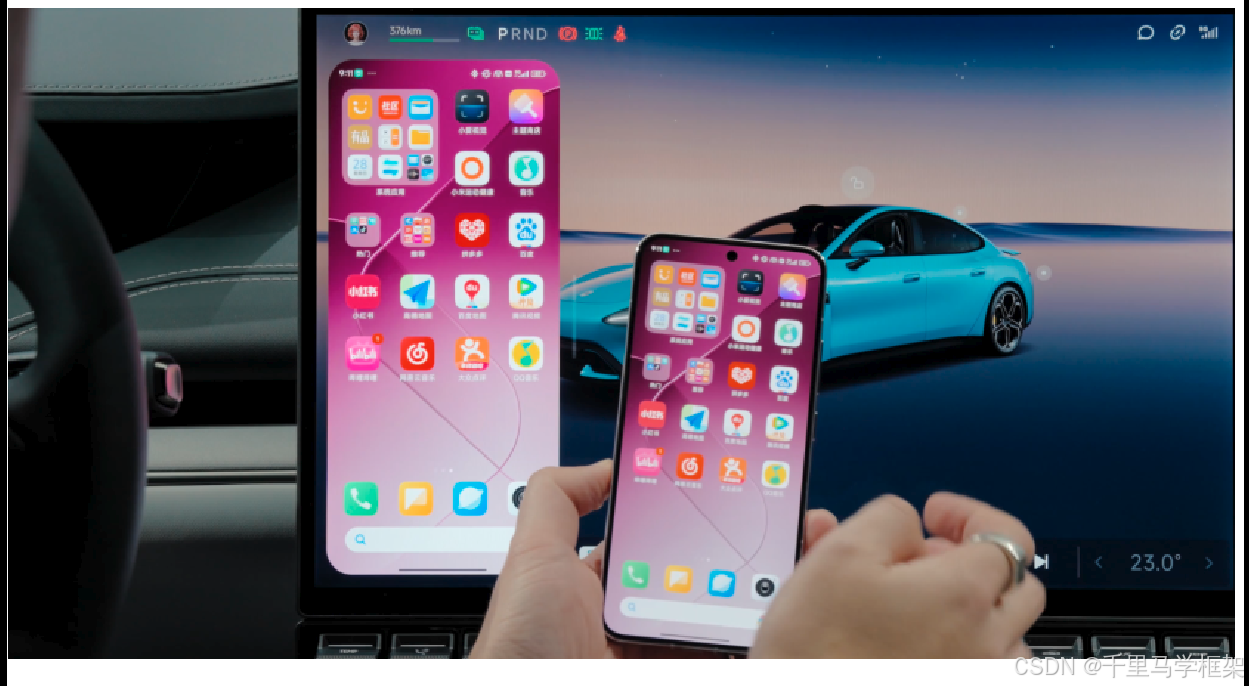
createVirtualDisplay方法介绍
/**
 * Creates a virtual display.
 *
 * @see #createVirtualDisplay(String, int, int, int, Surface, int,
 * VirtualDisplay.Callback, Handler)
 */
public VirtualDisplay createVirtualDisplay(@NonNull String name,
        int width, int height, int densityDpi, @Nullable Surface surface, int flags) {
    return createVirtualDisplay(name, width, height, densityDpi, surface, flags, null, null);
}

  /**
     * Creates a virtual display.
     * <p>
     * The content of a virtual display is rendered to a {@link Surface} provided
     * by the application.
     * </p><p>
     * The virtual display should be {@link VirtualDisplay#release released}
     * when no longer needed.  Because a virtual display renders to a surface
     * provided by the application, it will be released automatically when the
     * process terminates and all remaining windows on it will be forcibly removed.
     * </p><p>
     * The behavior of the virtual display depends on the flags that are provided
     * to this method.  By default, virtual displays are created to be private,
     * non-presentation and unsecure.  Permissions may be required to use certain flags.
     * </p><p>
     * As of {@link android.os.Build.VERSION_CODES#KITKAT_WATCH}, the surface may
     * be attached or detached dynamically using {@link VirtualDisplay#setSurface}.
     * Previously, the surface had to be non-null when {@link #createVirtualDisplay}
     * was called and could not be changed for the lifetime of the display.
     * </p><p>
     * Detaching the surface that backs a virtual display has a similar effect to
     * turning off the screen.
     * </p>
     *
     * @param name The name of the virtual display, must be non-empty.
     * @param width The width of the virtual display in pixels, must be greater than 0.
     * @param height The height of the virtual display in pixels, must be greater than 0.
     * @param densityDpi The density of the virtual display in dpi, must be greater than 0.
     * @param surface The surface to which the content of the virtual display should
     * be rendered, or null if there is none initially.
     * @param flags A combination of virtual display flags:
     * {@link #VIRTUAL_DISPLAY_FLAG_PUBLIC}, {@link #VIRTUAL_DISPLAY_FLAG_PRESENTATION},
     * {@link #VIRTUAL_DISPLAY_FLAG_SECURE}, {@link #VIRTUAL_DISPLAY_FLAG_OWN_CONTENT_ONLY},
     * or {@link #VIRTUAL_DISPLAY_FLAG_AUTO_MIRROR}.
     * @param callback Callback to call when the state of the {@link VirtualDisplay} changes
     * @param handler The handler on which the listener should be invoked, or null
     * if the listener should be invoked on the calling thread's looper.
     * @return The newly created virtual display, or null if the application could
     * not create the virtual display.
     *
     * @throws SecurityException if the caller does not have permission to create
     * a virtual display with the specified flags.
     */
    public VirtualDisplay createVirtualDisplay(@NonNull String name,
            int width, int height, int densityDpi, @Nullable Surface surface, int flags,
            @Nullable VirtualDisplay.Callback callback, @Nullable Handler handler) {
        final VirtualDisplayConfig.Builder builder = new VirtualDisplayConfig.Builder(name, width,
                height, densityDpi);
        builder.setFlags(flags);
        if (surface != null) {
            builder.setSurface(surface);
        }
        return createVirtualDisplay(null /* projection */, builder.build(), callback, handler);
    }
参数部分的英文注释已经有了:
name – 虚拟显示器的名称,必须非空。
width – 虚拟显示的宽度(以像素为单位),必须大于 0。
height – 虚拟显示器的高度(以像素为单位),必须大于 0。
densityDpi – 以 dpi 为单位的虚拟显示密度,必须大于 0。
surface – 虚拟显示器的内容应该被渲染到的表面,如果最初没有,则为 null。
flags – 虚拟显示标志的组合: VIRTUAL_DISPLAY_FLAG_PUBLIC 、 VIRTUAL_DISPLAY_FLAG_PRESENTATION 、 VIRTUAL_DISPLAY_FLAG_SECURE 、 VIRTUAL_DISPLAY_FLAG_OWN_CONTENT_ONLY或VIRTUAL_DISPLAY_FLAG_AUTO_MIRROR 。
本节最重要来讲解一下flags这个参数
Flags参数的详细讲解
frameworks/base/core/java/android/hardware/display/DisplayManager.java
 /**
     * Virtual display flag: Create a public display.
     *
     * <h3>Public virtual displays</h3>
     * <p>
     * When this flag is set, the virtual display is public.
     * </p><p>
     * A public virtual display behaves just like most any other display that is connected
     * to the system such as an external or wireless display.  Applications can open
     * windows on the display and the system may mirror the contents of other displays
     * onto it.
     * </p><p>
     * Creating a public virtual display that isn't restricted to own-content only implicitly
     * creates an auto-mirroring display. See {@link #VIRTUAL_DISPLAY_FLAG_AUTO_MIRROR} for
     * restrictions on who is allowed to create an auto-mirroring display.
     * </p>
     *
     * <h3>Private virtual displays</h3>
     * <p>
     * When this flag is not set, the virtual display is private as defined by the
     * {@link Display#FLAG_PRIVATE} display flag.
     * </p>
     *
     * <p>
     * A private virtual display belongs to the application that created it.  Only the a owner of a
     * private virtual display and the apps that are already on that display are allowed to place
     * windows upon it.  The private virtual display also does not participate in display mirroring:
     * it will neither receive mirrored content from another display nor allow its own content to be
     * mirrored elsewhere.  More precisely, the only processes that are allowed to enumerate or
     * interact with the private display are those that have the same UID as the application that
     * originally created the private virtual display or as the activities that are already on that
     * display.
     * </p>
     *
     * @see #createVirtualDisplay
     * @see #VIRTUAL_DISPLAY_FLAG_OWN_CONTENT_ONLY
     * @see #VIRTUAL_DISPLAY_FLAG_AUTO_MIRROR
     */
    public static final int VIRTUAL_DISPLAY_FLAG_PUBLIC = 1 << 0;

    /**
     * Virtual display flag: Create a presentation display.
     *
     * <h3>Presentation virtual displays</h3>
     * <p>
     * When this flag is set, the virtual display is registered as a presentation
     * display in the {@link #DISPLAY_CATEGORY_PRESENTATION presentation display category}.
     * Applications may automatically project their content to presentation displays
     * to provide richer second screen experiences.
     * </p>
     *
     * <h3>Non-presentation virtual displays</h3>
     * <p>
     * When this flag is not set, the virtual display is not registered as a presentation
     * display.  Applications can still project their content on the display but they
     * will typically not do so automatically.  This option is appropriate for
     * more special-purpose displays.
     * </p>
     *
     * @see android.app.Presentation
     * @see #createVirtualDisplay
     * @see #DISPLAY_CATEGORY_PRESENTATION
     * @see Display#FLAG_PRESENTATION
     */
    public static final int VIRTUAL_DISPLAY_FLAG_PRESENTATION = 1 << 1;

    /**
     * Virtual display flag: Create a secure display.
     *
     * <h3>Secure virtual displays</h3>
     * <p>
     * When this flag is set, the virtual display is considered secure as defined
     * by the {@link Display#FLAG_SECURE} display flag.  The caller promises to take
     * reasonable measures, such as over-the-air encryption, to prevent the contents
     * of the display from being intercepted or recorded on a persistent medium.
     * </p><p>
     * Creating a secure virtual display requires the CAPTURE_SECURE_VIDEO_OUTPUT permission.
     * This permission is reserved for use by system components and is not available to
     * third-party applications.
     * </p>
     *
     * <h3>Non-secure virtual displays</h3>
     * <p>
     * When this flag is not set, the virtual display is considered unsecure.
     * The content of secure windows will be blanked if shown on this display.
     * </p>
     *
     * @see Display#FLAG_SECURE
     * @see #createVirtualDisplay
     */
    public static final int VIRTUAL_DISPLAY_FLAG_SECURE = 1 << 2;

    /**
     * Virtual display flag: Only show this display's own content; do not mirror
     * the content of another display.
     *
     * <p>
     * This flag is used in conjunction with {@link #VIRTUAL_DISPLAY_FLAG_PUBLIC}.
     * Ordinarily public virtual displays will automatically mirror the content of the
     * default display if they have no windows of their own.  When this flag is
     * specified, the virtual display will only ever show its own content and
     * will be blanked instead if it has no windows.
     * </p>
     *
     * <p>
     * This flag is mutually exclusive with {@link #VIRTUAL_DISPLAY_FLAG_AUTO_MIRROR}.  If both
     * flags are specified then the own-content only behavior will be applied.
     * </p>
     *
     * <p>
     * This behavior of this flag is implied whenever neither {@link #VIRTUAL_DISPLAY_FLAG_PUBLIC}
     * nor {@link #VIRTUAL_DISPLAY_FLAG_AUTO_MIRROR} have been set.  This flag is only required to
     * override the default behavior when creating a public display.
     * </p>
     *
     * @see #createVirtualDisplay
     */
    public static final int VIRTUAL_DISPLAY_FLAG_OWN_CONTENT_ONLY = 1 << 3;


    /**
     * Virtual display flag: Allows content to be mirrored on private displays when no content is
     * being shown.
     *
     * <p>
     * This flag is mutually exclusive with {@link #VIRTUAL_DISPLAY_FLAG_OWN_CONTENT_ONLY}.
     * If both flags are specified then the own-content only behavior will be applied.
     * </p>
     *
     * <p>
     * The behavior of this flag is implied whenever {@link #VIRTUAL_DISPLAY_FLAG_PUBLIC} is set
     * and {@link #VIRTUAL_DISPLAY_FLAG_OWN_CONTENT_ONLY} has not been set.   This flag is only
     * required to override the default behavior when creating a private display.
     * </p>
     *
     * <p>
     * Creating an auto-mirroing virtual display requires the CAPTURE_VIDEO_OUTPUT
     * or CAPTURE_SECURE_VIDEO_OUTPUT permission.
     * These permissions are reserved for use by system components and are not available to
     * third-party applications.
     *
     * Alternatively, an appropriate {@link MediaProjection} may be used to create an
     * auto-mirroring virtual display.
     * </p>
     *
     * @see #createVirtualDisplay
     */
    public static final int VIRTUAL_DISPLAY_FLAG_AUTO_MIRROR = 1 << 4;
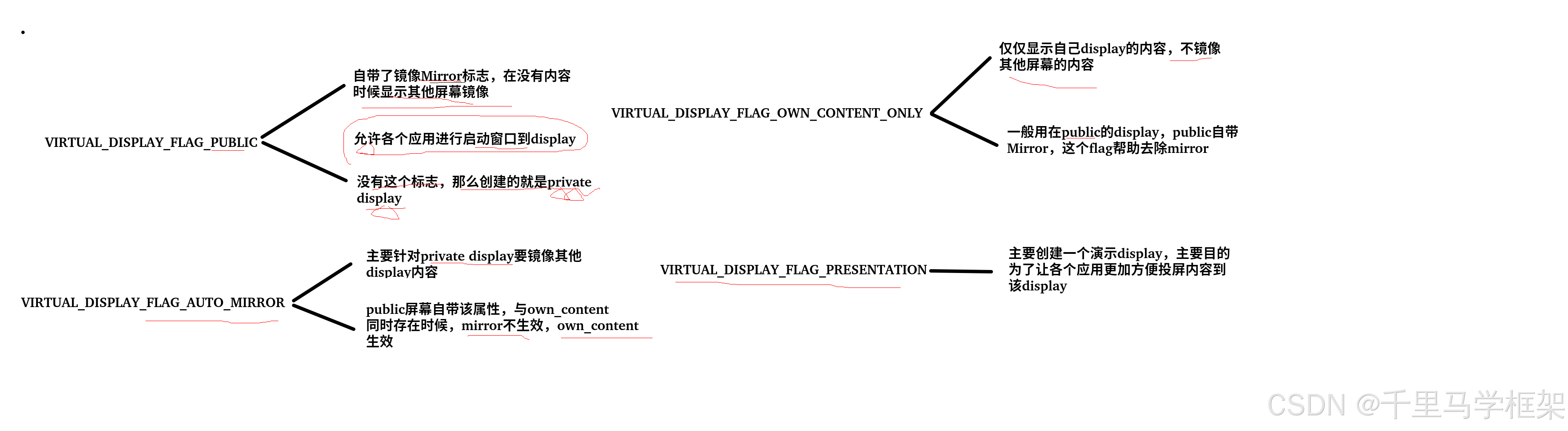
1.VIRTUAL_DISPLAY_FLAG_PUBLIC
虚拟显示标志:创建公共显示。公共虚拟显示器
设置此标志时,虚拟显示是公开的。公共虚拟显示器的行为与大多数连接到系统的其他显示器(例如外部或无线显示器)的行为类似。 应用程序可以在显示器上打开窗口,系统可以将其他显示器的内容镜像到它上面。
创建一个public虚拟屏幕,并不仅限于只有自己内容(即自己Display没有内容时候就是黑的),其实隐式创建了一个mirror的Display。
当这个public的标志位没有被设置的话,那么虚拟屏幕就是被定义为private的display,简单说就是屏幕标志不是public就是另一个private。
private就代表私有的虚拟屏幕,这个屏幕只有屏幕创建的app和已经在屏幕上的app可以放置对应的窗口,private display一般是不参与镜像其他display。
2.VIRTUAL_DISPLAY_FLAG_OWN_CONTENT_ONLY
虚拟显示标志:只显示该显示器本身的内容; 不要镜像另一个显示器的内容。
此标志与VIRTUAL_DISPLAY_FLAG_PUBLIC结合使用。 通常如果public display没有自己的窗口,它将自动镜像默认display的内容。 当这个标志被指定时,虚拟显示器将只显示它自己的内容,如果它没有窗口,啥也不显示一片空白。
这个flag如何和VIRTUAL_DISPLAY_FLAG_AUTO_MIRROR同时被设置,那么就按VIRTUAL_DISPLAY_FLAG_OWN_CONTENT_ONLY生效,即只能显示自己内容不能镜像其他display
当前这个VIRTUAL_DISPLAY_FLAG_OWN_CONTENT_ONLY标志默认被设置的如果没有声明VIRTUAL_DISPLAY_FLAG_PUBLIC或VIRTUAL_DISPLAY_FLAG_AUTO_MIRROR
3.VIRTUAL_DISPLAY_FLAG_AUTO_MIRROR
虚拟显示标志:当没有显示内容时,允许将内容镜像到private display上。在public的display上是默认有这个,如果没有声明public的那就代表是private display,这个时候想要镜像其他display内容就需要这个标志
这个一般要求有权限CAPTURE_VIDEO_OUTPUT 或 CAPTURE_SECURE_VIDEO_OUTPUT
当然也可以使用MediaProjection创建方式。
4.VIRTUAL_DISPLAY_FLAG_PRESENTATION
虚拟显示标志:创建演示显示。
当该标志被设置时,虚拟显示器被注册为presentation display category中的presentation display category , 应用程序可以自动将其内容投影到演示显示以提供更丰富的第二屏幕体验。
更多framework实战干货,请关注下面“千里马学框架”






 扫一扫
扫一扫


 1万+
1万+

 被折叠的 条评论
为什么被折叠?
被折叠的 条评论
为什么被折叠?
 到【灌水乐园】发言





