



在GIS可视化应用中,行政区边界遮罩与3D地图可视化是常见需求。本文结合高德地图API,以灵川县为例,详细拆解完整开发过程,并附带关键代码,适合开发者学习和快速集成。
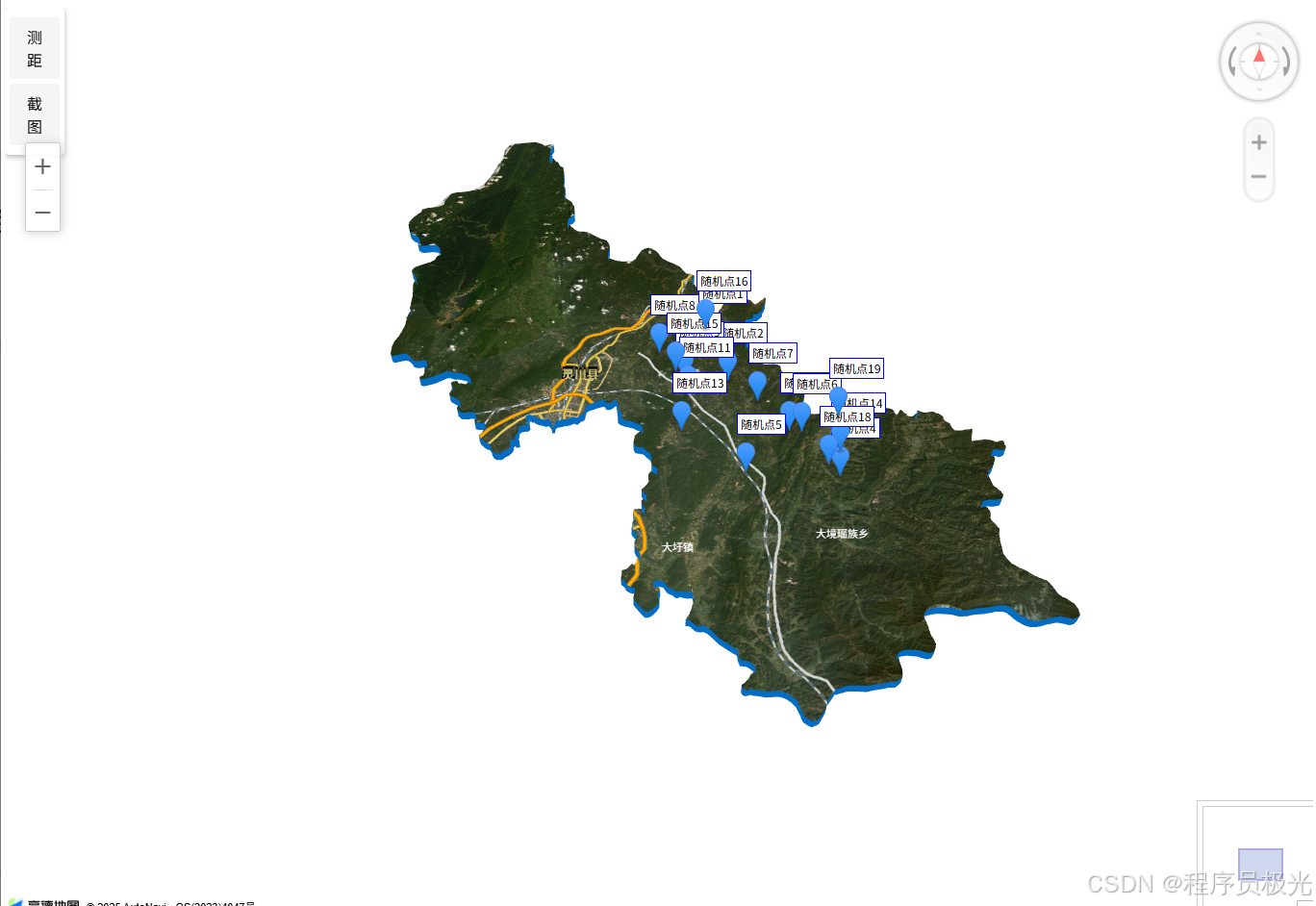
🎯 一、项目效果概述
- 灵川县及下属乡镇边界遮罩展示
- 支持3D倾斜视角与卫星图层
- 动态生成与展示地理标记点
- 集成缩放控件、鹰眼控件、测距工具
- 实现地图截图功能
🛠️ 二、技术栈
- 高德地图 JS API v1.4.15
- Turf.js (用于计算几何中心等)
- html2canvas (实现截图)
- 原生 JavaScript
📍 三、完整开发步骤与关键代码
1️⃣ 加载地图与核心插件
htmlCopyEdit<script src="https://webapi.amap.com/maps?v=1.4.15&key=你的key&plugin=Map3D,AMap.ControlBar,AMap.DistrictSearch,AMap.ToolBar,AMap.RangingTool,AMap.HawkEye,AMap.OverView"></script>
<script src="https://unpkg.com/@turf/turf@6/turf.min.js"></script>
<script src="https://cdnjs.cloudflare.com/ajax/libs/html2canvas/1.4.1/html2canvas.min.js"></script>
插件按需加载,避免性能浪费。
2️⃣ 获取灵川县边界数据
		let MapInfo; // 全局地图实例

        const locationPoints = Array.from({ length: 20 }, (_, i) => {
            const randomLng = 110.40 + Math.random() * 0.2;  // 经度在110.40 ~ 110.60
            const randomLat = 25.26 + Math.random() * 0.2;   // 纬度在25.26 ~ 25.46
            return {
                name: `随机点${i + 1}`,
                coord: [parseFloat(randomLng.toFixed(6)), parseFloat(randomLat.toFixed(6))],
                description: `这是第${i + 1}个随机生成的点,位于灵川县区域内。`
            };
        });
        // 初始化地图
        function initMap() {
            const opts = {
                subdistrict: 2,  // 获取乡镇级数据
                extensions: 'all',
                level: 'city'
            };

            // 查询灵川县及下属乡镇数据
            const district = new AMap.DistrictSearch(opts);
            district.search('灵川县', function (status, result) {
                if (status !== 'complete' || !result.districtList[0]) {
                    console.error('行政区查询失败');
                    return;
                }

                const countyData = result.districtList[0];
                const townships = countyData.districts || [];
                const countyBounds = countyData.boundaries || [];

                // 1. 创建3D地图(带灵川县边界遮罩)
                create3DMap(countyBounds);

            });
        }
使用
AMap.DistrictSearch获取行政区边界后,传入3D地图生成函数。
3️⃣ 创建3D地图与边界遮罩
// 创建3D地图并设置遮罩
function create3DMap(boundaries) {
            MapInfo = new AMap.Map('AllmapContainer', {
                mask: boundaries.map(boundary => [boundary]), // 设置遮罩区域
                viewMode: '3D',
                center: [110.4049, 25.28092],
                zoom: 10.5,
                pitch: 40, // 3D倾斜角度
                layers: [
                    new AMap.TileLayer.RoadNet(),
                    new AMap.TileLayer.Satellite() // 卫星图层
                ],
                mapStyle: "amap://styles/859154f30ffaec4521b959815da8902d" // 自定义样式
            });

            // 添加缩放控件
            MapInfo.addControl(new AMap.ControlBar({
                showZoomBar: true,      // 显示缩放按钮
                showControlButton: true,// 显示3D控件
                position: {
                    right: '10px',
                    top: '10px'
                }
            }));

            // 添加鹰眼图
            MapInfo.addControl(new AMap.OverView({
                visible: true,  // 默认显示
                isOpen: true,   // 默认展开
                tileLayer: new AMap.TileLayer.Satellite() // 鹰眼图使用卫星图
            }));


            // 添加工具栏
            const toolBar = new AMap.ToolBar({
                position: {
                    top: '200px',
                    right: '10px'
                },
                liteStyle: true // 简洁模式
            });
            MapInfo.addControl(toolBar);
            // 3. 显式添加Zoom控件(可选但推荐)
            //MapInfo.addControl(new AMap.Zoom());
            // 添加测距工具
            const rangeTool = new AMap.RangingTool(MapInfo);

            // 将测距按钮添加到工具栏
            document.querySelector('.amap-toolbar').innerHTML +=
                '<div class="amap-distance-marker" title="距离测量">测距</div>' +
                '<div class="amap-screenshot" title="地图截图">截图</div>';

            // 绑定测距按钮点击事件
            document.querySelector('.amap-distance-marker').addEventListener('click', function () {
                rangeTool.turnOn(); // 开启测距
            });

            // 绑定截图按钮点击事件
            document.querySelector('.amap-screenshot').addEventListener('click', function () {
                takeScreenshot();
            });

            // 添加3D地形厚度效果(可选)
            const object3Dlayer = new AMap.Object3DLayer();
            MapInfo.add(object3Dlayer);
            const wall = new AMap.Object3D.Wall({
                path: boundaries[0], // 取第一条边界
                height: -8000,
                color: '#0478d7',
                transparent: true
            });
            object3Dlayer.add(wall);
            addMarkers(locationPoints);
}
mask参数可实现“仅显示指定区域”的聚焦效果。
4️⃣ 添加常用控件
// 缩放与3D控件
MapInfo.addControl(new AMap.ControlBar({
    showZoomBar: true,
    showControlButton: true
}));

// 鹰眼控件
MapInfo.addControl(new AMap.OverView({
    visible: true,
    isOpen: true
}));

// 工具栏
const toolBar = new AMap.ToolBar();
MapInfo.addControl(toolBar);

// 测距工具
const rangeTool = new AMap.RangingTool(MapInfo);

// 将测距按钮添加到工具栏
document.querySelector('.amap-toolbar').innerHTML +=
                '<div class="amap-distance-marker" title="距离测量">测距</div>' +
                '<div class="amap-screenshot" title="地图截图">截图</div>';

// 绑定测距按钮点击事件
document.querySelector('.amap-distance-marker').addEventListener('click', function () {
                rangeTool.turnOn(); // 开启测距
});

// 绑定截图按钮点击事件
document.querySelector('.amap-screenshot').addEventListener('click', function () {
                takeScreenshot();
});
❌ 注意:高德地图不存在
AMap.Zoom控件,缩放功能应通过AMap.ControlBar实现。
5️⃣ 标记灵川县内地理坐标点
function addMarkers(points) {
            points.forEach(item => {
                const marker = new AMap.Marker({
                    map: MapInfo,
                    position: item.coord,
                    title: item.name,
                    label: {
                        content: item.name,
                        offset: new AMap.Pixel(0, -30)
                    }
                });

                marker.on('click', function () {
                    showInfoWindow(item);
                });
            });

        }

// 显示信息窗口
function showInfoWindow(point) {
            const infoWindow = new AMap.InfoWindow({
                content: `<div style="padding:10px;min-width:150px;">
            <h4 style="margin:0 0 5px 0;">${point.name}</h4>
            <p style="margin:3px 0;">坐标: ${point.coord[0].toFixed(6)}, ${point.coord[1].toFixed(6)}</p>
            <p style="margin:3px 0;">${point.description}</p>
            <p style="margin:3px 0;color:#666;font-size:12px;">点击时间: ${new Date().toLocaleTimeString()}</p>
        </div>`,
                offset: new AMap.Pixel(0, -30)
            });
            infoWindow.open(MapInfo, point.coord);
}
每个标记支持点击弹出详细信息窗口。
6️⃣ 添加3D地形墙效果(可选)
const object3Dlayer = new AMap.Object3DLayer();
const wall = new AMap.Object3D.Wall({
    path: boundaries[0],
    height: -8000,
    color: '#0478d7',
    transparent: true
});
object3Dlayer.add(wall);
MapInfo.add(object3Dlayer);
让边界区域呈现立体厚度效果,增强视觉冲击力。
7️⃣ 实现地图截图功能
function takeScreenshot() {
            // 尝试官方方法
            if (MapInfo && MapInfo.getMapType) {
                MapInfo.plugin(['AMap.MapType'], function () {
                    if (AMap.MapType.prototype.getCanvas) {
                        MapInfo.getMapType().getCanvas(function (canvas) {
                            if (canvas && canvas.toDataURL) {
                                try {
                                    const dataURL = canvas.toDataURL('image/png');
                                    downloadImage(dataURL);
                                    return;
                                } catch (e) {
                                    console.warn('官方截图方法失败:', e);
                                }
                            }
                            // 官方方法失败,尝试直接获取canvas
                            tryDirectCanvasCapture();
                        });
                    }
                });
            } else {
                tryDirectCanvasCapture();
            }
        }

        function downloadImage(dataUrl) {
            const link = document.createElement('a');
            link.download = `地图截图_${new Date().getTime()}.png`;
            link.href = dataUrl;
            document.body.appendChild(link);
            link.click();
            document.body.removeChild(link);
        }


        // 直接获取canvas尝试
        function tryDirectCanvasCapture() {
            const canvas = document.querySelector('#AllmapContainer canvas');
            if (canvas && canvas.toDataURL) {
                try {
                    const tempCanvas = document.createElement('canvas');
                    tempCanvas.width = canvas.width;
                    tempCanvas.height = canvas.height;
                    tempCanvas.getContext('2d').drawImage(canvas, 0, 0);
                    const dataURL = tempCanvas.toDataURL('image/png');
                    downloadImage(dataURL);
                    return;
                } catch (e) {
                    console.warn('直接canvas捕获失败:', e);
                }
            }

            // 最终回退到html2canvas
            if (window.html2canvas) {
                takeAlternativeScreenshot();
            } else {
                alert('截图功能初始化失败,请刷新页面重试');
            }
        }
📌 四、常见错误与优化
| 问题 | 解决方案 |
|---|---|
AMap.Zoom is not a constructor | 改用 AMap.ControlBar 实现缩放控件功能 |
| 行政区划边界为空 | 确保城市名称、key正确,或更换新版本API测试 |
| 截图黑屏或失败 | 优先使用Canvas截图,失败时用html2canvas作为备选 |
🎉 五、项目总结
通过本文的完整讲解与关键代码,你可以实现:
- 县3D行政区划地图
- 多种控件与交互功能
- 自定义地图样式与地理标记
- 灵活的地图截图功能






 扫一扫
扫一扫


 2万+
2万+

 被折叠的 条评论
为什么被折叠?
被折叠的 条评论
为什么被折叠?
 到【灌水乐园】发言





