


 本文深入探讨了C语言中的getchar()函数的工作原理,包括如何处理缓冲区中的字符,以及如何与scanf()和fgets()等函数交互。同时,文章详细解释了如何解决getchar()函数在特定情况下可能出现的问题,以及如何利用setvbuf()函数控制缓冲区。
先看看getchar()函数原型:
C 库函数 int getchar(void) 从标准输入 stdin 获取一个字符(一个无符号字符)。这等同于 getc 带有 stdin 作为参数。
返回值:该函数以无符号 char 强制转换为 int 的形式返回读取的字符,如果到达文件末尾或发生读错误,则返回 EOF。
除了返回值不同,getchar()和scanf("%c", &ch)功能是一样的。
其实很容易理解,先看另一个运行输出的结果:
Pick an integer from 1 to 100. I will try to guess it.
Respond with a y if guess right and with a n if wrong.
Is your number 1?
|abc
Well, then, is it 2?
Well, then, is it 3?
Well, then, is it 4?
Well, then, is it 5?键盘输入“abc”,结果打印了4条输出。输入“abc”时,它们被存在了缓冲区,最后输入回车[Enter]键时,由于回车符也是字符,相当于输入了'\n',即“abc\n”在缓冲区(参考关于缓冲输入),这时while循环体并未执行。但回车键还有一个功效,就是结束缓冲区,将缓冲区的内容刷出来,然后才执行while循环体,由于getchar()每次只读取一个字符,这时把'y'依次和'a'、'b'、'c'、'\n'比较,因都不相等,所以输出了4条记录。同理,输入一个非'y'字符,一定是输出两行记录,只有输入'y'才结束循环体。
要解决此问题,在while循环体里加一个对'\n'的判断:
while (getchar() != 'y') {
    printf("Well, then, is it %d?\n", ++guess);
    while (getchar() != '\n')
        continue; /* skip rest of input line */
}
以上代码看似简单,其实也蕴涵着难理解的点,即:第二个getchar()为什么没有等待键盘输入?
先看下面例子:
#include<stdio.h>
int main() {
	char ch, ch2;
	ch = getchar();
	printf("ch=%c->%d\n", ch, ch);
	ch2 = getchar();
	printf("ch2=%c->%d", ch2, ch2);
	return 0;
}
|A
ch=A->65
ch2=
->10
运行结果是不是很奇怪?我们再来看另一种输入对应的结果:
|ABC
ch=A->65
ch2=B->66
其实,这些结果都是与getchar()缓冲区有关的。
对于第一种输入“A”,我们知道了其实相当于输入了A\n,而'\n'对就ASCII码的十进制数就是10。所以第二条打印语句相当于printf("ch2=\n->10");所以输出中有个换行符且%d对应int型的10。
对于第二种输入“ABC”,按下回车键,即缓冲区有'A'、'B'、'C'、'\n'且结束缓冲区,getchar()每次读取一个字符,所以ch=A->65没问题,关键在于ch2=B->66是为什么?因为第一个getchar()获取了一个字符'A',然后第二个getchar()就读取缓冲区的第二个字符'B',这样依次进行。
同样键盘输入“ABC”,特意把缓冲区的内容全部读取出来,看结果:
#include<stdio.h>
int main() {
	char ch, ch2, ch3, ch4, ch5;
	ch = getchar();
	printf("ch=%c->%d\n", ch, ch);
	ch2 = getchar();
	printf("ch2=%c->%d\n", ch2, ch2);
	ch3 = getchar();
	printf("ch3=%c->%d\n", ch3, ch3);
	ch4 = getchar();
	printf("ch4=%c->%d\n", ch4, ch4);
	ch5 = getchar();
	printf("ch5=%c->%d", ch5, ch5);
	return 0;
}
|ABC
ch=A->65
ch2=B->66
ch3=C->67
ch4=
->10
|Y
ch5=Y->89ch、ch2、ch3、ch4的结果大家应该知道了。这时缓冲区的内容已经读取完了。所以,这时候就又要开始下一次缓冲了,这时才有了第二次的键盘输入,输入了“Y”,打印结果正确。
再来看上面修改后的代码:
while (getchar() != 'y') {
    printf("Well, then, is it %d?\n", ++guess);
    while (getchar() != '\n')
        continue; /* skip rest of input line */
}
比如输入“n”,按下回车,缓冲区有'n'、'\n',然后也结束了缓冲区,第一个getchar()=='n',正常输出一条记录;然后第二个getchar()=='\n',缓冲区已清空,继续while条件判断的getchar()再从键盘输入字符。
从上面的例子,大家应该明白了getchar()的用法了。
大致总结为:1.回车符也是一个可读取的字符'\n';2.优先依次读完缓冲区才开始下次的键盘输入。
还有很重要的知识点:
我们所运用的getchar()也好、fputs()也好,等等都是自带缓冲区的。
我们再来看一个例子,更深入一层:
#include <stdio.h>
#define STLEN 10
int main(void) {
	char words[STLEN];
	puts("Enter strings (empty line to quit):");
	while (fgets(words, STLEN, stdin) != NULL && words[0] != '\n') {
		printf("words=%s\n", words);
		for (int i = 0; i < STLEN; i++) {
			printf("[%d]-%c__", i, getchar());
		}
	}
	puts("Done!");
	return 0;
}
Enter strings (empty line to quit):
|123456789VXYZ
words=123456789
[0]-V__[1]-X__[2]-Y__[3]-Z__[4]-
__【第一次按下回车键在此处终止】
[5]-
__
[6]-
__
[7]-
__
[8]-
__
[9]-
__
Done!第一条printf输出结果没毛病,关键在于for循环里面的打印输出,我们看到getchar()只输出了第一条printf语句输出后的剩余字符。
这是因为缓冲区的前9个字符已经通过fgets()正常获取清掉了。对于getchar()的输出,最后一个是换行符,所以换了一条,而换行符不是可显字符,所以最后以自定义的分隔符__结尾。奇怪的是10次循环只执行了4次,将所有缓冲区输出后,for循环就终止了。然后每按下一次回车键就输出两行如[5]-\n__,直到最后for循环i=9,for循环结束,程序结束。这是因为:最开始的4次getchar()输出的是缓冲区剩余的所有字符,后5次是等待getchar()的键盘输入,for循环结束后,最后输入的回车符被while截取,跳出while循环,程序结束。
如果第一次回车后继续输入abcd,再按回车,结果如下:
Enter strings (empty line to quit):
|123456789VXYZ
words=123456789
[0]-V__[1]-X__[2]-Y__[3]-Z__[4]-
__|abcd
[5]-a__[6]-b__[7]-c__[8]-d__[9]-
__
Done!
如果第一次回车后继续输入的是abcdefgh,再不停按回车,结果如下:
Enter strings (empty line to quit):
|123456789VXYZ
words=123456789
[0]-V__[1]-X__[2]-Y__[3]-Z__[4]-
__|abcdefgh
[5]-a__[6]-b__[7]-c__[8]-d__[9]-e__words=fgh


[0]-
__
[1]-
__
[2]-
__
[3]-
__
[4]-
__
[5]-
__
[6]-
__
[7]-
__
[8]-
__
[9]-
__
Done!
即,先执行完for循环getchar(),输入了abcdefgh,直接从getchar()制造的这个缓冲区通过剩余的5次循环读取出abcde,这时缓冲区就剩下fgh了,这个缓冲区内容直接被fgets()函数获取(没有通过键盘输入),输出words=fgh。但这时又开始了while循环体,即for循环又开始执行,直到i=9,for循环结束,程序结束。
有了上面例子的理解,我们再来看一个经常会用到的自定义函数s_gets(),有让人迷惑的地方,现解析它。
我们经常在代码中用到它,如:
char title[TSIZE];
while (s_gets(title, TSIZE) != NULL && title[0] != '\0') {
    ...
}先回顾一下fgets()函数:(这里有它的详细介绍:关于字符串与从键盘输入)
用fgets()函数来处理一种情况:读取整行输入并用空字符代替换行符,或者读取一部分输入,并丢弃其余部分。关键代码如下:
char words[STLEN];
puts("Enter strings (empty line to quit):");
while (fgets(words, STLEN, stdin) != NULL && words[0] != '\n') {// fgets是会读取一个换行符的
	i = 0;
	while (words[i] != '\n' && words[i] != '\0')
		i++;
	if (words[i] == '\n')
		words[i] = '\0';
	else // 即word[i] == '\0'的情况
		while (getchar() != '\n') // 丢弃输入行的剩余字符
			continue;
	puts(words);
}
既然没有直接处理这种情况的标准函数,我们就自定义一个更优化版的函数s_gets():
char* s_gets(char *st, int n) {
	char *ret_val;
	char *find;
	ret_val = fgets(st, n, stdin);
	if (ret_val) {
		find = strchr(st, '\n');
		if (find)
			*find = '\0';
		else
			while (getchar() != '\n')
				continue;
	}
	return ret_val;
}
程序的意思是:如果字符串中出现换行符,就用空字符替换它;如果字符串中出现空字符,就丢弃该输入行的其余字符,然后返回与fgets()相同的值。
注:fgets()是会读取一个回车换行符的,从键盘输入abc然后回车,通过调试也可以看到这一点,如下图:
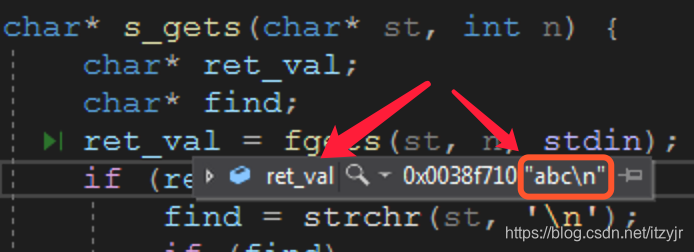
这里其实最难理解的地方在于这两行代码:
while (getchar() != '\n')
    continue;
它的功能为什么是:丢弃输入行的其余字符?
解读:fgets()正常获取到字符输入后,就清掉了那部分的缓存,但用户可能输入的字符数超过了n,这时超过n后面的所有字符就停留在缓冲区,所以“丢弃输入行的其余字符”这个描述是准确的,即清空多余字符的缓冲区。以免在下次从输入读取时字符时,直接从缓冲区读取。所以这两行代码是必须存在的,避免程序漏洞。
假如n=10,由于最后一定是按回车结束的,而fgets()可以获取到这个'\n',所以输入字符的最后面就一定带有一个换行符'\n'。当输入字符数(包括回车符)小于10,如:"abcde\n",find!=NULL => ret_val="abcde\0",没有要清理的缓存;当输入字符大于10,如:"123456789ABC\n",ret_val="123456789"(最后也是默认带有'\0'的),find==NULL,这时就用那两行代码清空多余输入的字符缓存。
我们设计的 s_gets()函数并不完美,它最严重的缺陷是遇到不合适的输入时毫无反应。它丢弃多余的字符时,既不通知程序也不告知用户。但是,用来替换gets()、fgets()足够了。
以上while循环的两行代码会出现在很多地方,比如下面:
// 输入多本书(书名、评级),并打印输出
int main() {
	char title[TSIZE];
	char input[TSIZE];
	puts("Enter first movie title:");
	while (s_gets(input, TSIZE) != NULL && input[0] != '\0') {
		strcpy(title, input);
		puts("Enter your rating<0-10>:");
		scanf("%d", &rating);
		while (getchar() != '\n')
			continue;
		puts("Enter next title (empty line to stop):");
	}
        printf("Here is the movie list:\n");
	for (int j = 0; j < ...; j++)
		printf("Movie:%s Rating:%d\n", movies[j].title, movies[j].rating);
	printf("Bye!\n");
	return 0;
}
解读:在结束scanf()输入时,会按下回车键,通过调试发现getchar()读取了这个换行符'\n',所以while的这两行代码,把'\n'消耗掉了。所以才可以继续第一个while循环,继续对第二本书的输入。如果去掉这两行代码,就只能输入一本书然后程序的输入就结束了(不是程序结束了)。事实上这两行代码直接替换为一行getchar();也是一样的。只是这两行代码能让程序可读性更强。
如果去掉这两行代码,运行结果如下:
Enter first movie title:
|Harvard Rode
Enter your rating<0-10>:
|10
Enter next movie title(empty line to stop):
Here is the movie list:
Movie:Harvard Rode Rating:10
Bye!
我们再了解一下对缓冲区的操作函数,比如下面的setvbuf()用来设定文件流的缓冲区,其原型为:
int setvbuf(FILE * stream, char * buf, int type, unsigned size);
【参数】stream为文件流指针,buf为缓冲区首地址,type为缓冲区类型,size为缓冲区内字节的数量。
参数类型type说明如下:
- _IOFBF (满缓冲):当缓冲区为空时,[从流读入]数据。或当缓冲区满时,[向流写入]数据。
- _IOLBF (行缓冲):每次[从流中读入]一行数据或[向流中写入]一行数据。
- _IONBF (无缓冲):直接[从流中读入]数据或直接[向流中写入]数据,而没有缓冲区。
【返回值】成功返回0,失败返回非0。
注:此函数是C11支持的,之前编译版本有setbuf()只有前两参数,buf为NULL指针时表示无缓冲。setbuf()相当于setvbuf(stream,buf,buf?_IOFBF:_IONBF,BUFSIZE)。
C 库函数 void *memset(void *str, int c, size_t n) 复制字符 c(一个无符号字符)到参数 str 所指向的字符串的前 n 个字符。
setbuf()和setvbuf()函数的实际意义在于:用户打开一个文件后,可以建立自己的文件缓冲区,而不必使用fopen()函数打开文件时设定的默认缓冲区。这样就可以让用户自己来控制缓冲区,包括改变缓冲区大小、定时刷新缓冲区、改变缓冲区类型、删除流中默认的缓冲区、为不带缓冲区的流开辟缓冲区等。
#include <stdio.h>
int main(void) {
  char outbuff[1024];
  memset(outbuff, '\0', sizeof(outbuff));
  setvbuf(stdout, outbuff, _IOFBF, 1024); // 读取内容前必须先setbuf来设置文件流缓冲区(启用全缓冲)
  puts("This is a test of buffered output.");
  puts(outbuff);
  fflush(stdout); // 第一次打印输出到屏幕
  puts(outbuff);
  fclose(stdout); // 第二次打印输出到屏幕
  return 0;
}
This is a test of buffered output.
This is a test of buffered output.
<LF>
This is a test of buffered output.
This is a test of buffered output.
<LF>
<LF>
<LF>
D:\workplace\cpp_workplace\HelloProject\Debug\HelloProject.exe (process 14600) exited with code 0.断点调试:

第一个puts,缓存区=【"This ... .\n"】;然后outbuff也就是存储的此字符串了。第二个puts(outbuff),缓存区=【"This....\n"】× 2 + '\n'(fputs自带的,勿忘!)。所以fflush(stdout);后输出如下:
 输出3行(2行字符串+1换行),由于刷新缓冲区的outbuff到stdout屏幕上了,缓冲区就没了!但outbuf这个数组里面的内容没清空,即没变!

第三个puts,再次向缓冲区填充数据,为:{原来=【"This....\n"】× 2 + '\n'} + '\n'。所以fclose(stdout);后输出如下:
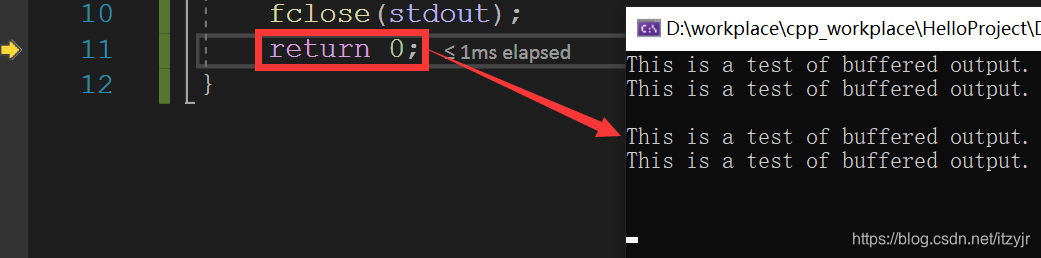 输出5行(2行字符串+3换行)
程序先把outbuff与输出流相连,然后输出一个字符串,这时因为缓冲区已经与流相连,所以outbuff中也保存着这个字符串,紧接着puts函数又输出一遍,所以现在outbuff中保存着两个一样的字符串。程序把缓冲输出保存到 outbuff,直到首次调用 fflush() 为止。刷新输出流之后,再次puts,则发送所有的缓存输出到 stdout。
如果将puts替换为printf,则执行完fflush(stdout)后,输出:
This is a test of buffered output.This is a test of buffered output.This is a test of buffered output.This is a test of buffered output.This is a test of buffered output.This is a test of buffered output.This is a test of buffered output.This is a test of buffered output.This is a test of buffered output.This is a test of buffered output.This is a test of buffered output.This is a test of buffered output.This is a test of buffered output.This is a test of buffered output.This is a test of buffered output.This is a test of buffered output.This is a test of buffered output.This is a test of buffered output.This is a test of buffered output.This is a test of buffered output.This is a test of buffered output.This is a test of buffered output.This is a test of buffered output.This is a test of buffered output.This is a test of buffered output.This is a test of buffered output.This is a test of buffered output.This is a test of buffered output.This is a test of buffered output.This is a test of buffered output.This 里面总字符数为1023,加上最后的'\0',共1024个字符,缓冲区满了。为啥会这样?
这涉及printf的缓冲:
printf在glibc中默认为行缓冲,遇到以下几种情况会刷新缓冲区,输出内容:
(1)缓冲区填满;
(2)写入的字符中有换行符\n或回车符\r;
(3)调用fflush手动刷新缓冲区;
(4)调用scanf要从输入缓冲区中读取数据时,也会将输出缓冲区内的数据刷新。
可使用setbuf(stdout,NULL)关闭行缓冲,或者setbuf(stdout,uBuff)设置新的缓冲区,uBuff为自己指定的缓冲区。也可以使用setvbuf(stdout,NULL,_IOFBF,0);来改变标准输出为全缓冲。全缓冲与行缓冲的区别在于遇到换行符不刷新缓冲区。
printf在VC++中默认关闭缓冲区,输出时会及时的输到屏幕[3]。如果显示开启缓冲区,只能设置全缓冲。
如果把puts替换为printf("%s", "This..."),则输出如下:
This is a test of buffered output.This is a test of buffered output.This is a test of buffered output.This is a test of buffered output.
看来printf带格式与不带格式直接输出的缓冲逻辑是不一样的。





 扫一扫
扫一扫


 2
2

 被折叠的 条评论
为什么被折叠?
被折叠的 条评论
为什么被折叠?
 到【灌水乐园】发言





