


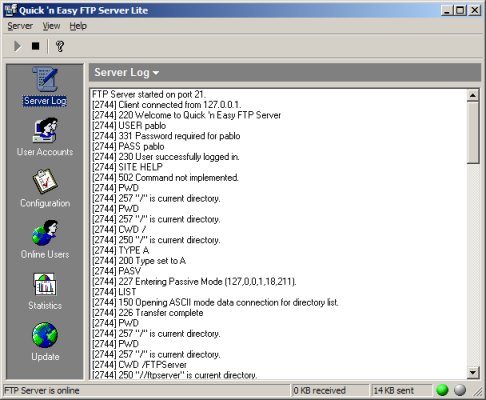
 本文介绍了一个全功能的FTP服务器实现,支持多线程处理多个连接,具备基本的FTP命令处理能力及用户账户管理功能。文章详细描述了关键类的设计,包括服务器核心类CFTPServer及其与其他组件的交互。
Description
This article presents a fully functional implementation of a FTP server. It can handle multiple connections at the same time (multi threaded) and has most of the features you would find in other commercial/shareware FTP servers. The server handles all basic FTP commands and offers easy user account management.
This article describes the most important classes of the application:
CFTPServer
This class is in fact the FTP server, and controls all other classes needed for the server to work. Although CFTPServer is part of a dialog based application, it does not rely on a User Interface and can easily be implemented in a service or console application as well.
-
BOOL Start()Activates the FTP server. It opens a listening socket (port 21) to accept connections.
-
void Stop()Deactivates the server and disconnects all connected clients by terminating the running threads.
-
BOOL IsActive()Is FTP server active?
-
void SetMaxUsers(int nValue)Set maximum number of users.
-
void SetPort(int nValue)Set listening port for new connections.
-
void SetTimeout(int nValue)Set connection timeout (in ms). When a client does not send any commands for
nValuems, the server will close the connection. -
void SetWelcomeMessage(LPCTSTR lpszText)Set the text that will be displayed when the client logs on.
-
void Initialize(CFTPEventSink *pEventSink)Set the event sink. The event sink will be the window (or any class) that receives the events generated by the FTP server. See
CFTPEventSinkdescription for more info.
CFTPEventSink
To be able to 'send' events from the CFTPServer class to the main application, I used multiple inheritance and virtual functions. The CFTPEventSink is just a helper class that contains nothing else than virtual functions, when you derive your class from CFTPEventSink these virtual functions become a kind of events. The class CFTPServer has a reference to this class and calls the virtual functions when it needs to notify the application.
The following 'events' are available:
-
void OnFTPUserConnected(DWORD nThreadID, LPCTSTR lpszUser, LPCSTR lpszAddress);A client has successfully connected.
-
void OnFTPUserDisconnected(DWORD nThreadID, LPCTSTR lpszUser);A client has disconnected.
-
void OnFTPStatusChange(int nType, LPCTSTR lpszText);FTP server status has changed (file downloaded/uploaded).
-
void OnFTPReceivedBytesChange(int nBytes);The number of received bytes has changed.
-
void OnFTPSentBytesChange(int nBytes);The number of sent bytes received has changed.
-
void OnFTPStatisticChange(int nType, int nValue);A statistic has changed, for example the number of downloaded or uploaded files.
Other helper classes:
CUserManager
The class CUserManager handles all user and file related stuff. It checks the connected users for their access rights and converts remote to local paths. CUserManager uses serializing for storing and loading the user settings.
CListenSocket
This socket is part of CFTPServer and accepts incoming connections. When a clients connects to the server, CListenSocket accepts the connection and creates a new thread (CConnectThread) that will take care of all further communication between the client and the server. After the thread has been created, CListenSocket will return to its waiting state.
CConnectThread
This thread will handle all communication between the client and the server using CConnectSocket.
CConnectSocket
This socket class will process all incoming FTP commands and send back the response to the client.
CDataSocket
When data needs to be send or received, a CDataSocket will be created by CConnectSocket. The CDataSocket class will transfer this data (such as directory listings and files) on a separate port.
All the other classes are just UI related and are only included to make it look a little bit fancier.
CFTPServer Usage:
To use the class in your application, you need to do the following:
- Add the class to your application.
- Derive your main class from
CFTPEventSink. - Override the virtual functions of
CFTPEventSink; these are the events that come from the server. - Initialize the eventsink.
- Start the server.


class CMyDlg : public CDialog, CFTPEventSink
{
    ...

    CFTPServer m_FTPSERVER;

    virtual void OnFTPUserConnected(DWORD nThreadID,
                 LPCTSTR lpszUser, LPCSTR lpszAddress);
    virtual void OnFTPUserDisconnected(DWORD nThreadID, LPCTSTR lpszUser);
    virtual void OnFTPStatusChange(int nType, LPCTSTR lpszText);
    virtual void OnFTPReceivedBytesChange(int nBytes);
    virtual void OnFTPSentBytesChange(int nBytes);
    virtual void OnFTPStatisticChange(int nType, int nValue);

    ...
}


BOOL CMyDlg::OnInitDialog()
{
    CDialog::OnInitDialog();

    ...

    // initialize event sink
    m_FTPSERVER.Initialize(this);
    // set maximum users to 10
    m_FTPSERVER.SetMaxUsers(10);
    // accept new connections on port 21
    m_FTPSERVER.SetPort(21);
    // activate server
    m_FTPSERVER.Start();

    return TRUE;
}
Contacting the Author
For any updates to this article, check my site.
Credits
Inspired by FileZilla Server.
License
This article has no explicit license attached to it but may contain usage terms in the article text or the download files themselves. If in doubt please contact the author via the discussion board below.
A list of licenses authors might use can be found here
About the Author
Pablo van der Meer Member | Pablo has been programming in C/C++ for 8 years and Visual C++/MFC for 6 years. He is interested in music, blonde women and programming. His background includes telecommunication, electronics and software engineering, and he is currently based in 't Westland, The Netherlands. Pablo van der Meer is developing software for a small Dutch telecom company. Besides programming Pablo is active as a dj/producer and creates various styles of music. Check out my website for lots of other MFC articles:http://www.pablosoftwaresolutions.com
|
 Netherlands





 扫一扫
扫一扫


 499
499

 被折叠的 条评论
为什么被折叠?
被折叠的 条评论
为什么被折叠?
 到【灌水乐园】发言





