 路由器配置与网络连通性测试,



 文章详细描述了在eNSP环境中,通过VirtualBox虚拟机配置华为路由器的IP地址、接口状态、路由表,以及使用Wireshark观察流量并进行ping测试验证网络连通性的过程。
所需环境
| eNSP | VirtualBox | WinPcap | Wireshark |
|---|

网络拓扑
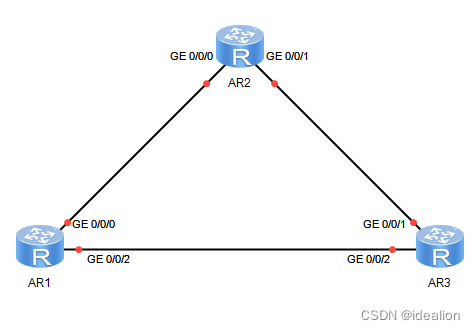
实验步骤
设备命名
<Huawei>system-view
[Huawei]sysname R1
[R1]
<Huawei>system-view
[Huawei]sysname R2
[R2]
<Huawei>system-view
[Huawei]sysname R3
[R3]
查看路由器接口状态
[R1]display interface brief
PHY: Physical
*down: administratively down
(l): loopback
(s): spoofing
(b): BFD down
^down: standby
(e): ETHOAM down
(d): Dampening Suppressed
InUti/OutUti: input utility/output utility
Interface                   PHY   Protocol InUti OutUti   inErrors  outErrors
GigabitEthernet0/0/0        up    down        0%     0%          0          0
GigabitEthernet0/0/1        down  down        0%     0%          0          0
GigabitEthernet0/0/2        up    down        0%     0%          0          0
NULL0                       up    up(s)       0%     0%          0          0

[R1]
[R2]display interface brief
PHY: Physical
*down: administratively down
(l): loopback
(s): spoofing
(b): BFD down
^down: standby
(e): ETHOAM down
(d): Dampening Suppressed
InUti/OutUti: input utility/output utility
Interface                   PHY   Protocol InUti OutUti   inErrors  outErrors
GigabitEthernet0/0/0        up    down        0%     0%          0          0
GigabitEthernet0/0/1        up    down        0%     0%          0          0
GigabitEthernet0/0/2        down  down        0%     0%          0          0
NULL0                       up    up(s)       0%     0%          0          0

[R2]
[R3]display interface brief
PHY: Physical
*down: administratively down
(l): loopback
(s): spoofing
(b): BFD down
^down: standby
(e): ETHOAM down
(d): Dampening Suppressed
InUti/OutUti: input utility/output utility
Interface                   PHY   Protocol InUti OutUti   inErrors  outErrors
GigabitEthernet0/0/0        down  down        0%     0%          0          0
GigabitEthernet0/0/1        up    down        0%     0%          0          0
GigabitEthernet0/0/2        up    down        0%     0%          0          0
NULL0                       up    up(s)       0%     0%          0          0

[R3]
查看初始路由表
[R1]display ip routing-table
Route Flags: R - relay, D - download to fib
------------------------------------------------------------------------------
Routing Tables: Public
         Destinations : 4        Routes : 4

Destination/Mask    Proto   Pre  Cost      Flags NextHop         Interface

      127.0.0.0/8   Direct  0    0           D   127.0.0.1       InLoopBack0
      127.0.0.1/32  Direct  0    0           D   127.0.0.1       InLoopBack0
127.255.255.255/32  Direct  0    0           D   127.0.0.1       InLoopBack0
255.255.255.255/32  Direct  0    0           D   127.0.0.1       InLoopBack0

[R1]
[R2]display ip routing-table
Route Flags: R - relay, D - download to fib
------------------------------------------------------------------------------
Routing Tables: Public
         Destinations : 4        Routes : 4

Destination/Mask    Proto   Pre  Cost      Flags NextHop         Interface

      127.0.0.0/8   Direct  0    0           D   127.0.0.1       InLoopBack0
      127.0.0.1/32  Direct  0    0           D   127.0.0.1       InLoopBack0
127.255.255.255/32  Direct  0    0           D   127.0.0.1       InLoopBack0
255.255.255.255/32  Direct  0    0           D   127.0.0.1       InLoopBack0

[R2]
[R3]display ip routing-table
Route Flags: R - relay, D - download to fib
------------------------------------------------------------------------------
Routing Tables: Public
         Destinations : 4        Routes : 4

Destination/Mask    Proto   Pre  Cost      Flags NextHop         Interface

      127.0.0.0/8   Direct  0    0           D   127.0.0.1       InLoopBack0
      127.0.0.1/32  Direct  0    0           D   127.0.0.1       InLoopBack0
127.255.255.255/32  Direct  0    0           D   127.0.0.1       InLoopBack0
255.255.255.255/32  Direct  0    0           D   127.0.0.1       InLoopBack0

[R3]
配置路由器IP地址
| 路由器 | 接口 | IP Address/Mask |
|---|---|---|
| R1 | GigabitEthernet0/0/0 | 10.0.12.1/24 |
| GigabitEthernet0/0/2 | 10.0.13.1/24 | |
| R2 | GigabitEthernet0/0/0 | 10.0.12.2/24 |
| GigabitEthernet0/0/1 | 10.0.23.2/24 | |
| R3 | GigabitEthernet0/0/1 | 10.0.23.3/24 |
| GigabitEthernet0/0/2 | 10.0.13.3/24 |
[R1]interface GigabitEthernet 0/0/0
[R1-GigabitEthernet 0/0/0]ip address 10.0.12.1 24

[R1-GigabitEthernet 0/0/0]interface GigabitEthernet 0/0/2
[R1-GigabitEthernet 0/0/2]ip address 10.0.13.1 24
[R2]interface GigabitEthernet 0/0/0
[R2-GigabitEthernet 0/0/0]ip address 10.0.12.2 24

[R2-GigabitEthernet 0/0/0]interface GigabitEthernet 0/0/1
[R2-GigabitEthernet 0/0/1]ip address 10.0.23.2 24
[R3]interface GigabitEthernet 0/0/1
[R3-GigabitEthernet 0/0/1]ip address 10.0.23.3 24

[R3-GigabitEthernet 0/0/1]interface GigabitEthernet 0/0/2
[R3-GigabitEthernet 0/0/2]ip address 10.0.13.3 24
测试联通性
[R1]ping 10.0.12.2
  PING 10.0.12.2: 56  data bytes, press CTRL_C to break
    Reply from 10.0.12.2: bytes=56 Sequence=1 ttl=255 time=110 ms
    Reply from 10.0.12.2: bytes=56 Sequence=2 ttl=255 time=20 ms
    Reply from 10.0.12.2: bytes=56 Sequence=3 ttl=255 time=10 ms
    Reply from 10.0.12.2: bytes=56 Sequence=4 ttl=255 time=20 ms
    Reply from 10.0.12.2: bytes=56 Sequence=5 ttl=255 time=20 ms

  --- 10.0.12.2 ping statistics ---
    5 packet(s) transmitted
    5 packet(s) received
    0.00% packet loss
    round-trip min/avg/max = 10/36/110 ms

[R1]
[R2]ping 10.0.23.3
  PING 10.0.23.3: 56  data bytes, press CTRL_C to break
    Reply from 10.0.23.3: bytes=56 Sequence=1 ttl=255 time=50 ms
    Reply from 10.0.23.3: bytes=56 Sequence=2 ttl=255 time=20 ms
    Reply from 10.0.23.3: bytes=56 Sequence=3 ttl=255 time=20 ms
    Reply from 10.0.23.3: bytes=56 Sequence=4 ttl=255 time=20 ms
    Reply from 10.0.23.3: bytes=56 Sequence=5 ttl=255 time=20 ms

  --- 10.0.23.3 ping statistics ---
    5 packet(s) transmitted
    5 packet(s) received
    0.00% packet loss
    round-trip min/avg/max = 20/26/50 ms

[R2]
[R3]ping 10.0.13.1
  PING 10.0.13.1: 56  data bytes, press CTRL_C to break
    Reply from 10.0.13.1: bytes=56 Sequence=1 ttl=255 time=40 ms
    Reply from 10.0.13.1: bytes=56 Sequence=2 ttl=255 time=20 ms
    Reply from 10.0.13.1: bytes=56 Sequence=3 ttl=255 time=20 ms
    Reply from 10.0.13.1: bytes=56 Sequence=4 ttl=255 time=30 ms
    Reply from 10.0.13.1: bytes=56 Sequence=5 ttl=255 time=30 ms

  --- 10.0.13.1 ping statistics ---
    5 packet(s) transmitted
    5 packet(s) received
    0.00% packet loss
    round-trip min/avg/max = 20/28/40 ms

[R3]
查看路由表
[R1]display ip routing-table
Route Flags: R - relay, D - download to fib
------------------------------------------------------------------------------
Routing Tables: Public
         Destinations : 10       Routes : 10

Destination/Mask    Proto   Pre  Cost      Flags NextHop         Interface

      10.0.12.0/24  Direct  0    0           D   10.0.12.1       GigabitEthernet 0/0/0
      10.0.12.1/32  Direct  0    0           D   127.0.0.1       GigabitEthernet 0/0/0
    10.0.12.255/32  Direct  0    0           D   127.0.0.1       GigabitEthernet 0/0/0
      10.0.13.0/24  Direct  0    0           D   10.0.13.1       GigabitEthernet 0/0/2
      10.0.13.1/32  Direct  0    0           D   127.0.0.1       GigabitEthernet 0/0/2
    10.0.13.255/32  Direct  0    0           D   127.0.0.1       GigabitEthernet 0/0/2
      127.0.0.0/8   Direct  0    0           D   127.0.0.1       InLoopBack0
      127.0.0.1/32  Direct  0    0           D   127.0.0.1       InLoopBack0
127.255.255.255/32  Direct  0    0           D   127.0.0.1       InLoopBack0
255.255.255.255/32  Direct  0    0           D   127.0.0.1       InLoopBack0

[R1]
[R2]display ip routing-table
Route Flags: R - relay, D - download to fib
------------------------------------------------------------------------------
Routing Tables: Public
         Destinations : 10       Routes : 10

Destination/Mask    Proto   Pre  Cost      Flags NextHop         Interface

      10.0.12.0/24  Direct  0    0           D   10.0.12.2       GigabitEthernet 0/0/0
      10.0.12.2/32  Direct  0    0           D   127.0.0.1       GigabitEthernet 0/0/0
    10.0.12.255/32  Direct  0    0           D   127.0.0.1       GigabitEthernet 0/0/0
      10.0.23.0/24  Direct  0    0           D   10.0.23.2       GigabitEthernet 0/0/1
      10.0.23.2/32  Direct  0    0           D   127.0.0.1       GigabitEthernet 0/0/1
    10.0.23.255/32  Direct  0    0           D   127.0.0.1       GigabitEthernet 0/0/1
      127.0.0.0/8   Direct  0    0           D   127.0.0.1       InLoopBack0
      127.0.0.1/32  Direct  0    0           D   127.0.0.1       InLoopBack0
127.255.255.255/32  Direct  0    0           D   127.0.0.1       InLoopBack0
255.255.255.255/32  Direct  0    0           D   127.0.0.1       InLoopBack0

[R2]
[R3]display ip routing-table
Route Flags: R - relay, D - download to fib
------------------------------------------------------------------------------
Routing Tables: Public
         Destinations : 10       Routes : 10

Destination/Mask    Proto   Pre  Cost      Flags NextHop         Interface

      10.0.13.0/24  Direct  0    0           D   10.0.13.3       GigabitEthernet 0/0/2
      10.0.13.3/32  Direct  0    0           D   127.0.0.1       GigabitEthernet 0/0/2
    10.0.13.255/32  Direct  0    0           D   127.0.0.1       GigabitEthernet 0/0/2
      10.0.23.0/24  Direct  0    0           D   10.0.23.3       GigabitEthernet 0/0/1
      10.0.23.3/32  Direct  0    0           D   127.0.0.1       GigabitEthernet 0/0/1
    10.0.23.255/32  Direct  0    0           D   127.0.0.1       GigabitEthernet 0/0/1
      127.0.0.0/8   Direct  0    0           D   127.0.0.1       InLoopBack0
      127.0.0.1/32  Direct  0    0           D   127.0.0.1       InLoopBack0
127.255.255.255/32  Direct  0    0           D   127.0.0.1       InLoopBack0
255.255.255.255/32  Direct  0    0           D   127.0.0.1       InLoopBack0

[R3]
配置LoopBack地址
| 路由器 | 接口 | IP Address/Mask |
|---|---|---|
| R1 | LoopBack 0 | 10.0.1.1/32 |
| R2 | LoopBack 0 | 10.0.2.2/32 |
| R3 | LoopBack 0 | 10.0.3.3/32 |
[R1]interface LoopBack 0
[R1-LoopBack0]ip address 10.0.1.1 32
[R2]interface LoopBack 0
[R2-LoopBack0]ip address 10.0.2.2 32
[R3]interface LoopBack 0
[R3-LoopBack0]ip address 10.0.3.3 32
测试联通性
[R1]ping 10.0.2.2
  PING 10.0.2.2: 56  data bytes, press CTRL_C to break
    Request time out
    Request time out
    Request time out
    Request time out
    Request time out

  --- 10.0.2.2 ping statistics ---
    5 packet(s) transmitted
    0 packet(s) received
    100.00% packet loss
[R2]ping 10.0.3.3
  PING 10.0.3.3: 56  data bytes, press CTRL_C to break
    Request time out
    Request time out
    Request time out
    Request time out
    Request time out

  --- 10.0.3.3 ping statistics ---
    5 packet(s) transmitted
    0 packet(s) received
    100.00% packet loss

[R2]
[R3]ping 10.0.1.1
  PING 10.0.1.1: 56  data bytes, press CTRL_C to break
    Request time out
    Request time out
    Request time out
    Request time out
    Request time out

  --- 10.0.1.1 ping statistics ---
    5 packet(s) transmitted
    0 packet(s) received
    100.00% packet loss

[R3]
配置静态路由
[R1]ip route-static 10.0.2.2 32 10.0.12.2

[R1]ip route-static 10.0.3.3 32 10.0.13.3
[R2]ip route-static 10.0.1.1 32 10.0.12.1

[R2]ip route-static 10.0.3.3 32 10.0.23.3
[R3]ip route-static 10.0.1.1 32 10.0.13.1

[R3]ip route-static 10.0.2.2 32 10.0.23.2
测试联通性
[R1]ping 10.0.2.2
  PING 10.0.2.2: 56  data bytes, press CTRL_C to break
    Reply from 10.0.2.2: bytes=56 Sequence=1 ttl=255 time=30 ms
    Reply from 10.0.2.2: bytes=56 Sequence=2 ttl=255 time=20 ms
    Reply from 10.0.2.2: bytes=56 Sequence=3 ttl=255 time=20 ms
    Reply from 10.0.2.2: bytes=56 Sequence=4 ttl=255 time=30 ms
    Reply from 10.0.2.2: bytes=56 Sequence=5 ttl=255 time=20 ms

  --- 10.0.2.2 ping statistics ---
    5 packet(s) transmitted
    5 packet(s) received
    0.00% packet loss
    round-trip min/avg/max = 20/24/30 ms

[R1]
[R2]ping 10.0.3.3
  PING 10.0.3.3: 56  data bytes, press CTRL_C to break
    Reply from 10.0.3.3: bytes=56 Sequence=1 ttl=255 time=20 ms
    Reply from 10.0.3.3: bytes=56 Sequence=2 ttl=255 time=10 ms
    Reply from 10.0.3.3: bytes=56 Sequence=3 ttl=255 time=20 ms
    Reply from 10.0.3.3: bytes=56 Sequence=4 ttl=255 time=20 ms
    Reply from 10.0.3.3: bytes=56 Sequence=5 ttl=255 time=30 ms

  --- 10.0.3.3 ping statistics ---
    5 packet(s) transmitted
    5 packet(s) received
    0.00% packet loss
    round-trip min/avg/max = 10/20/30 ms

[R2]
[R3]ping 10.0.2.2
  PING 10.0.2.2: 56  data bytes, press CTRL_C to break
    Reply from 10.0.2.2: bytes=56 Sequence=1 ttl=255 time=40 ms
    Reply from 10.0.2.2: bytes=56 Sequence=2 ttl=255 time=10 ms
    Reply from 10.0.2.2: bytes=56 Sequence=3 ttl=255 time=30 ms
    Reply from 10.0.2.2: bytes=56 Sequence=4 ttl=255 time=10 ms
    Reply from 10.0.2.2: bytes=56 Sequence=5 ttl=255 time=20 ms

  --- 10.0.2.2 ping statistics ---
    5 packet(s) transmitted
    5 packet(s) received
    0.00% packet loss
    round-trip min/avg/max = 10/22/40 ms

[R3]
总结
本次实验对IP地址的配置、查看路由表、配置LoopBack地址、使用ping命令测试联通性。





 扫一扫
扫一扫


 2471
2471

 被折叠的 条评论
为什么被折叠?
被折叠的 条评论
为什么被折叠?
 到【灌水乐园】发言





