



基于PX4 1.14固件的北醒TF系列激光传感器驱动
前言
相比于PX4 1.13.2版本,1.14版本进行了大量更新,本文基于雷讯系列飞控,使用 PX4 1.14 固件,进行激光传感器驱动,并完成数据读取用于EKF融合。
一、PX4 距离传感器驱动与编译
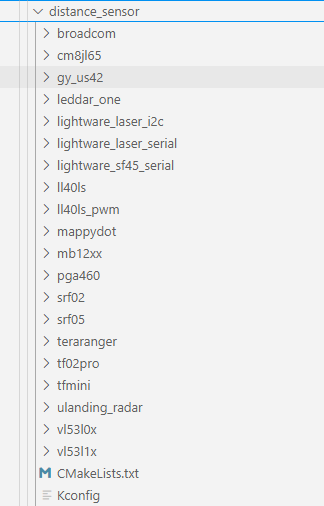
在PX4的源码中,已经支持一部分距离传感器的驱动例程,如北醒激光雷达、MB12XX、SRF05等,可以实现即插即用。相关代码位于…\Firmware\src\drivers\distance_sensor,其中 CmakeList.txt 用于定义这些驱动的编译规则(添加源码、生成模块,通过add_subdirectory(文件名) 将距离传感器添加到编译中;Kconfig用于提供配置开关(是否启用某个距离传感器驱动)。
//  CmakeList.TXT
add_subdirectory(tfmini)
add_subdirectory(tf02pro)
...
//  Kconfig
menu "Distance sensors"
    menuconfig COMMON_DISTANCE_SENSOR
        bool "Common distance sensor's"
        default n
        select DRIVERS_DISTANCE_SENSOR_TFMINI
        select DRIVERS_DISTANCE_SENSOR_TF02PRO
        ...
最后,通过位于…\Firmware\boards\cuav\x7pro\default.px4board中的编译命令,完成距离传感器的编译和执行。
CONFIG_COMMON_DISTANCE_SENSOR=y
二、北醒激光雷达使用
1.代码分析
本文选择北醒TF系列激光雷达,通信协议为串口,如TF_03,TF_Mini(uart)进行分析。PX4 代码位于**…\Firmware\src\drivers\distance_sensor\tfmini**,包含以下几个文本
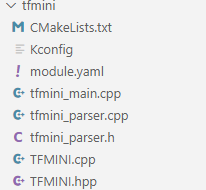
tfmini_main.cpp  →  调用  TFMINI 类
                        ↓
                  TFMINI.cpp / TFMINI.hpp
                        ↓
               调用 tfmini_parser.cpp(数据帧校验/解析)
                        ↓
               解析出距离 → 通过 PX4Rangefinder → uORB: distance_sensor
在文件 module.yaml 中,可以看到参数:SENS_TFMINI_CFG,即可以通过选择不同串口号来完成硬件连接。该参数可在地面站中查看和修改。
module_name: Benewake TFmini Rangefinder
serial_config:
    - command: tfmini start -d ${SERIAL_DEV}
      port_config_param:
        name: SENS_TFMINI_CFG
        group: Sensors
图中为地面站参数,这里我选择 飞控的TELEM2 连接 激光雷达。

**值得注意的是:**串口选择的参数只有1个,tfmini_main.cpp中也是单个雷达的驱动和运行。若飞控同时连接多个TF系列串口激光雷达,则无法实现,需要对代码进行修改。
2.参数修改
在 PX4 1.14 固件中,取消了参数EKF2_AID_MASK:(代码位于…\Firmware\src\modules\ekf2\ekf2_params.c)
/**
 * Will be removed after v1.14 release
 *  * Set bits in the following positions to enable:
 * 0 : Deprecated, use EKF2_GPS_CTRL instead
 * 1 : Deprecated. use EKF2_OF_CTRL instead
 * 2 : Deprecated, use EKF2_IMU_CTRL instead
 * 3 : Deprecated, use EKF2_EV_CTRL instead
 * 4 : Deprecated, use EKF2_EV_CTRL instead
 * 5 : Deprecated. use EKF2_DRAG_CTRL instead
 * 6 : Deprecated, use EKF2_EV_CTRL instead
 * 7 : Deprecated, use EKF2_GPS_CTRL instead
 * 8 : Deprecated, use EKF2_EV_CTRL instead
 * ...
 */
PARAM_DEFINE_INT32(EKF2_AID_MASK, 0);
针对1.14固件,可以修改的距离传感器参数为:
EKF2_RNG_CTRL:决定是否启用距离融合,默认为:1 Enabled (conditional mode)1 Enabled (conditional mode)
/**
 * Range sensor height aiding
 *
 * WARNING: Range finder measurements are less reliable and can experience unexpected errors.
 * For these reasons, if accurate control of height relative to ground is required, it is recommended to use the MPC_ALT_MODE parameter instead,
 * unless baro errors are severe enough to cause problems with landing and takeoff.
 *
 * To en-/disable range finder for terrain height estimation, use EKF2_TERR_MASK instead.
 *
 * If this parameter is enabled then the estimator will make use of the range finder measurements to estimate its height in addition to other
 * height sources (if activated). Range sensor aiding can be enabled (i.e.: always use) or set in "conditional" mode.
 *
 * Conditional mode: This enables the range finder to be used during low speed (< EKF2_RNG_A_VMAX) and low altitude (< EKF2_RNG_A_HMAX)
 * operation, eg takeoff and landing, where baro interference from rotor wash is excessive and can corrupt EKF state
 * estimates. It is intended to be used where a vertical takeoff and landing is performed, and horizontal flight does
 * not occur until above EKF2_RNG_A_HMAX.
 *
 * @group EKF2
 * @value 0 Disable range fusion
 * @value 1 Enabled (conditional mode)
 * @value 2 Enabled
 */
PARAM_DEFINE_INT32(EKF2_RNG_CTRL, 1);
EKF2_RNG_A_HMAX:条件距离辅助模式允许的最大绝对高度(离地高度),默认:5 m。可根据传感器的测距范围修改参数的定义域。如:* @min 1.0 * @max 50.0
/**
 * Maximum absolute altitude (height above ground level) allowed for conditional range aid mode.
 *
 * If the vehicle absolute altitude exceeds this value then the estimator will not fuse range measurements
 * to estimate its height. This only applies when conditional range aid mode is activated (EKF2_RNG_CTRL = 1).
 *
 * @group EKF2
 * @min 1.0
 * @max 50.0
 * @unit m
 */
PARAM_DEFINE_FLOAT(EKF2_RNG_A_HMAX, 10.0f);
EKF2_RNG_A_VMAX:条件距离辅助模式允许的最大水平速度。默认:1.0f。
/**
 * Maximum horizontal velocity allowed for conditional range aid mode.
 *
 * If the vehicle horizontal speed exceeds this value then the estimator will not fuse range measurements
 * to estimate its height. This only applies when conditional range aid mode is activated (EKF2_RNG_CTRL = 1).
 *
 * @group EKF2
 * @min 0.1
 * @max 2
 * @unit m/s
 */
PARAM_DEFINE_FLOAT(EKF2_RNG_A_VMAX, 1.0f);
还有一些测距仪的位置的参数:
/**
 * X position of range finder origin in body frame (forward axis with origin relative to vehicle centre of gravity)
 *
 * @group EKF2
 * @unit m
 * @decimal 3
 */
PARAM_DEFINE_FLOAT(EKF2_RNG_POS_X, 0.0f);

/**
 * Y position of range finder origin in body frame (right axis with origin relative to vehicle centre of gravity)
 *
 * @group EKF2
 * @unit m
 * @decimal 3
 */
PARAM_DEFINE_FLOAT(EKF2_RNG_POS_Y, 0.0f);

/**
 * Z position of range finder origin in body frame (down axis with origin relative to vehicle centre of gravity)
 *
 * @group EKF2
 * @unit m
 * @decimal 3
 */
PARAM_DEFINE_FLOAT(EKF2_RNG_POS_Z, 0.0f);
这些EKF2_RNG_POS_*参数主要是为了向下的距离传感器提供位置校准,用于高度估计。
3.飞控高度估计
与高度数据融合的飞控参数为:EKF2_HGT_REF,可以知道获取高度的传感器有:气压计,GPS,距离传感器,视觉传感器,可修改该参数使用不同传感器作为主高度数据源,其他高度参数进行融合。
/**
 * Determines the reference source of height data used by the EKF.
 *
 * When multiple height sources are enabled at the same time, the height estimate will
 * always converge towards the reference height source selected by this parameter.
 *
 * The range sensor and vision options should only be used when for operation over a flat surface as the local NED origin will move up and down with ground level.
 *
 * @group EKF2
 * @value 0 Barometric pressure
 * @value 1 GPS
 * @value 2 Range sensor
 * @value 3 Vision
 * @reboot_required true
 */
PARAM_DEFINE_INT32(EKF2_HGT_REF, 1);
4.硬件接线与测试
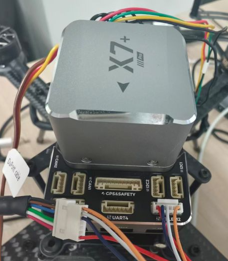
由于上文提到使用TELEM2作为激光雷达串口,因此连接TF03和飞控如下图所示:
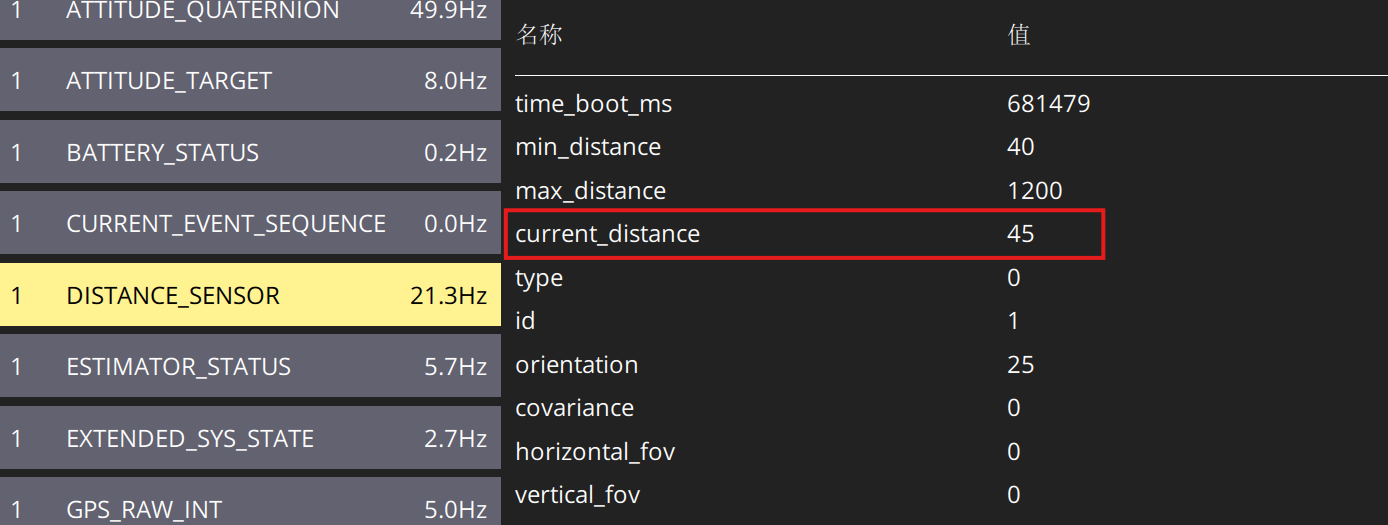
打开地面站,连接飞控,查看mavlink 监测数据:
总结
北醒系列官方的驱动教程位于:北醒官方雷达驱动教程





 扫一扫
扫一扫


 2038
2038

 被折叠的 条评论
为什么被折叠?
被折叠的 条评论
为什么被折叠?
 到【灌水乐园】发言





