


一、集合框架:数据管理的艺术
Java集合框架(Java Collections Framework)是一个统一的标准架构,用于表示和操作集合。它提供了一系列接口、实现类和算法,使开发者能够高效地处理各种数据结构。
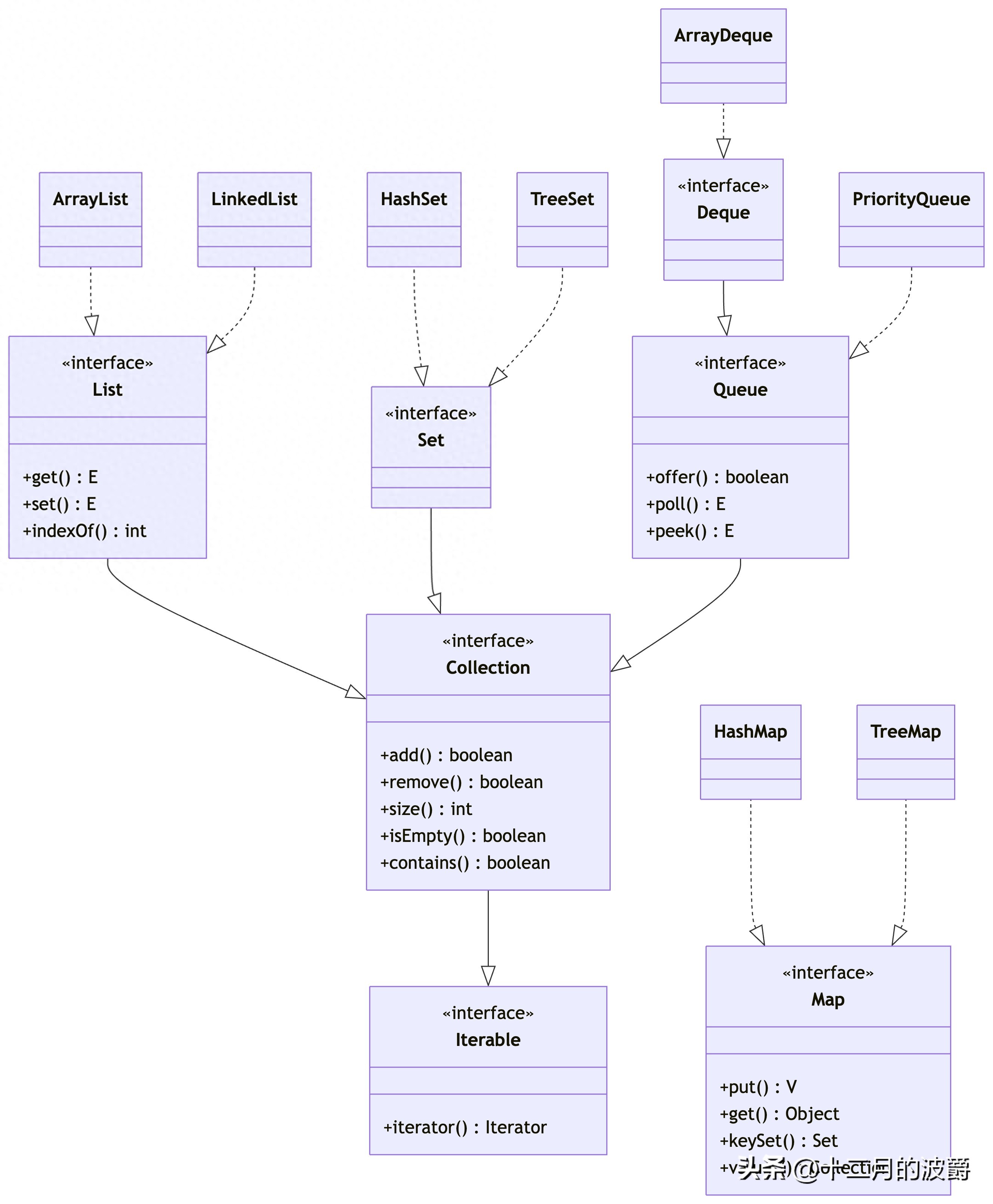
二、Collection体系:单值元素的容器
2.1 Collection接口
Collection是单值集合的根接口,定义了基本的集合操作:
public interface Collection<E> extends Iterable<E> {
    // 基本操作
    int size();
    boolean isEmpty();
    boolean contains(Object element);
    boolean add(E element);
    boolean remove(Object element);
    Iterator<E> iterator();

    // 批量操作
    boolean containsAll(Collection<?> c);
    boolean addAll(Collection<? extends E> c);
    boolean removeAll(Collection<?> c);
    boolean retainAll(Collection<?> c);
    void clear();

    // 数组操作
    Object[] toArray();
    <T> T[] toArray(T[] a);

    // Java 8新增的默认方法
    default boolean removeIf(Predicate<? super E> filter) {
        // 实现过滤删除
    }

    default Spliterator<E> spliterator() {
        // 返回可分割迭代器
    }

    default Stream<E> stream() {
        // 返回顺序流
    }

    default Stream<E> parallelStream() {
        // 返回并行流
    }
}
2.2 List接口:有序集合
List接口扩展了Collection,支持按索引访问的元素序列:
public interface List<E> extends Collection<E> {
    // 位置访问操作
    E get(int index);
    E set(int index, E element);
    void add(int index, E element);
    E remove(int index);
    boolean addAll(int index, Collection<? extends E> c);

    // 搜索操作
    int indexOf(Object o);
    int lastIndexOf(Object o);

    // 列表迭代器
    ListIterator<E> listIterator();
    ListIterator<E> listIterator(int index);

    // 视图操作
    List<E> subList(int fromIndex, int toIndex);

    // Java 8新增的默认方法
    default void replaceAll(UnaryOperator<E> operator) {
        // 对所有元素应用操作
    }

    default void sort(Comparator<? super E> c) {
        // 排序
    }
}
2.2.1 ArrayList:动态数组实现
// ArrayList的基本使用
List<String> arrayList = new ArrayList<>();
// 添加元素
arrayList.add("Java");
arrayList.add("Python");
arrayList.add(1, "C++"); // 在指定位置插入
// 访问元素
String first = arrayList.get(0); // "Java"
String last = arrayList.get(arrayList.size() - 1); // "Python"
// 遍历方式
// 1. for循环
for (int i = 0; i < arrayList.size(); i++) {
    System.out.println(arrayList.get(i));
}
// 2. 增强for循环
for (String language : arrayList) {
    System.out.println(language);
}
// 3. 迭代器
Iterator<String> iterator = arrayList.iterator();
while (iterator.hasNext()) {
    System.out.println(iterator.next());
}
// 4. Java 8 forEach
arrayList.forEach(System.out::println);
// 转换为数组
String[] array = arrayList.toArray(new String[0]);
2.2.2 LinkedList:双向链表实现
// LinkedList的基本使用
List<String> linkedList = new LinkedList<>();
// 添加元素
linkedList.add("Apple");
linkedList.addFirst("Banana"); // 添加到头部
linkedList.addLast("Orange");  // 添加到尾部
// 作为队列使用
Queue<String> queue = new LinkedList<>();
queue.offer("Task1"); // 入队
queue.offer("Task2");
String task = queue.poll(); // 出队:Task1
// 作为栈使用
Deque<String> stack = new LinkedList<>();
stack.push("Item1"); // 压栈
stack.push("Item2");
String item = stack.pop(); // 弹栈:Item2
2.3 Set接口:不重复集合
Set接口扩展了Collection,不允许包含重复元素:
public interface Set<E> extends Collection<E> {
    // 从Collection继承的方法,但具有Set的语义

    // 特别注意:Set不保证顺序(除非使用SortedSet)
}
2.3.1 HashSet:基于哈希表的Set实现
// HashSet的基本使用
Set<String> hashSet = new HashSet<>();
// 添加元素
hashSet.add("Apple");
hashSet.add("Banana");
hashSet.add("Apple"); // 重复元素,不会被添加
// 检查包含
boolean hasApple = hashSet.contains("Apple"); // true
// 遍历(顺序不确定)
for (String fruit : hashSet) {
    System.out.println(fruit);
}
// 使用LinkedHashSet保持插入顺序
Set<String> linkedHashSet = new LinkedHashSet<>();
linkedHashSet.add("Apple");
linkedHashSet.add("Banana");
linkedHashSet.add("Orange");
// 遍历顺序:Apple, Banana, Orange
2.3.2 TreeSet:基于红黑树的Set实现
// TreeSet的基本使用
Set<String> treeSet = new TreeSet<>();
// 添加元素(自动排序)
treeSet.add("Orange");
treeSet.add("Apple");
treeSet.add("Banana");
// 遍历顺序:Apple, Banana, Orange
// 使用自定义比较器
Set<Person> personSet = new TreeSet<>(Comparator.comparing(Person::getAge));
personSet.add(new Person("Alice", 25));
personSet.add(new Person("Bob", 30));
// 获取子集
SortedSet<String> subSet = ((TreeSet<String>) treeSet).subSet("Apple", "Orange");
2.4 Queue接口:队列结构
Queue接口扩展了Collection,定义了队列操作:
public interface Queue<E> extends Collection<E> {
    // 插入操作
    boolean add(E e);    // 抛出异常
    boolean offer(E e);  // 返回特殊值

    // 移除操作
    E remove();          // 抛出异常
    E poll();            // 返回特殊值

    // 检查操作
    E element();         // 抛出异常
    E peek();            // 返回特殊值
}
2.4.1 PriorityQueue:优先级队列
// PriorityQueue的基本使用
Queue<Integer> priorityQueue = new PriorityQueue<>();
// 添加元素
priorityQueue.offer(5);
priorityQueue.offer(1);
priorityQueue.offer(3);
// 按优先级出队
while (!priorityQueue.isEmpty()) {
    System.out.println(priorityQueue.poll()); // 输出:1, 3, 5
}
// 使用自定义比较器
Queue<Person> personQueue = new PriorityQueue<>(
    Comparator.comparing(Person::getAge).reversed()
);
personQueue.offer(new Person("Alice", 25));
personQueue.offer(new Person("Bob", 30));
// 出队顺序:Bob(30), Alice(25)
三、Map体系:键值对的容器
3.1 Map接口
Map接口表示键值对映射,不是Collection的子接口:
public interface Map<K, V> {
    // 基本操作
    V put(K key, V value);
    V get(Object key);
    V remove(Object key);
    boolean containsKey(Object key);
    boolean containsValue(Object value);
    int size();
    boolean isEmpty();

    // 批量操作
    void putAll(Map<? extends K, ? extends V> m);
    void clear();

    // 集合视图
    Set<K> keySet();
    Collection<V> values();
    Set<Map.Entry<K, V>> entrySet();

    // 内部接口
    interface Entry<K, V> {
        K getKey();
        V getValue();
        V setValue(V value);

        // 比较方法
        boolean equals(Object o);
        int hashCode();

        // Java 8新增的比较器
        public static <K extends Comparable<? super K>, V> Comparator<Map.Entry<K, V>> comparingByKey() {
            return (Comparator<Map.Entry<K, V>> & Serializable)
                (c1, c2) -> c1.getKey().compareTo(c2.getKey());
        }

        public static <K, V extends Comparable<? super V>> Comparator<Map.Entry<K, V>> comparingByValue() {
            return (Comparator<Map.Entry<K, V>> & Serializable)
                (c1, c2) -> c1.getValue().compareTo(c2.getValue());
        }
    }

    // Java 8新增的默认方法
    default V getOrDefault(Object key, V defaultValue) {
        // 实现...
    }

    default void forEach(BiConsumer<? super K, ? super V> action) {
        // 实现...
    }

    default V putIfAbsent(K key, V value) {
        // 实现...
    }

    default boolean remove(Object key, Object value) {
        // 实现...
    }

    default V computeIfAbsent(K key, Function<? super K, ? extends V> mappingFunction) {
        // 实现...
    }
}
3.2 HashMap:基于哈希表的Map实现
// HashMap的基本使用
Map<String, Integer> hashMap = new HashMap<>();
// 添加键值对
hashMap.put("Apple", 10);
hashMap.put("Banana", 5);
hashMap.put("Orange", 8);
// 获取值
Integer appleCount = hashMap.get("Apple"); // 10
Integer unknownCount = hashMap.get("Mango"); // null
// 获取默认值
int mangoCount = hashMap.getOrDefault("Mango", 0); // 0
// 遍历方式
// 1. 遍历键
for (String key : hashMap.keySet()) {
    System.out.println(key + ": " + hashMap.get(key));
}
// 2. 遍历值
for (Integer value : hashMap.values()) {
    System.out.println(value);
}
// 3. 遍历键值对
for (Map.Entry<String, Integer> entry : hashMap.entrySet()) {
    System.out.println(entry.getKey() + ": " + entry.getValue());
}
// 4. Java 8 forEach
hashMap.forEach((key, value) ->
    System.out.println(key + ": " + value));
// 使用LinkedHashMap保持插入顺序
Map<String, Integer> linkedHashMap = new LinkedHashMap<>();
linkedHashMap.put("Apple", 10);
linkedHashMap.put("Banana", 5);
linkedHashMap.put("Orange", 8);
// 遍历顺序:Apple, Banana, Orange
3.3 TreeMap:基于红黑树的Map实现
// TreeMap的基本使用
Map<String, Integer> treeMap = new TreeMap<>();
// 添加元素(按键排序)
treeMap.put("Orange", 8);
treeMap.put("Apple", 10);
treeMap.put("Banana", 5);
// 遍历顺序:Apple, Banana, Orange
// 使用自定义比较器
Map<Person, Integer> personMap = new TreeMap<>(
    Comparator.comparing(Person::getName)
);
personMap.put(new Person("Alice", 25), 100);
personMap.put(new Person("Bob", 30), 200);
// 获取子映射
SortedMap<String, Integer> subMap = ((TreeMap<String, Integer>) treeMap)
    .subMap("Apple", "Orange");
3.4 ConcurrentHashMap:线程安全的Map实现
java
// ConcurrentHashMap的基本使用
Map<String, Integer> concurrentMap = new ConcurrentHashMap<>();
// 线程安全的操作
concurrentMap.put("Apple", 10);
Integer count = concurrentMap.get("Apple");
// 原子操作
concurrentMap.putIfAbsent("Banana", 5); // 键不存在时插入
concurrentMap.computeIfPresent("Apple", (key, value) -> value + 1); // 键存在时更新
// 并行操作(适合大规模数据)
long result = concurrentMap.reduceValues(1, Integer::longValue, Long::sum);
四、工具类:Collections和Arrays
4.1 Collections工具类
// Collections的常用方法
List<Integer> numbers = new ArrayList<>();
numbers.add(3);
numbers.add(1);
numbers.add(2);
// 排序
Collections.sort(numbers); // [1, 2, 3]
// 反转
Collections.reverse(numbers); // [3, 2, 1]
// 洗牌
Collections.shuffle(numbers); // 随机顺序
// 不可变集合
List<Integer> unmodifiableList = Collections.unmodifiableList(numbers);
// 同步集合
List<Integer> synchronizedList = Collections.synchronizedList(numbers);
// 二分查找
int index = Collections.binarySearch(numbers, 2); // 找到的索引
// 最大最小值
Integer max = Collections.max(numbers);
Integer min = Collections.min(numbers);
4.2 Arrays工具类
// Arrays的常用方法
int[] array = {3, 1, 2, 5, 4};
// 排序
Arrays.sort(array); // [1, 2, 3, 4, 5]
// 二分查找
int index = Arrays.binarySearch(array, 3); // 索引2
// 填充
Arrays.fill(array, 0); // 所有元素变为0
// 转换为列表
List<Integer> list = Arrays.asList(1, 2, 3, 4, 5);
// 比较和哈希
boolean equal = Arrays.equals(new int[]{1, 2}, new int[]{1, 2});
int hash = Arrays.hashCode(new int[]{1, 2});
// Java 8流操作
int sum = Arrays.stream(array).sum();
double average = Arrays.stream(array).average().orElse(0);
五、集合框架的最佳实践
5.1 选择正确的集合类型
|
需求场景 |
推荐实现 |
原因 |
|
快速随机访问 |
ArrayList |
基于数组,get/set操作O(1) |
|
频繁插入删除 |
LinkedList |
基于链表,add/remove操作O(1) |
|
去重存储 |
HashSet |
基于哈希表,contains操作O(1) |
|
有序去重 |
TreeSet |
基于红黑树,自动排序 |
|
键值对存储 |
HashMap |
基于哈希表,get/put操作O(1) |
|
有序键值对 |
TreeMap |
基于红黑树,按键排序 |
|
线程安全 |
ConcurrentHashMap |
分段锁,高并发性能 |
|
优先级处理 |
PriorityQueue |
堆实现,按优先级处理 |
5.2 性能优化建议
- 初始容量设置:
// 避免频繁扩容
List<String> list = new ArrayList<>(1000); // 预估初始容量
Map<String, Integer> map = new HashMap<>(16, 0.75f); // 初始容量和负载因子
- 使用不可变集合:
// Java 9+ 的工厂方法
List<String> immutableList = List.of("A", "B", "C");
Set<String> immutableSet = Set.of("A", "B", "C");
Map<String, Integer> immutableMap = Map.of("A", 1, "B", 2);
// Java 8及之前
List<String> immutableList = Collections.unmodifiableList(new ArrayList<>());
- 避免装箱拆箱开销:
// 使用原始类型特化类
IntStream.range(0, 100).toArray(); // 而不是List<Integer>
5.3 常见陷阱与解决方案
// 1. 并发修改异常
List<String> list = new ArrayList<>(Arrays.asList("A", "B", "C"));
// 错误做法:在迭代中修改
for (String item : list) {
    if ("B".equals(item)) {
        list.remove(item); // ConcurrentModificationException
    }
}
// 正确做法:使用迭代器
Iterator<String> iterator = list.iterator();
while (iterator.hasNext()) {
    if ("B".equals(iterator.next())) {
        iterator.remove(); // 安全删除
    }
}
// 2. 可变对象作为键
public class MutableKey {
    private String value;

    public MutableKey(String value) { this.value = value; }
    public void setValue(String value) { this.value = value; }

    @Override
    public boolean equals(Object o) { /* 实现 */ }
    @Override
    public int hashCode() { /* 实现 */ }
}
MutableKey key = new MutableKey("original");
Map<MutableKey, String> map = new HashMap<>();
map.put(key, "value");
key.setValue("modified"); // 修改键对象
String value = map.get(key); // 可能返回null,哈希值改变了
// 3. 正确实现equals和hashCode
public final class Person {
    private final String name;
    private final int age;

    public Person(String name, int age) {
        this.name = name;
        this.age = age;
    }

    @Override
    public boolean equals(Object o) {
        if (this == o) return true;
        if (!(o instanceof Person)) return false;
        Person person = (Person) o;
        return age == person.age && Objects.equals(name, person.name);
    }

    @Override
    public int hashCode() {
        return Objects.hash(name, age);
    }
}
六、实际应用场景
6.1 缓存实现
// 基于LinkedHashMap的LRU缓存
public class LRUCache<K, V> extends LinkedHashMap<K, V> {
    private final int capacity;

    public LRUCache(int capacity) {
        super(capacity, 0.75f, true); // accessOrder=true表示按访问顺序排序
        this.capacity = capacity;
    }

    @Override
    protected boolean removeEldestEntry(Map.Entry<K, V> eldest) {
        return size() > capacity;
    }

    // 使用示例
    public static void main(String[] args) {
        LRUCache<String, String> cache = new LRUCache<>(3);
        cache.put("1", "A");
        cache.put("2", "B");
        cache.put("3", "C");

        cache.get("1"); // 访问"1",使其成为最近使用的

        cache.put("4", "D"); // 加入新元素,淘汰最久未使用的"2"

        System.out.println(cache); // 输出:{3=C, 1=A, 4=D}
    }
}
6.2 数据统计与分析
// 使用集合框架进行数据统计
public class DataAnalyzer {
    public static Map<String, Integer> countWordFrequency(List<String> words) {
        Map<String, Integer> frequencyMap = new HashMap<>();

        for (String word : words) {
            frequencyMap.merge(word, 1, Integer::sum);
        }

        return frequencyMap;
    }

    public static List<String> getTopFrequentWords(Map<String, Integer> frequencyMap, int topN) {
        return frequencyMap.entrySet().stream()
            .sorted(Map.Entry.<String, Integer>comparingByValue().reversed())
            .limit(topN)
            .map(Map.Entry::getKey)
            .collect(Collectors.toList());
    }

    public static void main(String[] args) {
        List<String> words = Arrays.asList("apple", "banana", "apple", "orange", "banana", "apple");

        Map<String, Integer> frequencyMap = countWordFrequency(words);
        System.out.println(frequencyMap); // {orange=1, banana=2, apple=3}

        List<String> topWords = getTopFrequentWords(frequencyMap, 2);
        System.out.println(topWords); // [apple, banana]
    }
}
6.3 多级索引查询
// 使用多重Map构建复杂索引
public class MultiIndexDatabase {
    private final Map<String, Person> primaryIndex = new HashMap<>();
    private final Map<Integer, Set<Person>> ageIndex = new HashMap<>();
    private final Map<String, Set<Person>> cityIndex = new HashMap<>();

    public void addPerson(Person person) {
        // 主索引
        primaryIndex.put(person.getId(), person);

        // 年龄索引
        ageIndex.computeIfAbsent(person.getAge(), k -> new HashSet<>()).add(person);

        // 城市索引
        cityIndex.computeIfAbsent(person.getCity(), k -> new HashSet<>()).add(person);
    }

    public Person getPersonById(String id) {
        return primaryIndex.get(id);
    }

    public Set<Person> getPersonsByAge(int age) {
        return ageIndex.getOrDefault(age, Collections.emptySet());
    }

    public Set<Person> getPersonsByCity(String city) {
        return cityIndex.getOrDefault(city, Collections.emptySet());
    }

    public Set<Person> getPersonsByAgeAndCity(int age, String city) {
        Set<Person> byAge = getPersonsByAge(age);
        Set<Person> byCity = getPersonsByCity(city);

        Set<Person> result = new HashSet<>(byAge);
        result.retainAll(byCity);
        return result;
    }
}
总结
Java集合框架提供了丰富而强大的数据结构工具,是每个Java开发者必须掌握的核心技能。通过合理选择和使用不同的集合实现,可以显著提高程序的性能和可维护性。
关键要点:
- 理解Collection和Map两大体系的结构差异和适用场景
- 根据具体需求选择合适的集合实现(ArrayList vs LinkedList,HashMap vs TreeMap等)
- 注意线程安全问题,在多线程环境下使用线程安全集合或同步包装
- 遵循最佳实践,如正确实现equals/hashCode方法、设置合适的初始容量等
- 利用Java 8+的新特性(Stream API、默认方法等)编写更简洁高效的代码
通过深入理解和熟练运用Java集合框架,开发者能够更好地处理各种数据管理需求,构建出高效、可靠的应用程序。





 扫一扫
扫一扫


 169万+
169万+

 被折叠的 条评论
为什么被折叠?
被折叠的 条评论
为什么被折叠?
 到【灌水乐园】发言





