



 本文详细介绍如何在Android项目中配置NDK环境,包括设置NDK目录、编辑build.gradle文件、配置Application.mk与CmakeLists.txt,以及使用ndk-build命令编译so库文件等关键步骤。
步骤:
1、首先,在电脑->属性->系统变量中,配置NDK 目录
D:\development\tools\android-ndk-r16b
2、配置build.gradle文件,如下:
apply plugin: 'com.android.application'

android {
    compileSdkVersion 29
    buildToolsVersion "29.0.3"

    defaultConfig {
        applicationId "com.bn.bullet"
        minSdkVersion 14
        targetSdkVersion 29
        versionCode 1
        versionName "1.0"

        testInstrumentationRunner "androidx.test.runner.AndroidJUnitRunner"
    }
//配置1:so库生成后所在目录
    sourceSets {
        main {
            jniLibs.srcDirs = ['D:\\whx\\AndroidStudioProject\\VolumeII\\Sample8_3\\src\\main\\libs']

        }
    }
//配置2:
    externalNativeBuild {
        ndkBuild {
            path file("src\\main\\jni\\Android.mk")
        }
        cmake {

            // Provides a relative path to your CMake build script.
            path "CMakeLists.txt"
        }
    }
    buildTypes {
        release {
            minifyEnabled false
            proguardFiles getDefaultProguardFile('proguard-android-optimize.txt'), 'proguard-rules.pro'
        }
    }

}

dependencies {
    implementation fileTree(dir: 'libs', include: ['*.jar'])

    implementation 'androidx.appcompat:appcompat:1.1.0'
    testImplementation 'junit:junit:4.12'
    androidTestImplementation 'androidx.test.ext:junit:1.1.1'
    androidTestImplementation 'androidx.test.espresso:espresso-core:3.2.0'
}
3、配置Application.mk
APP_STL := stlport_static//根据需求设置
APP_ABI := all
4、配置CmakeLists.txt
# For more information about using CMake with Android Studio, read the

# documentation: https://d.android.com/studio/projects/add-native-code.html


# Sets the minimum version of CMake required to build the native library.

#用来设置在编译本地库时我们需要的最小的cmake版本

cmake_minimum_required(VERSION 3.4.1)


# Creates and names a library, sets it as either STATIC

# or SHARED, and provides the relative paths to its source code.

# You can define multiple libraries, and CMake builds them for you.

# Gradle automatically packages shared libraries with your APK.

#创建并命名一个库,将其设置为静态

#或共享,并提供到其源代码的相对路径。

#您可以定义多个库,CMake为您构建它们。

# Gradle自动将共享库打包到APK中。

add_library(

# Sets the name of the library.

#生成.so文件的名字

BNbullet


# Sets the library as a shared library.

# 设置生成的库为动态库,也可以生成动态库STATIC

SHARED


# Provides a relative path to your source file(s).

# 表示参与编译的文件的路径,这里面可以写多个文件的路径。

src/main/jni/hellocpp/main.cpp )


# Searches for a specified prebuilt library and stores the path as a

# variable. Because CMake includes system libraries in the search path by

# default, you only need to specify the name of the public NDK library

# you want to add. CMake verifies that the library exists before

# completing its build.

#搜索指定的预构建库并将路径存储为

#变量。因为CMake在搜索路径by中包含了系统库

#默认情况下,您只需要指定公共NDK库的名称

#CMake验证库在完成构建之前会检查库是否存在


find_library( # Sets the name of the path variable.

log-lib


# Specifies the name of the NDK library that

# you want CMake to locate.

log )


# Specifies libraries CMake should link to your target library. You

# can link multiple libraries, such as libraries you define in this

# build script, prebuilt third-party libraries, or system libraries.

#指定库CMake应该链接到目标库。你

#可以链接多个库,比如您在本文中定义的库

#构建脚本、预构建的第三方库或系统库。


target_link_libraries( # Specifies the target library.

BNbullet


# Links the target library to the log library

# included in the NDK.

${log-lib} )
5、配置gradle.properties
android.useDeprecatedNdk=true
6、配置local.properties
ndk.dir=D\:\\development\\tools\\android-ndk-r16b //ndk所在目录
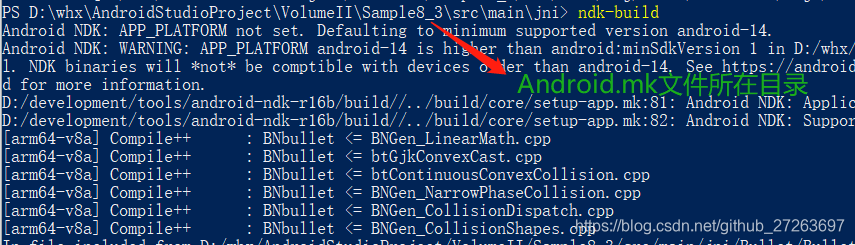
7、打开cmd,使用ndk-build命令,编译so库文件,如下:
8、Run项目到手机
此开发步骤仅供参考。





 扫一扫
扫一扫


 204
204

 被折叠的 条评论
为什么被折叠?
被折叠的 条评论
为什么被折叠?
 到【灌水乐园】发言





