



 本文详细介绍了Cocos2d-x引擎中的CCTextFieldTTF控件的使用方法,包括创建方式、常用操作、事件处理等,并通过实战代码演示了如何设置编辑框的代理、触控事件以及编辑框的状态事件。
|
1
2
3
4
5
6
7
8
9
10
11
12
13
14
15
16
17
18
19
20
21
22
23
24
25
26
27
28
29
30
|
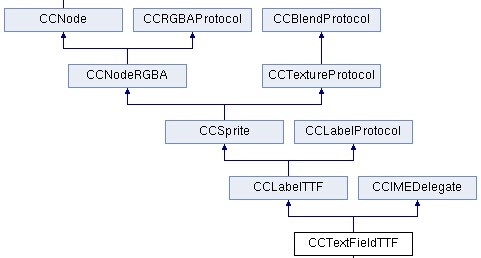
//class CC_DLL CCTextFieldTTF : public CCLabelTTF, public CCIMEDelegate/** *
创建CCTextFieldTTF的两种方式 *
textFieldWithPlaceHolder */ //placeholder:默认内容。即输入为空时显示的内容。 //fontName: 字体资源名。 //fontSize: 字体大小。 //编辑框的大小为:CCLabelTTF的大小。且在输入的过程中,若内容超过编辑框的大小,会自动扩展。 static CCTextFieldTTF* textFieldWithPlaceHolder(const char* placeholder, const char* fontName, float fontSize); //placeholder:默认内容。即编辑框的输入内容为空时,显示的内容。 //dimensions: 编辑框的尺寸大小。 //alignment: 文本内容的对齐方式。 //kCCTextAlignmentLeft 左对齐 //kCCTextAlignmentCenter 居中,默认方式 //kCCTextAlignmentRight 右对齐 //编辑框的大小固定,不可扩展。 static CCTextFieldTTF* textFieldWithPlaceHolder(const char* placeholder, const CCSize& dimensions, CCTextAlignment alignment, const char*fontName, float fontSize);/** *
创建方式举例 */ CCTextFieldTTF::textFieldWithPlaceHolder("Please Click Me!", "Marker Felt", 24); CCTextFieldTTF::textFieldWithPlaceHolder("Please Click Me!", CCSizeMake(100,100), CCTextAlignment::kCCTextAlignmentCenter, "Marker Felt", 24);// |
|
1
2
3
4
5
6
7
8
9
10
11
12
13
14
15
16
17
18
19
20
21
22
23
24
25
26
27
28
29
30
|
///** *
属性设置 *
setDelegate , getCharCount , *
setPlaceHolder , setColorSpaceHolder , *
setString , setColor */ //设置编辑框的委托代理对象,一般为this //并且CCLayer必需要继承代理接口类CCTextFieldDelegate。 CC_SYNTHESIZE(CCTextFieldDelegate*, m_pDelegate, Delegate); //获取字符个数,只读get CC_SYNTHESIZE_READONLY(int, m_nCharCount, CharCount); //设置编辑框默认内容。即输入为空时显示的内容 virtual void setPlaceHolder(const char * text); virtual const char* getPlaceHolder(); //设置编辑框默认内容的字体颜色 virtual void setColorSpaceHolder(const ccColor3B& color); virtual const ccColor3B& getColorSpaceHolder(); //设置编辑框输入内容 virtual void setString(const char *text); virtual const char* getString(); //设置编辑框输入内容的字体颜色 virtual void setColor(const ccColor3B& color); virtual const ccColor3B& setColor();// |
|
1
2
3
4
5
6
|
// virtual bool attachWithIME(); //开启虚拟键盘,并允许输入。 virtual bool detachWithIME(); //关闭虚拟键盘,并停止输入。 //textFieldTTF->attachWithIME();// |
|
1
2
3
4
5
6
7
8
9
10
11
12
13
14
15
16
17
|
// //当用户启动虚拟键盘时的回调函数 //启用键盘false; 不启用键盘true virtual bool onTextFieldAttachWithIME(CCTextFieldTTF* sender) //当用户关闭虚拟键盘时的回调函数 //关闭键盘false; 不关闭键盘true virtual bool onTextFieldDetachWithIME(CCTextFieldTTF* sender) //当用户输入时的回调函数 //允许输入字符false; 不允许输入字符true virtual bool onTextFieldInsertText(CCTextFieldTTF* sender, const char* text, int nLen) //当用户删除文字时的回调函数 //允许删除字符false; 不允许删除字符true virtual bool onTextFieldDeleteBackward(CCTextFieldTTF* sender, const char* delText, int nLen)// |
|
1
2
3
4
5
6
7
8
9
10
11
12
13
14
15
16
|
// class HelloWorld : public cocos2d::CCLayer,cocos2d::CCTextFieldDelegate { virtual bool onTextFieldAttachWithIME(CCTextFieldTTF* sender); //当用户启动虚拟键盘的时候的回调函数 virtual bool onTextFieldDetachWithIME(CCTextFieldTTF* sender); //当用户关闭虚拟键盘的时候的回调函数 virtual bool onTextFieldInsertText(CCTextFieldTTF* sender, const char* text, int nLen); //当用户输入的时候的回调函数 virtual bool onTextFieldDeleteBackward(CCTextFieldTTF* sender, const char* delText, int nLen); //当用户删除文字的时候的回调函数 //开启触控 virtual bool ccTouchBegan(CCTouch* touch, CCEvent* event); virtual void ccTouchMoved(CCTouch* touch, CCEvent* event); virtual void ccTouchEnded(CCTouch* touch, CCEvent* event); virtual void onEnter(); virtual void onExit(); };// |
|
1
2
3
4
5
6
7
8
9
|
// CCTextFieldTTF* textFieldTTF = CCTextFieldTTF::textFieldWithPlaceHolder("please input", "Marker Felt", 24); //CCTextFieldTTF* textFieldTTF = CCTextFieldTTF::textFieldWithPlaceHolder("please input", CCSize(100,100), CCTextAlignment::kCCTextAlignmentCenter, "Arial", 20); textFieldTTF->setPosition( midPos ); this->addChild(textFieldTTF, 0, 1); //tag标记1 //设置编辑框的委托代理对象 textFieldTTF->setDelegate(this);// |
|
1
2
3
4
5
6
7
8
9
10
11
12
13
14
15
16
17
18
19
20
21
22
23
24
25
26
27
28
29
30
31
32
33
34
35
36
37
|
// bool HelloWorld::ccTouchBegan(CCTouch* touch, CCEvent* event) { CCLOG("ccTouchBegan"); return true; } void HelloWorld::ccTouchMoved(CCTouch* touch, CCEvent* event) { CCLOG("ccTouchMoved"); } void HelloWorld::ccTouchEnded(CCTouch* touch, CCEvent* event) { CCLOG("ccTouchEnded"); //获取触点 CCPoint pos = touch->getLocation(); //获取textFieldTTF所在的矩形区域rect CCTextFieldTTF* textFieldTTF = (CCTextFieldTTF*)this->getChildByTag(1); float x = textFieldTTF->getPositionX() - textFieldTTF->getContentSize().width/2; float y = textFieldTTF->getPositionY() - textFieldTTF->getContentSize().height/2; float width = textFieldTTF->getContentSize().width; float height = textFieldTTF->getContentSize().height; CCRect rect = CCRectMake(x, y, width, height); //判断触点是否触摸到编辑框内部 if( rect.containsPoint(pos) ) { CCLOG("attachWithIME"); textFieldTTF->attachWithIME(); //开启虚拟键盘 }else { CCLOG("detachWithIME"); textFieldTTF->detachWithIME(); //关闭虚拟键盘 } }// |
|
1
2
3
4
5
6
7
8
9
10
11
12
13
14
15
16
17
18
19
20
21
22
23
24
25
26
27
28
29
30
31
32
33
34
35
36
37
38
|
// //当用户启动虚拟键盘的时候的回调函数 bool HelloWorld::onTextFieldAttachWithIME(CCTextFieldTTF* sender) { //事件处理 sender->setFontSize(30); //字体放大为30 sender->setColor(ccYELLOW); //内容颜色: *** sender->setColorSpaceHolder(ccWHITE); //默认内容颜色: 白色 return false; //启用键盘。若不启用键盘return true; } //当用户关闭虚拟键盘的时候的回调函数 bool HelloWorld::onTextFieldDetachWithIME(CCTextFieldTTF* sender) { //事件处理 sender->setFontSize(24); //字体大小还原为24 sender->setColor(ccORANGE); //内容颜色: 橘黄 sender->setColorSpaceHolder(ccGRAY); //默认内容颜色: 灰色 return false; //关闭键盘。若不关闭键盘return true; } //当用户输入的时候的回调函数 bool HelloWorld::onTextFieldInsertText(CCTextFieldTTF* sender, const char* text, int nLen) { //事件处理 CCLOG("CharCount: %d", sender->getCharCount()); return false; //输入字符。若不允许输入字符return true; } //当用户删除文字的时候的回调函数 bool HelloWorld::onTextFieldDeleteBackward(CCTextFieldTTF* sender, const char* delText, int nLen) { return false; //删除字符。若不允许删除字符return true; }// |

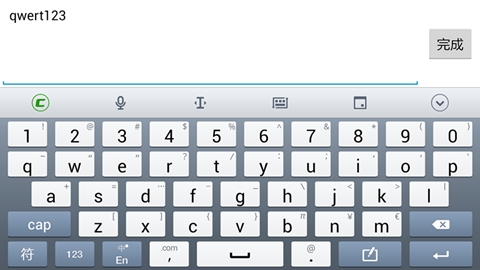
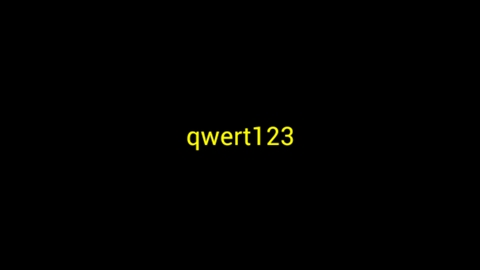
 。好吧,因为Win32没有虚拟键盘,要是想看虚拟键盘的效果,就需要移植到手机上。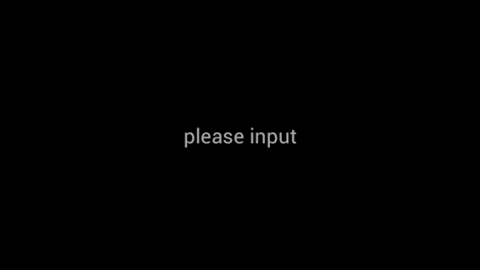





 扫一扫
扫一扫


 207
207

 被折叠的 条评论
为什么被折叠?
被折叠的 条评论
为什么被折叠?
 到【灌水乐园】发言





