





 本文介绍如何使用Serilog进行日志记录,并将其与Elasticsearch集成来实现高效的日志管理和检索。主要内容包括配置Serilog以不同级别记录日志到文件及控制台,以及如何配置Elasticsearch作为日志接收端。
1.通过nuget安装以下包
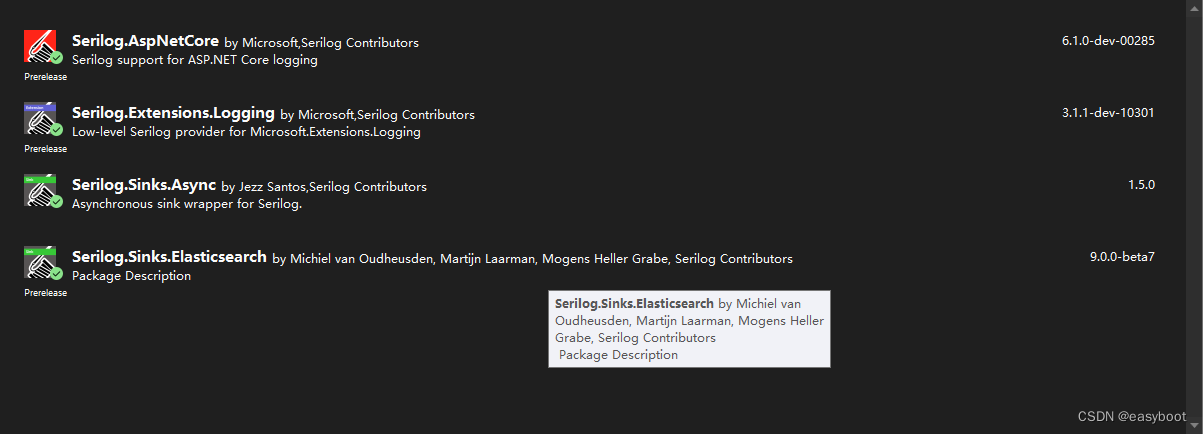
2.在program.cs中加入下面代码
感觉这个 DetectElasticsearchVersion = true,代码必须写,否则无法写入ES
string Dir1 = DateTime.Now.ToString("yyyy-MM-dd");
string Dir2 = DateTime.Now.ToString("yyyy-MM-dd HH");

//LogEvent.
Log.Logger = new LoggerConfiguration()
    .MinimumLevel.Debug()
    .MinimumLevel.Override("Microsoft", LogEventLevel.Information)
    .ReadFrom.Configuration(new ConfigurationBuilder()
    .AddJsonFile("appsettings.json")
    .Build())
    .Enrich.FromLogContext()
                    .WriteTo.Elasticsearch(new ElasticsearchSinkOptions(new Uri("http://192.168.1.104:9200/"))
                    {
                        BufferBaseFilename = "./logs/buffer",
                        IndexFormat = "muxue-api-{0:yyyy.MM}",
                        EmitEventFailure = EmitEventFailureHandling.RaiseCallback,
                        FailureCallback = e => Debug.WriteLine($"unable to ------{e.MessageTemplate}"),
                        AutoRegisterTemplate = true,
                        DetectElasticsearchVersion = true,

                        OverwriteTemplate = true,
                       // TemplateName = yourTemplateName,
                        AutoRegisterTemplateVersion = AutoRegisterTemplateVersion.ESv7,
                        TypeName = null,
                        BatchAction = ElasticOpType.Create
                        // AutoRegisterTemplateVersion = AutoRegisterTemplateVersion.ESv7,
                    })
    //  .WriteTo.Async(c => c.File(Path.Combine(AppDomain.CurrentDomain.BaseDirectory + $"/Slog/{Dir1}/{Dir2}{typeof(LevelAlias).FullName}/", $"log.txt"), rollingInterval: RollingInterval.Hour))
    .WriteTo.Async(c => c.Console(new JsonFormatter()))
    .WriteTo.Async(c => c.File(Path.Combine(AppDomain.CurrentDomain.BaseDirectory + $"/Slog/{Dir1}/{Dir2}/Debug/", $"log.txt"), restrictedToMinimumLevel: LogEventLevel.Debug, rollingInterval: RollingInterval.Hour))
    .WriteTo.Async(c => c.File(Path.Combine(AppDomain.CurrentDomain.BaseDirectory + $"/Slog/{Dir1}/{Dir2}/Info/", $"log.txt"), restrictedToMinimumLevel: LogEventLevel.Information, rollingInterval: RollingInterval.Hour))
    .WriteTo.Async(c => c.File(Path.Combine(AppDomain.CurrentDomain.BaseDirectory + $"/Slog/{Dir1}/{Dir2}/Warning/", $"log.txt"), restrictedToMinimumLevel: LogEventLevel.Warning, rollingInterval: RollingInterval.Hour))
    .WriteTo.Async(c => c.File(Path.Combine(AppDomain.CurrentDomain.BaseDirectory + $"/Slog/{Dir1}/{Dir2}/Error/", $"log.txt"), restrictedToMinimumLevel: LogEventLevel.Error, rollingInterval: RollingInterval.Hour))
    // .WriteTo.Async(path: "error.log", restrictedToMinimumLevel: LogEventLevel.Error, rollingInterval: RollingInterval.Day)
    // .WriteTo.Elasticsearch(new ElasticsearchSinkOptions(new Uri("http://192.168.1.104:9200/MyES")))
    .CreateLogger();


//global using StraightLineSorting.Helper;
var builder = WebApplication.CreateBuilder(args);

// Add services to the container.
builder.Services.AddControllersWithViews();

builder.Services.AddSignalR();
builder.Services.AddHostedService<HostedService>();

//使用Serilog日志记录
builder.Host.UseSerilog();

Log.Logger.Information("laslkdlk");

var app = builder.Build();

// Configure the HTTP request pipeline.
if (!app.Environment.IsDevelopment())
{
    app.UseExceptionHandler("/Home/Error");
}
app.UseStatusCodePagesWithRedirects("/Error/{0}");

app.UseStaticFiles();

app.UseRouting();

app.UseAuthorization();

app.MapControllerRoute(
    name: "default",
    pattern: "{controller=Login}/{action=Login}/{id?}");

app.MapHub<ChatHub>("/chatHub");


app.Run();
3.appsettings.json
    "Serilog": {
        "MinimumLevel": {
            "Default": "Debug", //最小日志记录级别
            "Override": { //系统日志最小记录级别
                "Default": "Warning",
                "System": "Warning",
                "Microsoft": "Warning"
            }
        },
        "WriteTo": [
            { "Name": "Console" }, //输出到控制台
            {
                "Name": "Async", //异步写入日志
                "Args": {
                    "configure": [
                        {
                            "Name": "File", //输出文件
                            "Args": {
                                "path": "log/log.txt",
                                "outputTemplate": "{NewLine}Date:{Timestamp:yyyy-MM-dd HH:mm:ss.fff}{NewLine}LogLevel:{Level}{NewLine}Class:{SourceContext}{NewLine}Message:{Message}{NewLine}{Exception}",
                                "rollingInterval": "3" //日志文件生成精度:1:年  2:月 3:日 4:小时
                            }
                        }
                    ]
                }
            },
            {
                "Name": "Elasticsearch",
                "Args": {
                    "nodeUris": "http://192.168.1.104:9200/",
                    "indexFormat": "muxue-api-{0:yyyy.MM}"
                }
            }
        ]
    }






 扫一扫
扫一扫


 3049
3049

 被折叠的 条评论
为什么被折叠?
被折叠的 条评论
为什么被折叠?
 到【灌水乐园】发言





