


 本文详细介绍了交换机配置与管理的关键技术,包括交换机端口安全、VLAN中继、生成树协议、以太通道及三层交换机的配置。通过具体的配置命令和拓扑图,帮助读者理解如何实现端口安全、VTP、STP、以太通道以及三层交换机的vlan间通信,确保网络的稳定与安全。
关键字:交换机端口安全、交换机vlan中继、生成树协议(STP)、以太通道、三层交换机。
一、交换机端口安全
未提供端口安全性的交换机将使攻击者轻易连接到交换机未使用且已启用的端口,并执行信息收集或攻击。实施安全措施可以实现:1、在端口上指定一组允许的有效MAC地址。2、在任一时刻只允许一个MAC地址访问端口。3、指定端口在检测到未授权的MAC地址时将自动关闭。
怎样实现配置?
以如下拓扑图为例:

Switch>en
Switch#conf t
Enter configuration commands, one per line. End with CNTL/Z.
Switch(config)#int f0/1
Switch(config-if)#shutdown //先将端口关闭,再进行配置
Switch(config-if)#
%LINK-5-CHANGED: Interface FastEthernet0/1, changed state to administratively down
%LINEPROTO-5-UPDOWN: Line protocol on Interface FastEthernet0/1, changed state to down
Switch(config-if)#
Switch(config-if)#swi mode access //将端口设为access
Switch(config-if)#swi por
Switch(config-if)#swi port-security
Switch(config-if)#swi por
Switch(config-if)#swi port-security maxi
Switch(config-if)#swi port-security maximum 1 //允许最多mac地址数量
Switch(config-if)#swi por
Switch(config-if)#swi port-security violation shut
Switch(config-if)#swi port-security violation shutdown //违反后的措施
Switch(config-if)#swi por
Switch(config-if)#swi port-security mac-a
Switch(config-if)#swi port-security mac-address 0003.E449.984B //允许的pc的mac地址
Switch(config-if)#no shut
二、交换机vlan中继
VTP的主要优点:
1、使用VTP可以减少配置的工作量,减少配置错误的概率,减少配置的不一致性;
2、VTP是用来通告VLAN信息的;
3、VTP的作用仅仅在一个管理域内;
4、VTP只在trunk端口上传播,普通的access端口上是不会传播VTP信息。
Cisco的IOS提供了VTP三种工作模式,分别是服务器模式、客户模式、和透明模式。交换机可以工作在任意一种模式下,但同时时间只能处于其中一种模式下。
VTP配置拓扑图如下:

VTP域名是交换机上设置的关键参数,错误配置域名将影响交换机之间的vlan同步 。
配置3560交换机VTP
Switch>en
Switch#vlan da
Switch#vlan database
% Warning: It is recommended to configure VLAN from config mode,
as VLAN database mode is being deprecated. Please consult user
documentation for configuring VTP/VLAN in config mode.
Switch(vlan)#vtp domain sziit
Changing VTP domain name from NULL to sziit
Switch(vlan)#exit
设置二层交换机域名和工作模式:
Switch>en
Switch#conf t
Enter configuration commands, one per line. End with CNTL/Z.
Switch(config)#vtp mode cli
Switch(config)#vtp mode client
Setting device to VTP CLIENT mode.
Switch(config)#vtp do
Switch(config)#vtp domain sziit
三、创建vlan
Switch(config)#vlan 10
Switch(config-vlan)#exit
Switch(config)#vlan 20
Switch(config-vlan)#exit
四、建立交换机的中继链路
Switch(config)#int f0/1
Switch(config-if)#swi mode dy
Switch(config-if)#swi mode dynamic de
Switch(config-if)#swi mode dynamic desirable
五、在二层交换机上划分vlan
Switch(config)#int f0/1
Switch(config-if)#swi mode trunk
Switch(config-if)#exit
Switch(config)#int f0/2
Switch(config-if)#swi mode access
Switch(config-if)#swi access vlan 10
Switch(config-if)#exit
Switch(config)#int f0/3
Switch(config-if)#swi mode acc
Switch(config-if)#swi mode access
Switch(config-if)#swi mode acc
Switch(config-if)#swi access vlan 20
Switch(config-if)#exit
建立了二层交换机与三层交换机的中继链路之后二层交换机会自己学习到vlan信息。
三、生成树协议
生成树协议是IEEE 802.1D中定议的数据链路层协议,用于解决在网络的核心层构建冗余链路里产生的网络环路问题,通过在交换机之间传递网桥协议数据单元(Bridge Protocol Data Unit,简称BPDU),通过采用STA生成树算法选举根桥、根端口和指定端口的方式,最终将网络形成一个树形结构的网络,其中,根端口、指定端口都处于转发状态,其他端口处于禁用状态。 如果网络拓扑发生改变,将重新计算生成树拓扑。
选举根桥的原则是:根桥必须具有最低的优先权ID与MAC地址。在优先权数值相等时,将由MAC地址大小来决定,哪个MAC地址值低就由其作为根设备。
由于MAC地址无法更改,所以将优先权数值改为最低。
四、以太通道
以太通道是用于交换机之间提供多链路捆绑技术,达到提高带宽的目的。
举以下的拓扑图为例:
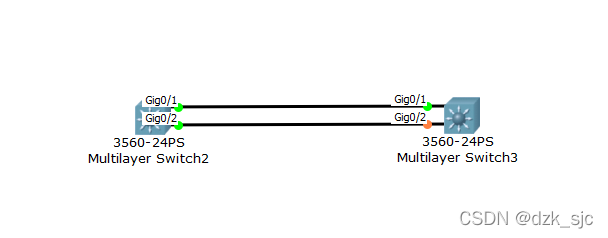
由于生成树协议的作用下,只有一条链路处于通信状态,这样另一条链路就不能发挥它的作用了。
应用了以太通道之后,物理上两条链路会变成逻辑上的一条链路,从而达到带宽倍增的目的,所有的链路就发挥了它的作用,当一条或多条链路发生故障时,流量会自动转移到其他链路上。
配置以太通道分四个步骤:1、创建以太通道。2、配置以太通道。3、配置链路负载均衡方式
4、配置以太通道对的属性。
配置命令如下:
Switch>en
Switch#conf t
Enter configuration commands, one per line. End with CNTL/Z.
Switch(config)#int por
Switch(config)#int port-channel 40
Switch(config-if)#int range g0/1-2
Switch(config-if-range)#chan
Switch(config-if-range)#channel-group 40 mode on
Switch(config-if-range)#
%LINK-5-CHANGED: Interface Port-channel 40, changed state to up
%LINEPROTO-5-UPDOWN: Line protocol on Interface Port-channel 40, changed state to up
%LINEPROTO-5-UPDOWN: Line protocol on Interface GigabitEthernet0/1, changed state to down
%LINEPROTO-5-UPDOWN: Line protocol on Interface GigabitEthernet0/1, changed state to up
%LINEPROTO-5-UPDOWN: Line protocol on Interface GigabitEthernet0/2, changed state to down
%LINEPROTO-5-UPDOWN: Line protocol on Interface GigabitEthernet0/2, changed state to up
Switch(config-if-range)#
Switch(config-if-range)#
Switch(config-if-range)#exit
Switch(config)#por
Switch(config)#port-channel load
Switch(config)#port-channel load-balance dst-mac
Switch(config)#int por
Switch(config)#int port-channel 40
Switch(config-if)#swi mode trunk
Command rejected: An interface whose trunk encapsulation is "Auto" can not be configured to "trunk" mode.
Switch(config-if)#exit
五、三层交换机
三层交换机是指具备三层路由功能的交换机,其接口可以实现基于三层寻址的分组转发,每个三层接口都定义了一个单独的广播域。
二层与三层交换机原理的区别是,二层用的是MAC地址交换表,三层用的是IP地址交换表。
三层交换机同时具备三层功能和二层功能。
三层交换机默认二层功能要开启三层功能需要输入no switchport命令。
(一)实现三层功能配置拓扑图如下:
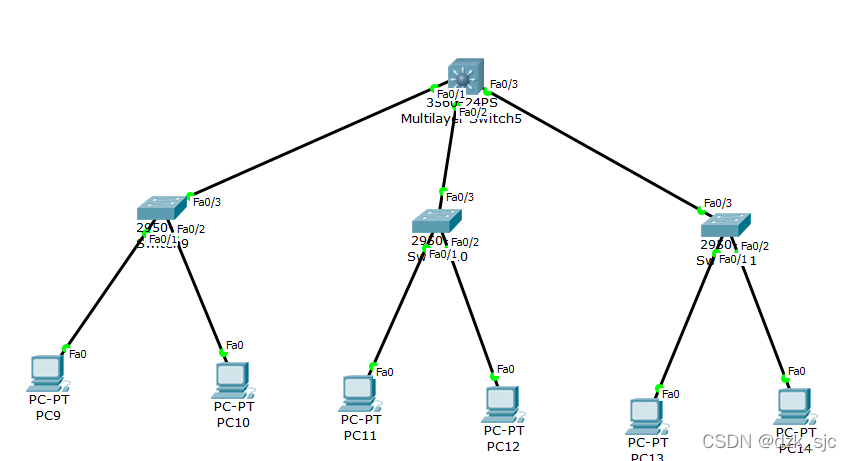
命令如下:
三层交换机配置:
Switch>en
Switch#conf t
Enter configuration commands, one per line. End with CNTL/Z.
Switch(config)#int f0/1-3
^
% Invalid input detected at '^' marker.
Switch(config)#int range f0/1-3
Switch(config-if-range)#no swi
Switch(config-if-range)#no switchport
Switch(config-if-range)#
%LINEPROTO-5-UPDOWN: Line protocol on Interface FastEthernet0/1, changed state to down
%LINEPROTO-5-UPDOWN: Line protocol on Interface FastEthernet0/1, changed state to up
%LINEPROTO-5-UPDOWN: Line protocol on Interface FastEthernet0/2, changed state to down
%LINEPROTO-5-UPDOWN: Line protocol on Interface FastEthernet0/2, changed state to up
%LINEPROTO-5-UPDOWN: Line protocol on Interface FastEthernet0/3, changed state to down
%LINEPROTO-5-UPDOWN: Line protocol on Interface FastEthernet0/3, changed state to up
Switch(config-if-range)#
Switch(config-if-range)#
Switch(config-if-range)#
Switch(config-if-range)#
Switch(config-if-range)#
Switch(config-if-range)#
Switch(config-if-range)#exit
Switch(config)#int f0/1
Switch(config-if)#ip add
Switch(config-if)#ip address 192.168.10.254 255.255.255.0
Switch(config-if)#exit
Switch(config)#int f0/1
Switch(config-if)#ip address 192.168.10.254 255.255.255.0
Switch(config-if)#no shut
Switch(config-if)#exit
Switch(config)#int f0/2
Switch(config-if)#ip add
Switch(config-if)#ip address 192.168.20.254 255.255.255.0
Switch(config-if)#no shut
Switch(config-if)#exit
Switch(config)#int f0/3
Switch(config-if)#ip add
Switch(config-if)#ip address 192.168.30.254 255.255.255.0
Switch(config-if)#no shut
Switch(config-if)#exit
Switch(config)#iprouting
^
% Invalid input detected at '^' marker.
Switch(config)#ip routing //一定要记得启用三层交换机的路由功能
(二)三层交换机实现vlan之间通信
要实现vlan之间通信要用到三层交换机的二层功能。
以下面的拓扑图为例:
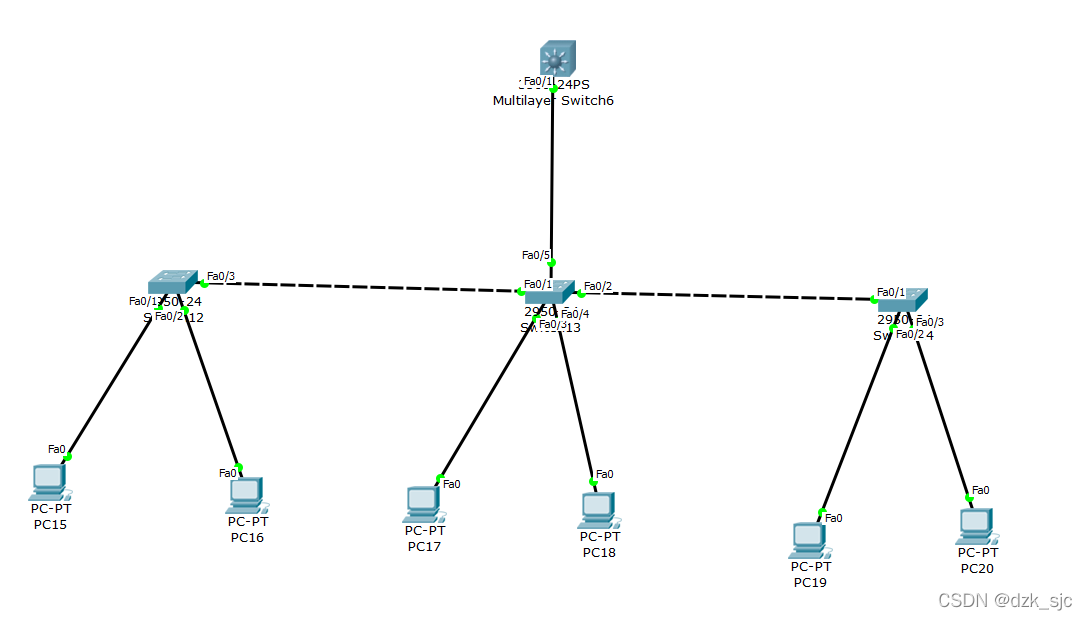
Switch>en
Switch#conf t
Enter configuration commands, one per line. End with CNTL/Z.
Switch(config)#vtp domain sziit //配置VTP域名
Changing VTP domain name from NULL to sziit
Switch(config)#
Switch(config)#
Switch con0 is now available
Press RETURN to get started.
%LINEPROTO-5-UPDOWN: Line protocol on Interface FastEthernet0/1, changed state to down
%LINEPROTO-5-UPDOWN: Line protocol on Interface FastEthernet0/1, changed state to up
Switch>
Switch>
Switch>en
Switch#vlan 10
^
% Invalid input detected at '^' marker.
Switch#conf t
Enter configuration commands, one per line. End with CNTL/Z.
Switch(config)#vlan 10
Switch(config-vlan)#exit
Switch(config)#vlan 20
Switch(config-vlan)#exit
Switch(config)#vlan 30
Switch(config-vlan)#exit
Switch(config)#int vlan 10
Switch(config-if)#
%LINK-5-CHANGED: Interface Vlan10, changed state to up
%LINEPROTO-5-UPDOWN: Line protocol on Interface Vlan10, changed state to up
Switch(config-if)#
Switch(config-if)#
Switch(config-if)#exit
Switch(config)#exit
Switch#
%SYS-5-CONFIG_I: Configured from console by console
Switch#
Switch#
Switch#conf t
Enter configuration commands, one per line. End with CNTL/Z.
Switch(config)#int vlan 10
Switch(config-if)#ip
% Incomplete command.
Switch(config-if)#ip add
Switch(config-if)#ip address 192.168.10.254 255.255.255.0
Switch(config-if)#no shut
Switch(config-if)#int vlan 20
Switch(config-if)#
%LINK-5-CHANGED: Interface Vlan20, changed state to up
%LINEPROTO-5-UPDOWN: Line protocol on Interface Vlan20, changed state to up
Switch(config-if)#
Switch(config-if)#
Switch(config-if)#ip add
Switch(config-if)#ip address 192.168.20.254 255.255.255.0
Switch(config-if)#no shut
Switch(config-if)#int vlan 30
Switch(config-if)#
%LINK-5-CHANGED: Interface Vlan30, changed state to up
%LINEPROTO-5-UPDOWN: Line protocol on Interface Vlan30, changed state to up
Switch(config-if)#
Switch(config-if)#ip ad
Switch(config-if)#ip address 192.168.30.254 255.255.255.0
Switch(config-if)#no shut
Switch(config-if)#exit
Switch(config)#ip routing
//启用三层交换机的路由功能
二层交换机配置:
Switch>en
Switch#conf t
Enter configuration commands, one per line. End with CNTL/Z.
Switch(config)#vtp mode cli
Switch(config)#vtp mode client
Setting device to VTP CLIENT mode.
Switch(config)#vtp domain sziit
Changing VTP domain name from NULL to sziit
Switch(config)#int range f0/5,f0/1-2
Switch(config-if-range)#swi mode trunk //VTP只在trunk端口传播VTP信息
Switch(config-if-range)#
%LINEPROTO-5-UPDOWN: Line protocol on Interface FastEthernet0/5, changed state to down
%LINEPROTO-5-UPDOWN: Line protocol on Interface FastEthernet0/5, changed state to up
%LINEPROTO-5-UPDOWN: Line protocol on Interface FastEthernet0/1, changed state to down
%LINEPROTO-5-UPDOWN: Line protocol on Interface FastEthernet0/1, changed state to up
%LINEPROTO-5-UPDOWN: Line protocol on Interface FastEthernet0/2, changed state to down
%LINEPROTO-5-UPDOWN: Line protocol on Interface FastEthernet0/2, changed state to up
Switch(config-if-range)#
Switch(config-if-range)#
Switch(config-if-range)#exit
Switch(config)#int range f0/3-4
Switch(config-if-range)#swi mode access
Switch(config-if-range)#swi access vlan 20
Switch(config-if-range)#exit
六、总结
三层交换技术等于二层交换技术加上三层的路由器功能,或者再直接明了便是三层交换机=二层交换机+路由器!





 扫一扫
扫一扫


 586
586


 到【灌水乐园】发言



