



 本文介绍了一个简单的Python脚本,利用Tkinter库创建一个基础的网站连通性检查工具,虽然功能基础,但适合初学者了解网络请求和GUI编程。
站点连通性检查,即看网站是否能访问得通,实用价值不大,不过用来作软件应用入门还不错。
代码:
import urllib.request
import tkinter as tk


def test_connectivity():
    window = tk.Tk()
    window.geometry('600x400')
    window.resizable(False, False)
    head = tk.Label(window, text='Website Connectivity Checker',
                    font='Calibre 15')
    head.pack(pady=20)

    def check_url():
        # 销毁之前的Label
        for widget in window.winfo_children():
            if isinstance(widget, tk.Label):
                widget.destroy()

        web = url.get()
        if not web.startswith("http"):
            web = "http://" + web

        try:
            status_code = urllib.request.urlopen(web).getcode()
            website_is_up = status_code == 200

            if website_is_up:
                tk.Label(window, text='Website Available',
                         font='Calibre 15').place(x=260, y=200)
            else:
                tk.Label(window, text='Website Not Available',
                         font='Calibre 15').place(x=260, y=200)

        except Exception as e:
            tk.Label(window, text=f'Error: {e}',
                     font='Calibre 15', fg='red', wraplength=300).place(x=160, y=200)

    url = tk.StringVar()
    tk.Entry(window, textvariable=url).place(x=160, y=80, height=30, width=280)
    tk.Button(window, text='Check', command=check_url).place(x=285, y=150)
    window.mainloop()


if __name__ == '__main__':
    test_connectivity()
结果:
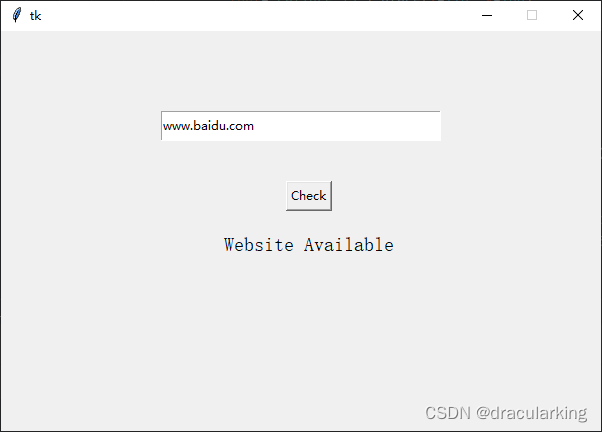
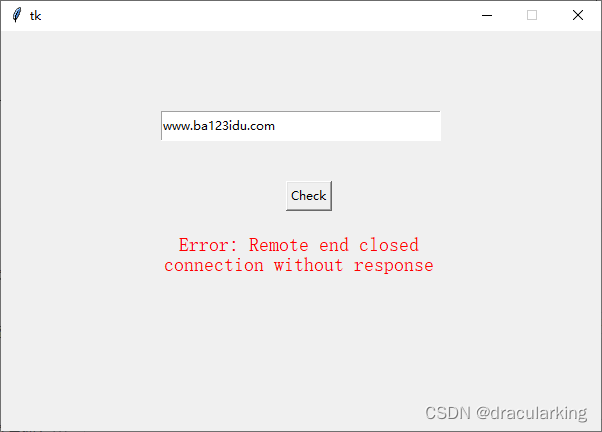
展望:
可以以此为模板,做一些类似以及创意的软件。





 扫一扫
扫一扫


 1384
1384

 被折叠的 条评论
为什么被折叠?
被折叠的 条评论
为什么被折叠?
 到【灌水乐园】发言





